Web Xplorer Description
The First MS Office Task Pane Integrated Fully Functionally Web Browser.
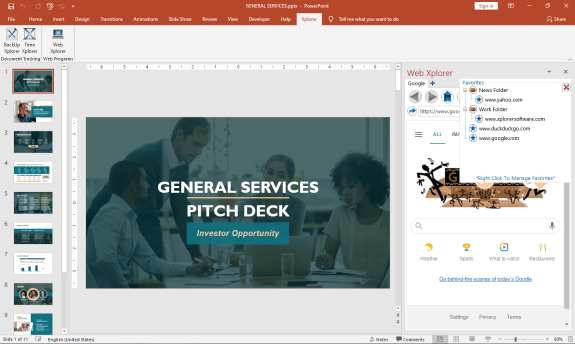
Browse the Web and do your research right from your MS Office Task Pane.
*Viewing can be switched to mobile format to take advantage of space constraints
*Save Your Favorites for Easy Navigation
*Save Your Passwords for Your Most Visited Sites
*Set up multiple tabs to open automatically when you open the app
*View Browser Compatible Documents, Audio, Video, and Images (.pdf) right in the Task Pane
You can increase your productivity by never leaving your active screen.
Works with:
Word
Web Xplorer Alternatives
Shift puts you in control of your browser. Arrange apps, bars, and controls exactly where you want them, building a personalized workspace that works around you — not the other way around. Connect over 1,500 web apps, jump between dedicated Spaces for work, side hustles, and personal browsing, and manage multiple accounts without ever logging in and out. As a pioneer in carbon-neutral browsing, Shift is committed to rethinking what a browser can be — for the people who use it and the world they live in.
Started in Victoria, British Columbia in 2016, Shift is a Certified B Corp and proud member of the Redbrick portfolio.
What you can do with Shift:
- Build your browser: Design a layout tailored to how you use the internet.
- Create Spaces: Keep work, side hustles, and passion projects in their own lane.
- Integrate Apps: Bring your favorite web apps together in one place.
- Templates: Pick from 6 ready-made layouts to get started fast.
- Shift AI: A built-in AI assistant that helps you get more done across every tab and app.
Learn more
Wave Browser is designed for people who want a safer, faster, and more meaningful way to explore the web. Built on strong security principles, Wave puts you in control of your privacy with customizable cookie and tracker blocking, incognito mode, and clear permission choices. AppEsteem Certification ensures Wave meets strict, independently verified standards for clean installation, transparent behavior, and responsible software practices, giving you confidence every time you browse.
Wave is also built for productivity, offering tools that help you stay organized and move through information with purpose. Tab grouping, bookmarks, and a reading list keep ideas within reach, while split screen let you research, compare, or watch without switching between windows. Memory Saver mode helps your device stay fast during heavy sessions, and the built-in AI Assistant and messaging integrations bring your favorite tasks closer to a single click.
Designed to be simple and user-friendly, Wave Browser removes friction from everyday browsing. The free ad blocker keeps pages clean, and built-in tools—like the converter, package tracker, price tracker, translation tool, stock tracker, and content notifier—help you get things done without extra extensions.
Most importantly, Wave is a browser with real ocean impact built in. Through a certified partnership with 4ocean, Wave helps fund the removal of 100,000 pounds of trash from our ocean, rivers, and coastlines every year. A live impact tracker shows exactly how much waste the Wave community has helped remove, with verified monthly updates from cleanup crews in the U.S., Indonesia, and the Dominican Republic. With Wave Browser, your everyday browsing directly supports a cleaner planet and the people working to protect it.
Learn more
Tungsten
Tungsten is a web browser designed with simplicity in mind while incorporating distinctive functionalities. Its interface is minimalistic, yet it encompasses all essential browser features. The main functions of the browser are conveniently organized in a start menu located in the upper-left corner. Adjacent to this menu is a quick-start button, allowing for efficient navigation. Users can easily create a group by dragging a tab and dropping it onto another tab's center, which can further be organized into multi-level groups. Additionally, Tungsten offers the ability to split tabs either vertically or horizontally, enabling users to manage tabs or groups within a group effectively. For instance, one could browse webpages in the left pane while simultaneously watching videos on the right pane. Furthermore, Tungsten includes a local folder browsing feature, which allows users to view downloaded files, access local files, and navigate to the desktop or control panel, much like a file explorer. This functionality eliminates the need to switch between different applications to open downloaded items. Overall, Tungsten combines efficient browsing with user-friendly features that streamline the online experience.
Learn more
Polo File Manager
Polo is a contemporary and efficient file management application for Linux, developed using Vala, that features various layouts including single, dual, and quad panes, each capable of hosting multiple tabs. This file manager allows users to create, extract, and navigate archives seamlessly, while also offering integration with cloud storage services. Additionally, Polo facilitates the operation and management of KVM images, allows for the editing of PDF and image files, and supports booting ISO files in a KVM environment or writing them to USB drives. Each pane includes multiple tabs, and users can toggle an embedded terminal with the F4 key for enhanced functionality. When devices are connected, a popup displays them along with options for mounting and unmounting, and the application can handle LUKS encrypted devices, offering locking and unlocking capabilities. Users can browse archives like regular folders and create them in various formats, taking advantage of advanced compression settings for efficient storage. Moreover, Polo's user-friendly interface, combined with its robust features, makes it a versatile tool for both casual and advanced users looking to manage files with ease and efficiency.
Learn more
Pricing
Pricing Starts At:
$29.00
Pricing Information:
FREE 7 day trial. Purchase a perpetual license that is good for 2 users.
Free Trial:
Yes
Integrations
Company Details
Company:
Breakthrough Applications
Year Founded:
2020
Headquarters:
United States
Website:
www.xplorersoftware.com
Media

Web Xplorer | Excel Task Pane



Recommended Products
MongoDB Atlas runs apps anywhere
MongoDB Atlas gives you the freedom to build and run modern applications anywhere—across AWS, Azure, and Google Cloud. With global availability in over 115 regions, Atlas lets you deploy close to your users, meet compliance needs, and scale with confidence across any geography.
Product Details
Platforms
Windows
Types of Training
Training Docs
Training Videos
Customer Support
Online Support
Web Xplorer Features and Options
Web Xplorer User Reviews
Write a Review- Previous
- Next
