Web Xplorer Description
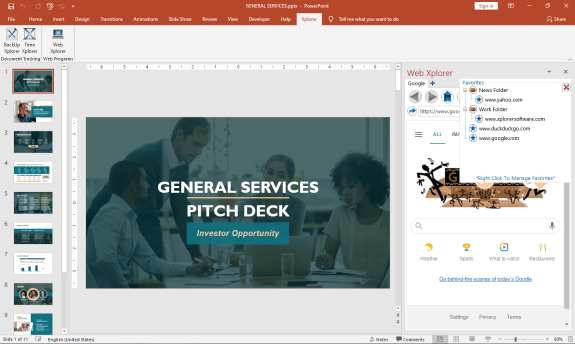
The First MS Office Task Pane Integrated Fully Functionally Web Browser.
Browse the Web and do your research right from your MS Office Task Pane.
*Viewing can be switched to mobile format to take advantage of space constraints
*Save Your Favorites for Easy Navigation
*Save Your Passwords for Your Most Visited Sites
*Set up multiple tabs to open automatically when you open the app
*View Browser Compatible Documents, Audio, Video, and Images (.pdf) right in the Task Pane
You can increase your productivity by never leaving your active screen.
Works with:
Word
Web Xplorer Alternatives
Wave Browser
Wave Browser is an efficient, eco-friendly browser built for people who want to make a difference without changing their daily habits. Through its partnership with 4ocean, every browsing session helps support cleanup efforts to remove plastic and trash from the our ocean.
Wave Browser keeps productivity front and center. Its built-in sidebar gives you quick access to your go-to tools and lists, while Split View lets you work across two pages at once, making research, comparisons, studying, and multitasking much easier without relying on extra extensions.
Wave’s built-in tools include:
- Free Ad-Blocker
- Memory Saver
- AI Assistant
- Converter Tool
- Reading List
- Bookmarks
- Package Tracking
- Price Tracker
- Messaging & Social Apps
- Translate
- Content Notifier
For anyone who wants a more efficient workflow and a browser that contributes to real environmental impact, Wave is the choice that matches your values.
Surf the web. Save the ocean. Make every tab count.
Learn more
CryptoTab
Experience CryptoTab, the pioneering browser that integrates mining capabilities, compatible with both desktop systems (Windows and Mac) and mobile devices (Android and iPhone/iPad). You can earn bitcoin effortlessly while enjoying videos, engaging in conversations, or playing online games. Join a thriving global community of over 20 million users who are already benefiting from CryptoTab Browser. Download this innovative browsing platform that merges cutting-edge web technologies with a distinctive built-in mining algorithm. For those seeking more flexibility, CryptoTab PRO offers a comprehensive suite of tools to enhance your online exploration. Simply activate the mining feature and enjoy scrolling through your newsfeed, chatting on social media, or watching your favorite shows on Netflix, as CryptoTab's mining algorithm seamlessly manages the process. Boost your earnings by inviting new users to join the mining network through your personalized link, allowing you to multiply your income and take your first steps towards acquiring Bitcoin. Whether you are a casual user or a dedicated miner, CryptoTab provides an engaging and rewarding online experience.
Learn more
Shrestha Files Pro X
Introducing Shrestha Files Pro X, a contemporary dual-pane file management solution designed for Windows 10 and 11, featuring a tabbed interface and vibrant themes that enhance your workflow. This innovative application sports a sleek and minimalist aesthetic, making it perfect for anyone eager to elevate their productivity. Available on the Microsoft Store, it seamlessly integrates with the Fluent design principles of Windows, ensuring a cohesive user experience. Users can choose between the straightforward single-pane view or the more sophisticated dual-pane setup tailored for advanced users. You can effortlessly drag and drop files or folders between tabs, and the application intelligently saves your open tabs, view preferences, and pane dimensions for future sessions. The robust search functionality allows you to locate items within your current directory and its subdirectories. Options for viewing include simple lists, detailed lists, small grids, medium grids, large grids, and tile formats. Additionally, built-in viewers for text and image files enhance usability, while the tabbed interface bears a resemblance to popular web browsers, allowing easy tab management across panes. Users can even create personalized themes, in addition to the standard colorful options provided. With its array of features, Shrestha Files Pro X stands out as an essential tool for efficient file management on your Windows device.
Learn more
Tungsten
Tungsten is a web browser designed with simplicity in mind while incorporating distinctive functionalities. Its interface is minimalistic, yet it encompasses all essential browser features. The main functions of the browser are conveniently organized in a start menu located in the upper-left corner. Adjacent to this menu is a quick-start button, allowing for efficient navigation. Users can easily create a group by dragging a tab and dropping it onto another tab's center, which can further be organized into multi-level groups. Additionally, Tungsten offers the ability to split tabs either vertically or horizontally, enabling users to manage tabs or groups within a group effectively. For instance, one could browse webpages in the left pane while simultaneously watching videos on the right pane. Furthermore, Tungsten includes a local folder browsing feature, which allows users to view downloaded files, access local files, and navigate to the desktop or control panel, much like a file explorer. This functionality eliminates the need to switch between different applications to open downloaded items. Overall, Tungsten combines efficient browsing with user-friendly features that streamline the online experience.
Learn more
Pricing
Pricing Starts At:
$29.00
Pricing Information:
FREE 7 day trial. Purchase a perpetual license that is good for 2 users.
Free Trial:
Yes
Integrations
Company Details
Company:
Breakthrough Applications
Year Founded:
2020
Headquarters:
United States
Website:
www.xplorersoftware.com
Media

Web Xplorer | Excel Task Pane



Recommended Products
Our Free Plans just got better! | Auth0
You asked, we delivered! Auth0 is excited to expand our Free and Paid plans to include more options so you can focus on building, deploying, and scaling applications without having to worry about your security. Auth0 now, thank yourself later.
Product Details
Platforms
Windows
Types of Training
Training Docs
Training Videos
Customer Support
Online Support
Web Xplorer Features and Options
Web Xplorer User Reviews
Write a Review- Previous
- Next
