Average Ratings 0 Ratings
Average Ratings 0 Ratings
Similar Products
-
SuperOpsSuperOps is the AI-native unified platform for modern MSPs and internal IT teams. It replaces the typical four-to-six-tool IT operations stack - PSA, RMM, helpdesk, MDM, asset tracking, network monitoring, patch management and IT documentation - with a single, built-as-one platform on a shared data layer. That architectural choice is what makes the rest of the platform work, particularly its agentic AI. Monica AI, SuperOps' intelligence layer, was designed alongside the platform from day one. It triages tickets, surfaces patch and CVE risks, drafts worklogs, suggests knowledge base articles, and increasingly handles fully autonomous workflows for routine work. SuperOps supports Windows, macOS, Linux, iOS, iPadOS and Android, integrates with the IT and MSP ecosystem (Slack, Teams, Azure AD, Okta, QuickBooks, Xero, Bitdefender, SentinelOne and more), and bundles Splashtop and ISL Online remote access free. Transparent pricing, fast deployment, founder-led product investment.
-
FreshserviceFreshservice is the right choice if you are looking for an IT service desk solution with simplicity. Freshservice is an easy-to-use ITIL service desk from Freshworks that helps businesses modernize IT and other business functions without the complexity and cost. Freshservice provides everything teams need to manage proactive IT services, including asset management, ticketing, configuration management, enhanced impact analysis, robust incident management functions, and more.
-
Universal KnowledgeUniversal Knowledge by KPSOL is a SaaS Knowledge Management System that helps organizations capture, manage, and share trusted knowledge from a single source of truth. It combines powerful enterprise search, intuitive content authoring, collaborative workflows, and analytics to ensure employees and customer-facing teams can quickly find accurate, up-to-date information. In the age of AI, Knowledge Management is more important than ever. AI is only as effective as the quality of the knowledge it can access. Universal Knowledge provides the trusted, governed content needed to power reliable AI search, assistants and automation while reducing misinformation and improving compliance. Available as a standalone platform or integrated via comprehensive APIs, Universal Knowledge improves productivity, enhances customer experiences, and reduces operational costs. SaaS deployments are in the region customers choose, to maintain data sovereignty.
-
JDisc DiscoveryJDisc Discovery is a powerful IT asset management and network discovery tool, designed to provide organizations with clear, real-time insights into their entire IT environment. By automatically scanning the network, it identifies and catalogs devices, from physical servers and workstations to virtual machines and network appliances, giving users a detailed inventory of their assets. The tool captures essential data such as hardware specifications, installed software, system configurations, and interdependencies among devices. A key advantage of JDisc Discovery is its agentless architecture. Rather than requiring installation on each device, it uses multiple protocols (like SNMP, SSH, WMI) to gather information, ensuring quick deployment and compatibility across various operating systems, including Windows, Linux, and Unix. This makes it ideal for diverse and dynamic IT ecosystems, enabling efficient and non-intrusive data collection.
-
Dialpad SupportCustomer experience shouldn't run on disconnected tools and static scripts. Dialpad Contact Center brings voice, digital channels, and human agents together in a single AI-native platform, built to act — not just record — on every customer interaction. This is Agentic AI in practice: agents that reason through a problem, take the next step, and drive it to resolution without waiting on a human to intervene. Where legacy systems leave data trapped in silos, Dialpad Contact Center closes that gap, linking voice and data so context travels with the customer instead of getting lost between systems. The payoff compounds. Dialpad has already generated over 775 million AI recaps, and each new interaction adds to a growing base of operational intelligence — sharper resolution paths, more productive agents, better outcomes quarter over quarter. None of it runs unchecked: Dialpad's Guardian layer keeps AI operations secure and governed, so intelligence scales without sacrificing oversight. In practice, that means up to 80% of issues get resolved autonomously, freeing your team to focus on the conversations that genuinely need a human. Intelligence works at the edge; people stay at the center of the experience. And you don't have to take the ROI on faith. Through Dialpad's Proving Ground, enterprises can validate performance and cost savings before rolling out at scale — a far more reliable path than betting on a brittle, rules-based bot.
-
Service CenterService Center by Office Ally is trusted by more than 80,000 healthcare providers and health services organizations to help them take complete control of their revenue cycle. Service Center can verify patient eligibility and benefits, submit, correct, and check claims status online, and receive remittance advice. Accepting standard ANSI formats, data entry, and pipe-delimited formats, Service Center helps streamline administrative tasks and create more efficient workflows for providers.
-
CrowdinGet quality translations for your app, website, game, supporting documentation, and on. Invite your own translation team or work with professional translation agencies within Crowdin. Features that ensure quality translations and speed up the process • Glossary – create a list of terms to get consistent translations • Translation Memory (TM) – no need to translate identical strings • Screenshots – tag source strings to get context-relevant translations • Integrations – set up integration with GitHub, Google Play, API, CLI, Android Studio, and on • QA checks – make sure that all the translations have the same meaning and functions as the source strings • In-Context – proofreading within the actual web application • Machine Translations (MT) – pre-translate via translation engine • Reports – get insights, plan and manage the project Crowdin supports more than 30 file formats for mobile, software, documents, subtitles, graphics and assets: .xml, .strings, .json, .html, .xliff, .csv, .php, .resx, .yaml, .xml, .strings and on.
-
ScreenMeetScreenMeet offers a suite of secure, browser-based remote support and screen-sharing tools designed to enhance customer service and IT support. With capabilities like remote desktop access, live voice and video support, co-browsing, and asynchronous screen recording, ScreenMeet allows agents to assist customers or employees seamlessly. It integrates with major ITSM, CRM, and contact center platforms such as ServiceNow, Salesforce, and Microsoft Dynamics 365, providing a unified support experience. Designed for enterprises, ScreenMeet ensures high security, scalability, and flexibility, making it ideal for businesses aiming to improve support efficiency and customer satisfaction.
-
PeerGFSA Comprehensive Solution for Streamlined File Orchestration and Management across Edge, Data Center, and Cloud Storage PeerGFS presents an exclusively software-based solution designed to address file management and replication challenges within multi-site and hybrid multi-cloud environments. With our extensive expertise spanning over 25 years, we specialize in file replication for geographically dispersed organizations. Here's how PeerGFS can benefit your operations: Enhanced Availability: Achieve high availability through Active-Active data centers, whether located on-premises or in the cloud. Edge Data Protection: Safeguard your valuable data at the Edge with continuous protection to the central Data Center. Improved Productivity: Empower distributed project teams by providing swift, local access to critical file information. In today's world, having a real-time data infrastructure is paramount. PeerGFS seamlessly integrates with your existing storage systems, supporting: High-volume data replication between interconnected data centers. Wide area networks characterized by lower bandwidth and higher latency. Rest assured, PeerGFS is designed to be user-friendly, making installation and management a breeze.
-
NeuBirdNeuBird is the Agentic Operations Center: one secure link to your telemetry and LLMs that resolves incidents, remembers every investigation, and shares one governed truth across your teams and agents.
Description
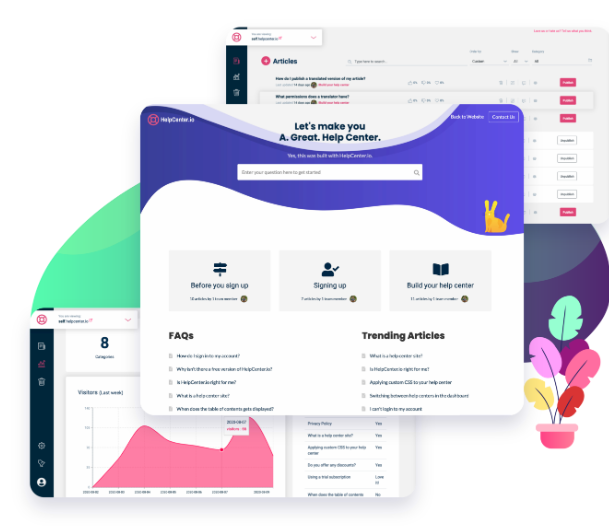
An effective knowledge base is built upon a robust tool. Create a streamlined help center in mere minutes instead of taking months to set it up. By quickly establishing a customer-focused knowledge base, you can provide proactive support, alleviating your team's burden from urgent cases and enhancing overall customer satisfaction. Effortlessly manage multiple help centers from a single dashboard. Explore the simplest method to launch your help center. Focus on producing high-quality articles instead of getting caught up in their design. Support a variety of content types, such as images, videos, documents, and audio files. Seamlessly link to other articles within your help center while remaining in the editor. Benefit from automatic suggestions generated by your help center, customized according to the user's location and actions. Open help center materials in a widget, allowing customers to access information without navigating away from their current page. Easily maintain and organize FAQs in your help center for straightforward presentation on your website, eliminating the need for outdated, hard-to-modify FAQ sections. Furthermore, a well-structured knowledge base can significantly reduce support ticket volume, allowing your team to focus on more complex issues.
Description
An IT communication assistant workspace offers a variety of tools that IT professionals can access instantly. For every IT-related scenario, there is an interactive message template designed to provide guidance; users simply need to select a format and populate it with relevant details, creating a clear and professional IT message ready for distribution. This ensures consistency across communications. Additionally, a user-friendly IT newsletter builder is at your fingertips, allowing you to frequently showcase updates on behalf of your IT team by selecting which sections to include and filling in the details, ultimately producing an engaging PDF newsletter for stakeholders. Furthermore, an IT jargon translation engine is available, enabling the quick simplification of complex technical concepts into everyday language, making it accessible for those without a technical background. Lastly, there is a manual creator designed for addressing temporary issues, providing IT professionals with practical solutions to immediate problems. This comprehensive suite of tools enhances the efficiency and effectiveness of IT communication.
API Access
Has API
No
API Access
Has API
No


Integrations
ChatGPT
No
Pricing Details
$19 per month
Free Trial
Yes
Free Version
No
Pricing Details
€95 per month
Free Trial
Yes
Free Version
No
Deployment
Web-Based
Yes
On-Premises
No
iPhone App
No
iPad App
No
Android App
No
Windows
No
Mac
No
Linux
No
Chromebook
No
Deployment
Web-Based
Yes
On-Premises
No
iPhone App
No
iPad App
No
Android App
No
Windows
No
Mac
No
Linux
No
Chromebook
No
Customer Support
Business Hours
No
Live Rep (24/7)
Yes
Online Support
Yes
Customer Support
Business Hours
Yes
Live Rep (24/7)
No
Online Support
Yes
Types of Training
Training Docs
Yes
Webinars
No
Live Training (Online)
No
In Person
No
Types of Training
Training Docs
Yes
Webinars
No
Live Training (Online)
No
In Person
No
Vendor Details
Company Name
HelpCenter.io
Country
United States
Website
helpcenter.io
Vendor Details
Company Name
IT Communication Assistant portal
Country
United States
Website
howtocommunicate.tech/it-communication-assistant/
Product Features
Knowledge Management
Artificial Intelligence (AI)
No
Cataloging / Categorization
No
Collaboration
No
Content Management
No
Decision Tree
No
Discussion Boards
No
Full Text Search
No
Knowledge Base Management
No
Self Service Portal
No
