Konsole Description
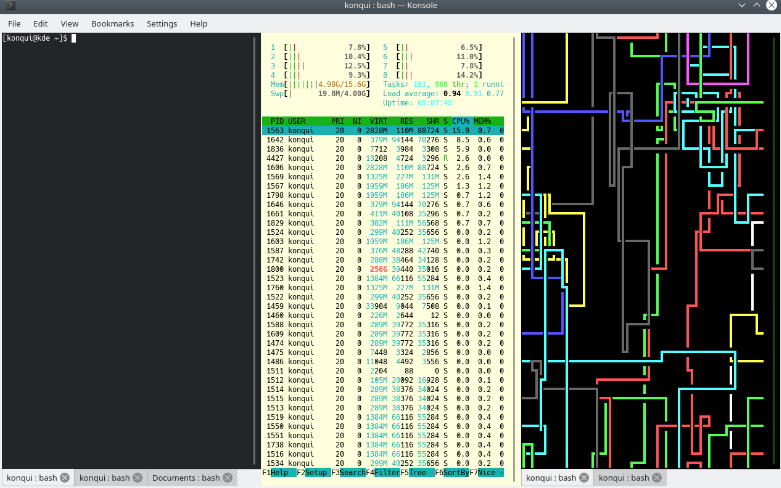
Konsole is seamlessly incorporated into various other KDE Applications, enhancing accessibility and user convenience. Applications like KDevelop, Kate, and Dolphin utilize Konsole as their built-in terminal emulator. If you have ideas to improve Konsole, we invite you to participate in its development and contribute to making it the premier terminal emulator available! Your involvement could lead to innovative features that benefit the entire KDE community.
Konsole Alternatives
Codemagic’s macOS build environments facilitate the smooth creation of hybrid applications, bolstered by an extensive array of preinstalled software. You can efficiently configure your Cordova Android and iOS application builds and workflows through a single codemagic.yaml file. To maintain the performance of your Android and iOS applications, Codemagic provides automated testing on simulators, emulators, and actual devices, ensuring you receive prompt feedback on your build outcomes. Integration with the Apple Developer Portal streamlines iOS code signing, enabling seamless deployment to App Store Connect and Google Play. Similarly, you can also set up your React Native app builds and workflows in one straightforward codemagic.yaml file. With multiple versions of Xcode, Android SDK, and npm preinstalled, Codemagic’s macOS build machines are designed for effortless Android and iOS builds. Moreover, Codemagic simplifies the automation of testing for your React Native applications across a variety of testing platforms. This comprehensive approach not only boosts productivity but also enhances the overall development experience.
Learn more
Safeguarding mission-critical host and mainframe applications is vital. Rocket® Secure Host Access is a security-first terminal emulation platform that brings modern identity and access management directly to your green screen environments. We help you eliminate vulnerabilities using passwordless, phishing-resistant authentication that dramatically reduces credential-based threats.
Designed for desktop, web, and hybrid ecosystems, this solution empowers your team to work securely without disrupting daily workflows. When you need to meet rigorous compliance standards like HIPAA, PCI-DSS, and DORA, Rocket Secure Host Access ensures your sensitive data remains protected through advanced TLS 1.3 and SSH encryption.
- Extend zero-trust security to legacy systems.
- Simplify ongoing administration across all environments.
- Achieve full compliance with global data privacy regulations.
Modernize your enterprise security posture today. Let us partner with you to protect your most valuable assets.
Learn more
Wave Terminal
Wave is a free, AI-native terminal that allows for seamless developer workflows. It features inline rendering, modern UI, and persistent sessions.
Features Include:
- Render anything with plugins, including audio/video, Markdown, images, and more.
- Edit code fast with the same editor used by VSCode both locally and remotely.
- Persistent Sessions, searchable Universal History, and workspaces between local and remote sessions.
- Native integration of AI with ChatGPT. In the future, users will be able to bring their own AI with them (BYOLLM).
- Packages are available for macOS and Linux, licensed under the Apache 2.0 License.
Learn more
TTerm Connect
Turbosoft's terminal emulation program supports more than 80 emulations of systems such as IBM and HP, OpenVMS (Unix), HP NonStop (Unix), Unisys, Wyse, and many more.
TTerm Connect is our web-based HTML5 offering.
TTerm Connect, our web-based terminal emulator, offers powerful, flexible terminal emulation using only a web browser. TTerm Connect provides all the features that you would expect from a desktop emulator in a lightweight web app. TTerm Connect is centrally managed and configured. It can be deployed with your existing web client or integrated into your existing website. Any host, any device.
Available for all modern web browsers and client devices, with options for Linux or Windows based servers. Flexible and capable of serving the terminal emulation requirements of thousands of concurrent users.
Learn more
Integrations
No Integrations at this time
Company Details
Company:
KDE
Year Founded:
1996
Headquarters:
Germany
Website:
konsole.kde.org
Media



Recommended Products
Earn up to 16% annual interest with Nexo.
Generate interest, borrow against your crypto, and trade a range of cryptocurrencies — all in one platform.
Geographic restrictions, eligibility, and terms apply.
Product Details
Platforms
Linux
Konsole Features and Options
Konsole User Reviews
Write a Review- Previous
- Next
