Average Ratings 0 Ratings
Average Ratings 0 Ratings
Similar Products
-
LALAL.AIAny audio or video can be extracted to extract vocal, accompaniment, and other instruments. High-quality stem cutting based on the #1 AI-powered technology in the world. Next-generation vocal remover and music source separator service for fast, simple, and precise stem removal. You can remove vocal, instrumental, drums and bass tracks, as well as acoustic guitar, electric guitar, and synthesizer tracks, without any quality loss. You can start the service free of charge. Upgrade to get more files processed and faster results. Only for personal use. Move to the next level. You can process thousands of minutes of audio and/or video. This software is suitable for both personal and business use. Each LALAL.AI package has a limit on the amount of audio/video that can be split. The package minute limit is deducted from each file that has been fully split. You can split as many files you like, provided their total length does not exceed the minute limit.
-
ScreencaptScreencapt allows you to record the entire screen or a selected area. You can also record a specific window. Screencapt is the ideal screen recorder because of its flexibility. Using the integrated audio recording you can also add your commentary or system sound directly into the screen recording. This is particularly useful when creating explanation videos or presentations. Screencapt's ability to record a webcam is a special feature. You can now add your comments and reactions to the video. This makes your screen recordings more personal and professional. Screencapt offers advanced options to record the cursor. You can choose to hide the cursor or add special effects to highlight specific actions. This is especially useful for software tutorials and demonstrations where a clear cursor view is required.
-
4K Video DownloaderYou can watch videos from anywhere, anytime, even offline. It's easy to download: simply copy the link from your browser, and then click 'Paste Link" in the application. You can save full playlists and channels on YouTube in high-quality and other video or audio formats. Download your YouTube Mix, Watch Later and Liked videos as well as private YouTube playlists. Receive new videos from your favorite YouTube channels automatically. You can feel the action around you with virtual reality videos. To experience the amazing VR experience in 360deg, download 360deg videos. You can bypass any restrictions placed by your Internet service provider to bypass your school firewall or workplace firewall. To access YouTube and other sites, set up an in-app proxy connection.
-
TollFreeForwardingIn 60 seconds, activate your international phone number. You can choose from over 120+ countries or 1,000 cities. Forward your calls to any number worldwide. You can route your calls according to the hours and days of your business with robust scheduling options. You can route your calls to your main office during business hours or to voicemail during nonbusiness hours. You can instantly view detailed information about calls to your TollFreeForwarding number. To make informed decisions about outbound sales, and follow-up, learn about your customers' call patterns. Record all or part of your calls to keep track of them. Call detail records are a place where recordings can be stored. They can be downloaded or played at any time.
-
QEvalContact center QA teams evaluate 1 to 5% of calls manually. QEval eliminates that bottleneck by applying AI speech analytics and automated scoring to 100% of interactions across voice, chat, and email, using a classification engine trained on 138M+ real conversations. Capabilities span quality monitoring, compliance detection for PCI, HIPAA, and GDPR at 98% accuracy, sentiment analysis, keyword identification, agent coaching workflows, performance gamification, and predictive analytics across 110+ configurable dashboards. Quality scoring runs at 94% accuracy with zero manual intervention. Deployment takes 30 days. Industry standard is 90 to 120. No disruption to live operations. Etech Global Services built QEval from two decades of running Fortune 500 contact centers in healthcare, telecom, retail, banking, and BPO. ISO 27001, SOC 2, PCI-DSS certified. Built for QA leaders and operations teams scaling coverage without adding headcount. QEval also provides call recording management, screen capture, custom evaluation forms, calibration tools for QA consistency, root cause analysis, trend identification, and automated alert systems for compliance breaches. The voice of customer module tracks customer sentiment across touchpoints to identify service gaps and training opportunities. Real-time monitoring lets supervisors intervene during live interactions. Role-based access controls, audit trails, and data encryption ensure enterprise-grade security. QEval supports multi-site and multilingual contact center environments with centralized reporting across locations. API integrations connect QEval with existing CRM, telephony, and workforce management systems. Automated report scheduling delivers insights to stakeholders without manual effort.
-
AircallAircall transforms business communications with an intelligent, cloud-based phone system built for modern sales and customer support. More than just a calling tool, it provides an all-in-one hub that connects phone, SMS, and WhatsApp conversations in a single platform. Its AI Assist Pro feature delivers real-time coaching during calls and simplifies follow-up, enabling reps to sell smarter and resolve support issues faster. Teams can leverage advanced capabilities like call routing, IVR, analytics dashboards, and power dialers to maximize efficiency. With integrations across Salesforce, HubSpot, Zendesk, Intercom, Shopify, and 250+ other apps, Aircall seamlessly fits into existing workflows. Businesses benefit from reliable call quality, international number coverage, and scalable features that grow with their needs. Customer stories highlight improvements such as a 4% increase in CSAT scores and the ability to process 25,000+ calls per month with stability and ease. Aircall makes customer conversations more personal, productive, and impactful—without the complexity of traditional systems.
-
Dynamo SoftwareUnlock precision and clarity in alternative investments with Dynamo Software, a cloud-native, AI-powered platform that unifies your entire workflow. We provide a single, configurable solution for your front-, middle-, and back-office needs. For General Partners (GPs), Dynamo enhances every stage of the investment lifecycle with advanced CRM, deal pipeline tracking, fundraising tools, and secure investor relations and fund accounting reporting. For Limited Partners (LPs), our platform delivers real-time research and portfolio management capabilities. We automate document ingestion, data extraction, and holdings enrichment, providing deep exposure analytics for informed decision-making. Dynamo serves a wide range of private capital firms, including private equity, venture capital, real estate, hedge funds, and infrastructure. Our platform is also tailored for endowments, pensions, foundations, family offices, fund of funds, and fund administrators. By centralizing all investment data into a single source of truth, we equip your team with the control needed to uncover powerful insights. Our AI-driven system automates data ingestion and tagging, while our HoldingsInsight feature enriches portfolio data for advanced analysis. All modules work together seamlessly, supported by a dedicated Client Services team committed to your success. With Dynamo, you can streamline operations, improve data accuracy, and drive strategic decisions with confidence.
-
ISL Light Remote DesktopISL Light is a remote desktop software that is easy to use for security-conscious users. It offers great value-performance. ISL Light is a powerful tool for IT staff and support personnel to solve problems remotely via remote support, unattended access, or screen-sharing from mobile devices. It is cross-platform and provides 256-bit encrypted sessions, all the standard remote access features, as well as session recording, chat, videocall and multi-monitor support, file transfers, reporting, and many other important extras. Users can choose between cloud and on-premise services. ISL Online license doesn't limit the number or workstations of clients, users, and users you can support. It is a reliable, highly secure software that can be used in all industries, including banks, hospitals, government institutions, and insurances.
-
MuzaicMuzaic: High-Fidelity AI Soundtracks for the Serial Creator Workflow For professional video creators, the production pipeline has a major bottleneck: sound design. While modern NLEs make visual editing fast, finding the right track remains a manual, 40-minute hunt through generic stock libraries. Muzaic is a web-based AI music architect designed to solve this by matching audio to video content programmatically. Instead of browsing metadata tags, Muzaic uses AI to analyze your video’s vibe, tempo, and emotional arc, generating custom soundtracks in seconds. This is built for agencies and serial creators—those producing recurring formats like YouTube series or high-ARPU ad campaigns—where workflow efficiency is the primary driver of ROI. Muzaic provides professional 192kbps audio that sounds like a studio production, not a generic AI demo. Proper synchronization isn't just aesthetic; it's a growth driver, directly affecting viewer retention and completion rates by managing the audience's emotional state. Match-First Pricing Model: We believe you should only pay for what actually works in your project. - Unlimited Generation: Preview unlimited tracks for free to find the perfect match. - One Soundtrack ($2): One high-quality track for your video, plus 3 AI video analyses. - Creator ($19/mo): Unlimited downloads and unlimited AI analyses for high-scale production. Technical Highlights: - AI Analysis: The system "watches" the video to propose styles that fit the specific content. - Commercial Licensing: 100% royalty-free for ads and client projects, eliminating copyright stress. - Efficiency: Reduces time spent on sound design by up to 70%. Stop searching. Start creating.
-
Switcher StudioSwitcher Studio allows you to capture video from multiple angles and edit it in real-time. This will allow you to connect with your community in a more engaging way. You can stream it live or save it for later. Your audience will be attracted to you with relevant content. Make it look great. There's no need to purchase, lug or learn largeequipment. Switcher is compatible with iPads and iPhones. Switcher is so intuitive that anyone can create amazing video with it. You don't need to hire outside videographers or producers. It takes an hour to edit every minute of edited video. Every minute of live-editing takes, well, one second. You can share every moment, live or recorded, external or internal, with video -- no matter what it holds.
Description
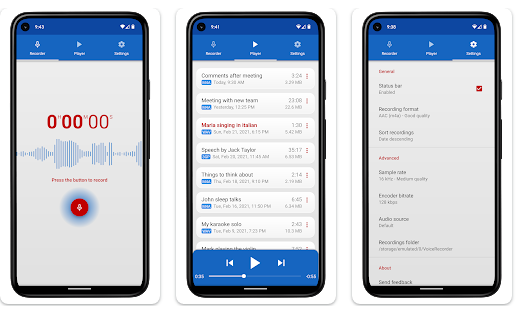
Splend Voice Recorder is a free audio recording application for Android that is aesthetically pleasing, fully equipped with features, and user-friendly. This sound recorder allows for high-quality audio captures without any time restrictions, as long as there is available memory. It can serve various purposes, such as taking voice notes, recording meetings, interviews, lectures, speeches, concerts, and even sleep talking. The app is compatible with both smartphones and tablets, functioning well regardless of the presence of external storage. Users can choose from four audio formats: MP3, high-quality PCM (wav), good quality AAC (m4a/mp4), and AMR (3gp), ensuring efficient use of storage space. The adjustable sample rate ranges from standard phone quality (8 kHz) to CD quality (44 kHz), and the bit rate can be modified from 32 to 320 kbps. It also features a live audio spectrum analyzer, enables background recording even when the device's screen is turned off, and allows users to customize their recording folders. Additionally, users can select their preferred audio source, whether from microphones or phone calls, and enjoy an integrated media player that functions similarly to a standard mp3 player, enhancing the overall experience. This versatility makes it an excellent tool for anyone needing to capture audio effectively.
Description
Vidmore Screen Recorder allows you to capture any area of your screen, record HD audio and video, and take screenshots whenever you want. Vidmore Screen Recorder allows you to capture any screen at any moment. You can save screenshots, capture computer screens, and even webcam videos. You can easily capture your desktop screen activity from any location. High-quality video content can be recorded and saved from your webcam. Record audio from your computer and your voice using the microphone. You can take a screenshot of the entire screen or of one window. Vidmore Screen Recorder allows you to capture screen shots of any part of your screen. It is both easy to use for new users as well as experienced YouTubers, vloggers and gamers.
API Access
Has API
No
API Access
Has API
No


Integrations
Google Meet
No
Microsoft Teams
No
Zoom
No
Pricing Details
Free
Free Trial
No
Free Version
Yes
Pricing Details
$14.95 per month
Free Trial
No
Free Version
Yes
Deployment
Web-Based
No
On-Premises
No
iPhone App
No
iPad App
No
Android App
Yes
Windows
No
Mac
No
Linux
No
Chromebook
No
Deployment
Web-Based
No
On-Premises
No
iPhone App
No
iPad App
No
Android App
No
Windows
Yes
Mac
Yes
Linux
No
Chromebook
No
Customer Support
Business Hours
No
Live Rep (24/7)
No
Online Support
Yes
Customer Support
Business Hours
No
Live Rep (24/7)
No
Online Support
Yes
Types of Training
Training Docs
Yes
Webinars
No
Live Training (Online)
No
In Person
Yes
Types of Training
Training Docs
Yes
Webinars
No
Live Training (Online)
No
In Person
No
Vendor Details
Company Name
Splend Apps
Country
Poland
Website
splendapps.com
Vendor Details
Company Name
Vidmore
Country
United States
Website
www.vidmore.com/screen-recorder/
Product Features
Product Features
Screen Recording
Annotations / Drawing
No
Audio Capture
No
Backup
No
Collaboration Tools
No
File Sharing
No
Multi-Screen Recording
No
Screen Capture
No
Speech-to-Text
No
Video Editing
No
YouTube Uploading
No
