Average Ratings 0 Ratings
Average Ratings 0 Ratings
Similar Products
-
ScreencaptScreencapt allows you to record the entire screen or a selected area. You can also record a specific window. Screencapt is the ideal screen recorder because of its flexibility. Using the integrated audio recording you can also add your commentary or system sound directly into the screen recording. This is particularly useful when creating explanation videos or presentations. Screencapt's ability to record a webcam is a special feature. You can now add your comments and reactions to the video. This makes your screen recordings more personal and professional. Screencapt offers advanced options to record the cursor. You can choose to hide the cursor or add special effects to highlight specific actions. This is especially useful for software tutorials and demonstrations where a clear cursor view is required.
-
Switcher StudioSwitcher Studio allows you to capture video from multiple angles and edit it in real-time. This will allow you to connect with your community in a more engaging way. You can stream it live or save it for later. Your audience will be attracted to you with relevant content. Make it look great. There's no need to purchase, lug or learn largeequipment. Switcher is compatible with iPads and iPhones. Switcher is so intuitive that anyone can create amazing video with it. You don't need to hire outside videographers or producers. It takes an hour to edit every minute of edited video. Every minute of live-editing takes, well, one second. You can share every moment, live or recorded, external or internal, with video -- no matter what it holds.
-
Curtain MonGuard Screen WatermarkCurtain MonGuard Screen Watermark is an enterprise solution for displaying screen watermarks that administrators can enable on users' computers. This screen watermark can display various user information, such as the computer name, username, and IP address. The purpose of this watermark is to effectively grab the user's attention and serve as a reminder before they take a screenshot or photograph the screen to share the information with others. The key benefit of Curtain MonGuard is that it encourages users to "think before sharing" sensitive information. If the content being shared contains confidential company data, the watermark can help trace the source of the leaked information back to the user responsible. This allows organizations to hold users accountable and mitigate the consequences of data breaches or unauthorized information sharing. Key features: - On-screen watermark - Full screen-watermark - Application screen-watermark - Supports over 500 Applications - Self-defined content of watermark - Screen-watermark by condition - Central administration - Integration with Active Directory - Uninstall password for client - Password management - Admin delegation - Self protection for the software
-
D&B Risk AnalyticsGlobally, teams in risk, procurement, and compliance are under pressure to manage geopolitical risks and business risks. Third-party risks are impacted by the complexity of domestic and international businesses, as well as complex and diverse regulations. It is crucial that companies proactively manage third-party relationships. This cutting-edge platform, powered by D&B Data Cloud's 520M+ Global Business Records with 2B+ annual updates for third-party risks, is an AI-powered solution that mitigates and monitors counterparty risk on a continual basis. D&B Risk Analytics uses best-in class risk data, including alerts for high-risk purchases and match points of more than a billion. This helps to drive informed decisions. Intelligent workflows allow for quick and thorough screening. Receive alerts on key business indicators.
-
FISPANFISPAN is a leader in embedded ERP banking, connecting financial institutions directly to the ERP and accounting systems businesses rely on every day. By embedding secure banking functionality inside NetSuite, Sage Intacct, Microsoft Dynamics 365 Business Central, Workday, QuickBooks, and Xero, FISPAN eliminates manual file uploads and disconnected workflows. Automate accounts payable, streamline accounts receivable, enable reliable bank feeds, initiate payments, manage expense reimbursements, and access near real-time cash visibility, all within your ERP. FISPAN’s secure API connectivity ensures accurate transaction data flows directly into your reconciliation module, reducing errors, improving efficiency, and enhancing financial control. Designed for banks, businesses, and ERP partners, FISPAN transforms ERP systems into fully connected financial command centers.
-
CrankWheelCrankWheel allows you to share your screen while on a call. This makes it easy to create engaging presentations. You can send a link via email or SMS to the viewer and they will be able to view it in any browser on any device. CrankWheel was designed for simplicity and can be shared with customers to facilitate business deals. CrankWheel can be used to complement calls from insurance agents, mortgage advisors and solar advisors as well as educators and customer support specialists. CrankWheel is easy to integrate with websites and allows users to add a Demo button to receive quick notifications. We can show you if they are paying attention. Our Chrome Extension has enabled over 50,000 users to share their screens with prospects, regardless of their technical skills or device choice. CrankWheel can be used on old browsers and obscure devices, even with poor network connections. It works on Mac, Android, iOS, Blackberries, Internet Explorer, and Android.
-
SharpeSoft EstimatorSharpeSoft Estimator is an on-premise & cloud cost estimating software for contractors and sub-contractors in the construction industry. This software allows contractors to organize bids, compare item quantities and pricing from multiple subcontractors and vendors, manage their own contractor information, and more. SharpeSoft provides integrated tools for managing labor, equipment and subcontractor costing, contractor and subcontractor management, bid management, and more. The solution is designed for various industries including heavy civil, highway and road, earthwork, pipeline, grading and excavation, plant work, etc.
-
AircallAircall transforms business communications with an intelligent, cloud-based phone system built for modern sales and customer support. More than just a calling tool, it provides an all-in-one hub that connects phone, SMS, and WhatsApp conversations in a single platform. Its AI Assist Pro feature delivers real-time coaching during calls and simplifies follow-up, enabling reps to sell smarter and resolve support issues faster. Teams can leverage advanced capabilities like call routing, IVR, analytics dashboards, and power dialers to maximize efficiency. With integrations across Salesforce, HubSpot, Zendesk, Intercom, Shopify, and 250+ other apps, Aircall seamlessly fits into existing workflows. Businesses benefit from reliable call quality, international number coverage, and scalable features that grow with their needs. Customer stories highlight improvements such as a 4% increase in CSAT scores and the ability to process 25,000+ calls per month with stability and ease. Aircall makes customer conversations more personal, productive, and impactful—without the complexity of traditional systems.
-
NINJIONINJIO is an all-in-one cybersecurity awareness training solution that lowers human-based cybersecurity risk through engaging training, personalized testing, and insightful reporting. This multi-pronged approach to training focuses on the latest attack vectors to build employee knowledge and the behavioral science behind human engineering to sharpen users’ intuition. Our proprietary NINJIO Risk Algorithm™ identifies users’ social engineering vulnerabilities based on phishing simulation data and informs content delivery to provide a personalized experience that changes individual behavior. With NINJIO you get: - NINJIO AWARE attack vector-based training that engages viewers with Hollywood style, micro learning episodes based on real hacks. - NINJIO PHISH3D simulated phishing identifies the specific social engineering tricks most likely to fool users in your organization. - NINJIO SENSE is our new behavioral science-based training course that shows employees what it “feels like” when hackers are trying to manipulate them.
-
ConcordConcord Horizon is an AI native contract platform built from a complete rewrite of Concord’s technology, applying ten years of experience to a modern architecture for faster and more accurate contract work. The redesigned interface offers light and dark mode, collapsible navigation, full screen focus, custom columns, advanced filtering, and consistent tables across modules. AI Copilot supports natural language questions, contract summaries, key point extraction, and fast portfolio insights, while AI Search adds lexical and semantic search with improved performance and multi actions on results. MCP brings contract intelligence into AI tools like ChatGPT and Claude for summaries, tables, or automated monitoring. Concord applies a strict zero data retention policy with AI partners and never uses customer data to train AI models .
Description
If you're looking to make fast edits to a video, QuickTime Player provides tools for essential adjustments such as trimming, rearranging, and rotating footage. Additionally, you have the option to split a film into several segments and edit each one separately. If you need to demonstrate something on your Mac or share your screen with someone else, you can easily record either your full display or just a chosen area. Perhaps you're excited about a recent gaming achievement on your iPhone or want to film something using your iPad's camera—QuickTime allows you to capture what’s happening on your device and save it as a movie file on your Mac. Moreover, QuickTime is accessible on Windows as well, offering features for audio recording too. This versatility makes it a great tool for both casual and professional video editing tasks.
Description
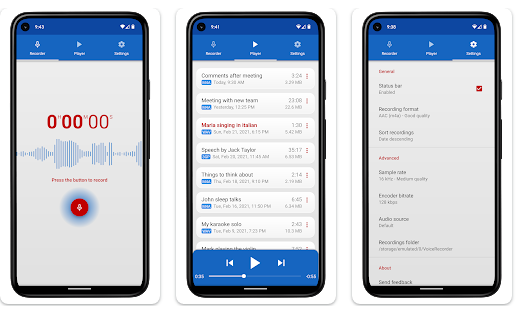
Splend Voice Recorder is a free audio recording application for Android that is aesthetically pleasing, fully equipped with features, and user-friendly. This sound recorder allows for high-quality audio captures without any time restrictions, as long as there is available memory. It can serve various purposes, such as taking voice notes, recording meetings, interviews, lectures, speeches, concerts, and even sleep talking. The app is compatible with both smartphones and tablets, functioning well regardless of the presence of external storage. Users can choose from four audio formats: MP3, high-quality PCM (wav), good quality AAC (m4a/mp4), and AMR (3gp), ensuring efficient use of storage space. The adjustable sample rate ranges from standard phone quality (8 kHz) to CD quality (44 kHz), and the bit rate can be modified from 32 to 320 kbps. It also features a live audio spectrum analyzer, enables background recording even when the device's screen is turned off, and allows users to customize their recording folders. Additionally, users can select their preferred audio source, whether from microphones or phone calls, and enjoy an integrated media player that functions similarly to a standard mp3 player, enhancing the overall experience. This versatility makes it an excellent tool for anyone needing to capture audio effectively.
API Access
Has API
No
API Access
Has API
No


Integrations
TurboScribe
No
WOLFCOM Evidence Management System
No
Pricing Details
No price information available.
Free Trial
No
Free Version
Yes
Pricing Details
Free
Free Trial
No
Free Version
Yes
Deployment
Web-Based
No
On-Premises
No
iPhone App
No
iPad App
No
Android App
No
Windows
Yes
Mac
Yes
Linux
No
Chromebook
No
Deployment
Web-Based
No
On-Premises
No
iPhone App
No
iPad App
No
Android App
Yes
Windows
No
Mac
No
Linux
No
Chromebook
No
Customer Support
Business Hours
No
Live Rep (24/7)
No
Online Support
No
Customer Support
Business Hours
No
Live Rep (24/7)
No
Online Support
Yes
Types of Training
Training Docs
Yes
Webinars
No
Live Training (Online)
No
In Person
No
Types of Training
Training Docs
Yes
Webinars
No
Live Training (Online)
No
In Person
Yes
Vendor Details
Company Name
Apple
Founded
1976
Country
United States
Website
apple.com
Vendor Details
Company Name
Splend Apps
Country
Poland
Website
splendapps.com
Product Features
Screen Recording
Annotations / Drawing
No
Audio Capture
No
Backup
No
Collaboration Tools
No
File Sharing
No
Multi-Screen Recording
No
Screen Capture
No
Speech-to-Text
No
Video Editing
No
YouTube Uploading
No
Video Editing
3D Video Editing
No
Audio Tools
No
Brand Overlay
No
Collaboration
No
Media Library
No
Social Sharing
No
Speed Adjustment
No
Split / Merge
No
Supports HD Resolution
No
Text Overlay
No
Video Capture
No
Video Stabilization
No
