Average Ratings 0 Ratings
Average Ratings 0 Ratings
Similar Products
-
JetBrains JunieJetBrains Junie is an innovative AI coding assistant that works inside many JetBrains IDEs to streamline programming efforts and boost efficiency. This agent leverages advanced AI to help developers write, test, and inspect code without leaving their familiar development environment. Junie offers both code execution and interactive collaboration, allowing programmers to switch between automated code writing and brainstorming sessions for features and improvements. By deeply understanding the codebase, Junie identifies the best ways to tackle tasks and ensures all changes meet quality standards through syntax and semantic checks. It also runs tests to minimize errors and keep the project healthy, freeing developers from routine tasks. Many developers have successfully built complex applications and games using Junie, highlighting its flexibility across different languages and frameworks. The AI adapts to each task’s complexity and workflow, making coding less tedious and more focused on creativity. Whether you are building a simple web app or a complex game, Junie offers smart support throughout the development cycle.
-
Checksum.aiEngineering teams shipping with AI have a new bottleneck: validation. Code output has accelerated. Quality hasn't. Checksum closes the gap. Checksum is a continuous quality platform with a suite of AI agents that handle testing end-to-end, at every stage of the development lifecycle. Where most tools wait for a human to trigger them, Checksum runs autonomously in the background, generating tests, executing them, and repairing failures without manual intervention. Seventy percent of test failures are resolved automatically through real-time auto-recovery. The platform covers every layer: end-to-end UI flows via Playwright, API endpoint chains, and targeted CI tests scoped to exactly what changed in a PR. All tests land as real code in your repository and are delivered as standard Playwright, owned by your team. Checksum is fine-tuned on 1.5+ million test runs and integrates natively with Cursor, Claude Code, and 100+ AI coding agents. Type /checksum and your coding agent's output gets tested before it ever reaches review. Generation and healing happen on Checksum's cloud infrastructure which means no LLM tokens consumed, no local resources required. The result: test suites that stay green as the product evolves, fewer regressions reaching production, and release confidence that scales alongside AI output.
-
Banker's DashboardAccess your bank's or credit union's financial performance from anywhere, anytime. Secure, cloud-based access gives you insight into your bank's financial performance. With a few clicks, you can access margin components, branch performance, forecasts, and more. The Banker's Dashboard and Credit Union Dashboard integrate seamlessly with your core processor. Easy setup allows you to immediately improve your bottom line. Automate reporting and eliminate errors so you can focus on higher-value tasks. Multiple forecast scenarios can be quickly run and revised, allowing you to analyze variances and other strategies. Compare branch performance. For better results, institute best practices and hold branches accountable.
-
G-POur solution is more than software. It includes a top-of-the-industry legal team, HR experts, and extensive support in every region we do business. There are no hidden or extra fees when you work with us. We're there every step of your way, from generating employment contracts to running compliant payroll, offering competitive benefits, 24/7/365 premium support and more. So you can manage the business. With the international expansion experts at your side, you can take the next step for your business. Your company wants to expand its operations quickly in a new country but you don't have the time or resources to learn local labor laws, tax issues, or establish subsidiaries in other countries. Although you have the right candidates, your company is not ready to allow your employees to start work.
-
CirrusPrintCirrusPrint helps you manage and streamline your printing and document delivery across multiple networks. It solves cloud migration issues related to printing and provides the fastest and most direct way to deliver documents to users. With CirrusPrint, traditional network printing is still possible without any changes to operations. You can also print to your users, email your printers, and send a file from your smartphone to a printer anywhere in the country. CirrusPrint can be used on Windows or Linux, either in the cloud or at your own data center. It can accept print jobs and other documents, compress them, and deliver them to remote printers and users. It is easy to integrate with applications. You can print to it as any network printer, email files, drop files into the device, or use REST API. CirrusPrint jobs are sent quickly and securely to remote printers as exact duplicates of the original job.
-
CrowdinGet quality translations for your app, website, game, supporting documentation, and on. Invite your own translation team or work with professional translation agencies within Crowdin. Features that ensure quality translations and speed up the process • Glossary – create a list of terms to get consistent translations • Translation Memory (TM) – no need to translate identical strings • Screenshots – tag source strings to get context-relevant translations • Integrations – set up integration with GitHub, Google Play, API, CLI, Android Studio, and on • QA checks – make sure that all the translations have the same meaning and functions as the source strings • In-Context – proofreading within the actual web application • Machine Translations (MT) – pre-translate via translation engine • Reports – get insights, plan and manage the project Crowdin supports more than 30 file formats for mobile, software, documents, subtitles, graphics and assets: .xml, .strings, .json, .html, .xliff, .csv, .php, .resx, .yaml, .xml, .strings and on.
-
SynchredibleSynchredible makes it easy to synchronize, copy, and back up individual folders or entire drives with just a single click. Its intuitive assistant guides you step by step in setting up tasks that can be scheduled, triggered by changes (real-time monitoring), or executed automatically when an external storage device is connected. Keep your data synchronized effortlessly and manage it seamlessly! With years of proven technology, Synchredible not only transfers data from A to B but also supports bidirectional synchronization. It automatically detects changes and reliably syncs the most recently edited files. Thanks to advanced duplicate detection, Synchredible saves valuable time by skipping unchanged files, enabling fast synchronization of large datasets in seconds! Synchredible is highly versatile, supporting local folder synchronization, network and USB device synchronization, as well as synchronization with cloud storage.
-
ONLYOFFICE DocsONLYOFFICE Docs is a secure online office suite for teams and businesses of all sizes. Create and edit docs, sheets, slides, fillable forms and PDFs. Collaborate with your teammates in real time using two co-editing modes, version history and other tools. Enable the AI assistant of your choice — ChatGPT, DeepSeek, Mistral, Groq AI, etc. Generate new content, summarize, translate and do more with your favourite AI tool while working on office files. Integrate ONLYOFFICE Docs into your business platform, whether it be Odoo, Alfresco, Confluence, Pipedrive, Nextcloud, Redmine, SuiteCRM, etc., via an integration app (40+ available integrations). Use Docs within ONLYOFFICE DocSpace, a room-based document collaboration platform equipped with the online office suite. Create dedicated spaces for different purposes, invite your teammates, assign access permissions and collaborate the way you like. With DocSpace, you can store, share and co-edit office files, and even interact with third parties.
-
AnsaradaAnsarada brings order to organizational chaos to increase business value. Ansarada is a total deal lifecycle management platform that provides world-leading AI-powered Virtual Data Rooms and dealmaking tools. These tools include advanced AI insights and automation, next level Q&A and collaboration, plus purpose-built, digitized and customizable workflows and checklists for M&A, capital raising, business audits, tenders and other high stakes outcomes. Unlike some competitor Virtual Data Rooms, Ansarada offers free trials, 24/7 localized expert support, integrated Q&A via email, AI-assisted deal prediction, plus easy drag and drop upload and superior document security controls. Manage and maximize your Deals with Ansarada Always & Secure File Share. Ansarada is designed to drive stronger business outcomes based on best practices from over 35,000 transactions.
-
GroupTogetherGroupTogether is a user-friendly online platform designed for creating group cards, collecting gifts, and sending eGift Cards quickly and effortlessly. It allows users to initiate a group card, decide whether to gather funds or select a gift, and then distribute a single link to friends, family, coworkers, or teammates. Participants have the option to add personalized messages, share photos, and include GIFs, while also contributing a specific amount, any amount they choose, or simply signing the card without making a financial contribution. With privacy assured, GroupTogether eliminates the discomfort of using personal banking details and ensures secure transactions, complete with verifiable records of contributions and expenditures. Organizers have the flexibility to use the collected funds for a variety of gifts, including eGift Cards, gift baskets, flowers, or the versatile GroupTogether AnyCard that allows recipients to choose from over 100 eGift Cards. The platform provides the option for digital delivery or downloadable PDFs for printing, making it a practical solution for various occasions such as remote team celebrations, workplace events, classroom activities, birthdays, farewells, and retirements. Moreover, this seamless process fosters a sense of community and connection, even in virtual settings.
Description
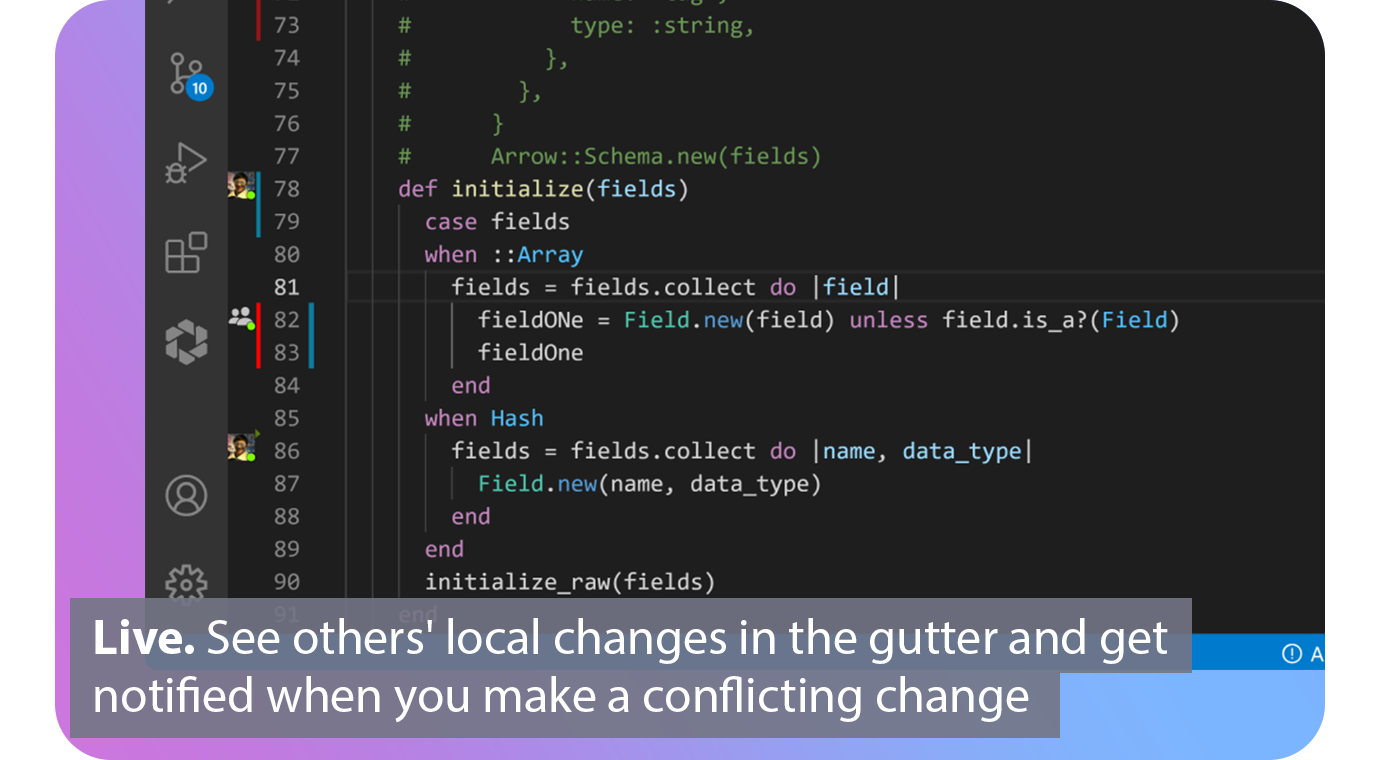
With real-time collaboration superpowers, extend Git. Connect. Connect. Automated. Connect your issue tracker and share the issue you are working with based on your branch. Live. You can see the changes of others in the gutter of the editor and be notified when you make a conflicting one. Patch. View diffs of other contributors local files and cherry-pick individual files, lines, or complete working copies. Codeshare. Codeshare allows you to make voice and video calls from your editor. Agnostic. Edit together simultaneously, interoperable with VS Code and all JetBrains IDEs.
Description
MergeMe integrates GitHub pull requests and GitLab merge requests into Slack, providing a streamlined, continuously updating notification card for each PR/MR. In contrast to the official Slack applications for GitHub or GitLab, which generate a new message for each event, MergeMe updates a single message as the status evolves (such as opened, under review, approved, or merged). Comments made during the review process are displayed as replies in a thread beneath that notification card, ensuring all feedback stays organized.
It supports a range of code hosting platforms including GitHub, GitLab, and self-hosted instances of GitLab. Users can link multiple git sources in one Slack workspace, directing each repository or project to a designated Slack channel, mapping usernames from GitHub and GitLab to Slack users to ensure that @mentions successfully notify reviewers, and utilizing label-based routing to categorize bugs, features, and documentation tasks into separate channels.
The setup process is quick, requiring roughly five minutes: simply connect your Slack account, link your git provider using OAuth, a GitHub App, or a webhook URL for self-hosted versions, and then configure your channel mappings. MergeMe operates solely on webhook payloads and does not access your private source code.
For those on the Free Hobby plan, users can enjoy one channel mapping and up to five users, making it an ideal starting point for teams looking to enhance their development workflow.
API Access
Has API
No
API Access
Has API
No



Integrations
GitHub
Yes
Slack
Yes
Android Studio
Yes
Asana
Yes
GitLab
No
Jira
Yes
Jira Align
Yes
Trello
Yes
Visual Studio Code
Yes
Integrations
GitHub
Yes
Slack
Yes
Android Studio
No
Asana
No
GitLab
Yes
Jira
No
Jira Align
No
Trello
No
Visual Studio Code
No
Pricing Details
$0
Free or paid plans available. Team plan starting at $5 per user per month.
Free Trial
No
Free Version
Yes
Pricing Details
£5 per developer seat / month
Free for small teams. Forever!
Free Trial
No
Free Version
Yes
Deployment
Web-Based
Yes
On-Premises
No
iPhone App
No
iPad App
No
Android App
No
Windows
No
Mac
No
Linux
No
Chromebook
No
Deployment
Web-Based
Yes
On-Premises
Yes
iPhone App
No
iPad App
No
Android App
No
Windows
No
Mac
No
Linux
No
Chromebook
No
Customer Support
Business Hours
Yes
Live Rep (24/7)
No
Online Support
Yes
Customer Support
Business Hours
No
Live Rep (24/7)
No
Online Support
Yes
Types of Training
Training Docs
Yes
Webinars
No
Live Training (Online)
No
In Person
No
Types of Training
Training Docs
Yes
Webinars
No
Live Training (Online)
Yes
In Person
No
Vendor Details
Company Name
GitLive
Founded
2019
Country
United Kingdom
Website
git.live/
Vendor Details
Company Name
MergeMe
Founded
2026
Country
United Kingdom
Website
mergeme.dev/
Product Features
Code Collaboration
Audio Conferencing
No
Chat / Messaging
No
Code Review
No
Discussion Threads
No
IDE Integration
Yes
Remote Control
No
Remote Pair Programming
Yes
Screen Sharing
Yes
Video Conferencing
Yes
Product Features
Code Collaboration
Audio Conferencing
No
Chat / Messaging
No
Code Review
No
Discussion Threads
No
IDE Integration
No
Remote Control
No
Remote Pair Programming
No
Screen Sharing
No
Video Conferencing
No
