Average Ratings 0 Ratings
Average Ratings 0 Ratings
Similar Products
-
Curtain MonGuard Screen WatermarkCurtain MonGuard Screen Watermark is an enterprise solution for displaying screen watermarks that administrators can enable on users' computers. This screen watermark can display various user information, such as the computer name, username, and IP address. The purpose of this watermark is to effectively grab the user's attention and serve as a reminder before they take a screenshot or photograph the screen to share the information with others. The key benefit of Curtain MonGuard is that it encourages users to "think before sharing" sensitive information. If the content being shared contains confidential company data, the watermark can help trace the source of the leaked information back to the user responsible. This allows organizations to hold users accountable and mitigate the consequences of data breaches or unauthorized information sharing. Key features: - On-screen watermark - Full screen-watermark - Application screen-watermark - Supports over 500 Applications - Self-defined content of watermark - Screen-watermark by condition - Central administration - Integration with Active Directory - Uninstall password for client - Password management - Admin delegation - Self protection for the software
-
CrankWheelCrankWheel allows you to share your screen while on a call. This makes it easy to create engaging presentations. You can send a link via email or SMS to the viewer and they will be able to view it in any browser on any device. CrankWheel was designed for simplicity and can be shared with customers to facilitate business deals. CrankWheel can be used to complement calls from insurance agents, mortgage advisors and solar advisors as well as educators and customer support specialists. CrankWheel is easy to integrate with websites and allows users to add a Demo button to receive quick notifications. We can show you if they are paying attention. Our Chrome Extension has enabled over 50,000 users to share their screens with prospects, regardless of their technical skills or device choice. CrankWheel can be used on old browsers and obscure devices, even with poor network connections. It works on Mac, Android, iOS, Blackberries, Internet Explorer, and Android.
-
BuildxactBuildxact is a construction management software that is easy to use for contractors, residential builders, and remodelers. It helps them manage their projects smoothly and efficiently. Transform your business with one system, from the first takeoff to the final invoice. Streamline estimation - Create takeoffs faster and get quotes 5x faster. Buildxact is cloud-based so you can get up and running in no time. Save time by ditching paper plans and spreadsheets! Buildxact digital takeoffs let you scale plans and measure with a few mouse clicks. Quickly measure and count materials knowing your numbers are correct. Easily move material counts into your estimate with online tools and pricing that are 5X faster than paper and pencil. Estimates that clearly lay out materials, labor and overhead for the client. Professional quotes that win more jobs. Find out today with a free trial!
-
VaizVaiz is a work management platform built for small and mid-sized teams — startups, agencies, and growing SaaS companies — who want the structure of tools like Jira, Asana, or ClickUp without the complexity or price tag. It centralizes task management, document sharing, and team coordination in one lightweight workspace, so teams of 5-50 people can get started in minutes, not weeks. Vaiz offers customizable task boards (lists, Kanban, Gantt charts), an AI assistant that drafts, summarizes, and analyzes work, and built-in automation that handles routine tasks without extra setup. Integrations with tools like Slack, GitHub, and Google Workspace keep teams aligned without switching between apps. Vaiz scales with you, from a 5-person startup to a growing team, without forcing you to re-learn the tool as you grow."
-
TelemetryOSTelemetryTV is a powerful platform for digital signage that allows organizations to connect with audiences, generate awareness and give voice to their communities and teams. TelemetryTV lets you broadcast dynamic content by streaming video, images and social feeds to all your displays, wherever they may be. TelemetryTV powers internal communications and marketing at Starbucks, Amazon and Stanford University. Our success is based on being flexible, open to communication, collaborative, and open to collaboration. We believe in continuous learning, challenging the status-quo, and listening to customers. We are moving towards a world in which our walls will eventually talk. This begs the question: What do you want them saying?
-
Athena SecurityAthena Security uses advanced concealed weapons detection systems to deliver a unified, AI-driven entryway solution for hospitals, K–12 schools, casinos, places of worship, government buildings, and commercial facilities across the U.S. The Apollo 500 enables seamless walk-through screening to detect weapons in real time, giving operators more actionable data points than traditional systems for faster, more confident decisions. Athena’s AI-powered X-ray leverages iPad technology to modernize screening and improve threat detection. Athena’s Hospital Visitor Management System integrates with EPIC to connect identity, access, and screening data. Innovations include the Ambulance Bay WDS for stretcher screening and secondary screening for bags and lower extremities to reduce human error. Designed with compliance in mind, Athena aligns with California AB 2975, which mandates weapons detection screening at key hospital entrances by 2027 to improve safety and reduce workplace violence. DHS-aligned workflows ensure testing, controls, and compliance, while telepresence and AR alert glasses provide real-time support. All systems connect in one platform for centralized monitoring and enterprise reporting.
-
PaligoPaligo supports teams working with complex technical documentation that needs to grow, adapt, and stay consistent over time. Built specifically for structured content at scale, Paligo enables organizations to treat documentation as a long-term business asset—powered by reuse, automation, and strong content governance. Paligo’s cloud-based CCMS is designed around modular content. Teams can write once, reuse components across multiple outputs, and keep documentation aligned across products, formats, and languages. This reduces manual effort, speeds up updates, and cuts translation overhead, allowing teams to publish faster while minimizing errors. The platform pairs advanced structured authoring capabilities with a modern, approachable interface. This makes Paligo effective for experienced documentation specialists while remaining accessible to contributors across the organization. From creation and collaboration to translation and multichannel delivery, Paligo brings the entire documentation workflow into one controlled environment. Paligo’s purpose is to help organizations move past static, fragmented documentation practices and build content operations that support continuous growth. With Paligo, teams stay in control of complexity and deliver documentation that evolves alongside their business.
-
ARGOS IdentityARGOS Identity provides AI-powered identity verification, fraud prevention, KYB, and workflow automation solutions for businesses operating in regulated and high-risk industries. ARGOS ID Check enables organizations to verify customers remotely using identity document authentication, facial recognition, selfie verification, liveness detection, AML screening, age verification, and additional fraud signals. The platform supports identity documents from more than 200 countries and is designed for fintech, gaming, virtual assets, e-commerce, telecommunications, and other digital platforms. Businesses can configure their verification process by selecting the modules that match their compliance requirements and risk tolerance. ARGOS can help identify forged documents, deepfakes, duplicate users, bots, VPNs, and suspicious activity while maintaining a fast and straightforward onboarding experience. For business verification, ARGOS Omni automates KYB and compliance workflows. Omni supports document collection and extraction, business registry searches, ownership and UBO identification, AML screening, case management, and audit reporting. Custom workflows and decision rules help teams reduce manual reviews and apply compliance policies consistently. ARGOS gives businesses one flexible platform for verifying people and companies, preventing fraud, lowering operational costs, and scaling compliant onboarding.
-
BudgytYou know the pain. 8,000+ formulas in your Excel budget, any one of which could break. Department heads emailing versions back and forth. Mystery errors appearing right before board meetings. Weekends lost hunting for that one number that doesn't add up. We built Budgyt because we lived that nightmare as CFOs ourselves. It's a true database that works like Excel, so your team doesn't need training. But formulas never break. Every number traces back to source with one click. Import your chart of accounts and actuals directly from your accounting system. Click any variance to drill down to vendor-level detail instantly. Run rolling reforecasts every month without rebuilding everything from scratch. We connected it via API so you're up and running in hours, not spending months on implementation consulting. Built for multi-department organizations where budgeting needs to be collaborative, but the finance team needs to stay in control. No more emailing spreadsheets around. No more "did I break something?" panic. Just budgeting that actually works.
-
AestheticsProAestheticsPro is today's most comprehensive medical aesthetic software. HIPAA cloud compliant with integrated POS, targeted advertising, and results driven reporting paired with electronic charting and client portal with "book now" capabilities. AestheticsPro provides everything you need to run your medical spa business.
Description
Crade serves as a native AI screen assistant for both Mac and Windows platforms, providing support by recognizing what is displayed on your screen and aiding in task completion. It is tailored for a variety of common tasks, including managing spreadsheets, offering writing assistance, filling out forms, troubleshooting code errors, handling documents, conducting data analysis, translating text, and facilitating research. Users can get started effortlessly, as Crade eliminates the need for complex setups or additional plugins; simply download the application, log in using your Google account or email, and pose questions related to the visible content on your screen. This intelligent assistant is capable of interpreting code snippets, deciphering charts, addressing error messages, discussing articles, and understanding foreign-language documents, as well as providing insights into Excel formulas and other on-screen elements. By delivering contextually relevant answers, Crade enhances user productivity and simplifies tasks like interpreting error messages, clarifying document content, aiding in writing projects, analyzing data sets, answering inquiries about articles, and providing practical support without the hassle of copying and pasting information into a different chat interface. Overall, Crade represents a seamless integration of AI technology into daily workflows, ensuring that users can accomplish their tasks more efficiently than ever before.
Description
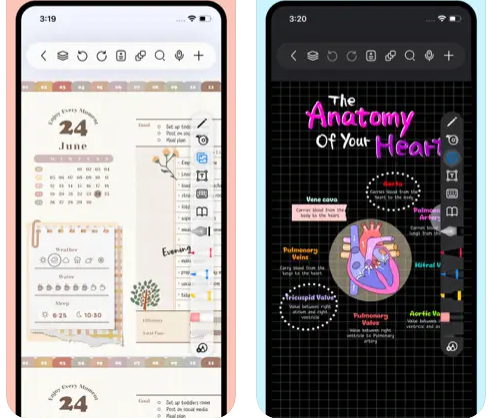
Freenotes delivers a digital note-taking platform that seamlessly combines the experience of writing on paper with advanced AI features. The app provides realistic pen strokes that replicate authentic handwriting, enhancing both sketching and note-taking, and includes functionalities such as handwriting-to-text conversion, a variety of stickers, and multiple brush styles. Your notes are easily synced through iCloud and various multi-cloud backup options. Freenotes also enables PDF annotation, allowing users to highlight, mark up, and translate text within their documents, as well as add hyperlinks to other pages or external websites. It supports picture-in-picture video mode and split-screen functionality, making it possible to take notes while watching educational videos or attending lectures. The integrated AI assistant allows you to capture screenshots or upload documents to receive quick answers or summaries of content. To keep your notes organized, you can categorize them into folders, and a swift search feature helps you find information rapidly. Additionally, Freenotes is designed to enhance productivity, making it an ideal choice for students and professionals alike.
API Access
Has API
No
API Access
Has API
No


Pricing Details
$7.99 per month
Free Trial
No
Free Version
Yes
Pricing Details
Free
Free Trial
No
Free Version
Yes
Deployment
Web-Based
No
On-Premises
No
iPhone App
No
iPad App
No
Android App
No
Windows
Yes
Mac
Yes
Linux
No
Chromebook
No
Deployment
Web-Based
No
On-Premises
No
iPhone App
Yes
iPad App
Yes
Android App
No
Windows
No
Mac
Yes
Linux
No
Chromebook
No
Customer Support
Business Hours
No
Live Rep (24/7)
No
Online Support
Yes
Customer Support
Business Hours
No
Live Rep (24/7)
No
Online Support
Yes
Types of Training
Training Docs
Yes
Webinars
No
Live Training (Online)
No
In Person
No
Types of Training
Training Docs
Yes
Webinars
No
Live Training (Online)
No
In Person
No
Vendor Details
Company Name
Crade
Country
United States
Website
www.crade.ai/
Vendor Details
Company Name
Freenotes
Country
China
Website
apps.apple.com/us/app/freenotes-ai-notes-taking/id6464237904
Product Features
Product Features
Note-Taking
Categories / Organization
No
Clip From Web
No
Document Scanning
No
Formatting / Markdown
No
Handwriting
No
Hyperlinking
No
Image Insertion
No
List/Checklist Creation
No
Printing
No
Search
No
Sharing / Collaboration
No
Syncing
No
Templates
No
Voice Notes
No
