Average Ratings 0 Ratings
Average Ratings 0 Ratings
Similar Products
-
Switcher StudioSwitcher Studio allows you to capture video from multiple angles and edit it in real-time. This will allow you to connect with your community in a more engaging way. You can stream it live or save it for later. Your audience will be attracted to you with relevant content. Make it look great. There's no need to purchase, lug or learn largeequipment. Switcher is compatible with iPads and iPhones. Switcher is so intuitive that anyone can create amazing video with it. You don't need to hire outside videographers or producers. It takes an hour to edit every minute of edited video. Every minute of live-editing takes, well, one second. You can share every moment, live or recorded, external or internal, with video -- no matter what it holds.
-
CloudFilerCloudFiler provides filing and searching in both New and Classic Outlook on all phones & tablets, all popular browsers, Macs and ARM based devices. Created Microsoft's new web Add-in technology by the architect of the Oasys email management system previously owned by Arup Group Ltd and the Excitech Mail system owned by Symetri and latterly Pentagon. File to: the cloud, Windows folders, SharePoint, OneDrive, Egnyte, Autodesk Forma, Bentley ProjectWise, etc. Favoured by the biggest businesses globally.
-
Google WorkspaceGoogle Workspace is an all-in-one cloud productivity platform developed by Google to help businesses manage communication, collaboration, document creation, and workflow automation from a centralized environment. The platform combines professional email, cloud storage, video conferencing, document editing, team messaging, scheduling, and AI-powered assistance into one subscription-based ecosystem optimized for modern work environments. Google Workspace includes applications such as Gmail, Google Drive, Google Meet, Docs, Sheets, Slides, Calendar, Chat, Keep, Forms, Sites, NotebookLM, and Gemini AI, enabling teams to work together seamlessly across devices and locations. One of the platform’s core strengths is its built-in AI functionality powered by Gemini, which helps users draft emails, summarize meetings, generate research insights, automate repetitive tasks, and improve productivity using contextual awareness from workplace data. Google Workspace also supports advanced collaboration features including real-time editing, appointment scheduling, eSignatures, document sharing, cloud storage management, and AI-assisted research tools. Businesses benefit from enterprise-grade security features such as AI-powered threat protection, data classification, endpoint management, Data Loss Prevention, secure access controls, and compliance support for enterprise environments. The platform offers scalable pricing plans suitable for startups, small businesses, enterprises, educational institutions, nonprofits, and government organizations. Google Workspace also simplifies data migration and onboarding with built-in migration tools and partner support for transferring emails, files, and business information securely into the cloud.
-
Construction Daily ReportsYou can save up to an hour per day on daily reports CDR – Construction Daily Reports is the fastest custom daily reporting solution available for the construction industry. It can be accessed on our mobile app for Android or Apple devices as well as our website portal. You can customize your reports by entering project details. Then, you can take photos and make notes using your mobile device. CDR will email your completed report in professional PDF format to you after you sign it. We also save it on our servers so that you can upload it to your cloud storage. CDR is a mobile-friendly, time-saving construction software designed to simplify your reporting process. Start your free trial now!
-
AddigyAddigy makes it easy for IT admins to remotely manage and secure Apple devices using our SaaS solution. Addigy is the only multi-tenant Apple device management and MDM platform for managing macOS, iOS, iPadOS, and tvOS devices across multiple clients and locations. Configure, patch, and maintain devices in the way that you prefer. Gain operational efficiencies and time-savings. Ensure your managed networks are secure from cyberthreats. Maintain end-user privacy. Connect to your favorite IT tools with seamless integrations. Inventory and track every device in your network, regardless of its location. Instantly connect to devices remotely with a single click. Apply and enforce policies to maintain always-on compliance. Deploy new devices in less than 5 minutes. And so much more. Addigy offers simple month-to-month or annual pricing with no contracts + access to every Addigy feature with no additional or hidden costs.
-
CompanyCamCompanyCam is a photo-based solution created specifically for contractors. Users can take unlimited photos—which are location and time stamped, sent to the cloud, and stored securely. Every photo is organized by project and instantly available to your team, allowing you to see what’s going on anytime, anywhere.
-
OnetraceBuilt specifically for subcontractors, Onetrace is construction management software that connects job planning, on-site evidence capture, and compliance sign-off in a single workflow. Rather than juggling spreadsheets and paper records, teams get one system covering everything from the first site visit to final handover, with audit-ready documentation ready for clients, main contractors, and regulators whenever it's needed. The platform supports a wide range of trades, including passive fire protection, drylining, roofing, and M&E. For fire protection specialists in particular, Onetrace works as dedicated fire protection software — linking photographs, sign-off forms, and approvals to the exact job and location they cover, so compliant installations are easy to evidence. Teams also get live visibility of projects, timesheets, signed documentation, and site progress as it happens. Key functionality: customisable forms, drag-and-drop scheduling, GPS-verified time-tracking, scope variation tracking, cost calculation, and mobile drawing markups with photo capture.
-
RedlistRedlist is a reliability centered maintenance platform built for industrial teams that need more from their CMMS. Where traditional maintenance software stops at the work order, Redlist continues to the shop floor, tracking every lubrication point, inspection task, and operator action. The platform runs on web, iOS, and Android with full offline functionality, purpose-built for technicians in plants, mines, and refineries where connectivity is unreliable. Lubrication Management Redlist manages lubrication at the individual point level, assigning the correct lubricant, volume, and frequency to every grease fitting, oil drain, and sample port. Routes are executed digitally, replacing paper-based systems and eliminating the pencil-whipping that hides missed tasks. Oil analysis results from labs integrate directly so technicians see condition data alongside their route. CMMS and Asset Management Manage assets from the enterprise level down to individual components. Create work orders, build PM templates, track parts inventory, and schedule predictive maintenance. Connects to existing ERP and CMMS systems including SAP, Oracle EAM, JDE, and Maximo, bridging the gap between enterprise software and field execution. Operator Basic Care Enable frontline operators to perform guided daily inspections and basic maintenance tasks, building a digital record of institutional knowledge that would otherwise be lost when experienced technicians retire. AI Agents Nine purpose-built agents for FMEA analysis, RCM-based PM development, oil analysis interpretation, vibration diagnostics, and lubrication optimization. Serving mining, oil and gas, chemical processing, food and beverage, packaging, paper and corrugated, and manufacturing. Deployed under 100 days.
-
ShareMyToolboxDiscover ShareMyToolbox - Your Tool Tracking Solution for Construction Teams. Effortlessly oversee small tools and equipment. Seamlessly compatible with Apple and Android devices, users can delve into their company's tool inventory. Smoothly request tools and embrace assignments with the ease of barcode scanning. Harness the potential of GPS coordinates captured during scans, precisely displayed on an interactive map. Tailored meticulously for contractors, our system redefines user-friendliness. Embark on your tool tracking odyssey with three simple steps: Effortless Organization: Cultivate an inventory of tools and equipment, shaping your personalized cloud catalog of invaluable assets. Enhanced Visibility: Empower field personnel, granting rapid access to survey the company's diverse assets via our intuitive mobile app. Cultivate Accountability: Equip field workers with the power to manage tool transactions seamlessly – check-ins, check-outs, and transfers – all facilitated through the convenience of barcodes and QR codes.
-
FathomFathom is an AI meeting assistant that helps users capture, summarize, search, and act on meetings with less manual work. The platform creates accurate transcripts, instant summaries, action items, and follow-up notes so users can focus on live conversations instead of taking notes. Fathom supports both traditional meeting capture and bot-free capture through its desktop app. Teams can use Fathom as a shared source of truth across customer calls, internal meetings, strategy sessions, and project conversations. Ask Fathom lets users search across meetings and ask questions about conversations, decisions, commitments, risks, and next steps. The platform also supports topic monitoring so important moments and signals are easier to find. Fathom syncs meeting notes, insights, and action items into tools such as Slack, Salesforce, HubSpot, Notion, Asana, Gmail, Zoom, Google Meet, Microsoft Teams, ChatGPT, Claude, Zapier, and API or MCP workflows. It supports security and compliance needs with SOC 2 Type II, GDPR, HIPAA compliance, SSO, and SCIM. By combining AI notetaking, bot-free capture, transcripts, summaries, integrations, search, and workflow automation, Fathom helps teams move from meetings to execution faster.
Description
Carbo is an innovative app designed for enthusiasts of handwriting, allowing you to use your preferred pen and paper freely, without limits. It enables you to capture, modify, and organize your handwritten notes, design sketches, and whiteboard illustrations, seamlessly bringing the art of handwriting into the digital realm. Now available on Mac, as well as iPhone and iPad, Carbo 2 is built using Mac Catalyst and is optimized for macOS 11 Big Sur, delivering a genuine Mac experience. The app takes full advantage of the capabilities of each Apple device: you can capture notes while on the move with your iPhone, create notes directly on your iPad using the Apple Pencil, and utilize your Mac for accessing and editing these materials in a more efficient workspace. Carbo features a distinctive pixel-free technology that retains the full expressiveness of your original drawings, making it stand out among digital note-taking solutions. Its hybrid capture and rendering technique, positioned between bitmap and vector graphics, ensures that your handwritten content is beautifully displayed, particularly on Retina screens, enhancing the overall visual experience. This combination of features makes Carbo an invaluable tool for anyone looking to bridge the gap between traditional handwriting and modern digital organization.
Description
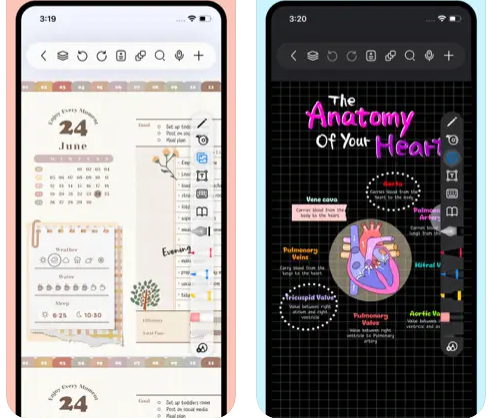
Freenotes delivers a digital note-taking platform that seamlessly combines the experience of writing on paper with advanced AI features. The app provides realistic pen strokes that replicate authentic handwriting, enhancing both sketching and note-taking, and includes functionalities such as handwriting-to-text conversion, a variety of stickers, and multiple brush styles. Your notes are easily synced through iCloud and various multi-cloud backup options. Freenotes also enables PDF annotation, allowing users to highlight, mark up, and translate text within their documents, as well as add hyperlinks to other pages or external websites. It supports picture-in-picture video mode and split-screen functionality, making it possible to take notes while watching educational videos or attending lectures. The integrated AI assistant allows you to capture screenshots or upload documents to receive quick answers or summaries of content. To keep your notes organized, you can categorize them into folders, and a swift search feature helps you find information rapidly. Additionally, Freenotes is designed to enhance productivity, making it an ideal choice for students and professionals alike.
API Access
Has API
No
API Access
Has API
No


Integrations
iCloud
Yes
Dropbox
Yes
Evernote
Yes
Facebook
Yes
X (Twitter)
Yes
Pricing Details
No price information available.
Free Trial
No
Free Version
No
Pricing Details
Free
Free Trial
No
Free Version
Yes
Deployment
Web-Based
No
On-Premises
No
iPhone App
Yes
iPad App
Yes
Android App
No
Windows
No
Mac
Yes
Linux
No
Chromebook
No
Deployment
Web-Based
No
On-Premises
No
iPhone App
Yes
iPad App
Yes
Android App
No
Windows
No
Mac
Yes
Linux
No
Chromebook
No
Customer Support
Business Hours
No
Live Rep (24/7)
No
Online Support
Yes
Customer Support
Business Hours
No
Live Rep (24/7)
No
Online Support
Yes
Types of Training
Training Docs
Yes
Webinars
No
Live Training (Online)
No
In Person
No
Types of Training
Training Docs
Yes
Webinars
No
Live Training (Online)
No
In Person
No
Vendor Details
Company Name
Creaceed
Founded
2008
Country
Belgium
Website
creaceed.com/carbo
Vendor Details
Company Name
Freenotes
Country
China
Website
apps.apple.com/us/app/freenotes-ai-notes-taking/id6464237904
Product Features
Note-Taking
Categories / Organization
No
Clip From Web
No
Document Scanning
No
Formatting / Markdown
No
Handwriting
No
Hyperlinking
No
Image Insertion
No
List/Checklist Creation
No
Printing
No
Search
No
Sharing / Collaboration
No
Syncing
No
Templates
No
Voice Notes
No
Product Features
Note-Taking
Categories / Organization
No
Clip From Web
No
Document Scanning
No
Formatting / Markdown
No
Handwriting
No
Hyperlinking
No
Image Insertion
No
List/Checklist Creation
No
Printing
No
Search
No
Sharing / Collaboration
No
Syncing
No
Templates
No
Voice Notes
No
