Average Ratings 0 Ratings
Average Ratings 0 Ratings
Similar Products
-
JOpt.TourOptimizerJOpt.TourOptimizer is an enterprise optimization engine for route planning, scheduling, and resource allocation across logistics, transportation, dispatch, and field service operations. It is built for organizations that need to solve complex planning problems under real-world business constraints rather than simple consumer-grade route calculation. The platform supports vehicle routing and scheduling scenarios such as VRP, CVRP, VRPTW, pickup and delivery, multi-depot planning, heterogeneous fleets, and workforce scheduling. JOpt.TourOptimizer can model time windows, working hours, visit durations, capacities, skills and expertise levels, territories, zone governance, overnight stays, alternate destinations, and custom business rules. This makes it suitable for production deployments where feasibility, transparency, and operational reliability matter. It is designed to generate practical plans that help teams balance travel time, service commitments, workload distribution, and operational cost in demanding enterprise environments. The solution is available both as an embedded Java SDK and as a Docker-based REST API with OpenAPI and Swagger support. This allows software vendors, enterprise developers, and system integrators to embed advanced optimization into TMS, ERP, CRM, WMS, dispatch systems, customer platforms, and field service applications. With support for scalable integration and modern service architectures, JOpt.TourOptimizer helps organizations improve planning efficiency, service quality, SLA compliance, transparency, and operational resilience at scale. It also supports enterprise integration strategies that require reproducible optimization runs, structured outputs, and flexible deployment models.
-
Monitask🚀 Supercharge Your Team's Productivity! 🚀 Introducing the ultimate productivity hack for the modern workforce. Whether your squad is crushing it in the office, remote, or rocking that hybrid life, we've got you covered. 📊 What's in the box? Smart Time Tracking: Auto clock-in/out. No more "I forgot" excuses! Random Screenshots: Catch those Insta-scrolling moments Web Detective: Know if they're coding or... "coding" 😉 Real-time Mission Control: See who's winning at work Ninja Mode: Stealth monitoring for the win Perfect for: Startups, agencies, outsourcing pros, and corporate giants 💡 Why it's awesome: Turn productivity data into team superpowers Spot workflow kryptonite and zap it Keep it ethical: Privacy for employees, insights for you 🕵️ Ninja Mode: Psst! Our stealth feature lets you observe natural work habits. It's like having a productivity crystal ball! 🔒 Fort Knox-level security included. Because we're paranoid, so you don't have to be. Ready to transform your team into productivity superheroes? Let's go! 🦸♂️🦸♀️
-
DeskTimeDeskTime is a high-performance, 100% automated time tracking and productivity management solution designed for modern IT teams, software houses, and remote organizations. Unlike traditional trackers that rely on manual "Start/Stop" timers, DeskTime runs silently in the background, logging computer activity from the moment of boot-up to ensure zero data loss and absolute payroll accuracy. ⏱️ 🚀 Key Technical Features: ✅ Fully Automated Tracking: Eliminate manual timesheets. DeskTime captures arrival, departure, and total work hours automatically based on device activity. ⚡ ✅ Productivity Profiling: Categorize URLs, applications, and document titles as Productive, Unproductive, or Neutral. Calculate real-time efficiency scores for individuals and teams. 📈 ✅ Advanced Resource Management: Integrated Shift Scheduling and an Absence Calendar allow HR and team leads to manage leave, vacations, and staffing within a single interface. 📅 ✅ Project & Cost Analysis: Track billable hours at the project and task level. Monitor budget burn rates and export precise reports for client invoicing or CapEx/OpEx accounting. 💸 ✅ Offline Time Logging: Capture time spent in meetings or on-site visits via manual entries or the dedicated mobile app for Android and iOS. 📱 ✅ Enterprise-Grade Security: DeskTime is GDPR compliant and ISO 27001 certified. Features include two-factor authentication (2FA), data encryption at rest and in transit, and optional blurred screenshots to protect employee privacy. 🔒 🛠️ Built for Integration: Seamlessly sync your workflow with top-tier project management and communication tools, including: ⚙️Jira, GitLab, Trello, and Asana. ⚙️Google and Outlook Calendars. ⚙️Custom API for bespoke internal tool integration.
-
BridgitBridgit is the leading AI workforce planning software built exclusively for construction. Trusted by over 40% of the ENR 400, Bridgit gives general contractors and specialty contractors a single source of truth to align business development and operations, forecast labor demand, and build high-performing project teams with confidence. Construction workforce planning is too complex for spreadsheets and disconnected tools. Bridgit replaces scattered emails, whiteboards, and siloed systems with one clear, real-time view of your people, projects, and pipeline — so operations leaders can plan ahead, staff smarter, and protect margins. Bridgit AI delivers intelligent staffing recommendations, experience-based matching, and 5-year scenario forecasting powered by your own data. Track skills, certifications, project history, and utilization across your entire workforce — from long-term project admins to craft workers in the field. Bridgit connects seamlessly with the tools contractors already use, including Procore, Autodesk Construction Cloud, Salesforce, BambooHR, Unanet, and more — eliminating double data entry and keeping every team aligned. Recently expanded to serve specialty contractors with purpose-built Labor Forecasting and Crew Management capabilities, Bridgit is now the definitive workforce planning platform for the full construction workforce.
-
CareermindsCareerminds helps organizations support their people at every stage of the talent lifecycle through outplacement services, career transition, talent solutions, and job architecture. We partner with HR and business leaders to navigate workforce change, enable growth, and build resilient, future-ready organizations. Founded in 2008, Careerminds operates across 80 languages and 100+ countries, combining global scale with a personalized, high-touch experience. Our unique delivery methodology blends advanced technology, workforce intelligence, and one-to-one coaching to deliver scalable, measurable results. Career transition Outplacement & Executive Outplacement Services: Data-driven outplacement services that help employees transition faster while supporting employers with measurable outcomes, cost efficiency, and brand protection. Workforce Redeployment: Redeployment services that enable internal mobility by aligning skills to business needs, reducing attrition and supporting agility. Job architecture: Career Frameworks: A solution that creates role clarity, defines skill expectations, and supports internal mobility and long-term workforce planning. Workforce Intelligence: A data-driven platform offering insight into skills, roles, and talent trends to support workforce planning and decision-making. Career Enablement: A modern career enablement tool that gives employees visibility into career paths and ownership of their development. Talent solutions: Career Development: A career development program that help employees build skills, grow in their roles, and prepare for future opportunities. Executive & Leadership Coaching: Executive and leadership coaching services that empower leaders to navigate change, strengthen performance, and drive sustainable growth.
-
11xEnhance your business operations with a 24/7 AI Sales Development Representative, allowing you to tap into your total addressable market more swiftly and grow your team in real-time without the stress of recruitment. Experience accelerated growth as you automatically source high-quality leads daily, while engaging a larger pool of prospects through tailored messaging. Streamline every aspect of your outreach process, from identifying and researching potential clients to crafting personalized communications and scheduling meetings. With access to every buyer globally in real-time, Alice effectively prioritizes and connects you with your ideal customers, focusing solely on companies currently in need of your solution. She delivers prospect insights that are specifically tailored to your business, facilitating outreach that is highly customized and driven by AI-enhanced research. Alice’s ability to hyper-personalize outreach surpasses human effectiveness, leading to improved conversion rates due to this meticulous approach. Additionally, she automates follow-up communications, ensuring a steady engagement with prospects throughout the entire outreach journey. Ultimately, this innovative solution not only saves time but also drives meaningful relationships with potential clients.
-
SurePayrollSince 1995, SurePayroll has been a leader in online payroll services for small businesses across the country. SurePayroll was the first SaaS payroll provider. It has since grown to be a household name in simple payroll, workers' compensation, and 401(k), as well as health insurance services. The company is backed by an award-winning U.S.-based customer service team. SurePayroll recently added HR services to its solution portfolio. SurePayroll is a trusted partner for a wide range of businesses, trusted advisors, and financial institutions, and offers co-branded and private-label solutions.
-
InsightfulInsightful is a Work Intelligence platform that helps organizations understand how work actually happens across people, processes, and AI, so they can improve performance, optimize workflows, and reduce operational waste. When work is spread across people, locations, and tools, small gaps add up fast. Time goes missing. Work slows down. Problems surface late. Insightful brings this together in one platform, built to help organizations optimize People, Process, and Technology through three core capabilities: 1. Workforce Analytics: Measure workforce productivity, utilization, and performance with real-time visibility into how work gets done. 2. Workflow Optimization: Identify bottlenecks, eliminate inefficiencies, and optimize workflows across teams and processes. 3. Work Intelligence: Measure AI adoption, usage, and business impact to maximize the ROI of your AI investments. With Insightful, you can: • Understand how work happens across teams, processes, and AI • Spot drops in utilization and output early • Track AI adoption, usage, and business impact • Arrange a custom layout with widgets to surface the KPIs and insights most relevant to your role • See where work slows, stalls, or creates rework across workflows • Compare performance across teams, roles, or locations • Use real activity data to review work and resolve disputes • Automate time tracking and reporting This is not just another monitoring tool. It’s a precision Work Intelligence for actionable bottom line impact. You get clear data you can use in weekly reviews, planning, and day-to-day decisions. Teams choose Insightful because it delivers strong visibility and control without the cost or complexity of heavier tools.
-
RunnRunn is a real-time resource management platform with integrated time tracking and powerful forecasting capabilities. Intuitively plan projects and schedule resources with allocations, project phases, milestones, and time off. Flick between monthly, quarterly and half-yearly views to plan for the short and long term. Get a dynamic bird’s-eye view of your entire organization to manage capacity, workload and availability changes as you create your plans. Runn makes resource management dynamic and visual from a single, shared view. Drill into different roles, teams and tags to compare trends and understand which groups are overbooked. Plan out tentative projects to see how plans might change if work gets confirmed. Track projects, view forecasts, and get relevant metrics within Runn. Get insights like utilization, project variance, and overall financial performance. Use Runn’s built-in timesheets to monitor project progress. Runn integrates with Harvest, WorkflowMax, and Clockify. With the API, build your own integrations to connect Runn with your favorite tools.
-
Project InsightProject Insight is a strategic project and portfolio management software that gives companies a complete picture of the work happening across their entire organization. Streamline workflows, automate processes, enhance collaboration, and capture project data points from all your teams and systems in one central command center so you can make confident decisions about business. Manage work at the project, program or portfolio levels and integrate with the tools you already use, including Azure DevOps, Jira, Microsoft, Salesforce, and ServiceNow, and HubSpot to eliminate the need to manually key in data across teams. With the most views of any project management platform, teams can keep tabs on assignments, status, risks, resources, capacity, schedules, budgets, and more. Project Insight also offers free view only seats for clients. The power of AI can be used to assign action items after meetings, predict future capacity, balance workloads, & select the right resources. Additional AI-powered features include what if simulations to generate tradeoffs when priorities change and AI-generated project templates (WBS). Whether you are moving from basic spreadsheet project tracking or you have a sophisticated PMO with a complex web of unique business processes, Project Insight has the broad feature set to help you grow as you go. Our onboarding teams are known for being the best in the business and our platform can be fully customized to manage projects and data the way your company needs to.
Description
The Ascent WorkZone workforce-management system not only predicts your workload but also devises optimal plans to accommodate that workload, translates those plans into practical schedules, allocates workers to those schedules, and makes necessary adjustments as the workload fluctuates, all while assigning tasks to workers in real time. By ensuring that the workforce's size, timing, and makeup align with the tasks at hand, the Ascent WorkZone system effectively reduces your operational costs. Additionally, it minimizes the time that planners, managers, administrators, and supervisors invest in creating plans and managing schedules, leading to further savings. The system is capable of dynamically modifying work schedules to adapt to real-time conditions, effectively responding to changes as they occur. Furthermore, it automatically detects situations such as worker shortages, excess personnel, and unassigned tasks as they arise, offering recommendations for worker reassignments, early departures, and cost-effective extra hours to optimize workforce efficiency. This proactive approach to workforce management not only streamlines operations but also enhances overall productivity.
Description
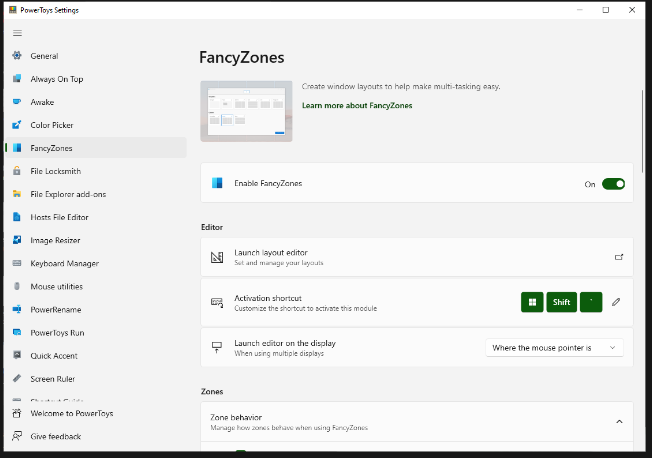
FancyZones serves as a window management tool designed to help users arrange and snap their application windows into optimized layouts, enhancing workflow efficiency and allowing for quick restoration of these layouts. This utility empowers you to specify a series of designated zones on your desktop where windows can be directed. By dragging a window into a predetermined zone or using a designated keyboard shortcut, the respective window automatically resizes and relocates to occupy that zone completely. Additionally, if you have the "Use non-primary mouse button to toggle zone activation" option activated, you can enter zone selection mode by simply clicking the secondary mouse button. When two zones are positioned next to each other, a window can be adjusted to span the combined area of both zones, effectively rounding up to the smallest rectangle that encompasses the two. As you maneuver the mouse cursor close to the shared boundary of two zones, both zones become active at the same time, giving you the flexibility to drop the window into either or both. Moreover, you can drag the window until it activates one zone and then, by pressing and holding the control key while continuing to drag, select multiple zones to expand your layout options. This feature significantly streamlines the process of organizing your desktop workspace efficiently.
API Access
Has API
No
API Access
Has API
No


Integrations
No details available.
Integrations
No details available.
Pricing Details
$1 per month
Free Trial
No
Free Version
No
Pricing Details
Free
Free Trial
No
Free Version
Yes
Deployment
Web-Based
Yes
On-Premises
No
iPhone App
No
iPad App
No
Android App
No
Windows
No
Mac
No
Linux
No
Chromebook
No
Deployment
Web-Based
No
On-Premises
No
iPhone App
No
iPad App
No
Android App
No
Windows
Yes
Mac
No
Linux
No
Chromebook
No
Customer Support
Business Hours
Yes
Live Rep (24/7)
Yes
Online Support
Yes
Customer Support
Business Hours
Yes
Live Rep (24/7)
No
Online Support
Yes
Types of Training
Training Docs
Yes
Webinars
No
Live Training (Online)
No
In Person
Yes
Types of Training
Training Docs
Yes
Webinars
Yes
Live Training (Online)
No
In Person
Yes
Vendor Details
Company Name
Ascent Technology
Founded
1986
Country
United States
Website
www.ascent.com
Vendor Details
Company Name
Microsoft
Country
United States
Website
learn.microsoft.com/en-us/windows/powertoys/fancyzones
Product Features
Workforce Management
Budgeting & Forecasting
Yes
Contractor Management
No
Employee Lifecycle Management
Yes
Labor Projection
Yes
Performance Appraisal
No
Recruiting Management
No
Scheduling
Yes
Skills Tracking
Yes
Time & Attendance
Yes
Variable Workforce
Yes
