

Wave Browser Description
Wave Browser is designed for people who want a safer, faster, and more meaningful way to explore the web. Built on strong security principles, Wave puts you in control of your privacy with customizable cookie and tracker blocking, incognito mode, and clear permission choices. AppEsteem Certification ensures Wave meets strict, independently verified standards for clean installation, transparent behavior, and responsible software practices, giving you confidence every time you browse.
Wave is also built for productivity, offering tools that help you stay organized and move through information with purpose. Tab grouping, bookmarks, and a reading list keep ideas within reach, while split screen let you research, compare, or watch without switching between windows. Memory Saver mode helps your device stay fast during heavy sessions, and the built-in AI Assistant and messaging integrations bring your favorite tasks closer to a single click.
Designed to be simple and user-friendly, Wave Browser removes friction from everyday browsing. The free ad blocker keeps pages clean, and built-in tools—like the converter, package tracker, price tracker, translation tool, stock tracker, and content notifier—help you get things done without extra extensions.
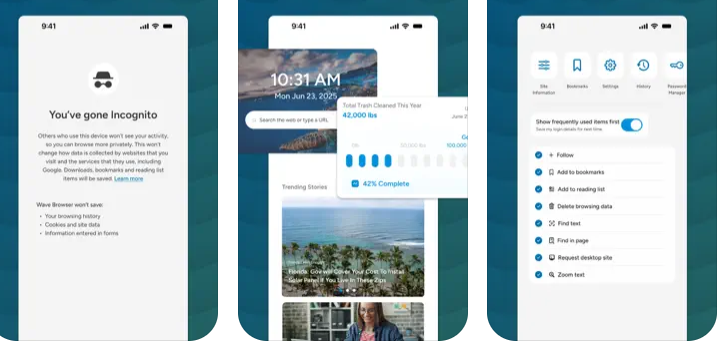
Most importantly, Wave is a browser with real ocean impact built in. Through a certified partnership with 4ocean, Wave helps fund the removal of 100,000 pounds of trash from our ocean, rivers, and coastlines every year. A live impact tracker shows exactly how much waste the Wave community has helped remove, with verified monthly updates from cleanup crews in the U.S., Indonesia, and the Dominican Republic. With Wave Browser, your everyday browsing directly supports a cleaner planet and the people working to protect it.
Pricing
Integrations
Interactive Demo

Try the Wave Browser demo now
Interact with a demo created by Wave Browser without leaving Slashdot
View DemoMedia


Product Details
Wave Browser Features and Options
Productivity Software
Wave Browser is designed to enhance your productivity by integrating essential features into a sleek and minimalist interface that promotes focus throughout your day. It offers a variety of tools, including a reading list, bookmarks, price and package tracking, and a multifunctional converter, all organized within the browser—eliminating the need for additional applications. The handy sidebar provides instant access to your favorite tools and apps, while the split view functionality allows you to work with two pages simultaneously, making it ideal for studying, research, comparisons, or efficient multitasking. Wave Browser’s fluid interface creates a seamless workspace, enabling effortless transitions between tasks. Additionally, each user’s activity contributes to verified ocean cleanup efforts, ensuring that your browsing has a meaningful impact on the world.
Web Browsers
Wave Browser is a cutting-edge web browser that leverages the Chromium framework to provide a seamless, modern browsing experience focused on clarity, safety, and efficiency. It comes equipped with a variety of integrated tools and extensions designed to enhance your work, study, and gaming activities. With a strong emphasis on privacy and robust security measures, your online activities remain protected. The browser features a sleek, ocean-themed interface that is both user-friendly and aesthetically pleasing, making it perfect for daily use. Whether you're conducting research, creating content, or simply navigating the internet, Wave Browser ensures quick and dependable performance without being intrusive. Additionally, each user contributes to verified ocean cleanup efforts, turning every browsing session into a significant step towards a healthier planet.
Ad Blockers
Wave Browser features an effective, complimentary ad blocker that eliminates disruptive advertisements, pop-ups, and covert trackers, ensuring a faster, more streamlined, and secure online experience. By intercepting the majority of unwanted scripts prior to their loading, Wave Browser enhances loading times and minimizes the chances of encountering harmful threats. With its user-friendly design and seamless interface, navigating the web becomes a breeze. Additionally, privacy options and security measures are integrated to safeguard your online activities. Wave Browser is designed to empower you to explore the internet confidently, reducing distractions and providing enhanced control.
Wave Browser Lists
Eco-Friendly Web Browsers
Wave Browser is an environmentally conscious web browser designed for individuals who wish to contribute to ocean conservation during their daily internet activities. Collaborating with 4ocean, Wave Browser actively participates in efforts to clear plastic and waste from oceans, rivers, and shorelines. Each browsing session and download you complete aids in actual cleanup initiatives, with a real-time impact tracker integrated directly into the browser and monthly updates to showcase the progress of these efforts. With a focus on sustainability, Wave Browser promotes responsible browsing habits through features such as Memory Saver, which minimizes resource consumption, and Energy Saver, aimed at reducing power usage. Wave empowers its users to create a positive impact on the environment with a tool they utilize regularly. Opt for Wave Browser, an environmentally friendly option dedicated to promoting a cleaner ocean and tangible ecological advancements.
-
Likelihood to Recommend to Others1 2 3 4 5 6 7 8 9 10
Simple and very promising Date: Dec 25 2025
Summary: I adapted to using it quickly; the interface is very similar to other more common browsers, it's lightweight to install, and I always use it in my free time.
Positive: I like it because of its high-quality interface; it's lightweight and can be used on mobile devices. As a teacher, I use it daily for all kinds of searches and it hasn't given me any trouble.
Negative: It's very safe to use, I can delete my search history to avoid slowing down my phone, and it doesn't have any annoying ads.
Read More... -
Likelihood to Recommend to Others1 2 3 4 5 6 7 8 9 10
Speed and Control with Wave Browser Date: Dec 25 2025
Summary: A key aspect is its security and compatibility. For our company, it's a great asset because it offers us the peace of mind of a secure environment for handling sensitive data, while maintaining 100% compatibility with all the Google Workspace tools we already use. It's good for us because it eliminates the learning curve: the team feels comfortable with it from the first minute, but it takes advantage of advanced features that Chrome doesn't offer.
Positive: What I appreciate most is its intuitive and customizable interface. Wave Browser doesn't feel like a generic browser; it feels like a command center. The ability to intelligently group tabs and the immediate access to integrated productivity tools makes browsing much more logical and less chaotic than in traditional browsers.
Negative: The main problem we've solved is "tab fatigue." In our daily work, we handle too much information simultaneously, which used to cause confusion and errors.
Read More... -
Likelihood to Recommend to Others1 2 3 4 5 6 7 8 9 10
Centralized and Efficient Browsing with Wave Browser Date: Dec 25 2025
Summary: Wave Browser has been key to overcoming challenges related to communication fragmentation. Previously, our employees wasted time navigating through numerous tabs to respond to Slack messages or check emails. The sidebar and integrated widgets have centralized these functions, streamlining interaction and improving operational efficiency.
Positive: The most outstanding feature of Wave Browser is its focus on integration and organization. Unlike other browsers, it incorporates a fixed sidebar that provides immediate access to services such as messaging, email, and task management tools, eliminating the need to constantly switch tabs. This functionality allows for true multitasking, maintaining focus and avoiding the typical interruptions of traditional browsing.
Negative: A key advantage is its efficient use of resources. Although it's based on the Chromium engine—which ensures compatibility with Chrome extensions—Wave has been optimized to be lightweight. This is key for our organization, as it enables the simultaneous use of multiple SaaS applications without compromising team performance, resulting in a more agile and seamless work experience.
Read More... -
Likelihood to Recommend to Others1 2 3 4 5 6 7 8 9 10
A simple-to-use browser Date: Dec 24 2025
Summary: I was looking for another search option, since I had Firefox and the constant updates it requested were a nuisance, plus it's slower when performing searches. Wave Browser is lightweight and when I perform searches the results are fast; incognito browsing makes me feel safer.
Positive: I use it daily to search for all kinds of information, from information for my children to work information; I stopped using more well-known browsers because they were too heavy. Wave Browser is more user-friendly, with specific features to ensure safe searches without virus downloads.
Negative: I haven't been able to find any negative features when using Wave Browser; I like using it because of its simplicity.
Read More... -
Likelihood to Recommend to Others1 2 3 4 5 6 7 8 9 10
My honest review of Wave Browser Date: Dec 24 2025
Summary: One of the qualities I appreciate most is how lightweight and responsive its interface is, even with all the features it includes. I think it's a great success that it's built on such an efficient architecture, as navigation feels instantaneous. I also appreciate its high level of customization: I've been able to adapt the visual design to my preferences, which makes working for hours in front of the monitor much more comfortable. Furthermore, its optimized management of system resources gives me the confidence that my computer's performance won't be compromised, even with several tools open simultaneously.
Positive: What impressed me most when I started using Wave Browser was how it transformed the cluttered tabs on my desktop into an organized workspace. Instead of constantly switching between applications or relying on external plugins, this browser integrates key functions into a very intuitive sidebar. I've found it especially useful to always have my notes, email, and most frequently used bookmarks visible, without sacrificing screen space. This integration of tools has noticeably improved the fluidity of my routine, helping me stay focused on my reading or writing without unnecessary interruptions.
Negative: Without a doubt, the biggest challenge Wave Browser has helped me overcome is the scattering of my daily activities. Before, I wasted valuable time trying to locate notes or sync bookmarks across different devices. Now, everything is centralized in one place. The main benefit has been much more efficient time management. By having immediate access to what I need, I've eliminated those little mental pauses that occur when switching tasks. Today, I feel that my browser has gone from being just a gateway to the web to becoming a true ally that boosts my productivity without complicating my digital environment.
Read More... -
Likelihood to Recommend to Others1 2 3 4 5 6 7 8 9 10
I started using it and I won't switch to another browser. Date: Dec 23 2025
Summary: I installed Wave Browser on a friend's recommendation and it was the best thing I've ever done, as it's a lightweight browser that I can use anytime.
Positive: It's a simple yet powerful browser; searches are fast, it's highly customizable, lightweight, and downloads are secure. Incognito browsing is very safe.
Negative: I've never had any problems with Wave Browser; the connectivity is excellent, and it integrates perfectly with my computer.
Read More... -
Likelihood to Recommend to Others1 2 3 4 5 6 7 8 9 10
I like that it's simple and has an eco-friendly approach. Date: Dec 23 2025
Summary: I've been using this browser for 8 months and I've already set it as the default browser on my computer; I do everything from this browser.
Positive: It's nice that it's similar to other Google browsers; I'm very satisfied and want to continue contributing to ecological development.
Negative: I don't think it has any negative aspects; in my experience, I've found it pleasant for everyday use, which is exactly what I was looking for.
Read More... -
Likelihood to Recommend to Others1 2 3 4 5 6 7 8 9 10
A purpose that fills me with joy Date: Dec 15 2025
Summary: The browser aims to address the lack of social impact on daily activities and the inefficiency of multitasking by centralizing tools. However, the problem it creates is exposure to digital insecurity and invasion of privacy. The effort the user must invest in detecting and removing the adware and resetting their settings ends up being much greater than the productivity benefit it offers, making it a risky product.
Positive: Its main appeal lies in its distinctive social purpose: committing to donate funds to ocean cleanup through browser usage, giving it a unique marketing advantage. Functionally, its best feature is the integrated Split View, which significantly improves productivity by allowing users to view two web pages simultaneously without the need for dual monitors or external extensions.
Negative: Wave Browser must drastically improve its distribution methods and transparency. The platform is consistently classified as a Potentially Unwanted Program (PUP) because it is often installed without the user's explicit consent and proceeds to change the browser's default settings (such as the search engine). This adware-like behavior completely erodes user trust and negates any perceived benefits of its features.
Read More... -
Likelihood to Recommend to Others1 2 3 4 5 6 7 8 9 10
I'm excited to use this browser Date: Dec 15 2025
Summary: You gain a multitasking tool with a positive purpose. But what you really lose is peace of mind. The need to constantly check if it has changed my search engine or is injecting ads makes the supposed efficiency not worth it.
Positive: Honestly, I'm excited that my browsing helps the oceans; it's a unique social good. Functionally, Split View saves me time and allows me to compare information without constantly switching tabs.
Negative: My biggest frustration is the surprise installation. I felt like the browser sneaked onto my PC and changed my settings, acting like adware. If they don't fix this distribution practice, I can't trust the software, no matter how good its cause.
Read More... -
Likelihood to Recommend to Others1 2 3 4 5 6 7 8 9 10
A browser with a social purpose Date: Dec 15 2025
Summary: Ideally, the software addresses the fragmentation of productivity tools within a single browser shell. More importantly, it provides a passive environmental support mechanism. However, the cost of using it often translates into an intrusive experience and the need to clean the system, causing the user to end up "cleaning" their own PC instead of purely contributing to ocean cleanup.
Positive: Wave Browser offers added social value, allowing users to financially support ocean cleanup. Functionally, it streamlines workflow with integrated productivity tools like Split View and utilities such as the bundle and price tracker, minimizing the need for multiple third-party extensions.
Negative: The critical area for improvement is the transparency of the business and distribution model. The way Wave Browser appears on users' systems, often as part of software bundles or without explicit notification, creates a perception of browser hijacking. This undermines user trust and consistently ranks it as an adware risk.
Read More... -
Likelihood to Recommend to Others1 2 3 4 5 6 7 8 9 10
Lightweight, safe and reliable Date: Dec 15 2025
Summary: Wave Browser promises to solve passive browsing by making it an environmentally friendly activity. It also addresses the need for multitasking without extensions. However, the security risk it introduces (similar to adware or browser hijackers) undermines any benefits, as it prioritizes ad injecting over the user experience.
Positive: Wave Browser promotes efficient multitasking through its Split View feature and a memory saver that optimizes performance. Its most unique feature is its social purpose of contributing to ocean cleanup with each browsing session, appealing to environmentally conscious users.
Negative: The platform urgently needs to address its reputation as a Potentially Unwanted Program (PUP). Intrusive installation methods (often through bundled software) and unwanted changes to default browser settings generate distrust, which is the main obstacle to its legitimate adoption in enterprise environments.
Read More... -
Likelihood to Recommend to Others1 2 3 4 5 6 7 8 9 10
Guaranteed and robust security Date: Dec 15 2025
Summary: In theory, Wave Browser attempts to address the lack of social impact in web browsing by allowing users to contribute to environmental causes effortlessly. It also aims to solve the inefficiency of multitasking by offering integrated tools that eliminate the need for separate extensions. However, in practice, the problems it introduces—adware-like behavior and intrusion into user settings—are far more significant for most users than the issues it purports to solve.
Positive: Wave Browser promotes itself through its unique social purpose of funding ocean cleanup through its use, and for its native productivity tools built on the Chromium platform. Among its most notable features is Split View, which allows users to view two web pages simultaneously. It also includes an ad blocker and a memory saver to provide a faster and less intrusive browsing experience.
Negative: The main area for improvement, and the source of controversy, is its installation method and post-download behavior. The browser has been flagged as a Potentially Unwanted Program (PUP) by many security tools. It should drastically improve the transparency and consent process for its installation, as users frequently report that it installs without clear permission, changes the homepage or default search engine, and injects ads, creating a significant security and privacy risk.
Read More... -
Likelihood to Recommend to Others1 2 3 4 5 6 7 8 9 10
Wave browser Date: Dec 13 2025
Summary: I really enjoy using wave browser and use it as my default browser! I recommend it to friends and family because of how easy it is to use!
Positive: Wave browser is really easy to use and super simple! I like the simplicity of it and how quickly everything loads.
Negative: I really don’t see anything wrong with the browser!
Read More... -
Likelihood to Recommend to Others1 2 3 4 5 6 7 8 9 10
Amazing Purpose Date: Dec 05 2025
Summary: I think Wave Browser is amazing and it’s a great way to help contribute to keeping our oceans clean. As an ocean lover, it’s important we support all efforts to do so. Using Wave Browser is such a cool way to contribute to those efforts and I hope more people discover its amazingness too!
Positive: I really love the mission of Wave Browser. It’s super important we keep making strides to keep our oceans clean and this is an amazing and basically effortless way of contributing to those positive impacts.
Negative: Not really any cons. I think maybe people might at first not be used to the transition of using a different browser than what they are used to?
Read More... -
Likelihood to Recommend to Others1 2 3 4 5 6 7 8 9 10
Wave Browser Made Me More Mindful! Date: Dec 04 2025
Summary: Overall, I highly recommend Wave Browser to everyone. It feels good to use a browser that not only performs well, but also supports a cause that matters.
Positive: I absolutely love using Wave Browser! Knowing it gives back to the ocean is something I care deeply about which makes every scroll and search feel more meaningful. I never used to think about the impact of my browsing habits until now, and Wave has helped me be so much more mindful. It’s super convenient, easy to use, and works just like any other browser I’ve used.
Negative: Honestly, I don’t have any!
Read More...