Average Ratings 0 Ratings
Average Ratings 0 Ratings
Similar Products
-
TinyPNGTinyPNG (by Tinify) is a free image optimization service built for developers and designers. It utilizes smart lossy compression to reduce the file sizes of JPEG, PNG, WebP, and AVIF files by up to 80% with no visible quality loss. That means faster load times, better SEO, and lower bandwidth. You can compress, convert, and resize images via a clean web interface or integrate it into your workflow with the API. The platform also provides an image CDN for fast global delivery of optimized assets. SDKs are available for Python, Node.js, PHP, Java, Ruby, and .NET. WordPress plugin included, plus plenty of community-driven integrations. No tuning, no noise, Tinify just works. Whether you're optimizing a handful of images or processing millions, it scales effortlessly. All plans include a generous free tier, and support is quick when you need it. George the panda 🐼 approves.
-
TrafficGuardWith TrafficGuard, you can put an end to the worry of polluted traffic disrupting your campaign success. Our advanced ML/AI-powered technology identifies and blocks both simple and complex fraudulent traffic in real time, ensuring your ad spend targets genuine, high-quality clicks and conversions. This leads to better campaign outcomes and an enhanced return on ad spend (ROAS). This robust solution safeguards every dollar of your advertising budget, allowing you to concentrate on reaching your marketing objectives without stress. Let TrafficGuard handle ad fraud protection, so you can confidently manage your: Google Search (PPC) campaigns Mobile user acquisition campaigns Affiliate spending Social media advertising In addition to our technology, we provide expert campaign management and exceptional customer support, making us a reliable partner for all your ad fraud protection needs.
-
JOpt.TourOptimizerJOpt.TourOptimizer is an enterprise optimization engine for route planning, scheduling, and resource allocation across logistics, transportation, dispatch, and field service operations. It is built for organizations that need to solve complex planning problems under real-world business constraints rather than simple consumer-grade route calculation. The platform supports vehicle routing and scheduling scenarios such as VRP, CVRP, VRPTW, pickup and delivery, multi-depot planning, heterogeneous fleets, and workforce scheduling. JOpt.TourOptimizer can model time windows, working hours, visit durations, capacities, skills and expertise levels, territories, zone governance, overnight stays, alternate destinations, and custom business rules. This makes it suitable for production deployments where feasibility, transparency, and operational reliability matter. It is designed to generate practical plans that help teams balance travel time, service commitments, workload distribution, and operational cost in demanding enterprise environments. The solution is available both as an embedded Java SDK and as a Docker-based REST API with OpenAPI and Swagger support. This allows software vendors, enterprise developers, and system integrators to embed advanced optimization into TMS, ERP, CRM, WMS, dispatch systems, customer platforms, and field service applications. With support for scalable integration and modern service architectures, JOpt.TourOptimizer helps organizations improve planning efficiency, service quality, SLA compliance, transparency, and operational resilience at scale. It also supports enterprise integration strategies that require reproducible optimization runs, structured outputs, and flexible deployment models.
-
SurveyJSSurveyJS is a set of four open-source JavaScript libraries that offer the benefits of a tailor-made in-house survey application, while considerably reducing the time and resources needed to deploy the system. These libraries are independent of specific server code or database requirements and seamlessly integrate with popular JavaScript frameworks, including React, Angular, Vue.js, jQuery, Knockout, and more. They are designed to communicate with any server that can handle JSON requests, ensuring compatibility with various server architectures and databases. The product family is composed of: - An open-source MIT-licensed rendering library that renders dynamic JSON-based forms in your web application, and collects responses. - A self-hosted drag & drop form builder that features an integrated CSS-based theme editor and a GUI for conditional rules. It automatically generates JSON definitions (schemas) of your forms in real time. - PDF Generator, a library that renders SurveyJS surveys and forms as PDF files in a browser; - The Dashboard library that allows you to simplify survey data analysis with interactive and customizable charts and tables. Visit our website to try out and evaluate our full-scale demo for free.
-
EvertuneEvertune is the Generative Engine Optimization (GEO) platform that helps brands improve visibility in AI search across ChatGPT, AI Overview, AI Mode, Gemini, Claude, Perplexity, Meta, DeepSeek and Copilot. We're building the first marketing platform for AI search as a channel. We show enterprise brands exactly where they stand when customers discover them through AI — then give them the precise playbook to show up stronger. This is Generative Engine Optimization, also known as AI SEO. Using applied AI and data science at scale, we give brands statistical confidence in our actionable insights. We decode what gets brands mentioned more and ranked higher, provide reliable brand monitoring and competitive intelligence, then deliver actionable content strategies that move the needle. Our AI SEO and AI search engine optimization tools are built for how LLMs actually work. Why Leading Enterprise Marketers Choose Evertune: Data Science at Scale: We prompt across every major LLM at volumes that capture response variations and ensure statistical significance for comprehensive brand monitoring and competitive intelligence. Actionable Strategy, Not Just Dashboards: Specific content, messaging and distribution tactics that increase your AI search visibility. Dedicated Customer Success: Hands-on training and strategic guidance to turn insights into improved performance in AI search. Built for AI search as a channel: Organic visibility today, paid advertising and commerce tomorrow. Proven Leadership: Founded by The Trade Desk veterans who pioneered data-driven digital advertising. Backed by data scientists from OpenAI, Meta and other AI leaders.
-
SKU ScienceSKU Science delivers a fast and intuitive solution for sales forecasting and performance tracking. Implement your demand planning process in as little as two days! Created by seasoned experts, it’s specifically designed for operations managers, S&OP managers, supply chain professionals, and demand planners. With 644 statistical combinations, the platform generates highly accurate and tailored sales forecasts at any level. For even greater precision, AI models can be trained on your unique dataset. Automatically calculated KPIs highlight the most critical items, helping you focus on what matters most for your supply chain and business success. The platform’s operational dashboards refresh every cycle, ensuring efficient activity monitoring and data-driven decision-making. Combining advanced capabilities with ease of use, SKU Science is trusted by clients across manufacturing, food and beverage, healthcare, retail, and e-commerce sectors.
-
SmoobuSmoobu is an all-in-one vacation rental management software that streamlines operations through a centralized Property Management System (PMS). This powerful command center allows for the professional oversight of all short-term rental operations from a single dashboard. By utilizing a high-speed Channel Manager for real-time calendar synchronization across all major booking platforms, Smoobu ensures accurate availability, effectively preventing double bookings and protecting your reputation. To scale your business, the Booking Engine and integrated Website Builder empower you to drive direct bookings and maximize total revenue. Hosts can further automate their workflow with a Guest Communication module that sends personalized messages and provides a digital Guest Guide for an elevated experience. With Dynamic Pricing to optimize nightly rates and detailed Statistics for performance tracking, Smoobu is the ultimate tool for managing everything—from individual apartments to boutique hotels—in one efficient, high-performance hub.
-
NetNutNetNut is a leading proxy service provider offering a comprehensive suite of solutions, including residential, static residential, mobile, and datacenter proxies, designed to enhance online operations and ensure top-notch performance. With access to over 85 million residential IPs across 195 countries, NetNut enables users to conduct seamless web scraping, data collection, and online anonymity with high-speed, reliable connections. Their unique architecture provides one-hop connectivity, minimizing latency and ensuring stable, uninterrupted service. NetNut's user-friendly dashboard offers real-time proxy management and insightful usage statistics, allowing for easy integration and control. Committed to customer satisfaction, NetNut provides responsive support and tailored solutions to meet diverse business needs.
-
RaimaDBRaimaDB, an embedded time series database that can be used for Edge and IoT devices, can run in-memory. It is a lightweight, secure, and extremely powerful RDBMS. It has been field tested by more than 20 000 developers around the world and has been deployed in excess of 25 000 000 times. RaimaDB is a high-performance, cross-platform embedded database optimized for mission-critical applications in industries such as IoT and edge computing. Its lightweight design makes it ideal for resource-constrained environments, supporting both in-memory and persistent storage options. RaimaDB offers flexible data modeling, including traditional relational models and direct relationships through network model sets. With ACID-compliant transactions and advanced indexing methods like B+Tree, Hash Table, R-Tree, and AVL-Tree, it ensures data reliability and efficiency. Built for real-time processing, it incorporates multi-version concurrency control (MVCC) and snapshot isolation, making it a robust solution for applications demanding speed and reliability.
-
R3 Contract Management for GovConManaging government contracts shouldn’t be a never-ending spreadsheet chore. R3 Contract Management is built from the ground up for GovCon — and now, it goes beyond tracking and compliance. With embedded AI and intelligent workflows, R3 starts doing the contract work for you. Whether it’s ingesting a new award, adding clauses with flowdowns, adding CLINS and SLINS with funding details, or creating new subcontracts, R3 AI delivers more than visibility — it executes and does the actual work. All of this happens inside a platform designed for how GovCon really works — with FAR/DFARS logic, secure collaboration, and My Contract Work dashboards that make life easier for everyone. It’s not just contract management. It’s contract execution — at scale, powered by AI.
Description
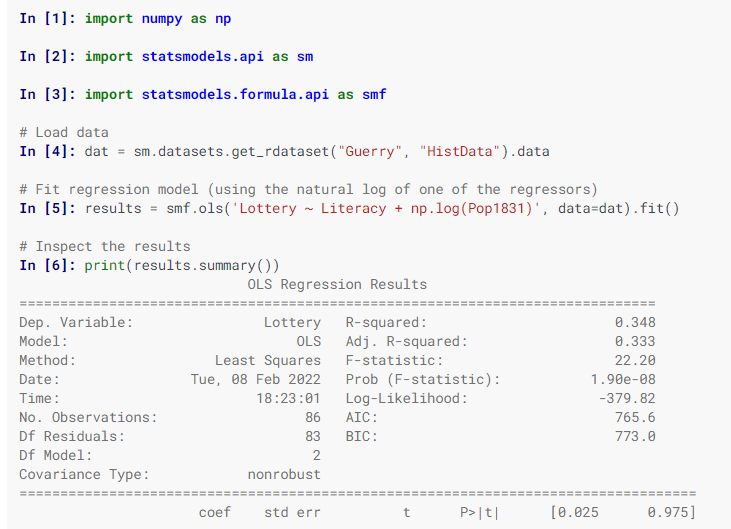
Statsmodels is a Python library designed for the estimation of various statistical models, enabling users to perform statistical tests and explore data effectively. Each estimator comes with a comprehensive array of result statistics, which are validated against established statistical software to ensure accuracy. This package is distributed under the open-source Modified BSD (3-clause) license, promoting free use and modification. Users can specify models using R-style formulas or utilize pandas DataFrames for convenience. To discover available results, you can check dir(results), and you will find that attributes are detailed in results.__doc__, while methods include their own docstrings for further guidance. Additionally, numpy arrays can be employed as an alternative to formulas. For most users, the simplest way to install statsmodels is through the Anaconda distribution, which caters to data analysis and scientific computing across various platforms. Overall, statsmodels serves as a powerful tool for statisticians and data analysts alike.
Description
tox is designed to streamline and automate the testing process in Python. This tool is a key component of a broader initiative to simplify the packaging, testing, and deployment workflow for Python applications. Serving as a universal virtualenv management tool and a test command-line interface, tox allows developers to verify that their packages can be installed correctly across multiple Python versions and interpreters. It facilitates running tests in each environment, configuring the preferred testing tools, and integrating seamlessly with continuous integration servers, which significantly minimizes redundant code and merges CI with shell-based testing. To get started, you can install tox by executing `pip install tox`. Next, create a `tox.ini` file adjacent to your `setup.py` file, detailing essential information about your project and the various test environments you plan to utilize. Alternatively, you can generate a `tox.ini` file automatically by running `tox-quickstart`, which will guide you through a series of straightforward questions. After setting up, be sure to install and validate your project with both Python 2.7 and Python 3.6 to ensure compatibility. This thorough approach helps maintain the reliability and functionality of your Python software across different versions.
API Access
Has API
Yes
API Access
Has API
No


Pricing Details
Free
Free Trial
No
Free Version
Yes
Pricing Details
Free
Free Trial
No
Free Version
Yes
Deployment
Web-Based
No
On-Premises
No
iPhone App
No
iPad App
No
Android App
No
Windows
Yes
Mac
Yes
Linux
Yes
Chromebook
No
Deployment
Web-Based
No
On-Premises
No
iPhone App
No
iPad App
No
Android App
No
Windows
Yes
Mac
No
Linux
Yes
Chromebook
No
Customer Support
Business Hours
No
Live Rep (24/7)
No
Online Support
Yes
Customer Support
Business Hours
No
Live Rep (24/7)
No
Online Support
Yes
Types of Training
Training Docs
Yes
Webinars
No
Live Training (Online)
No
In Person
No
Types of Training
Training Docs
Yes
Webinars
No
Live Training (Online)
No
In Person
No
Vendor Details
Company Name
statsmodels
Website
www.statsmodels.org/stable/index.html
Vendor Details
Company Name
tox
Website
tox.wiki/en/latest/
