Average Ratings 0 Ratings
Average Ratings 0 Ratings
Similar Products
-
QA WolfQA Wolf helps engineering teams achieve 80% automated test coverage end-to-end in just four months. Here's an overview of what you get in the box, whether it's 100 or 100,000 tests. • Automated end-to-end testing for 80% of the user flows in 4 months. The tests are written in Playwright, an open-source tool (no vendor lock-in; you own the code). • Test matrix and outline in the AAA framework. • Unlimited parallel testing on any environment of your choice. • We host and maintain 100% parallel-run infrastructure. • Maintenance of flaky and broken test for 24 hours. • Guaranteed 100% reliable results -- zero flakes. • Human-verified bugs sent via your messaging app as a bug report. • CI/CD Integration with your deployment pipelines and issue trackers. • Access to full-time QA Engineers at QA Wolf 24 hours a day.
-
GearsetGearset is a full‑featured Salesforce DevOps solution built for the enterprise, giving teams the tools to adopt best practices across every stage of the DevOps lifecycle. From metadata and CPQ deployments to CI/CD, testing, code analysis, sandbox seeding, backups, archiving, and observability, Gearset gives teams unmatched insight and control over their Salesforce workflows. Over 3,000 organizations — including names like McKesson and IBM — rely on Gearset to deliver with security and scale in mind. With advanced governance, detailed audit trails, SOX/ISO/HIPAA support, multi‑team pipelines, integrated security checks, and adherence to ISO 27001, SOC 2, GDPR, CCPA/CPRA, and HIPAA, Gearset combines enterprise‑ready compliance with rapid onboarding and an intuitive interface — all in one platform. Leading firms in finance, healthcare, and tech trust Gearset to power their DevOps initiatives without adding complexity.
-
ParasoftParasoft's mission is to provide automated testing solutions and expertise that empower organizations to expedite delivery of safe and reliable software. A powerful unified C and C++ test automation solution for static analysis, unit testing and structural code coverage, Parasoft C/C++test helps satisfy compliance with industry functional safety and security requirements for embedded software systems.
-
Virtuoso QAVirtuoso QA is an AI-native test automation solution built to streamline and scale enterprise quality assurance processes. It allows users to author tests in natural language, making it accessible for both technical and non-technical team members. The platform leverages self-healing AI to automatically adapt to changes in applications, reducing test flakiness and maintenance overhead. With features like live authoring, real-time execution, and automated diagnostics, teams can quickly identify and resolve issues. Virtuoso QA supports continuous testing across multiple browsers, devices, and environments, ensuring comprehensive test coverage. It integrates seamlessly with popular tools such as Jira, Jenkins, Azure DevOps, and BrowserStack, enabling smooth CI/CD workflows. The platform also provides detailed analytics and dashboards to track performance and optimize testing strategies. By automating test generation and execution, it significantly reduces manual effort and accelerates release cycles. Virtuoso QA empowers organizations to deliver high-quality software faster and more reliably.
-
Project InsightProject Insight is a strategic project and portfolio management software that gives companies a complete picture of the work happening across their entire organization. Streamline workflows, automate processes, enhance collaboration, and capture project data points from all your teams and systems in one central command center so you can make confident decisions about business. Manage work at the project, program or portfolio levels and integrate with the tools you already use, including Azure DevOps, Jira, Microsoft, Salesforce, and ServiceNow, and HubSpot to eliminate the need to manually key in data across teams. With the most views of any project management platform, teams can keep tabs on assignments, status, risks, resources, capacity, schedules, budgets, and more. Project Insight also offers free view only seats for clients. The power of AI can be used to assign action items after meetings, predict future capacity, balance workloads, & select the right resources. Additional AI-powered features include what if simulations to generate tradeoffs when priorities change and AI-generated project templates (WBS). Whether you are moving from basic spreadsheet project tracking or you have a sophisticated PMO with a complex web of unique business processes, Project Insight has the broad feature set to help you grow as you go. Our onboarding teams are known for being the best in the business and our platform can be fully customized to manage projects and data the way your company needs to.
-
MuukTestYou know that you could be testing more to catch bugs earlier, but QA testing can take a lot of time, effort and resources to do it right. MuukTest can get growing engineering teams up to 95% coverage of end-to-end tests in just 3 months. Our QA experts create, manage, maintain, and update E2E tests on the MuukTest Platform for your web, API, and mobile apps at record speed. We begin exploratory and negative tests after achieving 100% regression coverage within 8 weeks to uncover bugs and increase coverage. The time you spend on development is reduced by managing your testing frameworks, scripts, libraries and maintenance. We also proactively identify flaky tests and false test results to ensure the accuracy of your tests. Early and frequent testing allows you to detect errors in the early stages your development lifecycle. This reduces the burden of technical debt later on.
-
Checksum.aiEngineering teams shipping with AI have a new bottleneck: validation. Code output has accelerated. Quality hasn't. Checksum closes the gap. Checksum is a continuous quality platform with a suite of AI agents that handle testing end-to-end, at every stage of the development lifecycle. Where most tools wait for a human to trigger them, Checksum runs autonomously in the background, generating tests, executing them, and repairing failures without manual intervention. Seventy percent of test failures are resolved automatically through real-time auto-recovery. The platform covers every layer: end-to-end UI flows via Playwright, API endpoint chains, and targeted CI tests scoped to exactly what changed in a PR. All tests land as real code in your repository and are delivered as standard Playwright, owned by your team. Checksum is fine-tuned on 1.5+ million test runs and integrates natively with Cursor, Claude Code, and 100+ AI coding agents. Type /checksum and your coding agent's output gets tested before it ever reaches review. Generation and healing happen on Checksum's cloud infrastructure which means no LLM tokens consumed, no local resources required. The result: test suites that stay green as the product evolves, fewer regressions reaching production, and release confidence that scales alongside AI output.
-
CodemagicCodemagic’s macOS build environments facilitate the smooth creation of hybrid applications, bolstered by an extensive array of preinstalled software. You can efficiently configure your Cordova Android and iOS application builds and workflows through a single codemagic.yaml file. To maintain the performance of your Android and iOS applications, Codemagic provides automated testing on simulators, emulators, and actual devices, ensuring you receive prompt feedback on your build outcomes. Integration with the Apple Developer Portal streamlines iOS code signing, enabling seamless deployment to App Store Connect and Google Play. Similarly, you can also set up your React Native app builds and workflows in one straightforward codemagic.yaml file. With multiple versions of Xcode, Android SDK, and npm preinstalled, Codemagic’s macOS build machines are designed for effortless Android and iOS builds. Moreover, Codemagic simplifies the automation of testing for your React Native applications across a variety of testing platforms. This comprehensive approach not only boosts productivity but also enhances the overall development experience.
-
Planview Software Product DeliveryPlanview Software Product Delivery Solution is a comprehensive enterprise platform that provides delivery intelligence by connecting strategy to execution across development toolchains. It integrates seamlessly with tools such as Azure DevOps, GitHub, and Jira to collect and unify real-time data from across teams. This allows organizations to gain full visibility into their delivery processes and make informed decisions. The platform includes features like cross-team dependency management, capacity planning, and agile planning at both team and portfolio levels. It enables users to analyze workflows, identify bottlenecks, and optimize delivery performance. Advanced analytics, including DORA metrics, provide insights into engineering efficiency and outcomes. AI-powered roadmapping helps align business objectives with execution strategies. The solution also supports connected OKRs to ensure teams stay aligned with organizational goals. Portfolio-level investment planning and scenario modeling allow leaders to evaluate different strategies. Risk signals are surfaced early through configurable thresholds and flow metrics. By replacing manual reporting with real-time dashboards, Planview improves transparency and decision-making. Ultimately, it helps enterprises deliver digital products more efficiently and with measurable impact.
-
Zoho ProjectsProject management is as efficient as it gets. Zoho Projects, a cloud-based project management software, helps you plan and track your work efficiently. It also allows you to collaborate with your team from anywhere. To get things done on schedule, plan your project activities, assign work, manage your resources, and collaborate better with your team. Gantt charts can be used to create your project plan and track your tasks. Zoho Projects helps you keep track of your key tasks and their dependencies and shows you any deviations from your planned progress. Reduce time spent on repetitive tasks. Our project management software is easy to use, no matter how complex your process is. It has a drag-and drop interface that makes it easier to create and deploy new automations. The Projects timesheet module allows you to log both billable and unbilled hours. You can record every minute of your hardwork, manually or with timers. Our built-in integration with Zoho Invoice generates invoices.
Description
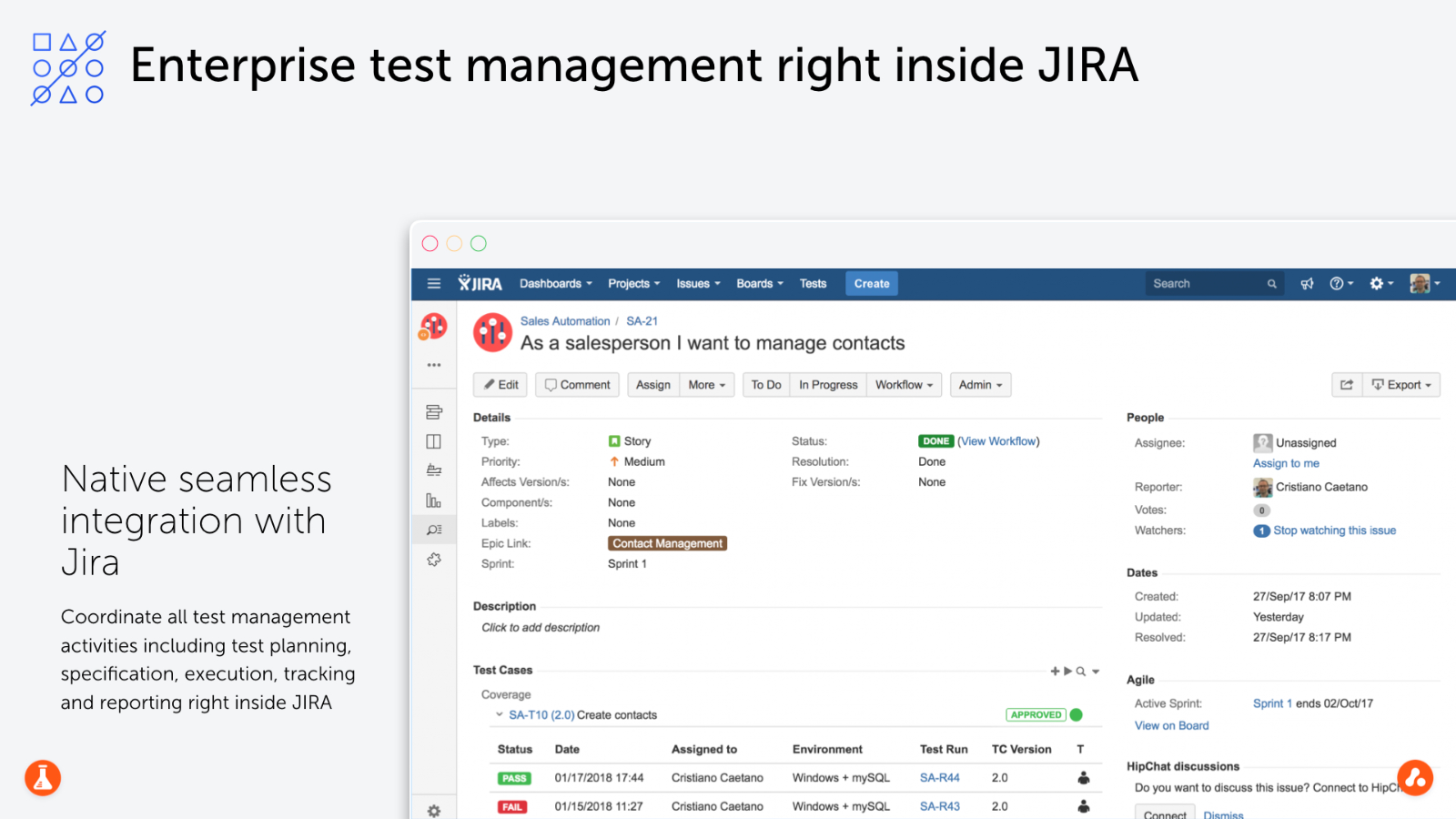
Test Management for Jira is an enterprise tool that allows you to plan, manage and measure your entire testing life cycle within Jira. It supports both agile and waterfall methodologies.
TM4J provides mission-critical projects with scalability and availability on any Jira deployment (Cloud Server, DataCenter, Server). TM4J will empower agile teams by enabling BDD at scale using Cucumber or any other compatible gherkin tool for collaboration between developers and testers.
You can use up to 70 built in reports to make informed decisions based upon real-time metrics throughout your software development lifecycle. Our powerful FREE REST API makes it easy to integrate CI servers, DevOps, and test automation tools and frameworks. This will help you save time and effort.
TM4J has been used by over 3.000 clients around the world and is the best QA and Testing app for Jira.
Description
Streamline your testing efforts with Testmo, a comprehensive platform designed for managing test cases, sessions, and automation seamlessly. With its powerful capabilities, users benefit from an exceptionally fast user interface and rich reporting features, while integrating effortlessly with popular tools like Jira, GitHub, and GitLab. As the most efficient test case management solution available, Testmo allows for easy organization of test cases, recording of results, and tracking of test executions with its adaptable management system. Tailored to fit your workflow, it enhances productivity through full customization and integration with the tools you already use. The platform prioritizes exploratory testing, session management, and note-taking as essential features, ensuring a comprehensive testing strategy. Efficiently handle your test sessions and spontaneous tests to support quick-release cycles and continuous delivery. Additionally, Testmo integrates fully with existing automation tools, CI pipelines, and build systems, enabling automated result submissions, test tracking, and failure reporting. This flexibility ensures compatibility with any tool, language, or platform, consolidating all of your test automation results into a single, centralized location for easy access and management. Ultimately, Testmo empowers teams to achieve greater efficiency and collaboration in their testing processes.
API Access
Has API
No
API Access
Has API
Yes



Integrations
Jira
Yes
.NET
No
BrowserStack
No
C
No
ClickUp
No
GitLab
No
Google Cloud Platform
No
Jasmine
No
Jenkins
No
Jest
No
Integrations
Jira
Yes
.NET
Yes
BrowserStack
Yes
C
Yes
ClickUp
Yes
GitLab
Yes
Google Cloud Platform
Yes
Jasmine
Yes
Jenkins
Yes
Jest
Yes
Pricing Details
$10.00/month
Free Trial
Yes
Free Version
No
Pricing Details
$99 per month
Free Trial
Yes
Free Version
No
Deployment
Web-Based
Yes
On-Premises
No
iPhone App
No
iPad App
No
Android App
No
Windows
Yes
Mac
Yes
Linux
No
Chromebook
No
Deployment
Web-Based
Yes
On-Premises
No
iPhone App
No
iPad App
No
Android App
No
Windows
No
Mac
No
Linux
No
Chromebook
No
Customer Support
Business Hours
Yes
Live Rep (24/7)
No
Online Support
Yes
Customer Support
Business Hours
No
Live Rep (24/7)
Yes
Online Support
Yes
Types of Training
Training Docs
Yes
Webinars
No
Live Training (Online)
No
In Person
No
Types of Training
Training Docs
Yes
Webinars
No
Live Training (Online)
Yes
In Person
No
Vendor Details
Company Name
SmartBear
Founded
2009
Country
United States
Website
smartbear.com/product/tm4j/overview/
Vendor Details
Company Name
Testmo
Country
Germany
Website
www.testmo.com
Product Features
Agile Project Management Tools
Backlog Management
No
Feedback Management
No
Gantt/Timeline View
No
Kanban Board
No
Prioritization
No
Request Management
No
Resource Management
No
Retrospectives Management
No
Status Tracking
Yes
Supports Scrum
No
Team Management
No
Template Management
No
Workflow Management
Yes
Automated Testing
Hierarchical View
Yes
Move & Copy
Yes
Parameterized Testing
Yes
Requirements-Based Testing
Yes
Security Testing
No
Supports Parallel Execution
No
Test Script Reviews
Yes
Unicode Compliance
No
Bug Tracking
Backlog Management
No
Filtering
Yes
Issue Tracking
Yes
Release Management
Yes
Task Management
No
Ticket Management
No
Workflow Management
Yes
Continuous Integration
Build Log
No
Change Management
No
Configuration Management
No
Continuous Delivery
Yes
Continuous Deployment
Yes
Debugging
No
Permission Management
No
Quality Assurance Management
No
Testing Management
Yes
DevOps
Approval Workflow
Yes
Dashboard
Yes
KPIs
No
Policy Management
No
Portfolio Management
No
Prioritization
No
Release Management
No
Timeline Management
No
Troubleshooting Reports
No
Issue Tracking
Assignment Management
Yes
Dashboard
Yes
Escalation Management
Yes
Issue Auditing
Yes
Issue Scheduling
Yes
Knowledge Base
No
Project Management
No
Recurring Issues
No
Scheduling
No
Task Management
No
Performance Testing
API Testing
No
Benchmarking
No
Cross Browser Testing
No
Debugging
No
Historical Reporting
No
Load Testing
No
Mobile Testing
No
Parallel Testing
No
Regression Testing
Yes
UI Testing
No
Web Testing
No
Quality Management
Audit Management
No
Complaint Management
No
Compliance Management
No
Corrective and Preventive Actions (CAPA)
No
Defect Tracking
Yes
Document Control
No
Equipment Management
No
ISO Standards Management
No
Maintenance Management
No
Risk Management
No
Supplier Quality Control
No
Training Management
No
Product Features
Automated Testing
Hierarchical View
No
Move & Copy
No
Parameterized Testing
No
Requirements-Based Testing
No
Security Testing
No
Supports Parallel Execution
No
Test Script Reviews
No
Unicode Compliance
No
Software Testing
Automated Testing
No
Black-Box Testing
No
Dynamic Testing
No
Issue Tracking
No
Manual Testing
No
Quality Assurance Planning
No
Reporting / Analytics
No
Static Testing
No
Test Case Management
No
Variable Testing Methods
No
White-Box Testing
No
Test Management
Automation Integration
No
Collaboration Tools
No
Pass/Fail Results Tabulation
No
Reporting / Analytics
No
Requirements Management
No
Test Scheduling
No
Test Tracking
No
Time/Budget Tracking
No
