Average Ratings 0 Ratings
Average Ratings 0 Ratings
Similar Products
-
4K Video DownloaderYou can watch videos from anywhere, anytime, even offline. It's easy to download: simply copy the link from your browser, and then click 'Paste Link" in the application. You can save full playlists and channels on YouTube in high-quality and other video or audio formats. Download your YouTube Mix, Watch Later and Liked videos as well as private YouTube playlists. Receive new videos from your favorite YouTube channels automatically. You can feel the action around you with virtual reality videos. To experience the amazing VR experience in 360deg, download 360deg videos. You can bypass any restrictions placed by your Internet service provider to bypass your school firewall or workplace firewall. To access YouTube and other sites, set up an in-app proxy connection.
-
OptiSignsOptiSigns, your friendly digital signage software! Designed with simplicity and ease in mind, it's the perfect harmony of affordable software and usage with any hardware in the market. Pick from 140+ Apps, Thousands of Templates, and formats like images & videos, playlists, Google Slides, Weather, Instagram, Twitter, YouTube – you name it! Level up your business and start engaging your audience. For just $10/month per screen, use any display to capture your audiences attention! Remotely manage it all from one central portal. Indulge in features, images, videos, playlists, and schedules. Jazz it up with apps like Google Slides, Weather, Instagram, Facebook, Twitter, and more. Oh, and did we mention? We play nice with the most hardware and operating systems in the market like Fire TV Stick, Android, Chrome, Raspberry Pi, Roku, Windows, Linux, and MacOS. Time to unleash your business potential!
-
LALAL.AIAny audio or video can be extracted to extract vocal, accompaniment, and other instruments. High-quality stem cutting based on the #1 AI-powered technology in the world. Next-generation vocal remover and music source separator service for fast, simple, and precise stem removal. You can remove vocal, instrumental, drums and bass tracks, as well as acoustic guitar, electric guitar, and synthesizer tracks, without any quality loss. You can start the service free of charge. Upgrade to get more files processed and faster results. Only for personal use. Move to the next level. You can process thousands of minutes of audio and/or video. This software is suitable for both personal and business use. Each LALAL.AI package has a limit on the amount of audio/video that can be split. The package minute limit is deducted from each file that has been fully split. You can split as many files you like, provided their total length does not exceed the minute limit.
-
CrowdinGet quality translations for your app, website, game, supporting documentation, and on. Invite your own translation team or work with professional translation agencies within Crowdin. Features that ensure quality translations and speed up the process • Glossary – create a list of terms to get consistent translations • Translation Memory (TM) – no need to translate identical strings • Screenshots – tag source strings to get context-relevant translations • Integrations – set up integration with GitHub, Google Play, API, CLI, Android Studio, and on • QA checks – make sure that all the translations have the same meaning and functions as the source strings • In-Context – proofreading within the actual web application • Machine Translations (MT) – pre-translate via translation engine • Reports – get insights, plan and manage the project Crowdin supports more than 30 file formats for mobile, software, documents, subtitles, graphics and assets: .xml, .strings, .json, .html, .xliff, .csv, .php, .resx, .yaml, .xml, .strings and on.
-
FreshserviceFreshservice is the right choice if you are looking for an IT service desk solution with simplicity. Freshservice is an easy-to-use ITIL service desk from Freshworks that helps businesses modernize IT and other business functions without the complexity and cost. Freshservice provides everything teams need to manage proactive IT services, including asset management, ticketing, configuration management, enhanced impact analysis, robust incident management functions, and more.
-
LTXMost AI video tools hand you a black box: closed weights, a subscription, and no way to see what is happening under the hood. LTX takes the opposite approach. Built by Lightricks, LTX is an open foundation model that generates and simulates across video, audio, and the physical world, and it puts the weights, the code, and the control in your hands. At the center of the model is LTX-2.5, a 22B-parameter dual-stream diffusion transformer that produces native 4K video at up to 50 frames per second, with audio and video generated together in a single pass rather than stitched together afterward. Artificial Analysis, an independent benchmarking group, currently ranks LTX among the top three AI video models in the world. You choose how you want to use it. Download the open weights and run LTX-2.5 on your own hardware. License the model for on-premise deployment backed by enterprise support. Or build directly on LTX Studio, the production suite that turns the model into a full creative workflow. Companies like ElevenLabs, Asteria Film Co., Magnopus, and NVIDIA already rely on LTX for their own work. LTX is not built for one-off social clips. It is infrastructure for teams that generate motion, audio, and physical environments as part of their own products and pipelines.
-
All in One AccessibilityAn AI based accessibility tool enables websites to be accessible among people with hearing or vision impairments, motor impaired, color blind, dyslexia, cognitive & learning impairments, seizure & epileptic, ADHD, elderly, and Parkinson. It installs in just 2 minutes. It reduces the risk of time-consuming accessibility lawsuits by improving accessibility compliance for the standards WCAG 2.0, 2.1, 2.2, ADA, Section 508, European EAA EN 301 549, Canada ACA, California Unruh, Israeli Standard 5568, Australian DDA, UK Equality Act, Ontario AODA, Indian RPD Act, GIGW 3.0, France RGAA, German BITV, Brazilian Inclusion law LBI 13.146/2015, Spain UNE 139803:2012, JIS X 8341, Italian Stanca Act, Switzerland DDA & more. It supports GDPR, HIPAA, CCPA, SOC Type 2, ISO 9001:2015, & ISO 27001:2022. It supports 190+ languages. It is a cornerstone of improving web accessibility through its ease of use for companies of all sizes and with the help of paid add-ons like manual accessibility audit, remediation, PDF accessibility remediation, VPAT/ ACR, white label subscription, and live site translation, SkynetAccessibility Scanner, and video subtitle. Top features of the All in One Accessibility: - AI Screen Reader - Accessibility statement - Accessibility interface for UI design fixes - Free Accessibility Statement Generator - Voice Navigation - Talk & Type - Libras (Brazilian Portuguese) Sign Language - Dashboard Automatic accessibility score - AI based Image Alternative Text remediation - AI based Text to Speech Screen Reader - Select Screen Reader Voice - Auto-detect language - Keyboard navigation adjustments - Content, Color, Contrast, Orientation Adjustments - Custom widget color, position, icon size, type - Dedicated support
-
MuzaicMuzaic: High-Fidelity AI Soundtracks for the Serial Creator Workflow For professional video creators, the production pipeline has a major bottleneck: sound design. While modern NLEs make visual editing fast, finding the right track remains a manual, 40-minute hunt through generic stock libraries. Muzaic is a web-based AI music architect designed to solve this by matching audio to video content programmatically. Instead of browsing metadata tags, Muzaic uses AI to analyze your video’s vibe, tempo, and emotional arc, generating custom soundtracks in seconds. This is built for agencies and serial creators—those producing recurring formats like YouTube series or high-ARPU ad campaigns—where workflow efficiency is the primary driver of ROI. Muzaic provides professional 192kbps audio that sounds like a studio production, not a generic AI demo. Proper synchronization isn't just aesthetic; it's a growth driver, directly affecting viewer retention and completion rates by managing the audience's emotional state. Match-First Pricing Model: We believe you should only pay for what actually works in your project. - Unlimited Generation: Preview unlimited tracks for free to find the perfect match. - One Soundtrack ($2): One high-quality track for your video, plus 3 AI video analyses. - Creator ($19/mo): Unlimited downloads and unlimited AI analyses for high-scale production. Technical Highlights: - AI Analysis: The system "watches" the video to propose styles that fit the specific content. - Commercial Licensing: 100% royalty-free for ads and client projects, eliminating copyright stress. - Efficiency: Reduces time spent on sound design by up to 70%. Stop searching. Start creating.
-
ForethoughtForethought is the most advanced generative AI agent for customer support and your 24/7 AI team member. Trained on your unique data sets and upholding the highest security protocols, Forethought delivers natural conversations through AI and eliminates inefficiencies to improve response times, resolution rates, and customer satisfaction scores at every interaction. - Add an AI Agent that is a 24/7 team member, reducing workload so your team can focus on delivering exceptional support. - Only Forethought ingests historical and current ticket data for AI specific to your business needs to deliver a personalized experience. - We're not just about meeting privacy standards – we're setting them, to keep you and your data secure every step of the way.
-
pCloud BusinesspCloud Business is a cloud storage and file synchronization platform designed for teams that need controlled access, cross-platform compatibility, and predictable storage allocation. It provides centralized file management with granular permissions and optional client-side encryption. Founded in 2013 in Switzerland, pCloud operates under EU-aligned privacy standards and offers data residency in Luxembourg (EU) and Dallas, Texas (US). The platform supports over 23 million users globally. Core Functionality : - Per-User Storage Allocation : 1 TB or 2 TB per user, suitable for small to mid-sized teams and distributed environments. - Virtual File System (pCloud Drive) : Mounts as a local drive on Windows, macOS, and Linux. Files are streamed on demand, reducing local disk usage. - File Sync & Sharing : Folder-level sync, link-based sharing, and permission control (view/edit/manage). Supports password-protected and time-limited links. - Admin & Access Control : Centralized user management, role assignment, and storage distribution via admin console. - Versioning & File History : File versioning with up to 180 days retention, enabling rollback and recovery. - Cross-Platform Support : Native clients for Windows, macOS, Linux, iOS, Android, plus web interface. - Client-Side Encryption (Optional) : Zero-knowledge encryption via pCloud Encryption for sensitive data; encryption keys are not stored server-side. Technical Positioning: - Swiss jurisdiction; GDPR-aligned processing - No file size limits - Works without mandatory ecosystem lock-in (no bundled office suite required) - Compatible with heterogeneous environments (Linux included) Trial : 30-day free trial available for up to 10 users.
Description
SMPlayer is a free media player designed for both Windows and Linux that comes with integrated codecs, allowing it to handle nearly all audio and video formats seamlessly. There’s no need for additional external codecs, as installing SMPlayer equips you to play any format without the annoyance of searching for and installing codec packs. Notably, one of SMPlayer's standout features is its ability to remember the settings for every file you play. If you start watching a movie but need to step away, you can rest assured that when you return to the film, it will resume exactly where you left off, preserving your chosen audio track, subtitles, and volume settings. Serving as a graphical user interface (GUI) for the acclaimed MPlayer, SMPlayer is capable of playing almost every known video and audio format. Beyond simply providing access to MPlayer's essential functionalities, SMPlayer also incorporates additional exciting features such as the ability to stream YouTube videos and download subtitles directly. This combination of capabilities makes SMPlayer an incredibly versatile tool for media consumption.
Description
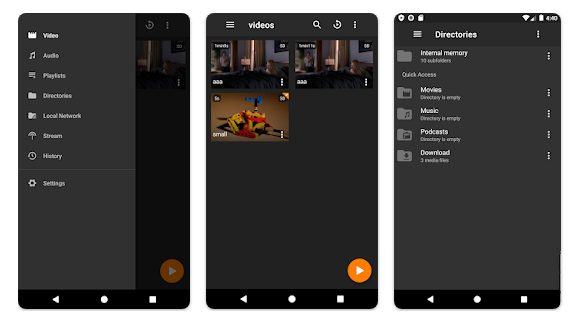
A completely free media player that accommodates a wide range of audio and video formats is available for users. This versatile application can also function as a music player, allowing you to enjoy your favorite tracks with ease. However, you may find that some items at the edges of lists could be slightly cropped due to the rounded dimensions of certain wearable devices. Despite this minor issue, the player remains fully functional, enabling seamless access to your media. Keep in mind that high-resolution videos may struggle to play smoothly on devices with limited memory or RAM, so it’s advisable to opt for lower-resolution content on wearables. Fortunately, most audio files should function without any problems. Sun Player is inspired by an open-source video player and was developed to enhance capabilities on platforms that were previously unsupported, such as smartwatches and wearable devices. It not only addresses bugs but also introduces various enhancements to improve user experience. The player supports a vast array of video and audio formats, features hardware acceleration for efficient video rendering, and utilizes multi-core decoding, all while providing a clean user interface. Best of all, it is completely free and contains no advertisements, ensuring an uninterrupted media experience. This commitment to user satisfaction makes it a standout choice for media consumption on portable devices.
API Access
Has API
No
API Access
Has API
No



Integrations
No details available.
Integrations
No details available.
Pricing Details
Free
Free Trial
No
Free Version
Yes
Pricing Details
Free
Free Trial
No
Free Version
Yes
Deployment
Web-Based
No
On-Premises
No
iPhone App
No
iPad App
No
Android App
No
Windows
Yes
Mac
Yes
Linux
Yes
Chromebook
No
Deployment
Web-Based
No
On-Premises
No
iPhone App
No
iPad App
No
Android App
Yes
Windows
No
Mac
No
Linux
No
Chromebook
No
Customer Support
Business Hours
No
Live Rep (24/7)
No
Online Support
Yes
Customer Support
Business Hours
No
Live Rep (24/7)
No
Online Support
Yes
Types of Training
Training Docs
No
Webinars
No
Live Training (Online)
No
In Person
No
Types of Training
Training Docs
Yes
Webinars
No
Live Training (Online)
No
In Person
Yes
Vendor Details
Company Name
SMPlayer
Website
www.smplayer.info/
Vendor Details
Company Name
Nasai
Country
Australia
Website
www.masstream.com/policy.htm
