Average Ratings 0 Ratings
Average Ratings 0 Ratings
Similar Products
-
NINJIONINJIO is an all-in-one cybersecurity awareness training solution that lowers human-based cybersecurity risk through engaging training, personalized testing, and insightful reporting. This multi-pronged approach to training focuses on the latest attack vectors to build employee knowledge and the behavioral science behind human engineering to sharpen users’ intuition. Our proprietary NINJIO Risk Algorithm™ identifies users’ social engineering vulnerabilities based on phishing simulation data and informs content delivery to provide a personalized experience that changes individual behavior. With NINJIO you get: - NINJIO AWARE attack vector-based training that engages viewers with Hollywood style, micro learning episodes based on real hacks. - NINJIO PHISH3D simulated phishing identifies the specific social engineering tricks most likely to fool users in your organization. - NINJIO SENSE is our new behavioral science-based training course that shows employees what it “feels like” when hackers are trying to manipulate them.
-
DocmosisDocmosis is a self-hosted or SaaS template-based document generation solution. Integrate with custom-built software applications or popular third-party apps using the API. Create templates using MS Word or LibreOffice. Add plain-text placeholders to control: the insertion of text/images/tables; conditionally add/remove any content; perform calculations; loop over repeating data; format data/numbers and much more. Integrate with: Custom software built using Java, C#, Python, PHP, Ruby and more via a REST API; Low-code and no-code platforms like Appian, Bubble, Mendix, Outsystems; Third-party form builders or apps that can perform a webhook such as FormAssembly or Salesforce. Used by customers in Finance, Health, Legal, Education, Government, HR, Insurance, Logistics, and Manufacturing to generate customized letters invoices, proposals, contracts, statements, reports and more.
-
SharpeSoft EstimatorSharpeSoft Estimator is an on-premise & cloud cost estimating software for contractors and sub-contractors in the construction industry. This software allows contractors to organize bids, compare item quantities and pricing from multiple subcontractors and vendors, manage their own contractor information, and more. SharpeSoft provides integrated tools for managing labor, equipment and subcontractor costing, contractor and subcontractor management, bid management, and more. The solution is designed for various industries including heavy civil, highway and road, earthwork, pipeline, grading and excavation, plant work, etc.
-
SurveyJSSurveyJS is a set of four open-source JavaScript libraries that offer the benefits of a tailor-made in-house survey application, while considerably reducing the time and resources needed to deploy the system. These libraries are independent of specific server code or database requirements and seamlessly integrate with popular JavaScript frameworks, including React, Angular, Vue.js, jQuery, Knockout, and more. They are designed to communicate with any server that can handle JSON requests, ensuring compatibility with various server architectures and databases. The product family is composed of: - An open-source MIT-licensed rendering library that renders dynamic JSON-based forms in your web application, and collects responses. - A self-hosted drag & drop form builder that features an integrated CSS-based theme editor and a GUI for conditional rules. It automatically generates JSON definitions (schemas) of your forms in real time. - PDF Generator, a library that renders SurveyJS surveys and forms as PDF files in a browser; - The Dashboard library that allows you to simplify survey data analysis with interactive and customizable charts and tables. Visit our website to try out and evaluate our full-scale demo for free.
-
Resco Inspections+Resco Inspections+ is a versatile digital solution designed for industries like construction, manufacturing, oil and gas, nonprofits, utilities, and property management. The platform helps organizations move away from paper forms by transforming audits, inspections, surveys, and checklists into fully customizable digital workflows. With native integration with Dynamics 365 and Salesforce, it allows you to extend CRM/ERP data beyond the office, ensuring you can collect and update field data effortlessly. The offline-first architecture is essential for environments where connectivity is unreliable, such as remote oil rigs, construction sites, garages, or even crowded cities. Field technicians, auditors, and inspectors can capture critical data without interruption, and the advanced sync engine ensures it syncs automatically once a connection is available. Inspections+ includes a drag-and-drop questionnaire builder with smart questions, business logic, rules, and media capture, enabling easy no-code customization for safety checks, compliance reports, or trial audits. With real-time data insights, organizations can streamline processes, reduce errors, and make informed decisions on the go.
-
JotformTrusted by over 25 million users worldwide, Jotform is an all-in-one platform that simplifies data collection, workflow automation, and online sales, all without coding. With Jotform’s drag-and-drop Form Builder, businesses can create customized forms and surveys to collect leads, contact information, payments, appointments, and e-signatures with ease. Choose from over 10,000 templates for everything from feedback surveys to registration forms, or build your own from scratch. Jotform's advanced features, such as conditional logic, autoresponders, and over 200 integrations, further streamline processes. In addition, Jotform's AI-powered Agents offer real-time customer support by guiding users through the form submission process, answering questions, and ensuring a smooth experience, all while reducing the need for manual intervention. With Jotform’s Store Builder, you can also set up an online store, sell products, services, and subscriptions, collect donations, and receive payments through 30+ supported payment gateways. Finally, Jotform’s tools like Approvals, PDF Editor, and Report Builder help businesses transform collected data into actionable insights and automate workflows for even greater efficiency.
-
OvermonitorOvermonitor is cloud-based infrastructure, website, and endpoint monitoring built for teams that want fast setup, clear alerts, and practical visibility without the complexity or cost of enterprise monitoring suites. Monitor websites, servers, endpoints, processes, Windows services, event logs, uptime, response time, SSL certificates, and internal network health from one easy dashboard. At the core of Overmonitor is a small, lightweight server agent that installs quickly, pairs with your account, and reports a heartbeat every minute from inside your network. This gives you visibility beyond public uptime checks, helping detect server outages, stalled services, failing processes, internal connectivity problems, and endpoint health issues before they become customer-facing downtime. Overmonitor supports city-level geotargeted monitoring, practical maintenance windows that reduce alert noise, push notifications for alerts, audible dashboard alerts for operations screens, process monitor rollups, embeddable performance graphs, and flexible à la carte pricing so you only pay for the monitoring you need. Designed for SaaS operators, IT teams, MSPs, developers, and small businesses, Overmonitor helps you track availability, analyze website performance, monitor infrastructure health, and improve end-user experience without being locked into a bloated monitoring platform.
-
SogolyticsSogolytics, an experience management platform, allows companies to collect, analyze and use employee and customer data to drive business growth. Sogolytics is used by organizations across all industries to track interactions at all touchpoints with customers and employees. The best-in-class reporting delivers real-time, actionable insights that help to prevent and mitigate potential problems. SogoCX improves every aspect of a company's customer experience. This means improved conversion rates, simplified data management, and understanding customers to increase return on investment. Organizations can use SogoCX to measure key metrics like NPS, CSAT and CES. SogoEX software is used by organizations to collect and use data to improve engagement and reduce turnover. This platform allows HR and leadership to drive organizational changes through real-time feedback collection and employee engagement.
-
HealtheeMeet Healthee—your intelligent healthcare navigation platform. Healthee takes the guesswork out of healthcare by delivering clear, personalized answers to employees’ healthcare and benefits questions—instantly. Employees can seamlessly navigate their existing health plans with on-demand guidance, all in one intuitive, mobile-first experience. Powered by Zoe, Healthee’s AI-powered Personal Health Assistant, employees receive tailored insights into coverage, costs, and care options—helping them make smarter decisions that reduce unnecessary healthcare spend. Healthee also simplifies open enrollment with easy-to-use plan comparison tools, guiding employees to the plans that best fit their needs and expected usage. This drives better plan selection, fewer surprises, and meaningful cost savings for both employees and employers. For HR teams, Healthee reduces administrative burden by delivering fast, accurate benefits support without changing existing plans. For finance leaders, claims analytics and cost insights provide visibility into utilization trends and key cost drivers, empowering CFOs to optimize plan design and control rising healthcare costs. The result: confident employees, healthier organizations, and a more cost-effective benefits strategy—right at your fingertips. Built for benefits managers and HR leaders, Healthee serves as a total benefits administration solution that consolidates 50+ point solutions into one intelligent hub. From FSA and HSA guidance to mental health navigation, telemedicine, and EAP access, Healthee connects every benefit in one place—increasing utilization, reducing cost-per-claim, and eliminating benefits fragmentation. Real-time analytics surface which benefits are underused so managers can reallocate budget strategical
-
DbVisualizerDbVisualizer is a universal database client for anyone who works with data, from indie developers and startups to professional teams managing complex database environments, including developers, DBAs, analysts, and data engineers working across relational and NoSQL databases. Key features: - SQL editor with intelligent autocomplete, visual query builders, variables, and execution tools - AI Assistant for answering questions, explaining errors, and analyzing code - Git integration for managing SQL scripts and team collaboration - Customizable layouts, key bindings, and UI themes - Favorites for frequently used scripts and database objects - Configurable security settings for organizational requirements Connects via JDBC to MySQL, PostgreSQL, SQL Server, Oracle, Snowflake, SQLite, Cassandra, BigQuery, and more. Runs on Windows, macOS, and Linux. Nearly 7 million downloads, with Pro users in 150 countries, scaling from solo projects to enterprise database management.
Description
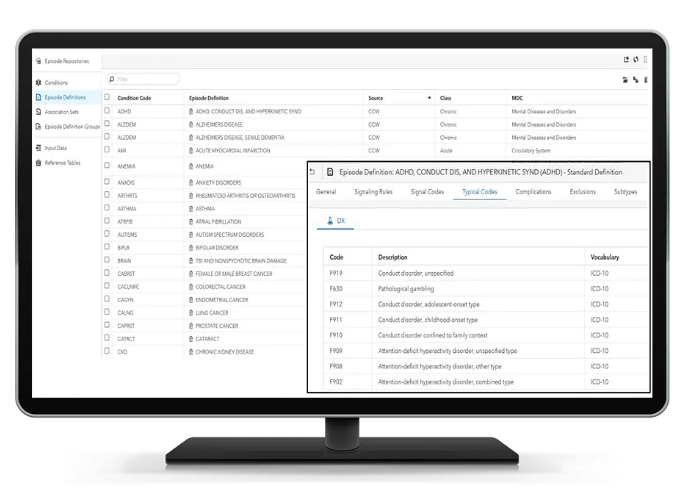
Enhance your digital transformation journey while uncovering valuable insights from your data with customized health analytic solutions. Featuring an intuitive drag-and-drop interface, SAS Health Cohort Builder allows users to query and create cohorts based on temporal relationships without any coding skills necessary. This user-friendly tool enables easy exploration of cohort traits and the impact of various inclusion or exclusion criteria on patient groups, assisting in assessing the feasibility of studies. You have the capability to save cohort definitions for future use, modify them as needed, and apply them across different real-world data resources for comparative analysis, ultimately conserving both time and resources. Additionally, you can validate findings and conduct further analyses through in-memory processing and visualization in SAS or other platforms such as R, Python, and various third-party visualization applications. On the other hand, SAS Health: Episode Builder empowers you with the ability to view and modify episode definitions directly, ensuring that you have control over the process. With SAS’s fully documented logic to generate episodes of care, you can rest assured that the underlying business rules are both transparent and subject to audit at any time, further enhancing the reliability of your health data analytics. This combination of features positions SAS as a leading tool in the realm of health analytics.
Description
Elevate your product experience by moving past mere analytics and harnessing user insights quickly. Gather valuable feedback from targeted user groups by analyzing their traits and interactions within your product. Utilize the comprehensive Sprig platform to gain a deeper understanding of user perspectives throughout the entire product development lifecycle. Capture video snippets of user sessions coupled with their real-time feedback within the product interface. Proactively address and resolve pain points in crucial user pathways before they escalate into significant issues. Discover the preferences and dislikes of your most engaged users, as well as their suggestions for future features. Recognize behavioral trends that may contribute to user churn and develop effective strategies to mitigate them. By understanding these dynamics, you can create a more tailored experience that keeps users engaged and satisfied.
API Access
Has API
No
API Access
Has API
No



Integrations
Amplitude
No
CleverX
No
Figma
No
LaunchDarkly
No
Mixpanel
No
Neyox
No
Python
Yes
Segment
No
User Interviews
No
Integrations
Amplitude
Yes
CleverX
Yes
Figma
Yes
LaunchDarkly
Yes
Mixpanel
Yes
Neyox
Yes
Python
No
Segment
Yes
User Interviews
Yes
Pricing Details
No price information available.
Free Trial
Yes
Free Version
No
Pricing Details
$175 per month
Free Trial
Yes
Free Version
Yes
Deployment
Web-Based
Yes
On-Premises
No
iPhone App
No
iPad App
No
Android App
No
Windows
No
Mac
No
Linux
No
Chromebook
No
Deployment
Web-Based
Yes
On-Premises
No
iPhone App
No
iPad App
No
Android App
No
Windows
No
Mac
No
Linux
No
Chromebook
No
Customer Support
Business Hours
Yes
Live Rep (24/7)
No
Online Support
Yes
Customer Support
Business Hours
No
Live Rep (24/7)
No
Online Support
Yes
Types of Training
Training Docs
Yes
Webinars
Yes
Live Training (Online)
Yes
In Person
Yes
Types of Training
Training Docs
Yes
Webinars
Yes
Live Training (Online)
Yes
In Person
No
Vendor Details
Company Name
SAS
Country
United States
Website
www.sas.com/en_us/software/health.html
Vendor Details
Company Name
Sprig
Founded
2018
Country
United States
Website
sprig.com
Product Features
Product Features
Product Analytics
Attribution
No
Automatic Data Capture
No
Churn Reporting
No
Customer Feedback Collection
No
Customer Guidance
No
Customer Journey Analytics
No
Data Export
No
Data History Retention
No
Data Labeling
No
Product Engagement Scoring
No
Real-Time Data Analysis
No
Touchpoint Analytics
No
User Segmentation
No
Session Replay
Eye Tracking
No
Form Analytics
No
Heatmaps
No
Mouse Tracking
No
Optimization Tools
No
Session Recording
No
Surveys
No
User Experience Analysis
No
User Feedback
No
Visitor Segmentation
No
Survey
Custom Survey URLs
No
Data Analysis Tools
No
Email Marketing
No
Mobile Survey
No
Offline Response Collection
No
Paper Survey
No
Question Branching
No
Question Library
No
Site Intercept Survey
No
Skip Logic
No
Supports Audio / Images / Video
No
