Average Ratings 0 Ratings
Average Ratings 0 Ratings
Similar Products
-
TremendousTremendous is the easiest way to distribute digital rewards and incentives globally. Tremendous allows you to instantly reward your recipients using gift cards, prepaid Visa®, cards, cash, or other digital rewards. Companies large and small can easily track, buy, and manage incentive programs at scale with us. Tremendous allows customers to send rewards individually or in bulk. Our API also allows customers to integrate with our API and automatically send rewards. We work with top brands around the world to support their specific use cases, such as market research, customer loyalty and health & wellbeing, employee rewards, referrals, etc. Tremendous is completely free to use. There are no platform fees Tremendous is currently the only platform that allows cash disbursements (Bank/ACH, PayPal). Tremendous has the best international coverage (230+ countries and regions). Tremendous has created the best API in the industry
-
Square PaymentsAccept all payments quickly, securely, and easily. Accept card payments quickly and easily, no matter where you are selling. You can streamline the process of creating, sending, and tracking your invoices. Customer not available in person? Remote credit card payments can be made over the phone or via your computer. Get paid quickly Square makes it easy to create and grow an online store and accept online payments seamlessly with Square. Accepting cards is as easy, painless, secure, and fast as possible with Square. We don't charge extra, have no long-term contracts and are not able to use tricks. You can rely on fast, secure payments.
-
GroupTogetherGroupTogether is a user-friendly online platform designed for creating group cards, collecting gifts, and sending eGift Cards quickly and effortlessly. It allows users to initiate a group card, decide whether to gather funds or select a gift, and then distribute a single link to friends, family, coworkers, or teammates. Participants have the option to add personalized messages, share photos, and include GIFs, while also contributing a specific amount, any amount they choose, or simply signing the card without making a financial contribution. With privacy assured, GroupTogether eliminates the discomfort of using personal banking details and ensures secure transactions, complete with verifiable records of contributions and expenditures. Organizers have the flexibility to use the collected funds for a variety of gifts, including eGift Cards, gift baskets, flowers, or the versatile GroupTogether AnyCard that allows recipients to choose from over 100 eGift Cards. The platform provides the option for digital delivery or downloadable PDFs for printing, making it a practical solution for various occasions such as remote team celebrations, workplace events, classroom activities, birthdays, farewells, and retirements. Moreover, this seamless process fosters a sense of community and connection, even in virtual settings.
-
InboxAllyInboxAlly is email deliverability software that moves your messages out of spam and promotions and into the primary inbox. It builds and protects sender reputation, warms new domains and IPs automatically, verifies inbox placement across the major mailbox providers, and monitors blacklists in real time. It layers onto any ESP or SMTP setup without changing how you send. Every plan carries a REST API, a dedicated customer success manager and 24/7 live support. Used by marketers, agencies, cold outreach teams and deliverability consultants.
-
Square POSSquare POS is a simple, intuitive point-of sale (POS) solution. It provides a rich set of tools for inventory tracking, sales tracking, online payment processing and digital receipts. Square POS is available for Android and iOS devices. It records transactions offline by storing data locally, then automatically syncing information when there is an Internet connection. Square POS allows users to manage details such as names, prices and quantities. It also offers features such as a barcode scanner and discounts, credit card processing and gift cards, refunds and more.
-
VoucherCartProfitable Gift cards, vouchers, and tickets are the most lucrative items you can sell for your business. They allow you to receive payment in full and in advance of products/services that you only deliver about 85% of the time. Flexible Your services and products can be sold as tickets, gift cards, or vouchers. You can sell what you want, at the terms and prices that you set, whenever and wherever you like, and at the profits you make. Powerful VoucherCart allows you to reach your customers in a way that is unmatched by other digital channels. Viral VoucherCart's embedded viral behaviors and loyalty means that we can attract new customers and retain them like no other eCommerce platform.
-
Centrex SoftwareOur powerful Customer Relationship Management software (CRM) can help you increase productivity, generate more revenues, and improve engagement. Manage your advance/loan portfolio. Integrated with ACH processors. Includes broker portal and syndicate reporting. Send email and SMS campaigns, send/receive SMS messages, track email openings, and much more. ClixSign® allows you to send any document for electronic signature. You can see when documents have been viewed and signed by up 8 signers. Your customers can access a branded portal that allows them to upload documents, view messages and track balances/payments. The most up-to-date contact and deal management software allows you to see the entire pipeline. Centrex Software provides custom software development solutions. We assist customers in building web and mobile apps for any purpose.
-
KudoboardKudoboard offers an online alternative to the card that is passed around and signed on birthdays, work anniversaries, onboardings, farewells, and more. Perfect for special occasions, shout-outs, and company events - Kudoboard allows your employees to drive workplace appreciation from the bottom-up! Getting started for employees is easy. They create a Kudoboard for a teammate's special occasion, add content to the board, invite others to contribute, and then schedule it for delivery. It's as simple as that!
-
DetrackStreamline everything from proof of delivery and real-time driver tracking, through to route optimisation and customer updates. Save time, reduce operating costs, and boost productivity with Detrack. Integrations Integrate with the best accounting and SMS platforms. From order creation through to proof of delivery, everything works together seamlessly - orders sync automatically, customers get notified instantly and drivers receive jobs in real-time. Test drive all features for free It only takes a few minutes to add your drivers, upload or create jobs and start branding your customer comms. Our free trial gives you access to all features for 14 days. We know that there aren’t enough hours in the day and our experts are available 24/5 to help you get set up to achieve your goals faster. You can chat live or book a call back for practical, hands-on support.
-
FirstPromoterRun affiliate, influencer, and referral programs from one platform. Connect your billing, set commission rules, and go live the same day. Native integrations with Stripe, Paddle, Chargebee, Recurly, and Braintree feed every billing event into your program. Upgrades, downgrades, renewals, refunds, and cancellations each update commissions on their own, so payouts stay in step with revenue. Run payouts fully managed, or in bulk through PayPal and Wise. W-9/W-8BEN forms are gathered before any money leaves, and an invoice accompanies every payout, removing most of the admin a program usually brings. Promoters get a dashboard in your branding, with links, coupon codes, and earnings in one view. You get 18-point reporting, commission structures from flat fee to multi-tier, fraud detection, and broadcast email to your entire promoter base. Start your program today with a 14-day free trial. No credit card required.
Description
Transforming your business into a digital entity begins with modern contact solutions, including reliable contactless business cards. You can easily share personalized name card URLs with clients through various channels such as email, SMS, WhatsApp, and Twitter. During online meetings held via platforms like Zoom, Google Meet, or Skype, effortlessly send your name card URL. By displaying a QR Code, your clients can quickly scan and access your e-card without delay. Additionally, a tailored website can showcase the contact details of your employees, and the system is designed to accommodate multiple organizations, allowing each to personalize its branding and information. Our software conveniently installs on your server at no additional cost, ensuring you retain ownership of your data. Its responsive design guarantees an attractive appearance across devices, while the QR Code facilitates easy scanning and sharing options. With just one click, clients can add your contact details, make calls, send emails, or view maps. Each employee can have a unique URL for their name card, such as CEO, CTO, or john-doe, reinforcing the personal touch of your business. This system not only features your name card under your domain but also ensures that your information remains private with no search engine indexing. Furthermore, you can track page view statistics for each card created, allowing for better insights into engagement. This comprehensive approach enhances your business's digital presence and connectivity.
Description
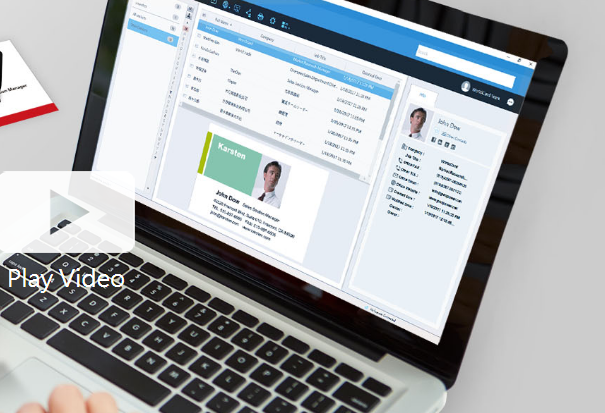
Business cards can be recognized and the associated data can be exported as a CSV file prior to the subscription's expiration. If you wish to retain the images of the business cards, it is advisable to reach out to PenPower's customer service for assistance. Please note that after the subscription expires, user data will be retained by the system for a period of 180 days; if renewal does not occur within this timeframe, all data will be permanently deleted. To optimize performance with WorldCard Team, it is recommended that the NAS edition should not exceed 20 users, while the Basic edition is best suited for fewer than 100 users. The maximum number of users allowed for the Windows Server edition will depend on the performance capabilities of your server. Additionally, you can transfer contact data to WorldCard Team from either WorldCard or WorldCard Mobile. When implementing the WorldCard Team system in your organization, we highly recommend migrating all contacts to WorldCard Team rather than continuing with WorldCard for improved efficiency and streamlined management of your business contacts. This approach not only enhances organization but also facilitates better collaboration among team members.
API Access
Has API
No
API Access
Has API
No



Integrations
Google Meet
Yes
Salesforce
No
Skype
Yes
WhatsApp
Yes
X (Twitter)
Yes
Zoom
Yes
Integrations
Google Meet
No
Salesforce
Yes
Skype
No
WhatsApp
No
X (Twitter)
No
Zoom
No
Pricing Details
No price information available.
Free Trial
No
Free Version
No
Pricing Details
Contact PenPower Technologies for pricing details.
Free Trial
Yes
Free Version
No
Deployment
Web-Based
Yes
On-Premises
No
iPhone App
No
iPad App
No
Android App
No
Windows
No
Mac
No
Linux
No
Chromebook
No
Deployment
Web-Based
Yes
On-Premises
No
iPhone App
Yes
iPad App
Yes
Android App
Yes
Windows
Yes
Mac
Yes
Linux
No
Chromebook
No
Customer Support
Business Hours
No
Live Rep (24/7)
No
Online Support
Yes
Customer Support
Business Hours
Yes
Live Rep (24/7)
No
Online Support
No
Types of Training
Training Docs
Yes
Webinars
No
Live Training (Online)
No
In Person
Yes
Types of Training
Training Docs
Yes
Webinars
No
Live Training (Online)
Yes
In Person
No
Vendor Details
Company Name
ReCards
Country
China
Website
www.re.cards/en/
Vendor Details
Company Name
PenPower Technology
Founded
1991
Country
United States
Website
www.worldcardteam.com/EN/
Product Features
Business Card
Contact Management
No
Data Extraction
No
Design Templates
No
Image Editor
No
Print Management
No
Step-by-Step Wizard
No
Product Features
Business Card
Contact Management
Yes
Data Extraction
Yes
Design Templates
No
Image Editor
No
Print Management
No
Step-by-Step Wizard
No
Contact Management
Activity Management
No
Appointment Management
No
Contact Database
Yes
Contact History
No
Contact Import/Export
Yes
Customer Pipeline
No
Email Marketing
No
Group Management
No
Interaction Tracking
Yes
Lead Management
No
Prospecting Tools
No
Sales Pipeline Management
No
Search / Filter
No
Segmentation
Yes
Shared Contacts
Yes
Social Media Integration
No
CRM
Calendar/Reminder System
No
Call Logging
No
Document Storage
No
Email Marketing
Yes
Internal Chat Integration
No
Lead Scoring
No
Marketing Automation Integration
No
Mobile Access
Yes
Quotes / Proposals
No
Segmentation
No
Social Media Integration
Yes
Task Management
No
Territory Management
No
Customer Engagement
Analytics
No
Churn Management
No
Communication Management
Yes
Community Management
Yes
Content Syndication
Yes
Feedback Collection
Yes
Gamification
No
Live Chat
No
Video Content
No
