Average Ratings 3 Ratings
Average Ratings 8 Ratings
Similar Products
-
Kasm WorkspacesKasm Workspaces streams your workplace environment directly to your web browser…on any device and from any location. Kasm is revolutionizing the way businesses deliver digital workspaces. We use our open-source web native container streaming technology to create a modern devops delivery of Desktop as a Service, application streaming, and browser isolation. Kasm is more than a service. It is a platform that is highly configurable and has a robust API that can be customized to your needs at any scale. Workspaces can be deployed wherever the work is. It can be deployed on-premise (including Air-Gapped Networks), in the cloud (Public and Private), or in a hybrid.
-
HERE Enterprise BrowserEverything works right here™. The product of years of collaboration with the world’s largest financial institutions, HERE Enterprise Browser is the first and only browser that solves both enterprise security and workforce productivity. Built on Google Chromium, HERE streamlines workflow and improves employee experience.
-
Google WorkspaceGoogle Workspace is an all-in-one cloud productivity platform developed by Google to help businesses manage communication, collaboration, document creation, and workflow automation from a centralized environment. The platform combines professional email, cloud storage, video conferencing, document editing, team messaging, scheduling, and AI-powered assistance into one subscription-based ecosystem optimized for modern work environments. Google Workspace includes applications such as Gmail, Google Drive, Google Meet, Docs, Sheets, Slides, Calendar, Chat, Keep, Forms, Sites, NotebookLM, and Gemini AI, enabling teams to work together seamlessly across devices and locations. One of the platform’s core strengths is its built-in AI functionality powered by Gemini, which helps users draft emails, summarize meetings, generate research insights, automate repetitive tasks, and improve productivity using contextual awareness from workplace data. Google Workspace also supports advanced collaboration features including real-time editing, appointment scheduling, eSignatures, document sharing, cloud storage management, and AI-assisted research tools. Businesses benefit from enterprise-grade security features such as AI-powered threat protection, data classification, endpoint management, Data Loss Prevention, secure access controls, and compliance support for enterprise environments. The platform offers scalable pricing plans suitable for startups, small businesses, enterprises, educational institutions, nonprofits, and government organizations. Google Workspace also simplifies data migration and onboarding with built-in migration tools and partner support for transferring emails, files, and business information securely into the cloud.
-
Thinfinity WorkspaceThinfinity Workspace 7.0's Technical Highlights: - Progressive Web App (PWA) technology for a seamless user experience - Integrated Thinfinity VNC, VirtualUI, and z/Scope for maximum versatility - HTML5 terminal emulation supporting DEC terminals, TN 5220, and TN 3270 protocols - Robust enterprise-grade audit logs for security and compliance management - Proprietary VNC protocol for real-time monitoring and troubleshooting IMPROVE USER EXPERIENCE - Deliver business-critical apps, desktops and files from a single web portal. - Provide simplified remote browser access for your users, while confining them to only the resources that they need. SIMPLIFY IT AND AVOID VPNs - Forget traditional VPN deployments and complexities. - Enable access from Chromebooks, mobile devices or any computer with a Web Browser. Zero setup. KEEP YOUR BUSINESS SECURE - Use enterprise-grade encrypted connections. - Integrate with your existing and external identity platforms. - Apply 2FA or MFA policies with all identity providers.
-
AxeroHundreds of companies and millions of employees use Axero’s intranet software to communicate, collaborate, manage tasks and events, organize content, and develop their company culture.
-
PlanfixThe Planfix platform allows organizations to manage their entire business online. Regardless of company size and industry, Planfix has something to offer as an excellent project and work management tool. With Planfix, your company gets a fully customizable management system, from process design to appearance. Planfix’s platform combines task and project management, CRM, sales, marketing, production, logistics, support service, accounting, and HR in one full-featured solution. Data is seamlessly transferred from one team to another - for example, a transaction at the implementation stage becomes a project and then is transferred to support. Planfix is equally well suited for businesses and non-profit organizations, public associations, or any other group of people working towards a common cause. Trusted by 7724 companies, automates business workflows of more than 68 000 users.
-
iTacitYour employees can connect to everything they need to do the job. iTacit is more than an employee app. It gives your front-line access to email-free messages and training, a social intranet as well as digital forms, checklists, and other resources. Better engagement starts with hiring and continues through employee retention. iTacit makes it easy to streamline recruitment, onboarding, training, as well as setting performance goals and standards. Keep an eye on your workforce's progress. Give your team the tools and training they need to succeed and watch them grow. iTacit can reduce or eliminate in-person training, track compliance, and offer independent learning paths for employees. Multiple teams working together and a large front-line workforce can pose challenges. Your business and customer success depend on a skilled workforce. This means you will already face the challenges of segmenting communications, managing compliance records, and other tasks.
-
HaystackHaystack connects every employee of your organization with the people, resources, and information they need to thrive and succeed. Haystack provides employees with a fun, intuitive and informative way to start the day. Custom branding with no-code and a modular layout make it easy to highlight key resources, organizational culture, and knowledge. Haystack's automated multi-channel delivery, combined with actionable analytics, makes it easy for you to reach your employees at the right time and place. Spend less time looking for information and more on achieving your goals. Haystack’s knowledge-sharing features make it easy for employees to get the materials they need, no matter where in the world they are. It can be difficult to stay connected with everyone as teams grow and change. Haystack’s rich employee profiles and company directory make colleagues around the world feel as if they are right across the room.
-
Wave BrowserWave Browser is designed for people who want a safer, faster, and more meaningful way to explore the web. Built on strong security principles, Wave puts you in control of your privacy with customizable cookie and tracker blocking, incognito mode, and clear permission choices. AppEsteem Certification ensures Wave meets strict, independently verified standards for clean installation, transparent behavior, and responsible software practices, giving you confidence every time you browse. Wave is also built for productivity, offering tools that help you stay organized and move through information with purpose. Tab grouping, bookmarks, and a reading list keep ideas within reach, while split screen let you research, compare, or watch without switching between windows. Memory Saver mode helps your device stay fast during heavy sessions, and the built-in AI Assistant and messaging integrations bring your favorite tasks closer to a single click. Designed to be simple and user-friendly, Wave Browser removes friction from everyday browsing. The free ad blocker keeps pages clean, and built-in tools—like the converter, package tracker, price tracker, translation tool, stock tracker, and content notifier—help you get things done without extra extensions. Most importantly, Wave is a browser with real ocean impact built in. Through a certified partnership with 4ocean, Wave helps fund the removal of 100,000 pounds of trash from our ocean, rivers, and coastlines every year. A live impact tracker shows exactly how much waste the Wave community has helped remove, with verified monthly updates from cleanup crews in the U.S., Indonesia, and the Dominican Republic. With Wave Browser, your everyday browsing directly supports a cleaner planet and the people working to protect it.
-
ConnecteamConnecteam is an all in one employee app that was specifically designed for non-desk employees. It provides all the necessary capabilities to manage and operate field employees, including communication features, workflows and scheduling, as well as time clock. Just a few clicks and you can bring together your deskless workforce. Your desktop Launchpad allows you to collaborate, manage operations, develop professional skills, and monitor employee engagement. In minutes, you can create a fully-branded mobile app for your company. You can add safety checklists, orientation courses, product catalogues, and shift management to your mobile app. Or, you can customize the features to suit your needs. You can also gain insight into how your team interacts with company assets and take steps to improve efficiency. Connecteam allows managers and employees to automate their processes and allow them to focus on growth. Integrations include Google Calendar, Gusto, QuickBooks Payroll, Xero and others.
Description
PRODUCTIVITY SOFTWARE
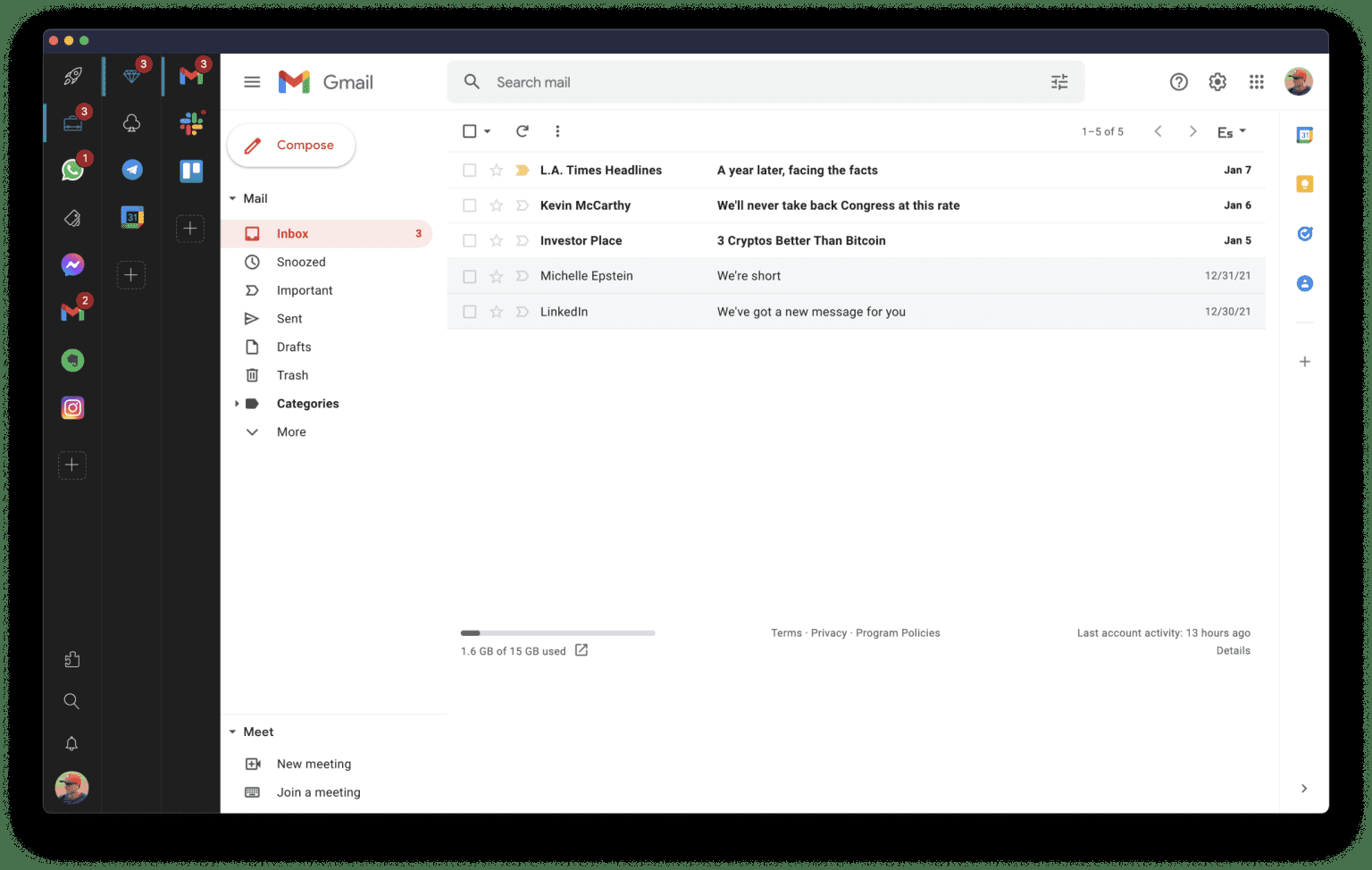
Rambox is a digital workspace organizer that 🚀 boosts productivity for professionals who use web apps frequently. It centralizes all your apps, making it easy to organize and access frequently used applications in one place.
80K+ users across 5,000 companies of all sizes choose Rambox worldwide to simplify their workspace. Select from our list of 700+ apps which you want to use and organize them into different workspaces. You can have multiple sessions of WhatsApp, Gmail, Slack, etc. and stay signed.
Workspaces
With over 700 pre-configured apps, you can instantly add them to your workspace, including:
- Gmail
- Google Apps
- WhatsApp
- Facebook
- iCloud
and much more
And if your app isn't listed, no problem - you can add any custom app in a few easy steps.
Rambox synchronizes app configurations and can disable notifications across all devices in the user dashboard, automatically hibernating inactive apps to free up memory. Plus, users can apply CSS styling and JS code to improve each app's design and performance.
Other features include: dark mode, do not disturb mode, spell checking, ad blocking, password management, notification management, and keyboard shortcuts.
Description
You can connect your teams and improve communication. Zoom Team Chat is included with your Zoom license. Zoom Team Chat helps your teams stay connected. Chat and video meetings can streamline your teams. Enterprise chat and instant video meetings make collaboration between teams and other participants easier. Modern and efficient team communication is possible. You can create a virtual workspace that allows all the people involved in every project to collaborate. You can organize your communications chaos. You can save time by quickly finding messages and content related to your conversations or projects. You can start a meeting with any channel, either group or 1:1. Zoom meetings can scale up to 1,000 participants with clear video, audio, and screen sharing. Communicate in private or public channels that are organized by topics, teams, or projects. You can share files, emojis and screenshots. You can quickly find contacts, messages, files, and other information. Calendar integrations sync presence and status.
API Access
Has API
No
API Access
Has API
No


Integrations
Asana
Yes
Baremetrics
Yes
Bitbucket
Yes
Constant Contact
Yes
Docusign
Yes
Evernote
Yes
Front
Yes
GitHub
Yes
GitLab
Yes
HubSpot CRM
Yes
Integrations
Asana
Yes
Baremetrics
Yes
Bitbucket
Yes
Constant Contact
Yes
Docusign
Yes
Evernote
Yes
Front
Yes
GitHub
Yes
GitLab
Yes
HubSpot CRM
Yes
Pricing Details
$7 per user per month
Or $5.83 per user per month if billed annually
Free Trial
Yes
Free Version
Yes
Pricing Details
No price information available.
Free Trial
No
Free Version
No
Deployment
Web-Based
No
On-Premises
Yes
iPhone App
No
iPad App
No
Android App
No
Windows
Yes
Mac
Yes
Linux
Yes
Chromebook
No
Deployment
Web-Based
Yes
On-Premises
No
iPhone App
Yes
iPad App
Yes
Android App
Yes
Windows
Yes
Mac
Yes
Linux
Yes
Chromebook
No
Customer Support
Business Hours
No
Live Rep (24/7)
No
Online Support
Yes
Customer Support
Business Hours
Yes
Live Rep (24/7)
Yes
Online Support
Yes
Types of Training
Training Docs
Yes
Webinars
No
Live Training (Online)
No
In Person
No
Types of Training
Training Docs
Yes
Webinars
Yes
Live Training (Online)
Yes
In Person
No
Vendor Details
Company Name
Rambox
Founded
2016
Country
United States
Website
rambox.app/
Vendor Details
Company Name
Zoom Communications
Founded
2011
Country
United States
Website
www.zoom.com/en/products/team-chat/
Product Features
Digital Workplace
Activity / News Feed
No
Calendar Management
Yes
Chat / Messaging
Yes
Content Management
No
Document Management
Yes
Employee Directory
No
File Sharing
Yes
Knowledge Management
No
Surveys & Feedback
No
Task Management
Yes
Messaging
End-to-End Encryption (E2EE)
No
File Sharing
Yes
Groups / Channels
No
Payments
No
Search / Filter
Yes
Self-Destructing Messages
No
Stickers / GIFs
No
Threaded Discussion
No
Video Conferencing
Yes
Voice Calling
No
Productivity
Collaboration
Yes
Database Creation
No
Document Creation
No
File Sharing
Yes
Notes Management
No
Office Suite
Yes
Presentation Tools
Yes
Project Management
Yes
Task Management
No
Team Chat
No
Team Chat
End-to-End Encryption (E2EE)
No
File Sharing
Yes
Groups / Channels
No
Payments
No
Search / Filter
Yes
Self-Destructing Messages
No
Stickers / GIFs
No
Threaded Discussion
No
Video Conferencing
Yes
Voice Calling
No
Product Features
Employee Communication Tools
Activity / News Feed
Yes
Audio / Video Conferencing
Yes
Blogs
No
Chat / Messaging
Yes
Employee Directory
Yes
Event Calendar
No
File Sharing
Yes
Knowledge Management
No
Newsletter Management
No
Surveys & Feedback
No
Internal Communications
App Integration
Yes
Blogs
No
Chat/Messaging
Yes
Email Management
No
Employee Directory
Yes
Event Calendar
No
Newsletter Management
No
Photo Gallery
No
Social Sharing
No
Survey Management
No
Telephony
Yes
Video Chat
Yes
Voice Chat
Yes
Messaging
End-to-End Encryption (E2EE)
Yes
File Sharing
Yes
Groups / Channels
Yes
Payments
No
Search / Filter
Yes
Self-Destructing Messages
No
Stickers / GIFs
No
Threaded Discussion
No
Video Conferencing
Yes
Voice Calling
Yes
Team Chat
End-to-End Encryption (E2EE)
Yes
File Sharing
Yes
Groups / Channels
Yes
Payments
No
Search / Filter
Yes
Self-Destructing Messages
No
Stickers / GIFs
No
Threaded Discussion
No
Video Conferencing
Yes
Voice Calling
Yes
Team Communication
Activity / News Feed
Yes
Audio Calls
Yes
Calendar Management
No
Chat / Messaging
Yes
Discussion Threads
Yes
File Sharing
Yes
Mobile Access
Yes
Push Notifications
Yes
Search
Yes
Surveys & Feedback
No
Task Management
No
Video Conferencing
Yes
