Average Ratings 8 Ratings
Average Ratings 0 Ratings
Similar Products
-
FilecampFilecamp is a cloud-based Digital Asset Management (DAM) software solution that helps marketing & creative teams organize and share their digital media such as images, videos, and brand guidelines. Filecamp comes with unlimited users, each user configured with their own set of user-, admin-, and folder permissions. Filecamp's unique custom branding options will make sure your DAM system matches your brand guidelines. The built-in online proofing and commenting tools allow you to review and approve creative work. Prices start at only USD 29/month and their free 30-day trial allows you to test the solution with your files, teammates, and customers.
-
AirConsolidate your team's resources in a well-structured workspace that is organized, version-controlled, and simple to share. While Air securely stores your content, it also offers intelligent search capabilities, guest access, customizable layouts, version tracking, and effortless sharing, enhancing every aspect of the creative journey. Don't let your valuable assets languish in folders and zip files; instead, plan social media campaigns, develop streamlined presentations, and arrange your materials in a workspace that embodies your brand identity. Effortlessly navigate your workspace using features akin to a search engine, where tools like image recognition and smart tags empower all team members to independently find assets. The only challenging element of the feedback process will now be the feedback itself, as you can create public boards that allow guests to upload directly to your workspace. Engage in commentary, initiate discussions, and make selections with context, all while staying updated on new modifications and clearly tracking the most recent version of each asset. This streamlined approach not only boosts collaboration but also fosters creativity within your team.
-
WrikeWrike is a powerful work management platform that gives cross-functional teams full visibility into complex projects. Our cloud-based collaboration software software is trusted by 20,000+ leading companies around the world, including tech giants such as Fitbit and Siemens. Wrike boasts a wide range of award-winning features, including dynamic request forms, automated workflows, cross-tagging, custom item types, and 400+ app integrations. Work smarter with Work Intelligence™: our advanced communication software that offers voice commands, smart replies, and document processing. We also offer tailor-made templates to help teams kick-start Agile projects and tick every box for compliance. As well as 99.9% uptime, our enterprise-grade security offers single sign-on, role-based access control, and continuous data backup. For extra peace of mind, you can use the Wrike Lock add-on and gain full ownership of your master encryption key. Wrike has been proven to make organizational processes 40% more efficient, eliminating time-consuming admin work and reducing costs across the board. Discover how it can benefit your team — start your free two-week trial today.
-
Virtuoso QAVirtuoso QA is a secure, agentic test automation platform for any browser-based application. Touchstone, our agentic assurance layer, turns your business requirements into tests, then runs, fixes and maintains them as your application changes. More than thirty specialised agents author, generate, triage and self-heal your functional and end-to-end tests, while a deterministic engine executes every run and your team approves every decision that matters. Every release comes with evidence of what was tested, what changed and who approved it. Release Insights shows execution risk and requirement coverage across every journey, and teams can export an Evidence Report in minutes rather than assembling one over weeks. That makes the platform a natural fit for regulated industries like financial services, insurance, healthcare, the public sector and more. The mission is to set the standard of proof for software releases. AI generates software. Virtuoso QA generates the evidence to trust it.
-
Nasdaq BoardvantageThe board portal platform and collaboration tool for boards and senior executives. Learn how Nasdaq Boardvantage can make board processes paperless, and reduce the time it takes to prepare meetings. You can create single- or multi-day meetings in a matter of seconds. Add details, attach files, track attendance, and even initiate remote meetings. To protect information, encryption and multiple layers provide protection for confidentiality, integrity, availability, and security. Quickly create and distribute Board and Committee Evaluations, Conflict of Interest, and general questionnaires. Manage files, contacts and signatures. Collaboration with notifications, annotations and unanimous consent votes, esignatures and in-app email security. Accessible on any device, smartphone, tablet, or desktop. Sync seamlessly online and offline.
-
MuzaicMuzaic.ai is a browser-based tool that scores video automatically. You give it a cut (or a folder of cuts); it returns a finished audio mix — music, SFX, ambience and voiceover as separate layers — mastered to broadcast spec, in roughly 30 seconds per clip. What it actually does The pipeline runs in four stages. First it analyses the video: scenes, objects, pacing, colour and sentiment. From that it builds an audio plan and commits each concept to a clear direction (the site's example: a string quartet under a battle scene) rather than averaging toward something inoffensive. Then it composes every layer to fit the picture and the other layers — SFX land on the action, ambience ducks under speech, the voiceover is drafted from your brief rather than read out. Finally it mixes and masters the result. Existing audio in the source can be kept, replaced or mixed under. Output is three concepts per clip, exported as MP3 or WAV. Layer balance is adjusted inside Muzaic before export; the deliverable is the finished mix, not separate stems. The commercial angle Pricing is metered in minutes of finished audio, not per track or per download; downloads are unlimited. Personal is free for 10 minutes a month, non-commercial only. Creator ($45/month) covers your own brand and paid ads. Studio ($249/month) is for agencies: the licence travels to the client and the legal cover extends to them too. Enterprise adds TV, radio, cinema and OOH, plus a custom contract, DPA and SLA. What it is not It is not a music-generation toy. The free tier exists to test the workflow on your own footage; nothing from it may be published. The target user is a team producing hundreds of ad variants a month, where the audio step is the bottleneck.
-
SurveySparrowA platform for managing Omni-channel Experiences. You can do more than just survey. Power-up your experience management programs. All touch points can have an omnichannel experience. All data in one location. You can customize and share email surveys to increase open-rates. You can customize the subject, body, or share from an email address you choose. White-label your emails, and share. For feedback, share a QR code that can be scannable. Share the code with respondents. Respondents can scan the code to access the survey and take it. Generate multiple unique survey links for sharing surveys. These links can be tracked and used to measure survey performance. You can white-label your survey by using Custom Domain. You can embed surveys to engage customers and visitors on your website. You can embed the survey as a popup card, chatbot on your website, or inline embed. Our mobile SDK allows you to quickly create surveys and collect actionable information.
-
TraildTraild is a powerful AP automation solution that helps businesses take full control of their accounts payable operations. It connects directly with popular ERP and accounting platforms to deliver a fully automated, paperless AP workflow. From invoice capture to payment execution, Traild eliminates manual processing and reduces operational costs. The platform automatically approves low-risk, matched invoices while escalating high-risk invoices with detailed context for faster decision-making. Traild is built fraud-prevention first, using AI, behavioral analysis, and network intelligence to stop duplicate payments, errors, and invoice fraud. Finance leaders gain real-time visibility into approvals, liabilities, and cash flow across the organization. The system adapts to industry-specific requirements that many generic AP tools cannot handle. Traild Pay extends automation into secure, one-click digital payments. Implementation is fast, with plug-and-play ERP integrations. Traild delivers efficiency, accuracy, and security at scale.
-
HR PartnerHR Partner is an all-inclusive, simple HR system for companies with 20 to 500+ employees. With HR Partner, you can eliminate manual HR tasks. HR Partner allows employees to submit leave requests and they are automatically sent to their managers. HR Partner is smart and simple for both HR admins and employees to use. It gives you everything you need to manage your HR processes and reduce the time spent on HR administration tasks. HR Partner includes: - Employee Records One safe place to store contact data, files, reviews, assets, and more - Leave Requests, Approvals & Accruals An easy, transparent process for both employees and admin users - Onboarding Checklists Easily assign a checklist for new employees to check off, read, sign, upload or watch - Recruitment and Applicant Tracking Publish jobs and manage applicants with a Kanban tracking system - Employee Portal Empower employees by giving them the information and tools they need - Electronic Signatures Allow employees and job applicants to sign HR documents electronically - Plus a Lot More 100's more features, including; timesheets, company files, org chart, and more. Start a free trial or request a demo today!
-
SummSumm (formerly Crypto Tax Calculator) is a crypto & equities tax platform that simplifies tracking and reporting across all your exchanges, wallets, NFTs, and DeFi activity. Backed by Airtree, Coinbase Ventures, and 20VC, Summ helps investors stay compliant with confidence. With support for thousands of integrations, Summ imports your complete transaction history and automatically generates audit-ready tax reports aligned with the tax requirements of over 180 countries. Users can review trades, uncover tax-saving opportunities, and download accountant-ready tax forms, including Form 8949, Form 1040, capital gains summaries, and more. Summ's portfolio tracker delivers real-time profit and loss insights, estimated tax liabilities, and accurate pricing for more than 300,000 cryptocurrencies and shares. Rated 4.6/5 on Trustpilot and featuring seamless TurboTax integration, Summ makes crypto & equities tax reporting simple for both casual investors and active traders. Built for speed, accuracy, and compliance, Summ gives users complete confidence at tax time.
Description
QuickReviewer is an online design review software that allows teams to quickly approve designs and receive feedback and approval. You can review videos, HTML, PDFs, images, and other media. It's not just an annotation tool. You can get conflicting feedbacks.
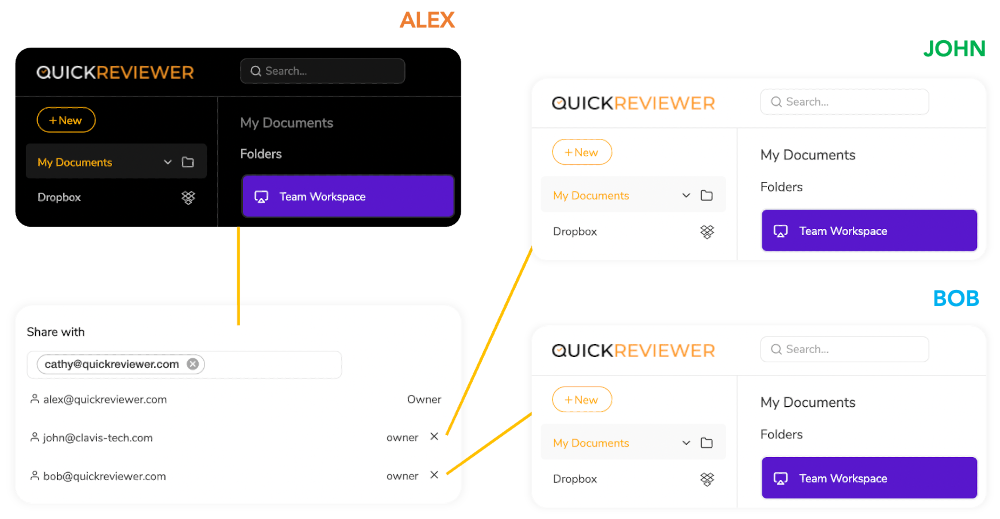
You can organize feedback on creative projects without needing to exchange multiple files or emails. Drag and drop to upload files, and share them with as many reviewers as you like. Highlight text, pinpoint and add comments. Each reviewer can be identified by colour and can reply to or upvote each other's comments.
QuickReviewer can be used on mobile devices to review and approve files.
Description
Chimping.io offers a comprehensive post-production workflow solution tailored for freelance filmmakers, editors, colorists, and small production crews. This platform integrates various essential services, such as video review, file transfer, project-folder synchronization, and final delivery of content. Clients can conveniently review video cuts via private links while providing timecoded feedback, which can seamlessly be converted into markers in a DaVinci Resolve timeline through its dedicated companion app. The application for Mac is designed to handle large file transfers, allowing for resumable uploads. Project Sync functionality ensures that all team members maintain an updated and organized project folder. Additionally, users can share files with collaborators, receive completed renders through links, and send out password-protected final versions. Recipients benefit from the ability to access shared links without the need to create an account. A unique rough-cut feature leverages video transcripts to create radio cuts organized by story, which can then be exported to either DaVinci Resolve or Premiere. For subscription options, monthly plans offer a designated amount of storage, review time, encoding, transfers, and rough cut capabilities, with different tiers available to accommodate both individual filmmakers and larger production teams. This flexibility makes Chimping.io a valuable tool in the post-production landscape.
API Access
Has API
No
API Access
Has API
No




Integrations
Adobe Illustrator
Yes
Adobe InDesign
Yes
Adobe Photoshop
Yes
Adobe Premiere Pro
Yes
DaVinci Resolve
No
Dropbox
Yes
Google Drive
Yes
Integrations
Adobe Illustrator
No
Adobe InDesign
No
Adobe Photoshop
No
Adobe Premiere Pro
No
DaVinci Resolve
Yes
Dropbox
No
Google Drive
No
Pricing Details
$35 Per Month
Save $72 /yr
Free Trial
Yes
Free Version
Yes
Pricing Details
$9/month
Plans start at $9 per month and include defined storage, review, encoding, transfer, and rough-cut allowances. The vendor describes the subscription as flat-rate, without per-seat or per-GB charges.
Free Trial
Yes
Free Version
No
Deployment
Web-Based
Yes
On-Premises
No
iPhone App
No
iPad App
No
Android App
No
Windows
Yes
Mac
Yes
Linux
No
Chromebook
No
Deployment
Web-Based
Yes
On-Premises
No
iPhone App
No
iPad App
No
Android App
No
Windows
No
Mac
Yes
Linux
No
Chromebook
No
Customer Support
Business Hours
Yes
Live Rep (24/7)
No
Online Support
Yes
Customer Support
Business Hours
No
Live Rep (24/7)
No
Online Support
Yes
Types of Training
Training Docs
No
Webinars
No
Live Training (Online)
Yes
In Person
No
Types of Training
Training Docs
No
Webinars
No
Live Training (Online)
No
In Person
No
Vendor Details
Company Name
Clavis Technologies Pvt. Ltd.
Founded
2011
Country
India
Website
www.quickreviewer.com
Vendor Details
Company Name
chimping.io
Founded
2026
Country
United States
Website
chimping.io
Product Features
Online Proofing
Audit Trail
No
Due Date Tracking
No
File Sharing
Yes
Markup Tools
No
Role-Based Permissions
No
Status Tracking
Yes
Version Control
Yes
Video Review & Collaboration
Activity Notifications
No
Annotations
No
Client Portal
No
Communication Tools
No
Customizable Branding / White Label
No
For Agencies
No
One-Click Approvals
No
Roles / Permissions / Groups
No
Side-to-Side Comparisons
No
Stages
No
Threaded Comments
No
Version Control
No
Video Editing
No
Workflow Management
No
Product Features
Video Review & Collaboration
Activity Notifications
No
Annotations
No
Client Portal
No
Communication Tools
No
Customizable Branding / White Label
No
For Agencies
No
One-Click Approvals
No
Roles / Permissions / Groups
No
Side-to-Side Comparisons
No
Stages
No
Threaded Comments
No
Version Control
No
Video Editing
No
Workflow Management
No
Alternatives
Alternatives
No Alternatives
