Average Ratings 1 Rating
Average Ratings 0 Ratings
Similar Products
-
Adobe FireflyAdobe Firefly is a versatile AI-powered creative platform designed to help users generate and edit multimedia content with ease. It allows users to create images, videos, and audio using simple text prompts within an interactive and flexible workspace. The platform features tools like generative fill, image editing, and video editing, enabling users to refine and enhance their creations. Firefly also includes quick actions such as background removal, cropping, resizing, and format conversion to streamline workflows. Users can explore an infinite canvas for creative production and experiment with various styles and outputs. The platform encourages creativity by allowing users to remix content from a shared community gallery. With its intuitive design, it reduces the need for advanced technical skills. Firefly integrates AI capabilities to speed up content creation and editing processes. It supports both beginners and professionals in producing high-quality results. Overall, Adobe Firefly provides a powerful and accessible environment for modern digital creativity.
-
YodeckNext-generation technology for digital signage professionals Yodeck, a cloud-based digital signage platform, is unbeatable. It powers your screen with dynamic content that instantly engages your target audience. Yodeck makes it easy to create, schedule, and design content from the web. To get your message across to those who matter most to you, use attention-grabbing media such as videos, images and PDF files, Office documents, data dashboards, and social media. It provides enterprise-grade security and control. Yodeck's drag-and-drop editing feature allows users to be creative in organizing content into interesting layouts. Yodeck is proud to offer a unique digital signage solution for businesses of all sizes. This includes local diners as well as global leaders like Delta Airlines, Autodesk and Adobe.
-
CompanyCamCompanyCam is a photo-based solution created specifically for contractors. Users can take unlimited photos—which are location and time stamped, sent to the cloud, and stored securely. Every photo is organized by project and instantly available to your team, allowing you to see what’s going on anytime, anywhere.
-
Switcher StudioSwitcher Studio allows you to capture video from multiple angles and edit it in real-time. This will allow you to connect with your community in a more engaging way. You can stream it live or save it for later. Your audience will be attracted to you with relevant content. Make it look great. There's no need to purchase, lug or learn largeequipment. Switcher is compatible with iPads and iPhones. Switcher is so intuitive that anyone can create amazing video with it. You don't need to hire outside videographers or producers. It takes an hour to edit every minute of edited video. Every minute of live-editing takes, well, one second. You can share every moment, live or recorded, external or internal, with video -- no matter what it holds.
-
4K Video DownloaderYou can watch videos from anywhere, anytime, even offline. It's easy to download: simply copy the link from your browser, and then click 'Paste Link" in the application. You can save full playlists and channels on YouTube in high-quality and other video or audio formats. Download your YouTube Mix, Watch Later and Liked videos as well as private YouTube playlists. Receive new videos from your favorite YouTube channels automatically. You can feel the action around you with virtual reality videos. To experience the amazing VR experience in 360deg, download 360deg videos. You can bypass any restrictions placed by your Internet service provider to bypass your school firewall or workplace firewall. To access YouTube and other sites, set up an in-app proxy connection.
-
ONLYOFFICE DocsONLYOFFICE Docs is a secure online office suite for teams and businesses of all sizes. Create and edit docs, sheets, slides, fillable forms and PDFs. Collaborate with your teammates in real time using two co-editing modes, version history and other tools. Enable the AI assistant of your choice — ChatGPT, DeepSeek, Mistral, Groq AI, etc. Generate new content, summarize, translate and do more with your favourite AI tool while working on office files. Integrate ONLYOFFICE Docs into your business platform, whether it be Odoo, Alfresco, Confluence, Pipedrive, Nextcloud, Redmine, SuiteCRM, etc., via an integration app (40+ available integrations). Use Docs within ONLYOFFICE DocSpace, a room-based document collaboration platform equipped with the online office suite. Create dedicated spaces for different purposes, invite your teammates, assign access permissions and collaborate the way you like. With DocSpace, you can store, share and co-edit office files, and even interact with third parties.
-
MobiPDFMobiPDF (formerly PDF Extra) is an intuitive reader and editor that allows you to read, edit, create, OCR, organize, annotate, fill and sign, convert, and share any PDF. This makes MobiPDF an excellent choice for users seeking a budget-friendly alternative to Adobe Acrobat Pro. HERE’S WHAT YOU GET WITH MOBIPDF: Multiple Page View Modes: Enjoy a distraction-free "Read Mode". Advanced Editing Tools: Experience a Word-like PDF editing environment. Two-Way Conversions: Convert PDFs to and from Word, Excel, PowerPoint, or image formats. OCR Support: Make scanned documents searchable. Markup Tools: Highlight, comment, strikethrough, stamp, and more to enhance your documents. Effortless PDF Organizer: Reorder, compress, split, and combine PDFs with ease. Sign & Secure: Add signatures, create and fill forms, and protect your PDFs with passwords, encryption, and digital certificates. Offline Mode: Work freely on your projects, even offline. Seamless translation: One-click translate any PDF into 50+ languages.
-
Expedience SoftwareEXPEDIENCE AUTOMATES MICROSOFT WORD PROPOSALS Use Microsoft Word to craft business proposals, RFP responses, or Statements of Work (SOWs)? Expedience delivers unmatched efficiency, flawless branding consistency, and 100% document accuracy – without ever leaving Microsoft Word! THE MICROSOFT ADVANTAGE Native to Microsoft Word, Expedience leverages the best of Microsoft 365: • Use Rich Content (tables, charts, videos, PowerPoint slides, etc) • Consistent Corporate Branding • Copilot Generative AI • Excel Data Integration • Realtime Collaboration AUTOMATED SALES PROPOSALS & SOWs Create complete Microsoft Word document proposals, sales documents, and SOWs in just a few clicks - even from Excel spreadsheets! Consistent, accurate, and perfectly formatted every time. TRUSTED CONTENT Expedience stores your curated, branded, approved content in a library for quick reuse. This means that your team will have trusted content at their fingertips directly within Microsoft Word.
-
EventsAirEventsAir is the one platform you need for everything events. Execute engaging in-person, virtual, and hybrid events with a solution that supports you from start to finish. From built-in budgeting and accounting tools to breathtaking on-brand event sites and seamless registration experiences, EventsAir's all-in-one event management software makes event planning a breath of fresh...air. With over 30 years of expertise, EventsAir has powered 350,000+ successful events, earning the trust of the industry's best to deliver seamless, standout experiences. We love dynamic and complex events, which is why we’ve built a comprehensive platform designed to grow and evolve alongside you.
-
MuzaicMuzaic: High-Fidelity AI Soundtracks for the Serial Creator Workflow For professional video creators, the production pipeline has a major bottleneck: sound design. While modern NLEs make visual editing fast, finding the right track remains a manual, 40-minute hunt through generic stock libraries. Muzaic is a web-based AI music architect designed to solve this by matching audio to video content programmatically. Instead of browsing metadata tags, Muzaic uses AI to analyze your video’s vibe, tempo, and emotional arc, generating custom soundtracks in seconds. This is built for agencies and serial creators—those producing recurring formats like YouTube series or high-ARPU ad campaigns—where workflow efficiency is the primary driver of ROI. Muzaic provides professional 192kbps audio that sounds like a studio production, not a generic AI demo. Proper synchronization isn't just aesthetic; it's a growth driver, directly affecting viewer retention and completion rates by managing the audience's emotional state. Match-First Pricing Model: We believe you should only pay for what actually works in your project. - Unlimited Generation: Preview unlimited tracks for free to find the perfect match. - One Soundtrack ($2): One high-quality track for your video, plus 3 AI video analyses. - Creator ($19/mo): Unlimited downloads and unlimited AI analyses for high-scale production. Technical Highlights: - AI Analysis: The system "watches" the video to propose styles that fit the specific content. - Commercial Licensing: 100% royalty-free for ads and client projects, eliminating copyright stress. - Efficiency: Reduces time spent on sound design by up to 70%. Stop searching. Start creating.
Description
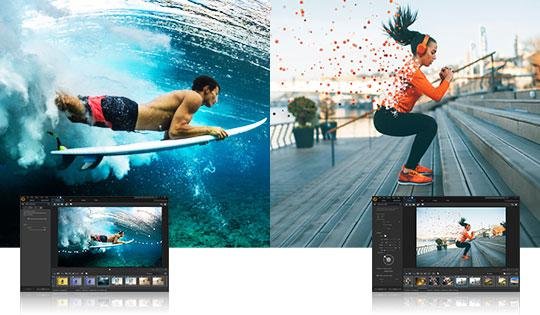
Dive right into the essence of innovative photo editing with ease. Utilizing robust AI technologies, stunning visual effects, sophisticated color adjustments, and user-friendly layer manipulation, you can effortlessly craft stunning images and artistic creations within moments. Engaging with fine art has reached a new level of accessibility. PhotoDirector 365 provides you with unique AI tools, fresh features, format compatibility, and access to an extensive range of plug-ins. Let the AI seamlessly outline objects in your photos to facilitate impeccable selections. Our advanced AI engine intelligently applies brushstrokes to swiftly convert photos into artistic wonders. Infuse your images with drama by animating, modifying, blending, and shifting the sky. Developed by the team behind the PowerDirector video editing suite, this photo editor bridges the divide between static images and dynamic videos. Capture the essence of movement from a video and encapsulate it into one astonishing photograph that tells a story. With these tools, your creative possibilities are limitless.
Description
PhotoScape is an enjoyable and user-friendly photo editing software that allows users to enhance and correct their images with ease. It features a viewer that lets you browse photos in your directory and create engaging slideshows. The editing tools include options for resizing, adjusting brightness and color, correcting white balance and backlight, and applying various effects such as frames, balloons, and mosaic modes. Users can add text, draw, crop images, remove red-eye, and utilize features like the paint brush, clone stamp, and effect brush to fine-tune their pictures. For those needing to edit multiple images at once, the batch editor simplifies the process significantly. The page feature allows you to combine several photos into a single frame for a cohesive look, while the combine tool lets you stack images vertically or horizontally. Additionally, users can create animated GIFs by using multiple photos to generate a lively final product. Printing options are available for various formats, including portrait shots and passport photos. The splitter feature allows users to divide an image into smaller sections, and the screen capture tool enables easy saving of screenshots. Finally, with the color picker, you can zoom in on images to select and utilize specific colors for your projects. Not only is PhotoScape versatile, but it also encourages creativity and exploration in photo editing.
API Access
Has API
No
API Access
Has API
No




Integrations
Director Suite 365
No
YouTube
No
Pricing Details
$3.17 per month
Billed annually
Free Trial
No
Free Version
No
Pricing Details
No price information available.
Free Trial
No
Free Version
Yes
Deployment
Web-Based
No
On-Premises
No
iPhone App
No
iPad App
No
Android App
No
Windows
Yes
Mac
Yes
Linux
No
Chromebook
No
Deployment
Web-Based
No
On-Premises
No
iPhone App
No
iPad App
No
Android App
No
Windows
Yes
Mac
Yes
Linux
No
Chromebook
No
Customer Support
Business Hours
Yes
Live Rep (24/7)
No
Online Support
Yes
Customer Support
Business Hours
No
Live Rep (24/7)
No
Online Support
Yes
Types of Training
Training Docs
Yes
Webinars
Yes
Live Training (Online)
Yes
In Person
No
Types of Training
Training Docs
Yes
Webinars
No
Live Training (Online)
No
In Person
No
Vendor Details
Company Name
CyberLink
Founded
1996
Country
Taiwan
Website
www.cyberlink.com/products/photodirector-photo-editing-software-365/overview_en_US.html
Vendor Details
Company Name
MOOII TECH
Founded
2001
Country
United States
Website
www.photoscape.org
