Average Ratings 1 Rating
Average Ratings 1 Rating
Similar Products
-
Adobe FireflyAdobe Firefly is a versatile AI-powered creative platform designed to help users generate and edit multimedia content with ease. It allows users to create images, videos, and audio using simple text prompts within an interactive and flexible workspace. The platform features tools like generative fill, image editing, and video editing, enabling users to refine and enhance their creations. Firefly also includes quick actions such as background removal, cropping, resizing, and format conversion to streamline workflows. Users can explore an infinite canvas for creative production and experiment with various styles and outputs. The platform encourages creativity by allowing users to remix content from a shared community gallery. With its intuitive design, it reduces the need for advanced technical skills. Firefly integrates AI capabilities to speed up content creation and editing processes. It supports both beginners and professionals in producing high-quality results. Overall, Adobe Firefly provides a powerful and accessible environment for modern digital creativity.
-
Adaptive SecurityAdaptive Security is OpenAI’s investment for AI cyber threats. The company was founded in 2024 by serial entrepreneurs Brian Long and Andrew Jones. Adaptive has raised $50M+ from investors like OpenAI, a16z and executives at Google Cloud, Fidelity, Plaid, Shopify, and other leading companies. Adaptive protects customers from AI-powered cyber threats like deepfakes, vishing, smishing, and email spear phishing with its next-generation security awareness training and AI phishing simulation platform. With Adaptive, security teams can prepare employees for advanced threats with incredible, highly customized training content that is personalized for employee role and access levels, features open-source intelligence about their company, and includes amazing deepfakes of their own executives. Customers can measure the success of their training program over time with AI-powered phishing simulations. Hyper-realistic deepfake, voice, SMS, and email phishing tests assess risk levels across all threat vectors. Adaptive simulations are powered by an AI open-source intelligence engine that gives clients visibility into how their company's digital footprint can be leveraged by cybercriminals. Today, Adaptive’s customers include leading global organizations like Figma, The Dallas Mavericks, BMC Software, and Stone Point Capital. The company has a world class NPS score of 94, among the highest in cybersecurity.
-
QuantaStorQuantaStor, a unified Software Defined Storage platform, is designed to scale up and down to simplify storage management and reduce overall storage costs. QuantaStor storage grids can be configured to support complex workflows that span datacenters and sites. QuantaStor's storage technology includes a built-in Federated Management System that allows QuantaStor servers and clients to be combined to make management and automation easier via CLI and RESTAPIs. QuantaStor's layered architecture gives solution engineers unprecedented flexibility and allows them to design applications that maximize workload performance and fault tolerance for a wide variety of storage workloads. QuantaStor provides end-to-end security coverage that allows multi-layer data protection for cloud and enterprise storage deployments.
-
ONLYOFFICE DocsONLYOFFICE Docs is a secure online office suite for teams and businesses of all sizes. Create and edit docs, sheets, slides, fillable forms and PDFs. Collaborate with your teammates in real time using two co-editing modes, version history and other tools. Enable the AI assistant of your choice — ChatGPT, DeepSeek, Mistral, Groq AI, etc. Generate new content, summarize, translate and do more with your favourite AI tool while working on office files. Integrate ONLYOFFICE Docs into your business platform, whether it be Odoo, Alfresco, Confluence, Pipedrive, Nextcloud, Redmine, SuiteCRM, etc., via an integration app (40+ available integrations). Use Docs within ONLYOFFICE DocSpace, a room-based document collaboration platform equipped with the online office suite. Create dedicated spaces for different purposes, invite your teammates, assign access permissions and collaborate the way you like. With DocSpace, you can store, share and co-edit office files, and even interact with third parties.
-
LM-Kit.NETLM-Kit.NET is an enterprise-grade toolkit designed for seamlessly integrating generative AI into your .NET applications, fully supporting Windows, Linux, and macOS. Empower your C# and VB.NET projects with a flexible platform that simplifies the creation and orchestration of dynamic AI agents. Leverage efficient Small Language Models for on‑device inference, reducing computational load, minimizing latency, and enhancing security by processing data locally. Experience the power of Retrieval‑Augmented Generation (RAG) to boost accuracy and relevance, while advanced AI agents simplify complex workflows and accelerate development. Native SDKs ensure smooth integration and high performance across diverse platforms. With robust support for custom AI agent development and multi‑agent orchestration, LM‑Kit.NET streamlines prototyping, deployment, and scalability—enabling you to build smarter, faster, and more secure solutions trusted by professionals worldwide.
-
CredentialingSpectrumCredentialingSpectrum is a secured, cloud-based medical credentialing software for facility, payer and contract management. It is a healthcare credentialing system that simplifies the process and increases efficiency. CredentialingSpectrum is a one-click comprehensive automation system that makes it convenient and the best provider credentialing software available in the USA.
-
SuperOpsSuperOps is the AI-native unified platform for modern MSPs and internal IT teams. It replaces the typical four-to-six-tool IT operations stack - PSA, RMM, helpdesk, MDM, asset tracking, network monitoring, patch management and IT documentation - with a single, built-as-one platform on a shared data layer. That architectural choice is what makes the rest of the platform work, particularly its agentic AI. Monica AI, SuperOps' intelligence layer, was designed alongside the platform from day one. It triages tickets, surfaces patch and CVE risks, drafts worklogs, suggests knowledge base articles, and increasingly handles fully autonomous workflows for routine work. SuperOps supports Windows, macOS, Linux, iOS, iPadOS and Android, integrates with the IT and MSP ecosystem (Slack, Teams, Azure AD, Okta, QuickBooks, Xero, Bitdefender, SentinelOne and more), and bundles Splashtop and ISL Online remote access free. Transparent pricing, fast deployment, founder-led product investment.
-
Bitdefender Ultimate Small Business SecurityBitdefender Small Business Security provides robust, enterprise-level cyber-defense tailored for smaller companies, ensuring protection across various platforms including Windows, macOS, iOS, and Android. With a centralized management system that is user-friendly, it allows organizations lacking dedicated IT personnel to efficiently implement and oversee their security measures from a single interface. The solution features a multi-layered approach to endpoint protection, incorporating machine learning, behavioral analysis, real-time monitoring, process termination, and rollback capabilities to safeguard against both known and emerging threats. Additionally, it includes ransomware prevention and remediation strategies that detect unusual encryption activities and facilitate file recovery from backups. Users are also protected against fileless attacks, with measures like memory and back-injection interference as well as script blocking. The software further enhances security by preventing phishing and fraud through the blocking of malicious websites and alerting users accordingly, while offering advanced exploit protection with real-time shields for common applications such as browsers, Office software, and Adobe Reader, thus ensuring all-encompassing endpoint security. This comprehensive suite of features makes it an ideal choice for small businesses seeking to fortify their cybersecurity defenses.
-
Dialpad SupportCustomer experience shouldn't run on disconnected tools and static scripts. Dialpad Contact Center brings voice, digital channels, and human agents together in a single AI-native platform, built to act — not just record — on every customer interaction. This is Agentic AI in practice: agents that reason through a problem, take the next step, and drive it to resolution without waiting on a human to intervene. Where legacy systems leave data trapped in silos, Dialpad Contact Center closes that gap, linking voice and data so context travels with the customer instead of getting lost between systems. The payoff compounds. Dialpad has already generated over 775 million AI recaps, and each new interaction adds to a growing base of operational intelligence — sharper resolution paths, more productive agents, better outcomes quarter over quarter. None of it runs unchecked: Dialpad's Guardian layer keeps AI operations secure and governed, so intelligence scales without sacrificing oversight. In practice, that means up to 80% of issues get resolved autonomously, freeing your team to focus on the conversations that genuinely need a human. Intelligence works at the edge; people stay at the center of the experience. And you don't have to take the ROI on faith. Through Dialpad's Proving Ground, enterprises can validate performance and cost savings before rolling out at scale — a far more reliable path than betting on a brittle, rules-based bot.
-
Visual PlanningVisual Planning is a powerful scheduling and resource management tool that's simple to use. Visual Planning is used by thousands of organizations to share their schedules and work more efficiently together.
Description
PhotoCraft is an open-source graphics editing application that provides tools for photo manipulation, image composition, and layered digital artwork. Developed in Rust, the software uses a native GPU-accelerated canvas with support for Metal, Vulkan, DirectX 12, and WebGPU rendering technologies. Its editing interface includes familiar menus, keyboard shortcuts, panels, and tools for managing image documents. Users can work with layers, masks, brushes, vector elements, and editable text to create or modify visual compositions. PhotoCraft supports PSD and PSB file formats, allowing users to open and save layered image documents. The application includes 16 adjustment layers, more than 70 live-preview filters, smart objects, and configurable layer styles for non-destructive editing. On-device selection tools enable users to isolate subjects and objects and refine masks without sending image data to an external server. Color management features support RGB, CMYK, Lab, and grayscale documents at multiple bit depths, along with ICC profiles and soft proofing. PhotoCraft is available for macOS, Windows, and Linux, and its source code can be downloaded, modified, and compiled independently.
Description
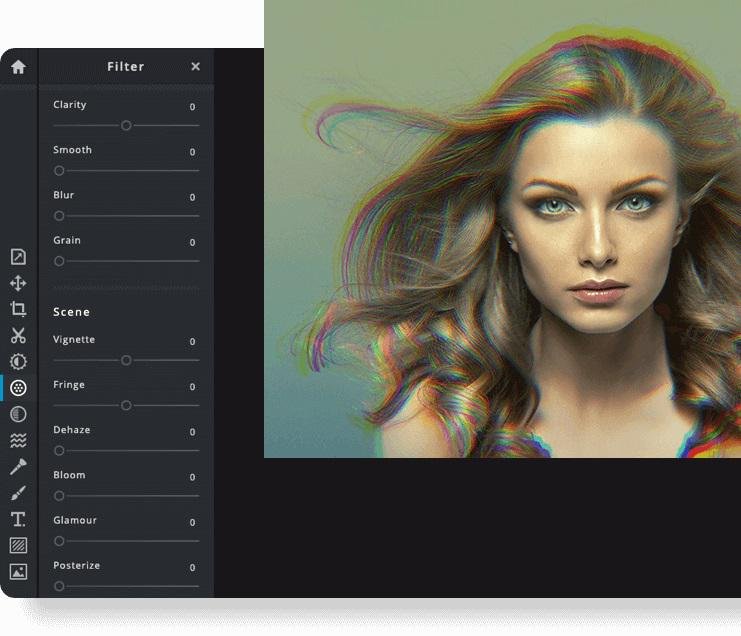
Pixlr is a free online photo editor that enables users to enhance images and create stunning designs directly in their browser. With advanced AI-powered tools, you can enjoy a seamless and intuitive photo editing experience that delivers professional results in no time. The editor supports a wide range of image formats, including PSD (Photoshop), PXD, JPEG, PNG (with transparency), WebP, SVG, and others. You have the option to start with a blank canvas or choose from our selection of expertly designed templates. Thanks to our innovative AI design tools, tedious editing tasks are a thing of the past; you can effortlessly remove backgrounds from images with just one click, capturing even the finest details like individual strands of hair. Let the power of AI and machine learning elevate your photo editing and background removal to unprecedented heights! With straightforward controls, such as toggles and adjustable sliders, achieving stunning and unique photo effects has never been easier. Explore endless creative possibilities and transform your images with Pixlr today!
API Access
Has API
Yes
API Access
Has API
No




Integrations
Gmail
No
Google Drive
No
Model Context Protocol (MCP)
Yes
Prodia
No
YouTube
No
Integrations
Gmail
Yes
Google Drive
Yes
Model Context Protocol (MCP)
No
Prodia
Yes
YouTube
Yes
Pricing Details
Free
Free to download and use; open source. No subscription is required.
Free Trial
No
Free Version
Yes
Pricing Details
$2.49 per month
$1.49/month if billed annually
Free Trial
Yes
Free Version
No
Deployment
Web-Based
No
On-Premises
No
iPhone App
No
iPad App
No
Android App
No
Windows
Yes
Mac
Yes
Linux
Yes
Chromebook
No
Deployment
Web-Based
Yes
On-Premises
No
iPhone App
Yes
iPad App
Yes
Android App
Yes
Windows
No
Mac
No
Linux
No
Chromebook
No
Customer Support
Business Hours
No
Live Rep (24/7)
No
Online Support
No
Customer Support
Business Hours
No
Live Rep (24/7)
No
Online Support
Yes
Types of Training
Training Docs
No
Webinars
No
Live Training (Online)
No
In Person
No
Types of Training
Training Docs
Yes
Webinars
No
Live Training (Online)
Yes
In Person
No
Vendor Details
Company Name
ArtCraft
Website
getartcraft.com/apps/photocraft
Vendor Details
Company Name
Pixlr
Founded
2008
Country
Sweden
Website
pixlr.com
Product Features
Graphic Design
Collaboration
No
Data Visualization
No
Filtering
No
Image Database
No
Image Editor
No
Templates
No
Product Features
Business Card
Contact Management
No
Data Extraction
No
Design Templates
No
Image Editor
No
Print Management
No
Step-by-Step Wizard
No
Graphic Design
Collaboration
No
Data Visualization
No
Filtering
No
Image Database
No
Image Editor
No
Templates
No
