Average Ratings 0 Ratings
Average Ratings 0 Ratings
Similar Products
-
MobiPDFMobiPDF (formerly PDF Extra) is an intuitive reader and editor that allows you to read, edit, create, OCR, organize, annotate, fill and sign, convert, and share any PDF. This makes MobiPDF an excellent choice for users seeking a budget-friendly alternative to Adobe Acrobat Pro. HERE’S WHAT YOU GET WITH MOBIPDF: Multiple Page View Modes: Enjoy a distraction-free "Read Mode". Advanced Editing Tools: Experience a Word-like PDF editing environment. Two-Way Conversions: Convert PDFs to and from Word, Excel, PowerPoint, or image formats. OCR Support: Make scanned documents searchable. Markup Tools: Highlight, comment, strikethrough, stamp, and more to enhance your documents. Effortless PDF Organizer: Reorder, compress, split, and combine PDFs with ease. Sign & Secure: Add signatures, create and fill forms, and protect your PDFs with passwords, encryption, and digital certificates. Offline Mode: Work freely on your projects, even offline. Seamless translation: One-click translate any PDF into 50+ languages.
-
PDF GuruEasily convert, edit, merge, and compress your PDF files with just a few simple clicks. You can quickly download your document without any hassle, as our PDF converter generates files in mere seconds! To ensure the safety of your digital information, we implement HTTPS encryption while you create PDF files on our site. You can redact PDFs, alter text, insert new elements, and engage in various other tasks, all from a single platform. Our user-friendly interface is designed for seamless navigation, allowing you to utilize our PDF creator with minimal effort. Compatible with every major operating system, our online PDF maker functions flawlessly on Windows, Mac OS, Linux, iOS, and Android. For those who wish to maintain privacy, you have the option to secure your file by locking or restricting access, preventing others from opening, editing, or printing it. This comprehensive tool simplifies your document management and enhances your productivity.
-
PDFCreatorPDFCreator automates document output in Windows-based business environments, covering the whole creation pipeline from conversion to delivery. It converts print output from any application into PDF, JPG, PNG, or TIF via a virtual printer, so existing workflows don’t need to change. Businesses use PDFCreator to streamline repetitive document tasks: output is captured, formatted, named, secured, and routed according to configurable profiles. Typical use cases include automated report generation, batch processing of large document sets, and compliant document delivery in regulated industries. Key capabilities include encryption, password protection, digital signatures, watermarking, MSI-based deployment, Group Policy support, and centralized profile management. It works with Word, Excel, browsers, ERP platforms, and essentially any Windows application that can print. PDFCreator is available as a free edition for individual, non‑commercial use, alongside three paid editions tailored to business, terminal server, and broader enterprise deployments.
-
SharesightSharesight, a popular investment portfolio tracker, is used in more than 100 countries around the world. It tracks all your stocks, ETFs and dividends in one place. Sharesight allows you to compare your portfolio with an index or a specific stock, and see your total investment return over a period of time. Track your investments across multiple exchanges, currencies and brokers. This eliminates the need for ongoing data input, as all dividends, stock splits, and corporate actions are handled by an automated system, saving you both time & money. Sharesight is free to use. Join hundreds of thousands of other investors who are tracking their portfolio performance.
-
Wave BrowserWave Browser is designed for people who want a safer, faster, and more meaningful way to explore the web. Built on strong security principles, Wave puts you in control of your privacy with customizable cookie and tracker blocking, incognito mode, and clear permission choices. AppEsteem Certification ensures Wave meets strict, independently verified standards for clean installation, transparent behavior, and responsible software practices, giving you confidence every time you browse. Wave is also built for productivity, offering tools that help you stay organized and move through information with purpose. Tab grouping, bookmarks, and a reading list keep ideas within reach, while split screen let you research, compare, or watch without switching between windows. Memory Saver mode helps your device stay fast during heavy sessions, and the built-in AI Assistant and messaging integrations bring your favorite tasks closer to a single click. Designed to be simple and user-friendly, Wave Browser removes friction from everyday browsing. The free ad blocker keeps pages clean, and built-in tools—like the converter, package tracker, price tracker, translation tool, stock tracker, and content notifier—help you get things done without extra extensions. Most importantly, Wave is a browser with real ocean impact built in. Through a certified partnership with 4ocean, Wave helps fund the removal of 100,000 pounds of trash from our ocean, rivers, and coastlines every year. A live impact tracker shows exactly how much waste the Wave community has helped remove, with verified monthly updates from cleanup crews in the U.S., Indonesia, and the Dominican Republic. With Wave Browser, your everyday browsing directly supports a cleaner planet and the people working to protect it.
-
Uptime.comUptime.com website monitoring solutions provide unmatched visibility and availability, empowering engineering, operations and SRE teams to monitor & respond to their most essential services. Simple & intuitive industry leading Enterprise-grade features delivered at a fair price, that are continuously improving. G2, Sourceforge and TechRadar Pro have recognized us as one of the world’s best uptime monitors for several consecutive years, including this one. Try 100% free.
-
ScotchScotch is a comprehensive operating system tailored specifically for liquor retailers, integrating liquor-focused point of sale (POS), payment processing, back office functions, inventory management, ordering, receiving, analytics, and customer engagement tools into one cohesive platform. More than just a typical POS system, Scotch is designed to meet the operational needs of bottle shops, wine retailers, beer outlets, and liquor stores, accommodating features like case breaks, handling distributor invoices, managing thousands of SKUs, working with multiple suppliers, ensuring age verification, enabling offline sales, and providing real-time inventory tracking. By streamlining transactions, the POS system allows staff to complete sales more quickly, enroll customers on the spot, manage rewards programs, facilitate split payments, ensure secure transactions, and maintain customer flow even during internet outages. Furthermore, Scotch automatically monitors parent-child inventory relationships, meaning that selling any quantity—be it a single bottle, a six-pack, or an entire case—instantly updates all related inventory types without the need for manual inputs or end-of-day reconciliation processes. This efficiency ultimately enhances the overall shopping experience for both retailers and their customers alike.
-
Curtain MonGuard Screen WatermarkCurtain MonGuard Screen Watermark is an enterprise solution for displaying screen watermarks that administrators can enable on users' computers. This screen watermark can display various user information, such as the computer name, username, and IP address. The purpose of this watermark is to effectively grab the user's attention and serve as a reminder before they take a screenshot or photograph the screen to share the information with others. The key benefit of Curtain MonGuard is that it encourages users to "think before sharing" sensitive information. If the content being shared contains confidential company data, the watermark can help trace the source of the leaked information back to the user responsible. This allows organizations to hold users accountable and mitigate the consequences of data breaches or unauthorized information sharing. Key features: - On-screen watermark - Full screen-watermark - Application screen-watermark - Supports over 500 Applications - Self-defined content of watermark - Screen-watermark by condition - Central administration - Integration with Active Directory - Uninstall password for client - Password management - Admin delegation - Self protection for the software
-
gPanelAdministrators have visibility and control over all user data and settings through gPanel's central user management interface. It offers security features that provide peace of mind and security. gPanel's intuitive interface makes it easy to use. This means you can spend less time looking and more time doing. Our advanced administration makes it easy to add, delete, suspend, and de-provision users. Just a click away, you can easily control docs, groups and sites, as well as email settings. Google Workspace does not provide much administrative power for documents within Google Drive. However, gPanel gives admins full text searching and text rights over any document in Drive owned or created by users in their domain. It also allows them to transfer ownership of Google Docs. Administrators have the ability to manage their domain with confidence using gPanel. Admins can save time with gPanel by automating repetitive, monotonous processes.
-
TeleRayTeleRay is an industry-first telehealth and image management platform. TeleRay cloud-based medical image management platform allows users to securely share images with professionals (specialists, referring, clinicians) and patients. The platform has many features, including the ability to import or convert DICOM or non DICOM images, query and HL7 connectivity. Integrate with any EMR, view images on an FDA approved viewer anywhere on any device. Complete DICOM image migration is available- set up, training, and implementation is included. Live streaming and remote control of modalities are options and great for many use cases to place professionals virtually in a room any where. TeleRay is the most secure platform with peer 2 peer health and data communication. You can use the app to access workflow tools like waiting rooms, multi-calls, call transfer and sharing of images. It's simple and affordable. More than 3000 locations use our service, including 38 of the top medical centers in more than 20 nations. Get started today for free.
Description
PDF Merge and split is a professional software for those who wish to merge multiple PDFs into one, or to split an existing PDF into several parts.
Details:
Split PDF
Split a detailed long PDF into one-page PDFs with little effort. Our PDF editor app allows you to split the PDF instantly.
Merge PDFs
Our PDF merger allows you to create a single page PDF from multiple PDFs. Merge your PDFs into one file to save space.
Delete Pages
The user can delete unwanted pages while merging or splitting PDFs. It helps remove extra or additional content in the PDF.
Unlock PDF
Is your PDF locked? Our PDF editor has a special unlock PDF feature that allows you to split or merge PDFs.
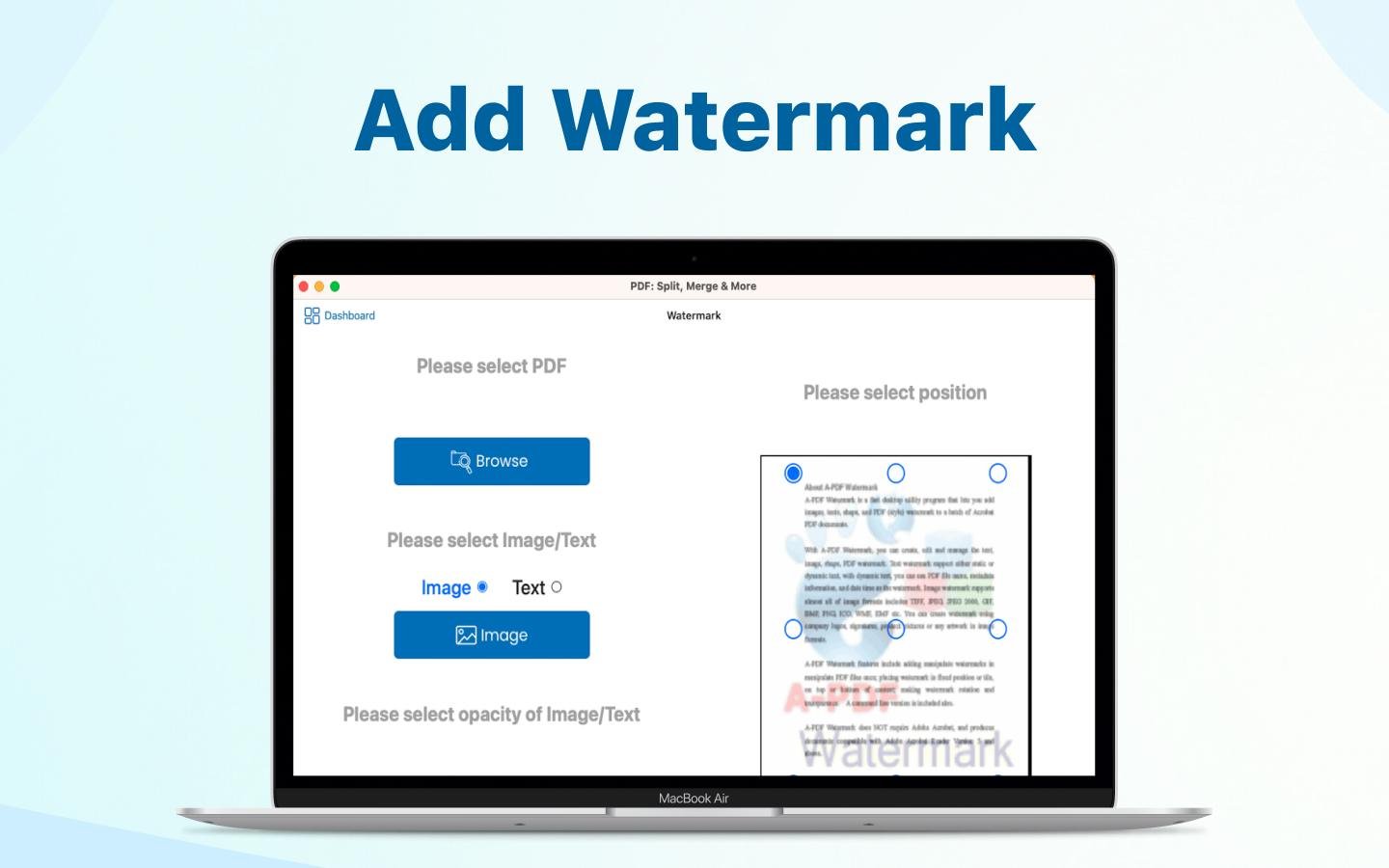
Watermark
Our PDF editor allows you to add a watermark to any page or section of the PDF. Add a watermark to your PDFs to customize their appearance.
Description
Introducing a highly dependable PDF utility that simplifies the process of editing your PDF files effortlessly. Whether you're working with office paperwork, school assignments, financial documents, identification cards, or certificates, this tool caters to all your editing needs. It is completely free and lightweight, designed specifically for mobile use, and functions offline without requiring an internet connection. Additionally, the app now includes a built-in PDF reader for reviewing your modified files. This user-friendly PDF editor offers a variety of features tailored for both creating and altering PDFs, including the ability to open and view documents with the integrated PDF viewer. Users can customize their reading experience according to personal preferences. Furthermore, you can merge multiple PDFs or images (in formats such as JPG, PNG, BMP, and TIFF) into one single PDF document. The PDF merging functionality supports both local storage and cloud-based documents for added convenience. Additionally, you have the option to split larger PDFs into smaller files to optimize storage space, and the PDF split feature permits the extraction of specific pages by defining a range. Overall, this versatile tool is designed to meet all your PDF editing requirements with remarkable efficiency.
API Access
Has API
No
API Access
Has API
No




Integrations
Quickwork
No
Pricing Details
$4.99/Lifetime
Lifetime Subscription
Free Trial
Yes
Free Version
No
Pricing Details
Free
Free Trial
No
Free Version
Yes
Deployment
Web-Based
No
On-Premises
No
iPhone App
Yes
iPad App
Yes
Android App
No
Windows
No
Mac
Yes
Linux
No
Chromebook
No
Deployment
Web-Based
No
On-Premises
No
iPhone App
No
iPad App
No
Android App
Yes
Windows
No
Mac
No
Linux
No
Chromebook
No
Customer Support
Business Hours
Yes
Live Rep (24/7)
No
Online Support
Yes
Customer Support
Business Hours
No
Live Rep (24/7)
No
Online Support
Yes
Types of Training
Training Docs
Yes
Webinars
No
Live Training (Online)
Yes
In Person
No
Types of Training
Training Docs
No
Webinars
No
Live Training (Online)
No
In Person
No
Vendor Details
Company Name
Moon Apps
Founded
2009
Country
United States
Website
www.moonapps.xyz/merge-split-pdf
Vendor Details
Company Name
shash9989
Country
India
Website
pdfutils.shash9989.com
Product Features
Product Features
Annotations
No
Convert to PDF
No
Digital Signature
No
Encryption
No
Merge / Append
No
PDF Reader
No
Watermarking
No
PDF Editors
Access Controls / Permissions
No
Annotations
No
Commenting / Notes
No
Compare Side-by-Side
No
Customizable Branding
No
Delete Pages
No
Electronic Signature
No
Forms Management
No
Full Text Search
No
Merge / Append
No
Offline Access
No
Optical Character Recognition (OCR)
No
Rearrange Pages
No
Rotate Pages
No
Watermarking
No
