Average Ratings 1 Rating
Average Ratings 3 Ratings
Similar Products
-
Switcher StudioSwitcher Studio allows you to capture video from multiple angles and edit it in real-time. This will allow you to connect with your community in a more engaging way. You can stream it live or save it for later. Your audience will be attracted to you with relevant content. Make it look great. There's no need to purchase, lug or learn largeequipment. Switcher is compatible with iPads and iPhones. Switcher is so intuitive that anyone can create amazing video with it. You don't need to hire outside videographers or producers. It takes an hour to edit every minute of edited video. Every minute of live-editing takes, well, one second. You can share every moment, live or recorded, external or internal, with video -- no matter what it holds.
-
LALAL.AIAny audio or video can be extracted to extract vocal, accompaniment, and other instruments. High-quality stem cutting based on the #1 AI-powered technology in the world. Next-generation vocal remover and music source separator service for fast, simple, and precise stem removal. You can remove vocal, instrumental, drums and bass tracks, as well as acoustic guitar, electric guitar, and synthesizer tracks, without any quality loss. You can start the service free of charge. Upgrade to get more files processed and faster results. Only for personal use. Move to the next level. You can process thousands of minutes of audio and/or video. This software is suitable for both personal and business use. Each LALAL.AI package has a limit on the amount of audio/video that can be split. The package minute limit is deducted from each file that has been fully split. You can split as many files you like, provided their total length does not exceed the minute limit.
-
4K Video DownloaderYou can watch videos from anywhere, anytime, even offline. It's easy to download: simply copy the link from your browser, and then click 'Paste Link" in the application. You can save full playlists and channels on YouTube in high-quality and other video or audio formats. Download your YouTube Mix, Watch Later and Liked videos as well as private YouTube playlists. Receive new videos from your favorite YouTube channels automatically. You can feel the action around you with virtual reality videos. To experience the amazing VR experience in 360deg, download 360deg videos. You can bypass any restrictions placed by your Internet service provider to bypass your school firewall or workplace firewall. To access YouTube and other sites, set up an in-app proxy connection.
-
3Q3Q is an API-first video infrastructure for developers and engineering teams who want direct control over their media backend. A REST video API and native player SDKs give you programmatic access to hosting, ingestion, encoding, live streaming, video-on-demand, and delivery, so you can build video portals, streaming apps, or OTT backends on a single European platform. The stack is transparent by design. 3Q supports adaptive bitrate streaming over HLS and DASH with mixed HEVC and AVC codecs and automatic Live-to-VoD. Delivery runs over a proprietary global CDN, encryption, and HTTP/2 over TLS 1.3. The Cookie- and Consent-free HTML5 Video Player is barrier-free in accordance with WCAG 2.1/BITV 2.0 and needs no consent layer. Video AI exposes speech-to-text transcription, automatic subtitles, translation, and chapter markers through the same API, and integration fits your existing pipeline and video workflows. What sets 3Q apart is ownership. 3Q runs on its own independent European video infrastructure, so your data stays in the EU and under German jurisdiction. 3Q is GDPR-compliant and all processes are ISO/IEC 27001 certified, with modular pay-as-you-go pricing and 24/7 support from real video experts.
-
LTXMost AI video tools hand you a black box: closed weights, a subscription, and no way to see what is happening under the hood. LTX takes the opposite approach. Built by Lightricks, LTX is an open foundation model that generates and simulates across video, audio, and the physical world, and it puts the weights, the code, and the control in your hands. At the center of the model is LTX-2.5, a 22B-parameter dual-stream diffusion transformer that produces native 4K video at up to 50 frames per second, with audio and video generated together in a single pass rather than stitched together afterward. Artificial Analysis, an independent benchmarking group, currently ranks LTX among the top three AI video models in the world. You choose how you want to use it. Download the open weights and run LTX-2.5 on your own hardware. License the model for on-premise deployment backed by enterprise support. Or build directly on LTX Studio, the production suite that turns the model into a full creative workflow. Companies like ElevenLabs, Asteria Film Co., Magnopus, and NVIDIA already rely on LTX for their own work. LTX is not built for one-off social clips. It is infrastructure for teams that generate motion, audio, and physical environments as part of their own products and pipelines.
-
Adobe FireflyAdobe Firefly is a versatile AI-powered creative platform designed to help users generate and edit multimedia content with ease. It allows users to create images, videos, and audio using simple text prompts within an interactive and flexible workspace. The platform features tools like generative fill, image editing, and video editing, enabling users to refine and enhance their creations. Firefly also includes quick actions such as background removal, cropping, resizing, and format conversion to streamline workflows. Users can explore an infinite canvas for creative production and experiment with various styles and outputs. The platform encourages creativity by allowing users to remix content from a shared community gallery. With its intuitive design, it reduces the need for advanced technical skills. Firefly integrates AI capabilities to speed up content creation and editing processes. It supports both beginners and professionals in producing high-quality results. Overall, Adobe Firefly provides a powerful and accessible environment for modern digital creativity.
-
pCloud BusinesspCloud Business is a cloud storage and file synchronization platform designed for teams that need controlled access, cross-platform compatibility, and predictable storage allocation. It provides centralized file management with granular permissions and optional client-side encryption. Founded in 2013 in Switzerland, pCloud operates under EU-aligned privacy standards and offers data residency in Luxembourg (EU) and Dallas, Texas (US). The platform supports over 23 million users globally. Core Functionality : - Per-User Storage Allocation : 1 TB or 2 TB per user, suitable for small to mid-sized teams and distributed environments. - Virtual File System (pCloud Drive) : Mounts as a local drive on Windows, macOS, and Linux. Files are streamed on demand, reducing local disk usage. - File Sync & Sharing : Folder-level sync, link-based sharing, and permission control (view/edit/manage). Supports password-protected and time-limited links. - Admin & Access Control : Centralized user management, role assignment, and storage distribution via admin console. - Versioning & File History : File versioning with up to 180 days retention, enabling rollback and recovery. - Cross-Platform Support : Native clients for Windows, macOS, Linux, iOS, Android, plus web interface. - Client-Side Encryption (Optional) : Zero-knowledge encryption via pCloud Encryption for sensitive data; encryption keys are not stored server-side. Technical Positioning: - Swiss jurisdiction; GDPR-aligned processing - No file size limits - Works without mandatory ecosystem lock-in (no bundled office suite required) - Compatible with heterogeneous environments (Linux included) Trial : 30-day free trial available for up to 10 users.
-
AI Video CutAI Video Cut is a complimentary tool designed to convert long videos into dynamic short clips that are perfect for platforms such as YouTube Shorts, TikTok, and social media advertisements. By utilizing AI-enhanced prompts, it provides a range of ready-made templates alongside customizable features, enabling users to craft enticing trailers, product showcases, and educational content. The tool boasts advanced smart cropping technology that recognizes faces, a variety of caption styles, and multilingual support, ensuring that the content resonates with a wide array of audiences. Additionally, users have the flexibility to export their videos in different lengths and aspect ratios tailored to various platforms and viewer preferences. Ideal for content creators, digital marketers, social media strategists, e-commerce entrepreneurs, event coordinators, and podcasters, AI Video Cut streamlines the process of enhancing video content, making it accessible and efficient for anyone looking to elevate their visual storytelling. With its user-friendly interface and innovative features, AI Video Cut empowers individuals and businesses alike to make a lasting impact through their video content.
-
Service CenterService Center by Office Ally is trusted by more than 80,000 healthcare providers and health services organizations to help them take complete control of their revenue cycle. Service Center can verify patient eligibility and benefits, submit, correct, and check claims status online, and receive remittance advice. Accepting standard ANSI formats, data entry, and pipe-delimited formats, Service Center helps streamline administrative tasks and create more efficient workflows for providers.
-
PipefyPipefy is a low-code Business Orchestration and Automation Technologies (BOAT) platform designed to act as a modern middleware layer for the enterprise stack. Rather than replacing existing Systems of Record (SORs) like SAP, Oracle, or Salesforce, Pipefy wraps them in an agile orchestration layer. This architecture allows technical teams to modernize legacy operations and extend the life of core systems without the risks associated with "rip and replace" projects. Pipefy provides the infrastructure to sanitize data inputs, manage complex business logic, and orchestrate API calls between fragmented endpoints. Technical & Architectural Highlights: • Adaptive Governance Framework: Pipefy solves the "Shadow IT" problem by establishing IT-sanctioned "Safe Zones." Business users can build workflows within these guardrails, while IT retains control over critical data, integrations, and permissions via a centralized console. • Agentic AI Engine (BYOLLM): The platform features a governable AI Agent Studio. Unlike "black box" solutions, Pipefy supports a Bring Your Own LLM approach, allowing enterprises to integrate preferred models (Azure OpenAI, AWS Bedrock) securely to automate document analysis (OCR) and decision-making. • Robust Connectivity: Built with an API-first philosophy, Pipefy offers a GraphQL API, Webhooks, and enterprise-grade iPaaS capabilities to ensure seamless data interoperability across the stack. • Security & Compliance: Engineered for regulated industries, the platform is ISO 27001, ISO 27701, and SOC2 Type II certified, supporting compliance with GDPR and SOX standards. Pipefy empowers IT leaders to eliminate technical debt and clear development backlogs by safely delegating low-complexity builds to business units.
Description
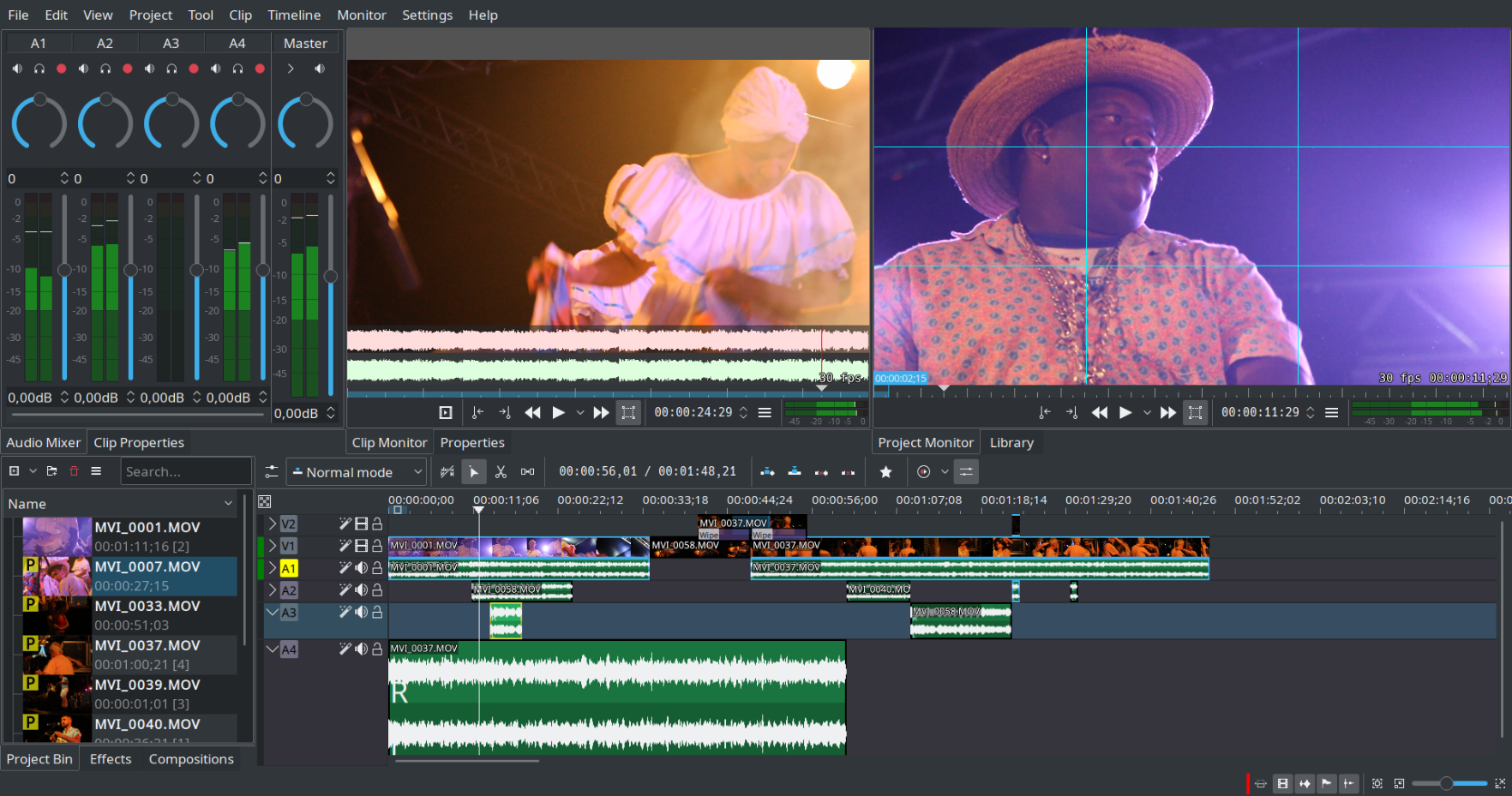
Kdenlive serves as a non-linear video editing software that operates on the MLT framework. This versatile tool supports a wide array of audio and video formats, enabling users to incorporate various effects and transitions into their projects while also providing the option to render in different formats as per their preferences. Additionally, Kdenlive's user-friendly interface makes it accessible for both beginners and experienced editors alike.
Description
VideoPad Master's Edition Windows allows you to create movies and edit videos in many formats, including avi, MP4,.3gp and.divx. The intuitive user interface makes it easy to create videos and movies. Drag and drop video clips. You can choose from more than 50 visual effects and transitions, including chroma keys or green screen technology. Fine tune color and visual effects. Send your friends a video and burn it to DVD.
API Access
Has API
Yes
API Access
Has API
No


Pricing Details
No price information available.
Free Trial
No
Free Version
No
Pricing Details
$69.95/one-time/user
All features including unlimited audio tracks and plugins.
Free Trial
Yes
Free Version
Yes
Deployment
Web-Based
No
On-Premises
No
iPhone App
No
iPad App
No
Android App
No
Windows
No
Mac
No
Linux
Yes
Chromebook
No
Deployment
Web-Based
No
On-Premises
No
iPhone App
Yes
iPad App
Yes
Android App
Yes
Windows
Yes
Mac
Yes
Linux
No
Chromebook
No
Customer Support
Business Hours
No
Live Rep (24/7)
No
Online Support
Yes
Customer Support
Business Hours
No
Live Rep (24/7)
No
Online Support
Yes
Types of Training
Training Docs
Yes
Webinars
No
Live Training (Online)
No
In Person
No
Types of Training
Training Docs
Yes
Webinars
No
Live Training (Online)
No
In Person
No
Vendor Details
Company Name
KDE
Founded
1996
Country
Germany
Website
apps.kde.org/kdenlive/
Vendor Details
Company Name
NCH Software
Founded
1993
Country
United States
Website
www.nchsoftware.com/videopad/index.html
Product Features
Video Editing
3D Video Editing
No
Audio Tools
No
Brand Overlay
No
Collaboration
No
Media Library
No
Social Sharing
No
Speed Adjustment
No
Split / Merge
No
Supports HD Resolution
No
Text Overlay
No
Video Capture
No
Video Stabilization
No
Product Features
Video Editing
3D Video Editing
Yes
Audio Tools
Yes
Brand Overlay
Yes
Collaboration
No
Media Library
Yes
Social Sharing
Yes
Speed Adjustment
Yes
Split / Merge
Yes
Supports HD Resolution
Yes
Text Overlay
Yes
Video Capture
Yes
Video Stabilization
Yes
Video Making
Animation
No
Collaboration Tools
No
Customizable Branding
Yes
Drag & Drop
Yes
Media Library
Yes
Privacy Options
No
Social Sharing
No
Templates
No
Text Overlay
Yes
Text to Video
Yes
Video Capture
Yes
Voice-Over
No
