Average Ratings 0 Ratings
Average Ratings 0 Ratings
Similar Products
-
IntelexIntelex delivers a unified software system for overseeing Environmental, Health, Safety, and Quality (EHSQ) initiatives. Its expandable platform is crafted to consolidate, oversee, and scrutinize EHS and Quality data comprehensively. The solution works on any device to meet the realities of your workplace. With Intelex, your organization can: Elevate your EHSQ program outcomes by supervising workflows for superior performance and command. Discern patterns and propensities through goal-setting to deepen understanding and improve decision-making in your EHSQ program. Diminish occurrences and cut down on administrative tasks by efficiently supervising, managing, refining, and extracting insights from your safety data via our intuitive safety software. Simplify the management and reporting of air, water, and waste emissions, and oversee environmental outputs to fulfill sustainability objectives. Foster ongoing improvements in quality by seamlessly logging and monitoring all instances of nonconformity within a unified, web-based system. Investigate trends across various departments, sites, or locations. Intelex can help you manage compliance with international standards and regulations such as: OSHA, WCB, ISO 45001, EPA, ISO
-
Resco Inspections+Resco Inspections+ is a versatile digital solution designed for industries like construction, manufacturing, oil and gas, nonprofits, utilities, and property management. The platform helps organizations move away from paper forms by transforming audits, inspections, surveys, and checklists into fully customizable digital workflows. With native integration with Dynamics 365 and Salesforce, it allows you to extend CRM/ERP data beyond the office, ensuring you can collect and update field data effortlessly. The offline-first architecture is essential for environments where connectivity is unreliable, such as remote oil rigs, construction sites, garages, or even crowded cities. Field technicians, auditors, and inspectors can capture critical data without interruption, and the advanced sync engine ensures it syncs automatically once a connection is available. Inspections+ includes a drag-and-drop questionnaire builder with smart questions, business logic, rules, and media capture, enabling easy no-code customization for safety checks, compliance reports, or trial audits. With real-time data insights, organizations can streamline processes, reduce errors, and make informed decisions on the go.
-
QBenchQBench is a cloud-based Laboratory Information Management System (LIMS) designed to help laboratories manage samples, workflows, data, inventory, reporting, quality processes, and client interactions in one platform. Labs use QBench to manage operations from order placement and sample processing through results and automated reporting. The platform is highly configurable, allowing laboratories to build workflows, define custom data fields, and automate processes around the way their lab operates. QBench helps reduce manual work by connecting instruments, software, and other systems through file parsers and a robust API. These integrations can automate data transfer, reduce repetitive data entry, and lower the risk of transcription errors. Key capabilities include sample and workflow management, configurable workflows and custom fields, workflow automation, instrument and system integrations, file parsing, API connectivity, inventory management, client portals, automated reporting, analytics, and integrated Quality Management System (QMS) capabilities. QBench is designed to adapt as laboratory processes change. Teams can modify workflows, fields, and automations without relying heavily on custom development. As a cloud-based platform, QBench brings laboratory data, workflows, automation, quality management, and reporting into one centralized system. Customers are also supported by a team that includes former bench scientists who understand laboratory workflows and provide guidance during implementation and ongoing use.
-
Certainty SoftwareCertainty is an enterprise-level auditing and inspection software that can be trusted to help you manage and report on business risk, compliance, and performance metrics quickly and efficiently. Certainty Software is used by hundreds of thousands of professionals to complete millions of inspections and audits each year. It provides all the tools you need to collect, collate, and report consistent, accurate, and meaningful metrics across your business. Certainty provides all the tools you need to design, manage, and report on audit/inspection data, as well as help you manage and mitigate any risks, incidents, and issues that may be identified during the audit/inspection process.
-
HighchartsHighcharts, a Javascript-based charting library, makes it easy to add interactive charts and graphs to web or mobile projects of any size. Highcharts is used by more than 80% of the 100 biggest companies in the world, as well as thousands of developers from a variety of industries, including finance, publishing, application development, and data science. Highcharts is in active development since 2009. It remains a favorite among developers due to its robust feature set and ease-of-use documentation, accessibility features and vibrant community.
-
Resco Field Service+Resco Field Service+ empowers field service teams by transforming traditional service processes into streamlined digital workflows. Built to enhance operations in industries like utilities, telecommunications, manufacturing, and energy, Field Service+ combines offline functionality with advanced scheduling, routing, and data capture tools to keep teams productive in any environment. With seamless integration into Dynamics 365 and Salesforce, Resco Field Service+ enables real-time data access and updates from the field, reducing manual entry and eliminating paper-based records. Field technicians can use their mobile devices to capture photos, scan barcodes, complete checklists, and access service history—even offline, which is critical for remote or high-traffic areas. Features include drag-and-drop customization, allowing teams to create workflows, forms, and reports without coding. Its GPS and routing capabilities help technicians optimize their routes, and with real-time insights, supervisors can monitor job status and resource allocation on the go. Resco Field Service+ makes managing field operations efficient and reliable, helping organizations improve response times, reduce errors, and enhance customer satisfaction.
-
ERA EHS SoftwareERA EHS Software Solutions provides a cloud-based EHS management platform designed to streamline compliance, sustainability, and chemical management for manufacturers. ERA’s software helps organizations manage complex regulatory requirements across air, water, waste, and refrigerant emissions. The platform supports comprehensive reporting for programs like TRI, NPRI, Title V, and NEI. Its SDS Authoring solution enables rapid generation of safety data sheets in more than 40 languages, with built-in support for GHS, OSHA, WHMIS, and REACH compliance. Health and safety tools include incident tracking, training management, and audit-ready documentation. ERA’s sustainability module tracks Scope 1, 2, and 3 emissions, providing the data infrastructure needed for ESG reporting and long-term sustainability planning. ERA's software is also SOC 2 Type II certified, ensuring enterprise-grade security, data integrity, and over 99.6% platform uptime. Its proprietary automation framework and database of over 216,000 curated chemical records powering automated hazard classification and chemical inventory control allows clients to reduce manual data entry, improve reporting speed, and guarantee compliance accuracy. With modular architecture and industry-specific configurations, ERA serves various industrial sectors, including automotive, aerospace, chemicals, oil and gas, coatings, and furniture manufacturing. ERA boasts Fortune 100 and Fortune 500 clients while also offering a fair pricing strategy and modular design that have allowed the company to become the market leader for small and medium businesses.
-
HSI DonesafeHSI Donesafe redefines EHS management with a no-code, cloud-based platform that transforms complex processes into streamlined, user-friendly workflows. Trusted across industries, Donesafe consolidates tracking, management, and reporting into one accessible platform, making compliance simpler and safety more effective. Donesafe’s adaptable design allows teams to customize workflows, forms, and dashboards to meet evolving compliance needs. With tools for incident reporting, audits, training, and risk assessment, staying ahead of regulatory changes has never been easier. Key Features: - Customizable workflows to align with regulations - Real-time insights for live safety tracking - Scalable design that grows with your team - Streamlined compliance tools for smooth audits and reporting Empower your EHS team to achieve safety excellence with HSI Donesafe.
-
Virtuoso QAVirtuoso QA is an AI-native test automation solution built to streamline and scale enterprise quality assurance processes. It allows users to author tests in natural language, making it accessible for both technical and non-technical team members. The platform leverages self-healing AI to automatically adapt to changes in applications, reducing test flakiness and maintenance overhead. With features like live authoring, real-time execution, and automated diagnostics, teams can quickly identify and resolve issues. Virtuoso QA supports continuous testing across multiple browsers, devices, and environments, ensuring comprehensive test coverage. It integrates seamlessly with popular tools such as Jira, Jenkins, Azure DevOps, and BrowserStack, enabling smooth CI/CD workflows. The platform also provides detailed analytics and dashboards to track performance and optimize testing strategies. By automating test generation and execution, it significantly reduces manual effort and accelerates release cycles. Virtuoso QA empowers organizations to deliver high-quality software faster and more reliably.
-
Source DefenseSource Defense is an essential element of web safety that protects data at the point where it is entered. Source Defense Platform is a simple, yet effective solution to data security and privacy compliance. It addresses threats and risks that arise from the increased use JavaScript, third party vendors, and open source code in your web properties. The Platform offers options for securing code as well as addressing an ubiquitous gap in managing third-party digital supply chains risk - controlling actions of third-party, forth-party and nth-party JavaScript that powers your website experience. Source Defense Platform provides protection against all types of client-side security incidents, including keylogging, formjacking and digital skimming. Magecart is also protected. - by extending the web security beyond the browser to the server.
Description
Inspect Element is a native feature found in most web browsers that enables users to examine and modify a website's HTML, CSS, and JavaScript code in real time. This capability is especially beneficial for web developers, designers, and digital marketers, as it allows them to debug elements, test layout modifications, and engage in live CSS editing. The tool presents the HTML structure of the webpage, enabling users to select and investigate specific components. The corresponding CSS styles are displayed in a separate panel, where users can make temporary changes to observe how those alterations impact the page's visual presentation. Importantly, these modifications are local and do not affect the actual website; if the page is refreshed, it returns to its original state. This feature is crucial for experimenting with design adjustments, resolving issues, and understanding how various web elements are assembled. Additionally, our platform emphasizes adaptability, recognizing that every production site globally is distinctive, just like the solutions we provide. In this way, we ensure that our tools cater to the diverse needs of our users.
Description
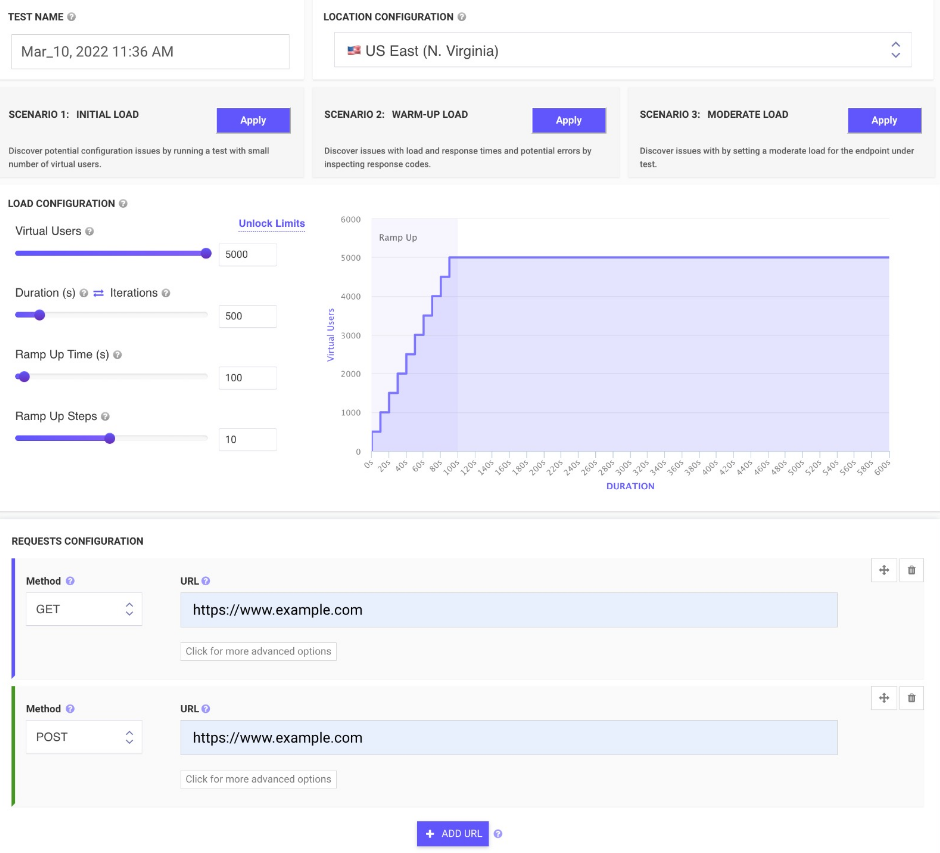
All-in-one cloud testing platform for performance testing, load testing, website speed testing and website UI testing. Mobile applications and API endpoints are all covered.
JMeter testing is easy from multiple cloud locations, with thousands of users. Apache JMeter allows you to see real-time performance metrics of your website and APIs from the cloud.
You can monitor changes over time and receive advice on how to speed up page loading times. We run your tests on cloud instances at set times and notify you if anything goes wrong.
To find rendering issues, invalid HTML, missing or incorrect CSS, load your web pages and websites in mobile emulators. In seconds, schedule runs and inspect the rendered images on all devices. Simulate your site on different screen sizes and resolutions.
Take screenshots of two websites in seconds. To check for differences, you can compare the generated screenshots using a threshold.
API Access
Has API
No
API Access
Has API
Yes


Integrations
CSS
Yes
Chrome DevTools
No
HTML
Yes
JMeter
No
JavaScript
Yes
Jenkins
No
Integrations
CSS
No
Chrome DevTools
Yes
HTML
No
JMeter
Yes
JavaScript
No
Jenkins
Yes
Pricing Details
€24 per month
Free Trial
Yes
Free Version
Yes
Pricing Details
$24 per month
Free Trial
No
Free Version
Yes
Deployment
Web-Based
Yes
On-Premises
No
iPhone App
Yes
iPad App
Yes
Android App
Yes
Windows
No
Mac
No
Linux
No
Chromebook
No
Deployment
Web-Based
Yes
On-Premises
No
iPhone App
No
iPad App
No
Android App
No
Windows
No
Mac
No
Linux
No
Chromebook
No
Customer Support
Business Hours
No
Live Rep (24/7)
No
Online Support
Yes
Customer Support
Business Hours
No
Live Rep (24/7)
No
Online Support
Yes
Types of Training
Training Docs
Yes
Webinars
No
Live Training (Online)
Yes
In Person
No
Types of Training
Training Docs
Yes
Webinars
Yes
Live Training (Online)
No
In Person
No
Vendor Details
Company Name
Inspectle
Founded
2022
Country
Estonia
Website
www.inspectle.com
Vendor Details
Company Name
LoadFocus
Founded
2014
Country
United Kingdom
Website
loadfocus.com
Product Features
Inspection
Appointment Management
No
Customer Database
No
Dispatch Management
No
Equipment Tracking
No
Photos In Reports
No
Print on Site
No
Report Templates
No
Speech Recognition
No
Subcontractor Management
No
Product Features
Automated Testing
Hierarchical View
Yes
Move & Copy
No
Parameterized Testing
Yes
Requirements-Based Testing
Yes
Security Testing
No
Supports Parallel Execution
Yes
Test Script Reviews
Yes
Unicode Compliance
No
Load Testing
API Load Testing
Yes
Database Load Testing
Yes
Load Test Performance Reporting
Yes
Mail Load Testing
No
Multilocation Load Testing
Yes
Multiple Protocol Support
No
Test Script Customization
Yes
Web Application Testing
No
Performance Testing
API Testing
Yes
Benchmarking
Yes
Cross Browser Testing
No
Debugging
Yes
Historical Reporting
Yes
Load Testing
Yes
Mobile Testing
Yes
Parallel Testing
No
Regression Testing
Yes
UI Testing
No
Web Testing
Yes
Website Monitoring
Availability Testing
No
Event Logs
No
Event-Based Notifications
No
FTP Monitoring
No
Mail Server Monitoring
No
Maintenance Scheduling
Yes
Performance Metrics
Yes
Real Time Monitoring
Yes
Transaction Monitoring
No
Uptime Reporting
Yes
