Average Ratings 0 Ratings
Average Ratings 0 Ratings
Similar Products
-
BudgytYou know the pain. 8,000+ formulas in your Excel budget, any one of which could break. Department heads emailing versions back and forth. Mystery errors appearing right before board meetings. Weekends lost hunting for that one number that doesn't add up. We built Budgyt because we lived that nightmare as CFOs ourselves. It's a true database that works like Excel, so your team doesn't need training. But formulas never break. Every number traces back to source with one click. Import your chart of accounts and actuals directly from your accounting system. Click any variance to drill down to vendor-level detail instantly. Run rolling reforecasts every month without rebuilding everything from scratch. We connected it via API so you're up and running in hours, not spending months on implementation consulting. Built for multi-department organizations where budgeting needs to be collaborative, but the finance team needs to stay in control. No more emailing spreadsheets around. No more "did I break something?" panic. Just budgeting that actually works.
-
PathSolutions TotalViewTotalView offers network monitoring as well as root-cause troubleshooting of problems in plain-English. The solution monitors every device as well as every interface on every device. In addition, TotalView goes deep, collecting 19 error counters, performance, configuration, and connectedness so nothing is outside of it’s view. A built-in heuristics engine analyzes this information to produce plain-English answers to problems. Complex problems can now be solved by junior level engineers leaving the senior level engineers to work on more strategic level projects. The core product includes everything needed to run a perfectly healthy network: Configuration management, server monitoring, cloud service monitoring, IPAM, NetFlow, path mapping, and diagramming. Get Total Network Visibility on your network and solve more problems faster.
-
sellerboardAmazon sellers profit analytics that are accurate Provide detailed information about Amazon fees (e.g. FBA fee, commissions, PPC spend, return cost, promotion costs and your fixed costs (e.g. Virtual Assistant, Prep Center You can also view your data by time period (today or yesterday) and by product. Our flexible charts allow for quick and easy analysis of your Key Performance indicators. Everything can be customized: KPI's (e.g. sales, units profit, return costs etc. The output can be filtered by timeframe and granularity (e.g. last year by month, or last month by day). You can filter the view by product or marketplace (with multi-selection). You can view summary information and drill down into product details for each period. It's a clickable, smart P&L statement that allows you to focus on each parameter (e.g. amazon fees) for each time period.
-
Elecard BoroElecard Boro is a professional software solution designed to monitor video stream health and track QoS/QoE parameters across distributed networks. By providing centralized access to statistics and automated reporting, Boro enables telecom professioals to build a powerful monitoring ecosystem from scratch or easily scale existing infrastructure to ensure flawless broadcast quality. How it works: Boro utilizes distributed software probes to monitor UDP, RTP, HTTP, HLS, DASH, SRT, and RTMP streams. By aggregating multi-point measurements on a centralized server, operators can instantly isolate quality degradation across the entire delivery chain. The platform provides network-wide visibility and real-time alerts for ETSI TR 101 290 errors via Email, SNMP, Webhook, PagerDuty, and Telegram. Key Features: • Rapid Deployment & Scalability: Launch a monitoring probe in just 30 minutes. Easily scale your infrastructure by adding new probes to the unified Boro ecosystem on any hardware. • Proactive Issue Resolution: Monitor over 50 QoS and QoE parameters (including full ETSI TR 101 290 compliance) and use triggers to localize network anomalies before they impact viewers. • Advanced Diagnostics: Use comprehensive analysis of SCTE-35 ad-insertion cues and PCAP stream recording for in-depth delivery troubleshooting. • Effortless Integration & Access: Access monitoring data from any device via an intuitive web interface. Seamlessly integrate Boro into your existing workflow using WebHook, SNMP, and ControlAPI. • Operational Efficiency: Reduce the workload on QA and network engineers through automated regular reporting, advanced visualization dashboards, and smart threshold tuning that eliminates false alarms.
-
BuildxactBuildxact is a construction management software that is easy to use for contractors, residential builders, and remodelers. It helps them manage their projects smoothly and efficiently. Transform your business with one system, from the first takeoff to the final invoice. Streamline estimation - Create takeoffs faster and get quotes 5x faster. Buildxact is cloud-based so you can get up and running in no time. Save time by ditching paper plans and spreadsheets! Buildxact digital takeoffs let you scale plans and measure with a few mouse clicks. Quickly measure and count materials knowing your numbers are correct. Easily move material counts into your estimate with online tools and pricing that are 5X faster than paper and pencil. Estimates that clearly lay out materials, labor and overhead for the client. Professional quotes that win more jobs. Find out today with a free trial!
-
RevalyRevaly helps subscription and recurring-revenue businesses stop losing money to failed transactions by transforming payment systems into revenue engines. Its AI-driven payment intelligence evaluates issuer signals and network behavior in real time to keep legitimate payments from failing. Instead of letting small errors or timing issues derail a customer’s purchase, Revaly corrects problems proactively before the user hits “pay.” When a payment does decline, the platform automatically determines the best moment and method to retry, using behavioral science to protect customer trust. Companies using Revaly see major increases in recovered revenue, improved profitability, and significantly reduced involuntary churn. The platform integrates with more than 100 billing, CRM, and payment tools, eliminating the need for operational changes. Performance metrics across retail, software, and media industries consistently show double-digit recovery improvements. Ultimately, Revaly gives businesses a predictable, scalable way to grow by ensuring their earned revenue successfully processes.
-
R3 Contract Management for GovConManaging government contracts shouldn’t be a never-ending spreadsheet chore. R3 Contract Management is built from the ground up for GovCon — and now, it goes beyond tracking and compliance. With embedded AI and intelligent workflows, R3 starts doing the contract work for you. Whether it’s ingesting a new award, adding clauses with flowdowns, adding CLINS and SLINS with funding details, or creating new subcontracts, R3 AI delivers more than visibility — it executes and does the actual work. All of this happens inside a platform designed for how GovCon really works — with FAR/DFARS logic, secure collaboration, and My Contract Work dashboards that make life easier for everyone. It’s not just contract management. It’s contract execution — at scale, powered by AI.
-
Banker's DashboardAccess your bank's or credit union's financial performance from anywhere, anytime. Secure, cloud-based access gives you insight into your bank's financial performance. With a few clicks, you can access margin components, branch performance, forecasts, and more. The Banker's Dashboard and Credit Union Dashboard integrate seamlessly with your core processor. Easy setup allows you to immediately improve your bottom line. Automate reporting and eliminate errors so you can focus on higher-value tasks. Multiple forecast scenarios can be quickly run and revised, allowing you to analyze variances and other strategies. Compare branch performance. For better results, institute best practices and hold branches accountable.
-
SorabanSoraban serves as an AI-driven administrative assistant tailored for accounting and tax firms, aimed at automating the processes of client data collection, document retrieval, and workflow management through a user-friendly, branded portal. By substituting monotonous manual tasks with flexible, customizable questionnaires that can send automatic reminders to clients via SMS, email, or voicemail, it also converts document uploads into PDFs and enhances client communication with intelligent, context-sensitive prompts. This tool integrates seamlessly with existing accounting software, enabling automatic data entry, the application of e-signatures for IRS documentation, and efficient coordination of tax return deliveries, all while minimizing the need for human involvement. By taking over repetitive administrative responsibilities, Soraban allows professionals to dedicate their time to advisory roles, thereby boosting overall efficiency, minimizing errors, and elevating the client experience through smooth, mobile-accessible interactions. Ultimately, Soraban not only transforms how accounting firms operate but also paves the way for a more streamlined future in client management.
-
PropelPropel is a modern, AI-powered cloud platform built for how manufacturers work today. It unifies Product Lifecycle Management (PLM), Quality Management System (QMS), and Product Information Management (PIM) into one intelligent system, giving teams a connected, always-accurate view of their products. With AI embedded across the platform through Propel One, manufacturers can automate routine work, surface insights faster, and make better decisions with confidence. AI continuously learns from product data to proactively flag risks, highlight trends, and guide next best actions across teams. Instead of relying on spreadsheets, siloed tools, and manual handoffs, teams manage product data, changes, and quality processes in a single governed environment with full traceability. Propel creates a true digital product record that spans design, development, manufacturing, commercialization, and continuous improvement. Built-in workflows standardize change management, streamline quality events, and support compliance without slowing teams down. Trusted by medical device, high tech, and industrial manufacturers, Propel helps organizations reduce errors, shorten cycle times, and improve collaboration across engineering, quality, operations, supply chain, and product teams. The result is faster launches, higher product quality, and a more resilient foundation for growth as products and processes become more complex. Propel has been recognized by Deloitte as a fast-growing technology company and named to the Inc. 5000 list of fastest-growing private companies, reflecting strong customer adoption and momentum helping manufacturers modernize how they build, manage, and deliver products. Designed to scale with growing products, teams, and regulatory demands.
Description
Real-time monitoring and notification of exceptions: The Error Reporting tool counts, evaluates, and compiles crashes occurring within your cloud services. It features a centralized interface for error management that allows for sorting and filtering of results. A specialized view provides comprehensive error details, including a timeline chart, frequency of occurrences, number of impacted users, first and last occurrence dates, along with a refined exception stack trace. You can also opt to receive alerts via email and mobile for any new errors that arise. Gain a quick understanding of errors: Instantly view your application's most significant or newly identified errors on an intuitive dashboard. Relying on a log stream to pinpoint critical errors can hinder your troubleshooting efforts. Error Reporting delivers processed information directly to you, facilitating a quicker understanding and resolution of root issues. Additionally, this tool enhances your overall incident response efficiency.
Description
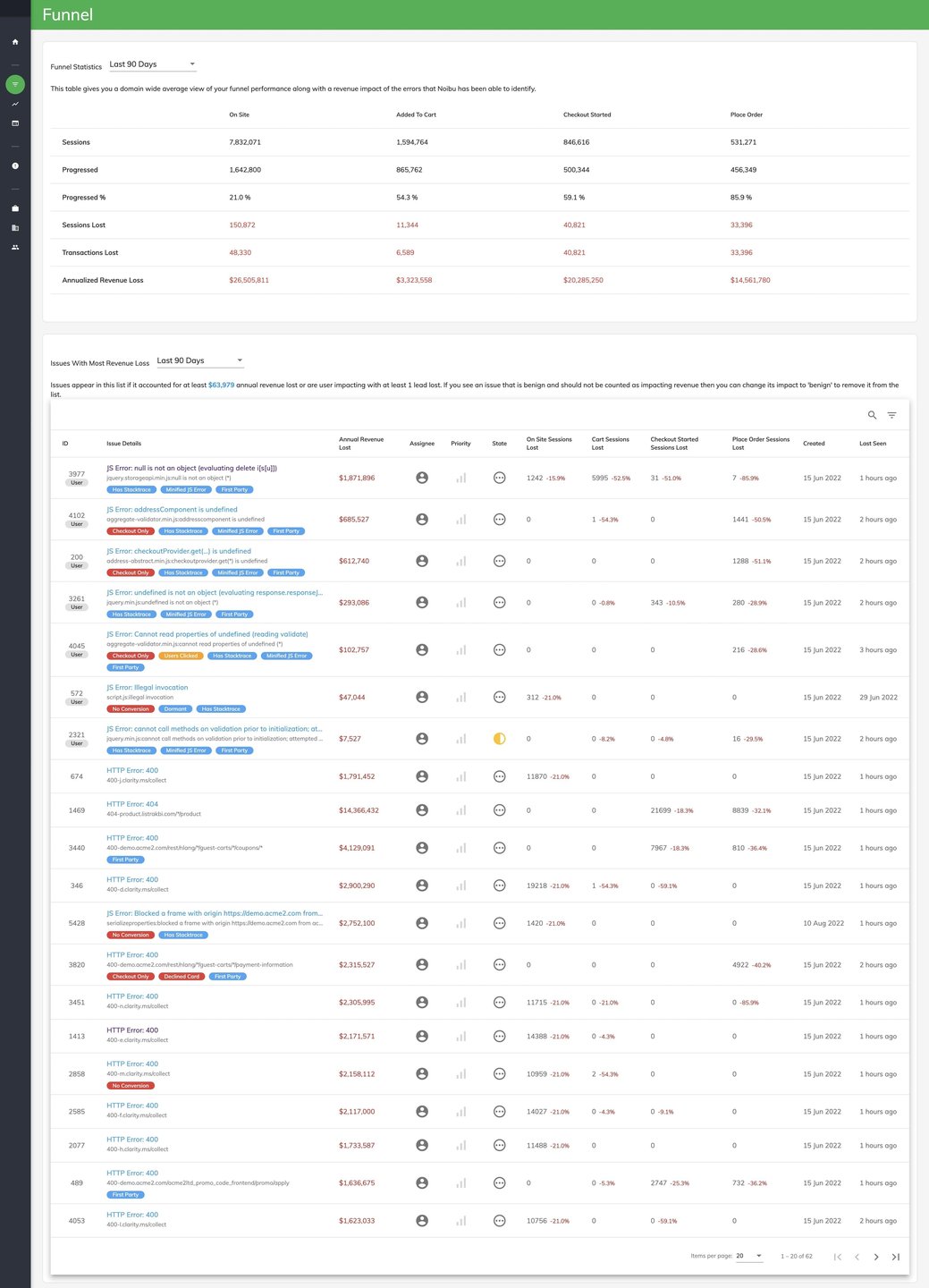
Enhance your digital interactions and safeguard your revenue stream with Noibu's advanced error monitoring platform. This tool not only identifies and prioritizes crucial ecommerce errors but also equips your team with all the necessary resources to resolve them efficiently. Notably, over 90% of website errors go unreported by customers, yet Noibu actively monitors your ecommerce platform and highlights these issues in real-time, ensuring that nothing slips through the cracks. With a myriad of plugins, browsers, devices, and varied customer behaviors, your website may face numerous errors; however, Noibu helps pinpoint the significant issues that negatively impact your sales and checkout conversions. Furthermore, developers often waste precious hours trying to recreate errors without full context; Noibu alleviates this burden by offering comprehensive session data for each detected error, guiding teams on which issues to tackle first. By streamlining the error detection and resolution process, Noibu not only saves time but also enhances the overall user experience on your ecommerce site.
API Access
Has API
No
API Access
Has API
No


Integrations
Amazon EC2
Yes
BigCommerce
No
Google App Engine
Yes
Google Cloud Platform
Yes
Google Compute Engine
Yes
Magento
No
SAP Commerce Cloud
No
Salesforce Agentforce Commerce
No
Shopify Plus
No
WooCommerce
No
Integrations
Amazon EC2
No
BigCommerce
Yes
Google App Engine
No
Google Cloud Platform
No
Google Compute Engine
No
Magento
Yes
SAP Commerce Cloud
Yes
Salesforce Agentforce Commerce
Yes
Shopify Plus
Yes
WooCommerce
Yes
Pricing Details
No price information available.
Free Trial
Yes
Free Version
No
Pricing Details
No price information available.
Free Trial
No
Free Version
No
Deployment
Web-Based
Yes
On-Premises
No
iPhone App
No
iPad App
No
Android App
No
Windows
No
Mac
No
Linux
No
Chromebook
No
Deployment
Web-Based
Yes
On-Premises
No
iPhone App
No
iPad App
No
Android App
No
Windows
No
Mac
No
Linux
No
Chromebook
No
Customer Support
Business Hours
Yes
Live Rep (24/7)
No
Online Support
Yes
Customer Support
Business Hours
Yes
Live Rep (24/7)
No
Online Support
Yes
Types of Training
Training Docs
Yes
Webinars
No
Live Training (Online)
No
In Person
No
Types of Training
Training Docs
Yes
Webinars
Yes
Live Training (Online)
Yes
In Person
No
Vendor Details
Company Name
Founded
1998
Country
United States
Website
cloud.google.com/error-reporting
Vendor Details
Company Name
Noibu Technologies
Founded
2017
Country
Canada
Website
www.noibu.com
Product Features
Bug Tracking
Backlog Management
Yes
Filtering
Yes
Issue Tracking
Yes
Release Management
Yes
Task Management
Yes
Ticket Management
No
Workflow Management
Yes
Product Features
Session Replay
Eye Tracking
No
Form Analytics
No
Heatmaps
No
Mouse Tracking
No
Optimization Tools
No
Session Recording
No
Surveys
No
User Experience Analysis
No
User Feedback
No
Visitor Segmentation
No
Website Monitoring
Availability Testing
No
Event Logs
Yes
Event-Based Notifications
No
FTP Monitoring
No
Mail Server Monitoring
Yes
Maintenance Scheduling
No
Performance Metrics
Yes
Real Time Monitoring
Yes
Transaction Monitoring
Yes
Uptime Reporting
No
