Average Ratings 0 Ratings
Average Ratings 1 Rating
Similar Products
-
Switcher StudioSwitcher Studio allows you to capture video from multiple angles and edit it in real-time. This will allow you to connect with your community in a more engaging way. You can stream it live or save it for later. Your audience will be attracted to you with relevant content. Make it look great. There's no need to purchase, lug or learn largeequipment. Switcher is compatible with iPads and iPhones. Switcher is so intuitive that anyone can create amazing video with it. You don't need to hire outside videographers or producers. It takes an hour to edit every minute of edited video. Every minute of live-editing takes, well, one second. You can share every moment, live or recorded, external or internal, with video -- no matter what it holds.
-
ScreencaptScreencapt allows you to record the entire screen or a selected area. You can also record a specific window. Screencapt is the ideal screen recorder because of its flexibility. Using the integrated audio recording you can also add your commentary or system sound directly into the screen recording. This is particularly useful when creating explanation videos or presentations. Screencapt's ability to record a webcam is a special feature. You can now add your comments and reactions to the video. This makes your screen recordings more personal and professional. Screencapt offers advanced options to record the cursor. You can choose to hide the cursor or add special effects to highlight specific actions. This is especially useful for software tutorials and demonstrations where a clear cursor view is required.
-
TelemetryOSTelemetryTV is a powerful platform for digital signage that allows organizations to connect with audiences, generate awareness and give voice to their communities and teams. TelemetryTV lets you broadcast dynamic content by streaming video, images and social feeds to all your displays, wherever they may be. TelemetryTV powers internal communications and marketing at Starbucks, Amazon and Stanford University. Our success is based on being flexible, open to communication, collaborative, and open to collaboration. We believe in continuous learning, challenging the status-quo, and listening to customers. We are moving towards a world in which our walls will eventually talk. This begs the question: What do you want them saying?
-
OptiSignsOptiSigns, your friendly digital signage software! Designed with simplicity and ease in mind, it's the perfect harmony of affordable software and usage with any hardware in the market. Pick from 140+ Apps, Thousands of Templates, and formats like images & videos, playlists, Google Slides, Weather, Instagram, Twitter, YouTube – you name it! Level up your business and start engaging your audience. For just $10/month per screen, use any display to capture your audiences attention! Remotely manage it all from one central portal. Indulge in features, images, videos, playlists, and schedules. Jazz it up with apps like Google Slides, Weather, Instagram, Facebook, Twitter, and more. Oh, and did we mention? We play nice with the most hardware and operating systems in the market like Fire TV Stick, Android, Chrome, Raspberry Pi, Roku, Windows, Linux, and MacOS. Time to unleash your business potential!
-
4K Video DownloaderYou can watch videos from anywhere, anytime, even offline. It's easy to download: simply copy the link from your browser, and then click 'Paste Link" in the application. You can save full playlists and channels on YouTube in high-quality and other video or audio formats. Download your YouTube Mix, Watch Later and Liked videos as well as private YouTube playlists. Receive new videos from your favorite YouTube channels automatically. You can feel the action around you with virtual reality videos. To experience the amazing VR experience in 360deg, download 360deg videos. You can bypass any restrictions placed by your Internet service provider to bypass your school firewall or workplace firewall. To access YouTube and other sites, set up an in-app proxy connection.
-
Curtain MonGuard Screen WatermarkCurtain MonGuard Screen Watermark is an enterprise solution for displaying screen watermarks that administrators can enable on users' computers. This screen watermark can display various user information, such as the computer name, username, and IP address. The purpose of this watermark is to effectively grab the user's attention and serve as a reminder before they take a screenshot or photograph the screen to share the information with others. The key benefit of Curtain MonGuard is that it encourages users to "think before sharing" sensitive information. If the content being shared contains confidential company data, the watermark can help trace the source of the leaked information back to the user responsible. This allows organizations to hold users accountable and mitigate the consequences of data breaches or unauthorized information sharing. Key features: - On-screen watermark - Full screen-watermark - Application screen-watermark - Supports over 500 Applications - Self-defined content of watermark - Screen-watermark by condition - Central administration - Integration with Active Directory - Uninstall password for client - Password management - Admin delegation - Self protection for the software
-
TollFreeForwardingIn 60 seconds, activate your international phone number. You can choose from over 120+ countries or 1,000 cities. Forward your calls to any number worldwide. You can route your calls according to the hours and days of your business with robust scheduling options. You can route your calls to your main office during business hours or to voicemail during nonbusiness hours. You can instantly view detailed information about calls to your TollFreeForwarding number. To make informed decisions about outbound sales, and follow-up, learn about your customers' call patterns. Record all or part of your calls to keep track of them. Call detail records are a place where recordings can be stored. They can be downloaded or played at any time.
-
ClickLearnClickLearn simplifies complex business processes using popular software. You can create multi-format learning materials in any language and publish them to a 24/7 learning portal with just one click. A video walkthrough of the process, with narration in your preferred language. Put your learning to the test. This interactive simulation of your workplace allows you to test your knowledge without any hints. Interactive simulation of your workplace environment that guides you through the process. This guide is step-by-step. ClickLearn wrote this guide with perfectly cropped screenshots. ClickLearn Assist can be your go-to helper when you are stuck, need process help, or want to try a new process in the live system. You don't have to worry about making another mistake. All your learning materials can be auto-translated with a click of a button
-
LALAL.AIAny audio or video can be extracted to extract vocal, accompaniment, and other instruments. High-quality stem cutting based on the #1 AI-powered technology in the world. Next-generation vocal remover and music source separator service for fast, simple, and precise stem removal. You can remove vocal, instrumental, drums and bass tracks, as well as acoustic guitar, electric guitar, and synthesizer tracks, without any quality loss. You can start the service free of charge. Upgrade to get more files processed and faster results. Only for personal use. Move to the next level. You can process thousands of minutes of audio and/or video. This software is suitable for both personal and business use. Each LALAL.AI package has a limit on the amount of audio/video that can be split. The package minute limit is deducted from each file that has been fully split. You can split as many files you like, provided their total length does not exceed the minute limit.
-
WorkableWorkable stands as the world's foremost recruitment and human resources management platform. We equip internal recruiters, hiring teams, and HR experts with a plethora of avenues to discover highly qualified candidates, facilitating seamless collaboration in the quest to identify, recruit, onboard, and oversee top-tier talent. Businesses that employ Workable experience accelerated transitions from requisition to offer letter thanks to our array of automated and AI-driven tools that streamline candidate sourcing, simplify decision-making, optimize the hiring workflow, and elevate employee management. Established in 2012, Workable has made substantial contributions to the hiring efforts of over 27,000 companies, aiding in the selection of 1.5 million candidates. Our global team of over 250 professionals spans locations in Greece, Australia, the United States, and the United Kingdom, serving a diverse clientele, including esteemed organizations like Starling Bank, JOEY Restaurants, RyanAir, among others.
Description
Introducing the ultimate Free Screen Recorder and Video Editor designed for beginners. With GoPlay's user-friendly screen recording software, you can effortlessly capture any portion of your screen, whether it's a full display or just a specific area. Enhance your recordings by including a webcam overlay, allowing you to insert a facecam during your gaming sessions. You also have the option to record your voiceover while creating your video content. This tool is optimized for fast-paced gaming, supporting recordings at an impressive 60fps. Unlock your creativity with a suite of powerful editing features that let you trim, edit, and add transitions, filters, and effects. The innovative subtitle option allows you to incorporate captions directly into your videos, boosting viewer engagement on social media with minimal effort. GoPlay excels in providing robust capabilities for screen, webcam, and gameplay recording, while also allowing you to easily eliminate unwanted audio or background noise. Fine-tune the audio levels of each track along the timeline and explore a diverse selection of stunning filters that deliver remarkable visual effects. With GoPlay, creating captivating videos has never been easier or more enjoyable.
Description
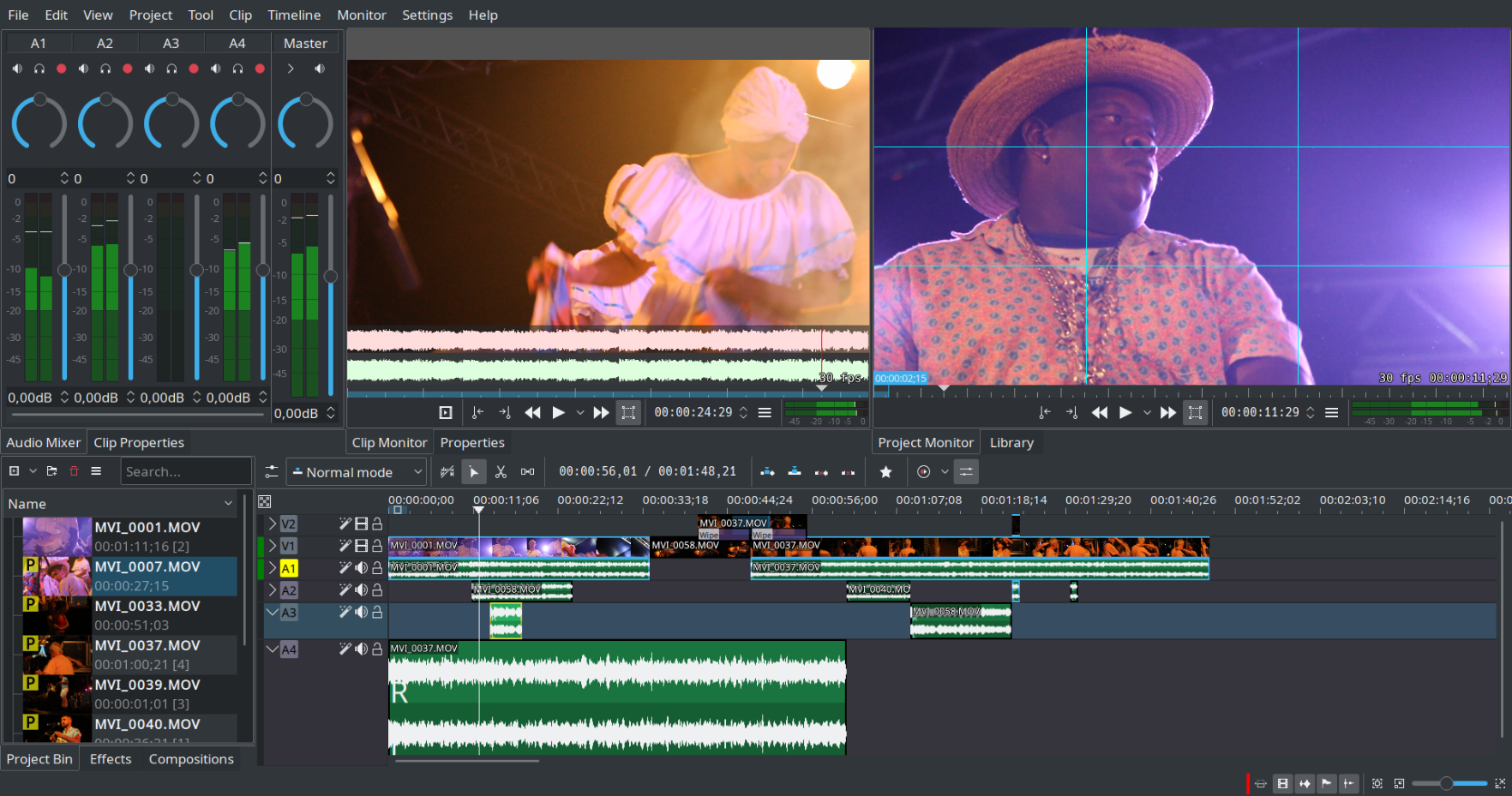
Kdenlive serves as a non-linear video editing software that operates on the MLT framework. This versatile tool supports a wide array of audio and video formats, enabling users to incorporate various effects and transitions into their projects while also providing the option to render in different formats as per their preferences. Additionally, Kdenlive's user-friendly interface makes it accessible for both beginners and experienced editors alike.
API Access
Has API
No
API Access
Has API
Yes




Integrations
KDE Plasma
No
Pricing Details
$14.90 one-time payment
Free Trial
Yes
Free Version
No
Pricing Details
No price information available.
Free Trial
No
Free Version
No
Deployment
Web-Based
No
On-Premises
No
iPhone App
Yes
iPad App
Yes
Android App
Yes
Windows
Yes
Mac
No
Linux
No
Chromebook
No
Deployment
Web-Based
No
On-Premises
No
iPhone App
No
iPad App
No
Android App
No
Windows
No
Mac
No
Linux
Yes
Chromebook
No
Customer Support
Business Hours
No
Live Rep (24/7)
Yes
Online Support
No
Customer Support
Business Hours
No
Live Rep (24/7)
No
Online Support
Yes
Types of Training
Training Docs
Yes
Webinars
No
Live Training (Online)
Yes
In Person
No
Types of Training
Training Docs
Yes
Webinars
No
Live Training (Online)
No
In Person
No
Vendor Details
Company Name
Beyond Play
Country
Hong Kong
Website
www.goplayeditor.com
Vendor Details
Company Name
KDE
Founded
1996
Country
Germany
Website
apps.kde.org/kdenlive/
Product Features
Video Editing
3D Video Editing
No
Audio Tools
Yes
Brand Overlay
Yes
Collaboration
Yes
Media Library
Yes
Social Sharing
Yes
Speed Adjustment
Yes
Split / Merge
Yes
Supports HD Resolution
Yes
Text Overlay
Yes
Video Capture
Yes
Video Stabilization
Yes
Product Features
Video Editing
3D Video Editing
No
Audio Tools
No
Brand Overlay
No
Collaboration
No
Media Library
No
Social Sharing
No
Speed Adjustment
No
Split / Merge
No
Supports HD Resolution
No
Text Overlay
No
Video Capture
No
Video Stabilization
No
