Average Ratings 0 Ratings
Average Ratings 8 Ratings
Similar Products
-
FilecampFilecamp is a cloud-based Digital Asset Management (DAM) software solution that helps marketing & creative teams organize and share their digital media such as images, videos, and brand guidelines. Filecamp comes with unlimited users, each user configured with their own set of user-, admin-, and folder permissions. Filecamp's unique custom branding options will make sure your DAM system matches your brand guidelines. The built-in online proofing and commenting tools allow you to review and approve creative work. Prices start at only USD 29/month and their free 30-day trial allows you to test the solution with your files, teammates, and customers.
-
CompanyCamCompanyCam is a photo-based solution created specifically for contractors. Users can take unlimited photos—which are location and time stamped, sent to the cloud, and stored securely. Every photo is organized by project and instantly available to your team, allowing you to see what’s going on anytime, anywhere.
-
AirConsolidate your team's resources in a well-structured workspace that is organized, version-controlled, and simple to share. While Air securely stores your content, it also offers intelligent search capabilities, guest access, customizable layouts, version tracking, and effortless sharing, enhancing every aspect of the creative journey. Don't let your valuable assets languish in folders and zip files; instead, plan social media campaigns, develop streamlined presentations, and arrange your materials in a workspace that embodies your brand identity. Effortlessly navigate your workspace using features akin to a search engine, where tools like image recognition and smart tags empower all team members to independently find assets. The only challenging element of the feedback process will now be the feedback itself, as you can create public boards that allow guests to upload directly to your workspace. Engage in commentary, initiate discussions, and make selections with context, all while staying updated on new modifications and clearly tracking the most recent version of each asset. This streamlined approach not only boosts collaboration but also fosters creativity within your team.
-
RAD PDFInstall-free PDF editing, form filling, redaction, signing, viewing, and more on your website with RAD PDF! Packaged as an easy to use library / WebControl (compatible with .NET 3.5+, .NET Core, and .NET 5+), RAD PDF can be used with just about any flavor of ASP.NET including MVC, Razor, Blazor, WebForms, and more. RAD PDF is compatible with 99% of internet browsers, including those on Linux, Mac OS X, Microsoft Windows, and mobile. No plugins. No Adobe Reader. RAD PDF is more than a PDF to HTML converter. It natively supports all the most common PDF features including annotations, bookmarks, form fields, page labels, and more. With advanced PDF options, RAD PDF allows you to selectively enable and disable features not available with Adobe Acrobat Reader, like protecting a PDF from being downloaded while still viewable online. RAD PDF users can use PDF form fields directly from the web browser by enabling PDF form filling and PDF form saving without having to install any software. Integrating directly with ASP.NET, RAD PDF allows your web application to capture input data, build custom workflows, and provide an intuitive graphical user interface (GUI) for just about any online PDF interaction imaginable!
-
MuzaicMuzaic.ai is a browser-based tool that scores video automatically. You give it a cut (or a folder of cuts); it returns a finished audio mix — music, SFX, ambience and voiceover as separate layers — mastered to broadcast spec, in roughly 30 seconds per clip. What it actually does The pipeline runs in four stages. First it analyses the video: scenes, objects, pacing, colour and sentiment. From that it builds an audio plan and commits each concept to a clear direction (the site's example: a string quartet under a battle scene) rather than averaging toward something inoffensive. Then it composes every layer to fit the picture and the other layers — SFX land on the action, ambience ducks under speech, the voiceover is drafted from your brief rather than read out. Finally it mixes and masters the result. Existing audio in the source can be kept, replaced or mixed under. Output is three concepts per clip, exported as MP3 or WAV. Layer balance is adjusted inside Muzaic before export; the deliverable is the finished mix, not separate stems. The commercial angle Pricing is metered in minutes of finished audio, not per track or per download; downloads are unlimited. Personal is free for 10 minutes a month, non-commercial only. Creator ($45/month) covers your own brand and paid ads. Studio ($249/month) is for agencies: the licence travels to the client and the legal cover extends to them too. Enterprise adds TV, radio, cinema and OOH, plus a custom contract, DPA and SLA. What it is not It is not a music-generation toy. The free tier exists to test the workflow on your own footage; nothing from it may be published. The target user is a team producing hundreds of ad variants a month, where the audio step is the bottleneck.
-
SmartDrawSmartDraw makes professional drawings and diagrams accessible to everyone. Non-technical users can quickly create floor plans, while professionals get the precision and scale they require. With industry-leading floor planning tools and an intuitive interface for traditional diagramming like flowcharts and organizational charts, SmartDraw delivers enterprise-ready power without unnecessary complexity. Key features: - Large collection of symbols and templates - Ability to create custom shapes - Import PDFs, images, Google Maps, Visio files, Visio stencils - Draw to any scale - Enrich drawings with data - Generate manifest and bills of materials - Generate diagrams from data automatically like org charts, AWS, Azure, PI Boards, and more - Use natural language text prompts to generate diagrams with AI - Save files directly to OneDrive, SharePoint, or Google Drive, or other preferred provider - Integrations with the Microsoft and Google enterprise stack plus Confluence and Jira SmartDraw supports a wide range of industries and real-world use cases, helping teams plan, document, and communicate more effectively. Construction professionals use it to create scaled floor plans, site layouts, and electrical and plumbing drawings. Fire departments rely on it for fire pre-planning and incident documentation, while police departments use it for accident reconstruction and crime scene diagrams. IT teams build network diagrams and cloud architectures, HR leaders create organizational charts, and product managers map out processes and workflows. From physical layouts to business processes, SmartDraw provides a single platform that adapts to the needs of each role and industry.
-
net2phonenet2phone is an AI-powered business communication platform for companies serious about customer experience. Trusted by 500,000+ users and backed by 30+ years of experience, net2phone eliminates the friction of scattered channels and disconnected tools, so every conversation drives retention and growth. Communication breaks down when channels are scattered and tools do not talk to each other. net2phone solves this with a connected business VoIP and unified communications platform built for teams that cannot afford dropped context or slow resolutions. Unite, net2phone's unified communications solution, brings voice, messaging, video, and chat into a single place, with call and video recording, transcription, sentiment analysis on voice calls, automated action item tracking, and AI-generated follow-up emails. AI Agent handles inquiries and completes workflows on its own, answering questions, resolving support cases, scheduling, and managing returns across phone and chat, in 30+ languages, with seamless handoff to human agents when needed. Coach AI analyzes 100% of voice, video, and text interactions, giving managers full visibility into team performance with sentiment analysis, call summaries, and coaching recommendations by user or department. uContact, net2phone's omnichannel contact center, gives high-volume sales and support teams the automation, AI-driven routing, and real-time dashboards they need to deliver consistent customer experiences at scale. Every net2phone solution connects to the tools businesses already use, with a drag-and-drop workflow builder for automating processes without writing code, backed by enterprise-grade security and expert guidance at every step, from setup to integration to ongoing optimization.
-
HaastHaast is an AI-powered compliance engine that helps enterprises eliminate manual marketing reviews and move faster with confidence. It uses AI agents to automatically detect and resolve regulatory and brand risks across content, websites, and social channels. By learning each company’s risk tolerance, Haast ensures consistent, policy-aligned decisions without slowing teams down. Marketers can check and fix content before it goes live, while legal teams gain faster, more reliable oversight without being overwhelmed by approvals. Haast works across text, images, PDFs, video, and web content, supporting both pre-launch checks and continuous monitoring of live assets. Embedded directly into existing workflows, it transforms compliance from a bottleneck into a scalable, automated system.
-
Digital WarRoomDWR eDiscovery allows legal professionals to review, process, and produce documents that could be relevant to litigation. Our Software and hosted Subscriptions offers a wide range of document review tools, including AI search, keyword search, keyword highlight, metadata filtering and marking documents. It also has privilege log, redactions and analysis tools to help users better understand their document corpus. These features can all be done by the user themselves, so they can do the standard eDiscovery tasks without consulting. DWR eDiscovery offers subscriptions to both hosted and on-prem eDiscovery. DWR Pro desktop software can be downloaded to your computer or server. DWR Pro costs $1995per concurrent use license/year. Cloud subscriptions are charged per-GB for hosting and there are no hidden fees. The entry-level Single Matter subscription costs $10/GB/Month and has a minimum of $250 per month. Private clouds allow multiple matters and multiple users for no more than $4/GB/month moving quickly to $1/GB/month.
-
PocomosSave hours per day in double data entry and thousands per month on fuel costs because of our automations and routing optimization tools powered by Google Easily keep track of your one-time and recurring jobs with our job pool and drag-and-drop scheduling tools. Sign up new customers, see your schedule, complete appointments, track chemical usage, and much more from the convenience of your phone or tablet. Automate pre-service notifications, follow-up messages, collection notices, review requests, and other daily tasks. Post payments, resend emails, upload and send attachments, text, and much more from an easy-to-use customer account. Use our Recruiting, Street-Level Lead Tracking, Area Management, Video Training, and Leaderboards to manage your Door-to-Door efforts.
Description
Discover the ultimate browser-based platform for the interactive review of photos and videos, making it incredibly easy to share and provide feedback on ongoing projects. Crafted with user-friendliness in mind, Frankie stands out as the most adaptable and intuitive solution for interactive reviews. It seamlessly operates on popular browsers such as Chrome, Safari, Firefox, and Edge, allowing guests to participate effortlessly by clicking a shared link. Even those new to the platform will find themselves engaged in the review process without any hassle. All comments and sketches made during the session are immediately visible to all participants. Every Frankie account features an array of options, including remote video review and approval, real-time interaction, compatibility with major browsers, advanced drawing and annotation tools, and a complimentary iOS application. When you sign up for your free Frankie trial, you receive a fully-equipped PRO account that allows one active project for a duration of 30 days. Additionally, Frankie enhances collaboration with its interactive drawing and note-taking capabilities, ensuring that feedback is both clear and immediate. This makes it an invaluable tool for teams looking to streamline their review processes.
Description
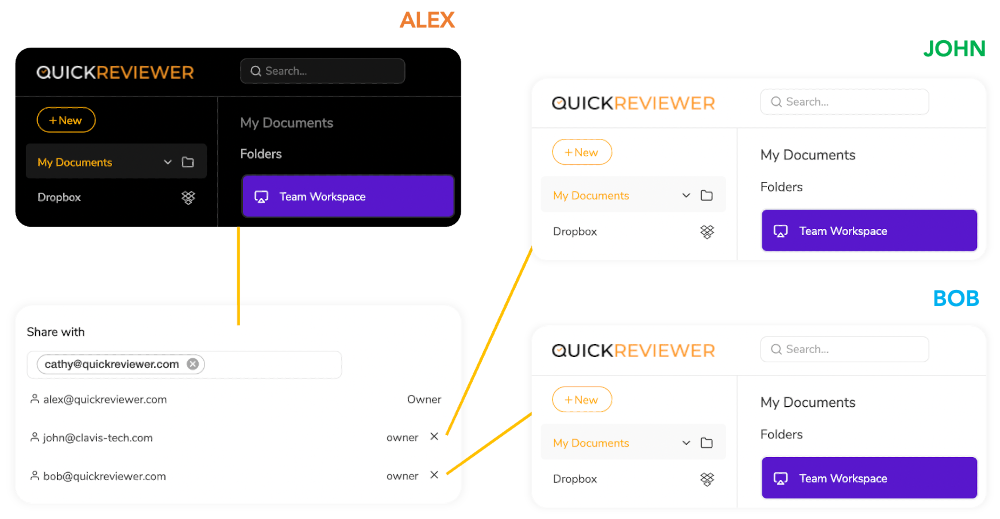
QuickReviewer is an online design review software that allows teams to quickly approve designs and receive feedback and approval. You can review videos, HTML, PDFs, images, and other media. It's not just an annotation tool. You can get conflicting feedbacks.
You can organize feedback on creative projects without needing to exchange multiple files or emails. Drag and drop to upload files, and share them with as many reviewers as you like. Highlight text, pinpoint and add comments. Each reviewer can be identified by colour and can reply to or upvote each other's comments.
QuickReviewer can be used on mobile devices to review and approve files.
API Access
Has API
No
API Access
Has API
No



Integrations
Adobe Illustrator
No
Adobe InDesign
No
Adobe Photoshop
No
Adobe Premiere Pro
No
Dropbox
No
Google Chrome
Yes
Google Drive
No
Microsoft Edge
Yes
Mozilla Firefox
Yes
Safari
Yes
Integrations
Adobe Illustrator
Yes
Adobe InDesign
Yes
Adobe Photoshop
Yes
Adobe Premiere Pro
Yes
Dropbox
Yes
Google Chrome
No
Google Drive
Yes
Microsoft Edge
No
Mozilla Firefox
No
Safari
No
Pricing Details
$49 per month
Free Trial
Yes
Free Version
No
Pricing Details
$35 Per Month
Save $72 /yr
Free Trial
Yes
Free Version
Yes
Deployment
Web-Based
Yes
On-Premises
No
iPhone App
Yes
iPad App
Yes
Android App
No
Windows
No
Mac
No
Linux
No
Chromebook
No
Deployment
Web-Based
Yes
On-Premises
No
iPhone App
No
iPad App
No
Android App
No
Windows
Yes
Mac
Yes
Linux
No
Chromebook
No
Customer Support
Business Hours
Yes
Live Rep (24/7)
No
Online Support
Yes
Customer Support
Business Hours
Yes
Live Rep (24/7)
No
Online Support
Yes
Types of Training
Training Docs
Yes
Webinars
Yes
Live Training (Online)
No
In Person
Yes
Types of Training
Training Docs
No
Webinars
No
Live Training (Online)
Yes
In Person
No
Vendor Details
Company Name
Cospective
Founded
1999
Country
Australia
Website
cospective.com/frankie/
Vendor Details
Company Name
Clavis Technologies Pvt. Ltd.
Founded
2011
Country
India
Website
www.quickreviewer.com
Product Features
Video Review & Collaboration
Activity Notifications
No
Annotations
No
Client Portal
No
Communication Tools
No
Customizable Branding / White Label
No
For Agencies
No
One-Click Approvals
No
Roles / Permissions / Groups
No
Side-to-Side Comparisons
No
Stages
No
Threaded Comments
No
Version Control
No
Video Editing
No
Workflow Management
No
Product Features
Online Proofing
Audit Trail
No
Due Date Tracking
No
File Sharing
Yes
Markup Tools
No
Role-Based Permissions
No
Status Tracking
Yes
Version Control
Yes
Video Review & Collaboration
Activity Notifications
No
Annotations
No
Client Portal
No
Communication Tools
No
Customizable Branding / White Label
No
For Agencies
No
One-Click Approvals
No
Roles / Permissions / Groups
No
Side-to-Side Comparisons
No
Stages
No
Threaded Comments
No
Version Control
No
Video Editing
No
Workflow Management
No
