
Average Ratings 0 Ratings
Average Ratings 0 Ratings
Similar Products
-
Comet BackupStart running backups and restores in less than 15 minutes! Comet is a fast, secure all-in-one backup platform for businesses and IT providers. You control your backup environment and storage destination (local, Wasabi, AWS, Google Cloud Storage, Azure, Backblaze, or other S3 storage providers). Our software supports businesses across 120 countries in 13 languages. Test drive Comet Backup with a 30-day FREE trial!
-
ManageEngine OpManagerOpManager is the ideal end-to-end network monitoring tool for your organization's network. With OpManager, you can keep a close eye on health, performance, and availability levels of all network devices. This includes monitoring switches, routers, LANs, WLCs, IP addresses and firewalls. Insights into your hardware health and performance; monitor CPU, memory, temperature, disk usage, and more to improve efficiency. Seamlessly manage faults and alerts with instant notifications and detailed logs. Streamlined workflows facilitate easy set-up to execute quick diagnosis and corrective measures. The solution also comes with powerful visualization tools such as business views, 3d data center views, topology maps, heat maps, and customizable dashboards. Get proactive in capacity planning and decision-making with over 250 predefined reports covering all important metrics and areas in your network. Overall, OpManager's detailed management capabilities make it the ideal solution for IT administrators to achieve network resiliency and efficiency.
-
Curtain LogTrace File Activity MonitoringIn the daily work environment, companies often need to authorize their employees to access and use sensitive company data. However, most companies lack visibility into how their employees are actually utilizing this data, and whether any misuse is occurring. At the same time, companies have to meet internal audit requirements and comply with various data security regulations and policies. This creates a need for the IT department to find ways to effectively monitor and record how employees are accessing and using the company’s data resources. Curtain LogTrace provides enterprise-wide file activity monitoring. It tracks user actions: create, copy, move, delete, rename, print, open, close, save. Includes source/destination paths and disk type. Perfect for monitoring user file activities. Key Features: - File log (create & delete file) - File log (copy & move file) - File log (print & rename file) - App log (save, open & close file) - Support MySQL & MS SQL - Watermark for printout - Central administration - Integration with Active Directory - Uninstall password for client - Password management - Admin delegation - Self protection for the software
-
ESET PROTECT AdvancedESET Protect Advanced offers a comprehensive cybersecurity solution for businesses of any size. It offers advanced endpoint security against ransomware and zero-day threats. It also includes full disk encryption to ensure legal compliance and data security. The solution uses adaptive scanning, cloud sandboxing and behavioral analysis for proactive cloud-based threats defense. Mobile threat protection secures Android and iOS with anti-malware and anti-theft. It also offers cloud app security, mail server protection, vulnerability and patch management, and cloud app protection. Multi-factor authentication and extended detection and reaction (XDR) improve threat detection and response. The solution provides a single pane of glass remote management to provide visibility into threats and users. It also offers advanced reporting and customized notifications.
-
NinjaOneNinjaOne automates the hardest parts of IT, empowering more than 20,000 IT teams. By providing deep insights into endpoints, robust security measures, and centralized control, NinjaOne boosts efficiency while safeguarding sensitive data and cutting IT expenses. This comprehensive platform offers a versatile toolkit for managing and securing endpoints, including patch management, mobile device oversight, software distribution, remote support, backup solutions, and more, thanks to its extensive IT and security integrations.
-
FilerevFilerev is a powerful tool that helps you easily find and manage hidden files, duplicate files, large files, and oversized folders, ensuring a streamlined and clutter-free digital workspace. Key features include advanced scanning technology that identifies the unorganized files taking up the most space and cluttering your Google Drive. Filerev enhances productivity by saving time and reducing the frustration of manual file organization. The custom filters and bulk delete tool give you complete control over finding and removing unwanted files in your account. The storage analyzer lets you browse your folders by size to see where the space is being used in your Google Drive. Whether you're an individual, a small business, or a large enterprise, Filerev offers robust solutions tailored to your needs. Visit filerev.com to discover how Filerev can transform your Google Drive experience and boost efficiency.
-
Secure EraserSecure Eraser: Secure Data Deletion, Shredders Your Files & Folders. Just because it has been removed from your hard drive doesn't mean that it is gone forever. Anyone can restore the information as long as it was not overwritten. It becomes more difficult if the computer has been resold, or given away. Secure Eraser employs the most well-known method of data disposal. It overwrites sensitive information so that it cannot be recovered even with specialized software. Our award-winning solutions for permanently destroying data eliminate cross-references that may leave traces of deleted files within the allocation table of your hard disk. This Windows software is easy to use and can overwrite sensitive data up to 35 times, regardless of whether they're files, folders or drives, recycle bins, or traces of surfing. You can also delete files that you have already deleted but not for good.
-
OfficeSpace SoftwareOfficeSpace Software is the #1 AI Operating System for the Built World, delivering an intelligent platform that helps organizations plan, manage, and optimize their physical workplaces. The system unifies space planning, desk and room reservations, wayfinding, visitor management, asset tracking, maintenance workflows, and workplace analytics in a single platform designed for scale and collaboration. AI-enabled analytics, predictive insights, and automated workflows give teams a clear view of how spaces are used and how people work across locations. Facilities, HR, IT, and Real Estate leaders use the platform to support hybrid and flexible environments, improve space utilization, streamline operations, and enhance the employee experience while reducing real estate and operational costs. Recognized by Gartner for innovation in the Workplace Experience Applications market, OfficeSpace provides a scalable foundation for future-ready workplaces. By connecting people, spaces, and assets through actionable data, the platform helps organizations make informed decisions and achieve measurable business outcomes.
-
ShiftShift is your power browser. The only browser to merge all your applications into one beautiful window. Connect all of your email accounts and manage all your apps from one powerful window. Streamline everything you do online when you install Shift and access thousands of apps without leaving your browser. Tired of juggling apps, hundreds of tabs, and multiple accounts? Most browsers make that feel messy, Shift makes it simple.
-
Securden Endpoint Privilege ManagerIdentify and populate all local administrator accounts on endpoints across your IT network. Eliminate local administrators and prevent malware and ransomware propagation in your network. Replace privileges with a seamless permission based system for smooth employee experience. Discover and add applications that require elevated privileges to run automatically. Whitelist and blacklist applications using comprehensive application control policies. Enforce principle of least privilege and principle of zero-trust across the organization. Comply with industry regulations with complete audit trails and record all activities. Track application usage across the organization using comprehensive reports and gain insights that help you with creating policies for smoother experience.
Description
Easily manage and adjust disk partitions with this intuitive partitioning software. With a trusted user base of 60 million customers globally, this tool caters to everyone from individual users to businesses and service providers. The free version of the partition manager addresses your essential partitioning needs, while the comprehensive utility allows you to perform both primary and advanced partition operations to optimize disk space utilization. Improve your business data organization by reallocating disk space and streamline IT disk management effortlessly. Before upgrading to the latest Windows operating system, make sure to convert your system hard drive to a GPT disk. Additionally, seamlessly transfer all your data, applications, and accounts to your new Windows 11 PC. By using EaseUS Partition Master, you can design an optimal disk layout that enhances the performance of your PC or server. There are straightforward methods to increase the space on the C drive, enabling you to effectively extend the local C drive or incorporate available space into it. With such versatile features, this software ensures that your system operates efficiently and meets your growing storage requirements.
Description
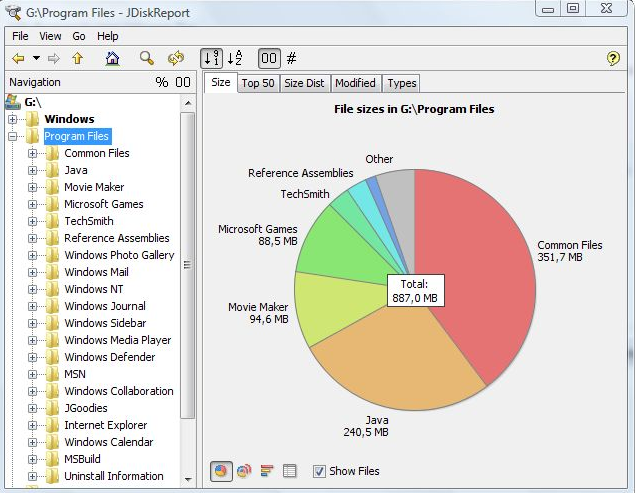
JDiskReport is a useful application that allows users to comprehend the amount of disk space consumed by files and directories while also aiding in the identification of outdated files and folders. The software analyzes your disk drives and compiles various statistics, which can be displayed as summary charts and detailed tables for easier interpretation. It is a completely free, ad-free program that does not have any limitations or expiration dates. This versatile tool is compatible with Windows, Mac, Linux, and other platforms, provided that Java is installed beforehand. Users should ensure that they have Java properly set up prior to installing JDiskReport. The application has been validated across Windows, Mac, and Linux systems, and it is also functional on Solaris and other operating systems that support Java. Additionally, an early version of JDiskReport 2 is currently accessible, which, while less polished than its predecessors from JGoodies, offers a different experience. Although this version is lacking certain features, such as the ability to click on the size pie chart, it can function as a cron job in the background, supplies more detailed information, and showcases a refreshed visual design. As a result, users looking for a robust analysis tool for their disk space management will find JDiskReport to be an invaluable asset.
API Access
Has API
API Access
Has API


Integrations
Java
Pricing Details
$54.95 per year
Free Trial
Free Version
Pricing Details
Free
Free Trial
Free Version
Deployment
Web-Based
On-Premises
iPhone App
iPad App
Android App
Windows
Mac
Linux
Chromebook
Deployment
Web-Based
On-Premises
iPhone App
iPad App
Android App
Windows
Mac
Linux
Chromebook
Customer Support
Business Hours
Live Rep (24/7)
Online Support
Customer Support
Business Hours
Live Rep (24/7)
Online Support
Types of Training
Training Docs
Webinars
Live Training (Online)
In Person
Types of Training
Training Docs
Webinars
Live Training (Online)
In Person
Vendor Details
Company Name
EaseUS
Country
China
Website
www.easeus.com/partition-manager/
Vendor Details
Company Name
JGoodies
Country
Germany
Website
www.jgoodies.com/freeware/jdiskreport/
Product Features
Disk Imaging
Backup Scheduling
Bare-Metal Restore
Compression
Differential Backup
Disk Cloning
Encryption
Image Deployment
Incremental Backup
Web Access / Restoration

