Average Ratings 0 Ratings
Average Ratings 0 Ratings
Similar Products
-
RAD PDFInstall-free PDF editing, form filling, redaction, signing, viewing, and more on your website with RAD PDF! Packaged as an easy to use library / WebControl (compatible with .NET 3.5+, .NET Core, and .NET 5+), RAD PDF can be used with just about any flavor of ASP.NET including MVC, Razor, Blazor, WebForms, and more. RAD PDF is compatible with 99% of internet browsers, including those on Linux, Mac OS X, Microsoft Windows, and mobile. No plugins. No Adobe Reader. RAD PDF is more than a PDF to HTML converter. It natively supports all the most common PDF features including annotations, bookmarks, form fields, page labels, and more. With advanced PDF options, RAD PDF allows you to selectively enable and disable features not available with Adobe Acrobat Reader, like protecting a PDF from being downloaded while still viewable online. RAD PDF users can use PDF form fields directly from the web browser by enabling PDF form filling and PDF form saving without having to install any software. Integrating directly with ASP.NET, RAD PDF allows your web application to capture input data, build custom workflows, and provide an intuitive graphical user interface (GUI) for just about any online PDF interaction imaginable!
-
Nutrient SDKNutrient provides an extensive solution for all your PDF requirements, delivering tools that seamlessly operate PDF features across any platform. 1. SDK: Incorporate advanced PDF functionality into iOS, Android, Windows, web, or any cross-platform technology, supplying abilities like PDF viewing, annotation, collaboration, and beyond. 2. Libraries: Employ our powerful .NET and Java libraries to enhance your backend applications with batch processing of redactions and PDF forms, OCR'd scanned text, and PDF document editing, all directly from your application server. 3. Processor: Our agile PDF microservice, Processor, enables rapid generation of PDFs from HTML, including HTML forms, as well as Office-to-PDF conversions, OCR, redaction, and XFDF combining and exporting. 4. PDF API: Take advantage of our hosted PDF API to generate, convert, and alter PDF documents in your workflows. We handle the development and server management, freeing you up to concentrate on your business. At Nutrient, we're not just a tool; we're a committed ally in your success. Gain direct contact with our engineers for expert guidance, utilize comprehensive examples to simplify integration, and make the most of our top-tier documentation.
-
Resco Field Service+Resco Field Service+ empowers field service teams by transforming traditional service processes into streamlined digital workflows. Built to enhance operations in industries like utilities, telecommunications, manufacturing, and energy, Field Service+ combines offline functionality with advanced scheduling, routing, and data capture tools to keep teams productive in any environment. With seamless integration into Dynamics 365 and Salesforce, Resco Field Service+ enables real-time data access and updates from the field, reducing manual entry and eliminating paper-based records. Field technicians can use their mobile devices to capture photos, scan barcodes, complete checklists, and access service history—even offline, which is critical for remote or high-traffic areas. Features include drag-and-drop customization, allowing teams to create workflows, forms, and reports without coding. Its GPS and routing capabilities help technicians optimize their routes, and with real-time insights, supervisors can monitor job status and resource allocation on the go. Resco Field Service+ makes managing field operations efficient and reliable, helping organizations improve response times, reduce errors, and enhance customer satisfaction.
-
Resco Mobile App Development ToolkitResco Mobile App Development Toolkit is a no-code platform for building custom mobile business applications designed to enhance Microsoft Dynamics 365, Power Platform, Business Central, and Salesforce. Ideal for partners and ISVs, it enables you to create white-labeled, scalable apps for industries like utilities, energy, construction, and field service. With offline functionality and secure data synchronization, you can build mobile solutions tailored for inspections, asset management, work orders, and more. The drag-and-drop interface streamlines customization, allowing you to design workflows, forms, and dashboards without coding expertise. This toolkit empowers you to create verticalized mobile solutions that extend CRM and ERP capabilities while addressing the specific needs of frontline workers. Deliver branded apps, modernize field operations, and generate new revenue streams by equipping clients with reliable, industry-specific mobile technology. Unlock the potential to scale your business with Resco's flexible and robust toolkit.
-
Adobe AcrobatAdobe Acrobat is an all-in-one PDF productivity and e-signature platform and one of the leading enterprise document platforms that scales for global teams — designed to simplify document creation, editing, collaboration, and protection. Users can edit text and images directly within PDFs, reorganize pages, and compare file versions to quickly identify changes. The software enables fast conversion between PDFs and common file formats such as Microsoft Word, Excel, PowerPoint, and image files. Integrated e-signature capabilities allow businesses to collect legally binding signatures and track responses securely. With Acrobat Studio, Adobe Acrobat expands beyond core PDF and e‑signature tasks into an AI‑powered workspace for document insight, content creation, and collaboration.Acrobat AI Assistant adds intelligent document support by summarizing content, generating insights, and answering contextual questions with cited references. PDF Spaces creates a collaborative workspace where teams can centralize files, comments, and AI-driven guidance. Built-in protection tools safeguard documents with encryption, permissions, and redaction features. Mobile apps such as Acrobat Reader and Adobe Scan ensure access and editing capabilities from anywhere. Designed for individuals, students, and enterprises, Adobe Acrobat helps reduce document processing time and improve overall productivity.
-
DocmosisDocmosis is a self-hosted or SaaS template-based document generation solution. Integrate with custom-built software applications or popular third-party apps using the API. Create templates using MS Word or LibreOffice. Add plain-text placeholders to control: the insertion of text/images/tables; conditionally add/remove any content; perform calculations; loop over repeating data; format data/numbers and much more. Integrate with: Custom software built using Java, C#, Python, PHP, Ruby and more via a REST API; Low-code and no-code platforms like Appian, Bubble, Mendix, Outsystems; Third-party form builders or apps that can perform a webhook such as FormAssembly or Salesforce. Used by customers in Finance, Health, Legal, Education, Government, HR, Insurance, Logistics, and Manufacturing to generate customized letters invoices, proposals, contracts, statements, reports and more.
-
EasySendEasySend simplifies the creation of digital customer journeys by allowing businesses to automate customer data intake, document management, and approval processes. Whether it’s for claims, loans, or quotes, EasySend’s no-code platform helps companies digitize their workflows, eliminating manual tasks and speeding up processes. With secure integrations, seamless e-signatures, and compliance with global data regulations, EasySend offers a robust solution for digital transformation. Trusted by Fortune 500 companies, it empowers businesses to offer dynamic, branded customer experiences while maintaining security and compliance across all stages of the journey.
-
RunMyJobs by RedwoodRunMyJobs by Redwood is the only SAP endorsed and premium-certified and the most awarded SAP-certified SaaS workload automation platform and only allowing enterprises to achieve end-to-end IT process automation and unify complex across any application, system or environment without limits and with high availability as you scale. We're the #1 job scheduling choice for SAP customers with seamless integration to S/4HANA, BTP, RISE, ECC and more while maintaining a clean core. Empower teams with seamless integration with any present and future tech stack, a low-code editor and a rich library of templates. Monitor processes in real-time with predictive SLA management and get proactive notifications via email or SMS on performance issues or delays in all your processes. Redwood team provides 24/7/365 day global support with the industry’s strongest SLAs and 15-minute response times and a proven approach to migration that secures continuous operations, including team training, on-demand learning and more.
-
Apryse PDF SDKApryse (formerly PDFTron) makes documents work harder for you. We give organizations the power to handle the full document lifecycle — from secure server-side processing to smooth web-based collaboration — without relying on third-party services. With Apryse, you can: Integrate advanced document capabilities like viewing, editing, annotation, and e-signature directly into your applications. Deploy on your own infrastructure for maximum control, privacy, and compliance. Scale effortlessly with technology built for high-volume, enterprise-grade workflows. Deliver modern web experiences that are fast, accessible, and reliable across browsers and devices. Trusted worldwide, Apryse helps enterprises, developers, and small businesses simplify workflows, cut costs, and deliver better digital document experiences.
-
JotformTrusted by over 25 million users worldwide, Jotform is an all-in-one platform that simplifies data collection, workflow automation, and online sales, all without coding. With Jotform’s drag-and-drop Form Builder, businesses can create customized forms and surveys to collect leads, contact information, payments, appointments, and e-signatures with ease. Choose from over 10,000 templates for everything from feedback surveys to registration forms, or build your own from scratch. Jotform's advanced features, such as conditional logic, autoresponders, and over 200 integrations, further streamline processes. In addition, Jotform's AI-powered Agents offer real-time customer support by guiding users through the form submission process, answering questions, and ensuring a smooth experience, all while reducing the need for manual intervention. With Jotform’s Store Builder, you can also set up an online store, sell products, services, and subscriptions, collect donations, and receive payments through 30+ supported payment gateways. Finally, Jotform’s tools like Approvals, PDF Editor, and Report Builder help businesses transform collected data into actionable insights and automate workflows for even greater efficiency.
Description
DocSpring simplifies the process for developers to create and complete PDFs effortlessly. By offering a user-friendly visual PDF template editor alongside a PDF filling API, it enables users to populate PDFs through a straightforward API request. Uploading a PDF template allows for automatic field importation if the document includes fillable forms, streamlining the setup process. With the intuitive drag-and-drop functionality in our visual template editor, programmers can easily arrange their fields and customize their types, conditions, and display settings. After configuring their templates, a simple POST request can be dispatched to generate a completed PDF with just a few lines of code. The system ensures that the data sent via API requests corresponds accurately to the fields in the PDF templates, minimizing the risk of accidental deletions or incorrect data submissions. Supporting an extensive variety of field types—including barcodes, QR codes, images, and signatures—DocSpring allows for comprehensive form completion and signing capabilities. Additionally, users can create web-based forms directly from the fields in their PDF templates, broadening the possibilities for digital interactions. This versatility makes DocSpring an invaluable tool for any developer aiming to enhance their PDF handling capabilities.
Description
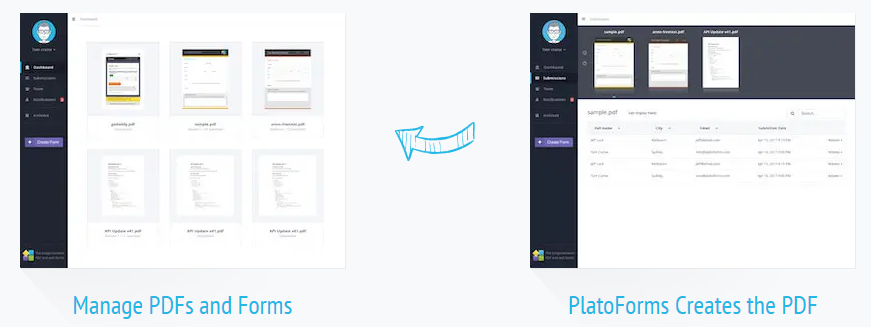
PlatoForms is a versatile and user-friendly online tool that allows you to transform your PDF documents into web forms that are easily accessible for customers through their web browsers. This online PDF Form solution provides features enabling users to fill out once and generate multiple PDF versions, along with the ability to complete PDFs within a streamlined workflow. It has gained popularity among businesses aiming to make PDFs readily shareable and fillable for their clients online. The PDFs maintain a sleek, modern, and professional appearance across all devices, readers, and operating systems. Additionally, it accommodates a wide array of colors, layouts, fonts, and images, ensuring a polished final product. Despite the availability of fillable PDFs, it is generally not advisable to send the document directly to customers or colleagues, as many may struggle with filling out and saving the completed forms. For example, the process of signing a PDF using Adobe Acrobat can pose challenges for individuals who are not particularly tech-savvy, making it essential to consider user-friendly alternatives. Therefore, leveraging tools like PlatoForms can greatly enhance the user experience and simplify the document management process.
API Access
Has API
API Access
Has API




Integrations
Amazon S3
Easyflow
Adobe Acrobat
Appcues
Box
Dropbox
Gmail
Google Drive
Google Sheets
KonnectzIT
Integrations
Amazon S3
Easyflow
Adobe Acrobat
Appcues
Box
Dropbox
Gmail
Google Drive
Google Sheets
KonnectzIT
Pricing Details
$49 per month
Free Trial
Free Version
Pricing Details
$12 per month
Free Trial
Free Version
Deployment
Web-Based
On-Premises
iPhone App
iPad App
Android App
Windows
Mac
Linux
Chromebook
Deployment
Web-Based
On-Premises
iPhone App
iPad App
Android App
Windows
Mac
Linux
Chromebook
Customer Support
Business Hours
Live Rep (24/7)
Online Support
Customer Support
Business Hours
Live Rep (24/7)
Online Support
Types of Training
Training Docs
Webinars
Live Training (Online)
In Person
Types of Training
Training Docs
Webinars
Live Training (Online)
In Person
Vendor Details
Company Name
DocSpring
Founded
2017
Country
United States
Website
docspring.com
Vendor Details
Company Name
PlatoForms
Founded
2017
Country
Australia
Website
www.platoforms.com
Product Features
Document Generation
Batch Processing
Collaboration
Digital Signature
Interaction Tracking
Multiple Output Formats
Templates
Product Features
Annotations
Convert to PDF
Digital Signature
Encryption
Merge / Append
PDF Reader
Watermarking



