Average Ratings 0 Ratings
Average Ratings 1 Rating
Similar Products
-
pCloud BusinesspCloud Business is a cloud storage and file synchronization platform designed for teams that need controlled access, cross-platform compatibility, and predictable storage allocation. It provides centralized file management with granular permissions and optional client-side encryption. Founded in 2013 in Switzerland, pCloud operates under EU-aligned privacy standards and offers data residency in Luxembourg (EU) and Dallas, Texas (US). The platform supports over 23 million users globally. Core Functionality : - Per-User Storage Allocation : 1 TB or 2 TB per user, suitable for small to mid-sized teams and distributed environments. - Virtual File System (pCloud Drive) : Mounts as a local drive on Windows, macOS, and Linux. Files are streamed on demand, reducing local disk usage. - File Sync & Sharing : Folder-level sync, link-based sharing, and permission control (view/edit/manage). Supports password-protected and time-limited links. - Admin & Access Control : Centralized user management, role assignment, and storage distribution via admin console. - Versioning & File History : File versioning with up to 180 days retention, enabling rollback and recovery. - Cross-Platform Support : Native clients for Windows, macOS, Linux, iOS, Android, plus web interface. - Client-Side Encryption (Optional) : Zero-knowledge encryption via pCloud Encryption for sensitive data; encryption keys are not stored server-side. Technical Positioning: - Swiss jurisdiction; GDPR-aligned processing - No file size limits - Works without mandatory ecosystem lock-in (no bundled office suite required) - Compatible with heterogeneous environments (Linux included) Trial : 30-day free trial available for up to 10 users.
-
CompanyCamCompanyCam is a photo-based solution created specifically for contractors. Users can take unlimited photos—which are location and time stamped, sent to the cloud, and stored securely. Every photo is organized by project and instantly available to your team, allowing you to see what’s going on anytime, anywhere.
-
4ALLPORTALIf you are looking for a way to easily manage your product data, 4ALLPORTAL is the hub for you. Our software saves resources! Increase sales, reduce costs and get more time for strategy and creativity. Maintain your product data once, link information and media with all products and keep them up-to-date in all sales channels with just a few clicks. Because our platform is highly customizable and scalable, we can create a solution specifically tailored to your needs. Your dedicated account manager will ensure that the software grows with your needs. Interested? Here's how it works: Step 1: In a 30-minute call, you tell us about your current and future needs and the problems you face in your daily work. Step 2: We evaluate your needs and create a customized 4ALLPORTAL, which we present to your team in a live demo. Step 3: You get access to your 4ALLPORTAL for 30+ days to test it extensively and decide if you want to work with us or not. What are you waiting for? Start managing your data efficient today and scale your business with 4ALLPORTAL.
-
Construction Daily ReportsYou can save up to an hour per day on daily reports CDR – Construction Daily Reports is the fastest custom daily reporting solution available for the construction industry. It can be accessed on our mobile app for Android or Apple devices as well as our website portal. You can customize your reports by entering project details. Then, you can take photos and make notes using your mobile device. CDR will email your completed report in professional PDF format to you after you sign it. We also save it on our servers so that you can upload it to your cloud storage. CDR is a mobile-friendly, time-saving construction software designed to simplify your reporting process. Start your free trial now!
-
Mitti (by SafetyCulture)Mitti by SafetyCulture is a frontline operations platform built to help organizations manage daily work across sites, shifts, teams, assets, standards, and compliance requirements. The platform brings inspections, issue reporting, training, task management, communications, document management, asset maintenance, contractor management, investigations, analytics, sensors, IoT, and operational AI into one connected system. Mitti helps teams capture frontline signals, turn checklists into workflows, assign actions, close out issues, and understand performance across the business. Its AI Assistant can create checklists, generate training, and surface information quickly, while AI Issue Capture turns photos or voice notes into actionable issues. The platform supports quality management, compliance, asset maintenance, training, onboarding, insurance, lone worker safety, benchmarking, integrations, and operational reporting. Organizations can use Mitti to digitize inspections, monitor assets, train workers, communicate with teams, track contractor readiness, investigate incidents, and benchmark performance across locations. Its analytics capabilities give leaders a clearer view of what is happening across operations so they can spot trends, reduce risk, and improve outcomes. Mitti is used across industries such as manufacturing, facilities management, hospitality, construction, and retail. By combining frontline workflows, inspections, training, AI, asset management, issue reporting, analytics, communications, and compliance tools, Mitti helps organizations run safer and more efficient operations.
-
Proton DriveProton Drive is the secure workspace for storing sensitive data and collaborating with confidence across teams, clients, and external partners. With full end-to-end encryption, you can share files, contracts, and business documents securely — and stay in control at all times. Set passwords, expiration dates, or revoke access instantly. Files are encrypted on your device before upload, and only you and your collaborators can access them. Even Proton can’t see your data. Each user gets 1 TB of storage, and you can scale as your organization grows. Proton Drive is developed in Switzerland by the makers of Proton Mail. We’re independent, built on privacy-first principles, and free from Big Tech surveillance, lock-in, or monetization of user data. We offer more than secure storage: - Real-time collaboration with Proton Docs - Granular sharing controls for external and internal access - File recovery for peace of mind - Cross-device access, including Windows, macOS, iOS, and Android We also help you meet compliance requirements out of the box. Proton Drive supports: - GDPR, HIPAA, DORA, NIS2, and ISO 27001 - Independently audited SOC 2 Type II compliance - No complex setup or third-party integrations required. By choosing Proton Drive, you show your clients, partners, and regulators that privacy and security are built into your workflows — not an afterthought.
-
ManageEngine ADAudit PlusADAudit Plus enhances the security and compliance of your Windows Server environment by delivering comprehensive insights into all operational activities. It offers a detailed overview of modifications made to Active Directory (AD) resources, encompassing AD objects and their respective attributes, group policies, and more. By conducting thorough AD audits, organizations can identify and mitigate insider threats, misuse of privileges, and other signs of potential security breaches, thereby bolstering their overall security framework. The tool enables users to monitor intricate details within AD, including entities such as users, computers, groups, organizational units (OUs), group policy objects (GPOs), schemas, and sites, along with their associated attributes. Furthermore, it tracks user management activities like the creation, deletion, password resets, and alterations in permissions, providing insights into the actions taken, the responsible individuals, the timing, and the originating locations. Additionally, it allows organizations to monitor the addition or removal of users from security and distribution groups, ensuring that access privileges are kept to the necessary minimum, which is critical for maintaining a secure environment. This level of oversight is vital for proactive security management and compliance adherence.
-
VKSVKS makes it simple for companies to get rid of paper work instructions and transform into a digital factory. There are many benefits to our visual work instruction solution, including: No need for paper! Digital work instructions can be created with better results. You can reduce your defects up to 95% by performing in-process quality checks. Standardize best practices to increase productivity by 20% You can track your processes 100% with 100% certainty and real-time control. You can accelerate and improve the accuracy of your operational decision making. Capture tribal knowledge to close the skills gap.
-
Project InsightProject Insight is a strategic project and portfolio management software that gives companies a complete picture of the work happening across their entire organization. Streamline workflows, automate processes, enhance collaboration, and capture project data points from all your teams and systems in one central command center so you can make confident decisions about business. Manage work at the project, program or portfolio levels and integrate with the tools you already use, including Azure DevOps, Jira, Microsoft, Salesforce, and ServiceNow, and HubSpot to eliminate the need to manually key in data across teams. With the most views of any project management platform, teams can keep tabs on assignments, status, risks, resources, capacity, schedules, budgets, and more. Project Insight also offers free view only seats for clients. The power of AI can be used to assign action items after meetings, predict future capacity, balance workloads, & select the right resources. Additional AI-powered features include what if simulations to generate tradeoffs when priorities change and AI-generated project templates (WBS). Whether you are moving from basic spreadsheet project tracking or you have a sophisticated PMO with a complex web of unique business processes, Project Insight has the broad feature set to help you grow as you go. Our onboarding teams are known for being the best in the business and our platform can be fully customized to manage projects and data the way your company needs to.
-
Centrex SoftwareOur powerful Customer Relationship Management software (CRM) can help you increase productivity, generate more revenues, and improve engagement. Manage your advance/loan portfolio. Integrated with ACH processors. Includes broker portal and syndicate reporting. Send email and SMS campaigns, send/receive SMS messages, track email openings, and much more. ClixSign® allows you to send any document for electronic signature. You can see when documents have been viewed and signed by up 8 signers. Your customers can access a branded portal that allows them to upload documents, view messages and track balances/payments. The most up-to-date contact and deal management software allows you to see the entire pipeline. Centrex Software provides custom software development solutions. We assist customers in building web and mobile apps for any purpose.
Description
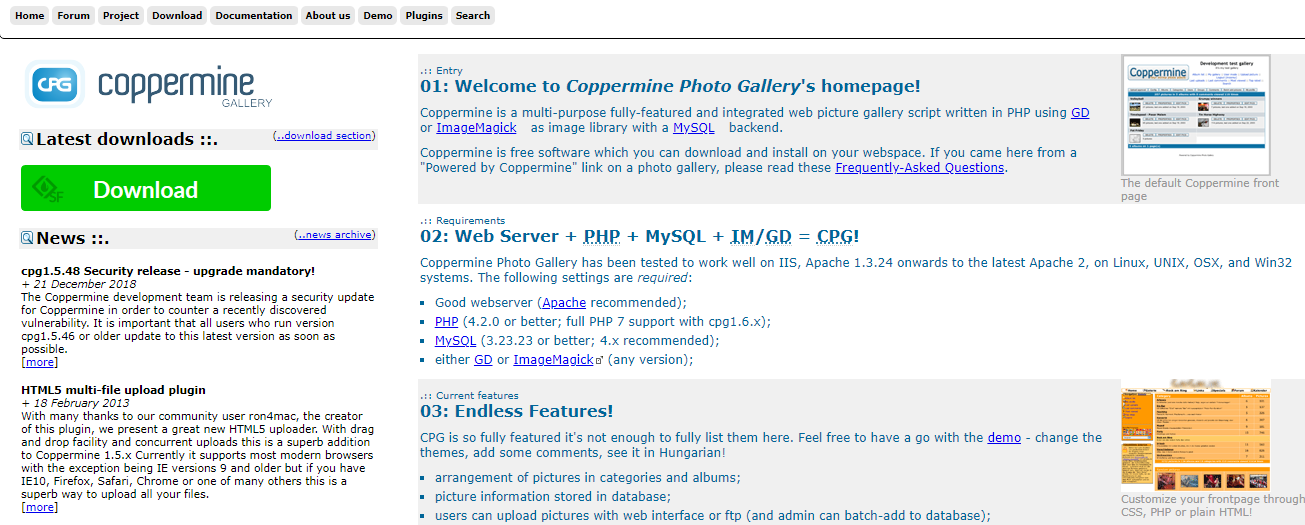
Coppermine is an open-source photo gallery software that allows website administrators to download and set it up on their personal sites. This versatile, feature-rich web picture gallery script is developed in PHP and utilizes either GD or ImageMagick for image processing, all backed by a MySQL database. As a free tool, Coppermine can be easily integrated into your web hosting space. It offers a structured way to organize images into categories and albums, while efficiently storing picture information within a database. Users have the option to upload images through a web interface or FTP, and administrators can conveniently add images in bulk. Additionally, it supports various multimedia formats, automatically generates thumbnails, and includes a robust search functionality. Users can explore recently added images or view random selections, while the platform facilitates user management, allowing for private galleries and group settings. Notably, it can seamlessly integrate user management with several bulletin board systems, such as phpBB and SMF. Each image can also have a caption, title, description, and customizable fields that enhance searchability. Overall, Coppermine stands out for its comprehensive features tailored for effective photo gallery management.
Description
LibrePhotos is a self-hosted alternative to Google Photos, emphasizing impressive graphical representations, and is a fork of Ownphotos. This open-source photo management platform features a Django backend and a React frontend, allowing for easy installation guided by detailed documentation. It supports a variety of photo formats, including raw images and videos, and provides a timeline view along with multiuser capabilities. Users can create albums based on specific events such as "Thursday in Berlin," and utilize advanced features like face recognition, face classification, reverse geocoding, object and scene detection, as well as semantic image search and metadata-based search functionalities. For optimal performance, a system with an x86 processor and at least 8GB of RAM is recommended, while a minimum of 10GB of HDD space is necessary to accommodate Docker images and machine learning models. Additionally, the system generates a database and thumbnails requiring further storage, and it operates with distinct backend and frontend servers for enhanced efficiency. This setup allows users to manage their photo collections effectively while enjoying rich analytical insights.
API Access
Has API
No
API Access
Has API
Yes


Pricing Details
No price information available.
Free Trial
No
Free Version
No
Pricing Details
No price information available.
Free Trial
No
Free Version
No
Deployment
Web-Based
Yes
On-Premises
No
iPhone App
No
iPad App
No
Android App
No
Windows
Yes
Mac
Yes
Linux
Yes
Chromebook
No
Deployment
Web-Based
No
On-Premises
Yes
iPhone App
No
iPad App
No
Android App
No
Windows
No
Mac
No
Linux
Yes
Chromebook
No
Customer Support
Business Hours
No
Live Rep (24/7)
No
Online Support
Yes
Customer Support
Business Hours
No
Live Rep (24/7)
No
Online Support
Yes
Types of Training
Training Docs
Yes
Webinars
No
Live Training (Online)
Yes
In Person
No
Types of Training
Training Docs
Yes
Webinars
No
Live Training (Online)
No
In Person
No
Vendor Details
Company Name
Coppermine Photo Gallery
Founded
2003
Country
United States
Website
coppermine-gallery.net
Vendor Details
Company Name
LibrePhotos
Website
docs.librephotos.com
