Average Ratings 0 Ratings
Average Ratings 0 Ratings
Similar Products
-
CloudFilerCloudFiler provides filing and searching in both New and Classic Outlook on all phones & tablets, all popular browsers, Macs and ARM based devices. Created Microsoft's new web Add-in technology by the architect of the Oasys email management system previously owned by Arup Group Ltd and the Excitech Mail system owned by Symetri and latterly Pentagon. File to: the cloud, Windows folders, SharePoint, OneDrive, Egnyte, Autodesk Forma, Bentley ProjectWise, etc. Favoured by the biggest businesses globally.
-
PlanfixThe Planfix platform allows organizations to manage their entire business online. Regardless of company size and industry, Planfix has something to offer as an excellent project and work management tool. With Planfix, your company gets a fully customizable management system, from process design to appearance. Planfix’s platform combines task and project management, CRM, sales, marketing, production, logistics, support service, accounting, and HR in one full-featured solution. Data is seamlessly transferred from one team to another - for example, a transaction at the implementation stage becomes a project and then is transferred to support. Planfix is equally well suited for businesses and non-profit organizations, public associations, or any other group of people working towards a common cause. Trusted by 7724 companies, automates business workflows of more than 68 000 users.
-
SiteKioskSiteKiosk Online is a turnkey, secure kiosk and digital signage software solution for Windows and Android devices. The company's easy-to-use and scalable application such as SiteKiosk helps protect the browser and operating system against manipulations and provides 24/7 maintenance-free operation.
-
CallTrackingMetricsCallTrackingMetrics is the only SaaS platform that uses call tracking and conversion intelligence to inform contact center automation--resulting in a more personalized customer experience. Find out which marketing campaigns are generating leads or conversions and use that data for automated call flows and to power your contact centre. Our phone, text, online, and live chat tools allow you to unify communications across your organization. CallTrackingMetrics is trusted by more than 100,000 users worldwide to manage communications for their sales, marketing, and service teams. Call tracking features include reliable dynamic numbers insertion (DNI), for session-level attribution, local and toll-free tracking numbers, and omnichannelattribution across calls, texts and form fills. Contact center features include a browser-based softphone and smart routing options.
-
PipedrivePipedrive is a powerful CRM and sales pipeline management platform designed to help businesses track and optimize their sales processes. The platform offers automation tools, AI-powered sales insights, and real-time reporting to help businesses close deals faster and more effectively. With customizable workflows, integrations with a wide range of apps, and an intuitive interface, Pipedrive supports sales teams of all sizes in managing leads, automating repetitive tasks, and monitoring performance for smarter, data-driven decisions.
-
Switcher StudioSwitcher Studio allows you to capture video from multiple angles and edit it in real-time. This will allow you to connect with your community in a more engaging way. You can stream it live or save it for later. Your audience will be attracted to you with relevant content. Make it look great. There's no need to purchase, lug or learn largeequipment. Switcher is compatible with iPads and iPhones. Switcher is so intuitive that anyone can create amazing video with it. You don't need to hire outside videographers or producers. It takes an hour to edit every minute of edited video. Every minute of live-editing takes, well, one second. You can share every moment, live or recorded, external or internal, with video -- no matter what it holds.
-
Files.com6,000+ companies trust Files.com to automate and secure business critical transfers. We obsess about security, compliance, reliability, and performance so your critical business processes just work every time. Easily manage any transfer flow without writing scripts or code, and onboard workloads and partners effortlessly. We support standard file transfer protocols (FTP, SFTP, AS2) for working with external partners and also provide native apps for high performance internal transfers. As a fully Cloud-Native SaaS, there are no servers for you to buy or maintain, there is no installation required, and high availability and redundancy are built in and free. Our InfoSec Program is audited annually by Kirkpatrick Price, a leading information security CPA firm. Our audit covers the scope of the entire Files.com business (not just datacenter operations) and names Files.com specifically. Beware of smaller competitors who try to pass off someone else’s audit as their own. Technical capabilities include encryption at-rest and in-transit, four types of two-factor authentication, nine enterprise identity (SSO) integrations, configurable password and session policies, and a perfect “A+” score from Qualys SSL Labs.
-
MelioMelio is an accounts payable platform designed to simplify bill payments, improve workflows, and maximize cash flow efficiency for businesses of all sizes. To get started, try all of Melio's features free for 30 days! You can pay vendors online using bank transfers or credit/debit cards—even if they only accept checks—while Melio takes care of the manual tasks. Integrate seamlessly with QuickBooks and Xero to keep your accounting up-to-date. Melio allows you to pay through bank transfer or card, helping you extend your cash flow and gain rewards. Enter vendor or bill details manually, upload, or snap a photo of the invoice—it’s that simple. Schedule payments according to your cash flow plan and let Melio manage them. Additionally, you can pay international vendors in their local currency for services and products. On-the-go? No problem, just get the Melio mobile app on iOS or Android to manage your payments, process approvals, and much more no matter where your business day takes you.
-
Dialpad SupportCustomer experience shouldn't run on disconnected tools and static scripts. Dialpad Contact Center brings voice, digital channels, and human agents together in a single AI-native platform, built to act — not just record — on every customer interaction. This is Agentic AI in practice: agents that reason through a problem, take the next step, and drive it to resolution without waiting on a human to intervene. Where legacy systems leave data trapped in silos, Dialpad Contact Center closes that gap, linking voice and data so context travels with the customer instead of getting lost between systems. The payoff compounds. Dialpad has already generated over 775 million AI recaps, and each new interaction adds to a growing base of operational intelligence — sharper resolution paths, more productive agents, better outcomes quarter over quarter. None of it runs unchecked: Dialpad's Guardian layer keeps AI operations secure and governed, so intelligence scales without sacrificing oversight. In practice, that means up to 80% of issues get resolved autonomously, freeing your team to focus on the conversations that genuinely need a human. Intelligence works at the edge; people stay at the center of the experience. And you don't have to take the ROI on faith. Through Dialpad's Proving Ground, enterprises can validate performance and cost savings before rolling out at scale — a far more reliable path than betting on a brittle, rules-based bot.
-
SquaretalkSquaretalk is a powerful contact center solution that transforms how modern sales teams connect with prospects and customers, convert sales opportunities, and grow their operations. It offers AI Voice Agents, omnichannel communication (including voice, WhatsApp messaging, SMS, and email), powerful call-handling features, and affordable scalability without additional complexity or costs. Squaretalk combines powerful communication tools with intelligent automation to help teams work more efficiently and deliver better customer experiences. Advanced call handling, automated transcripts, and sentiment analysis provide greater visibility into every conversation. The built-in contact management system keeps interactions organized and ensures no lead falls through the cracks. Flexible workflows can be customized to match specific operational needs, while advanced reporting tools offer actionable insights into team performance and business outcomes. Internal chat streamlines collaboration through instant communication, simplified mentoring, efficient escalations, and the consolidation of internal and external conversations within a single platform. Backed by enterprise-grade security, Squaretalk ensures that customer data remains protected and compliant. With local numbers in over 150 popular and niche destinations, we enable businesses of all sizes to establish and maintain a local presence, build trust, support their global expansion, and shorten sales cycles. Discover how Squaretalk’s cloud contact center platform can enhance your team’s connection rates and performance.
Description
Contact Transfer is a user-friendly desktop application designed for Windows that streamlines the management and transfer of contacts among iPhone, Android, and PC devices. This tool allows users to swiftly and locally transfer their contacts between mobile devices and computers without the need for cloud synchronization, ensuring a hassle-free experience.
With Contact Transfer, users can effortlessly migrate contacts from an Android device to an iPhone, vice versa, or between similar devices, and even transfer contacts to and from a computer. Furthermore, it offers the capability to save contacts in Windows Contacts or vCard format, and users can conveniently add, modify, or delete contacts directly from their computer, thus maintaining a well-organized and current address book.
The application connects through USB for iPhone devices and utilizes Wi-Fi for Android, ensuring effective communication between devices. All contact management and transfers occur locally on the user's computer, which upholds security and privacy standards, giving users peace of mind.
A free trial version of Contact Transfer permits the transfer of up to five contacts, while obtaining a full license removes these limitations, allowing for unlimited transfers and management of contacts, enhancing user flexibility and convenience. Additionally, this software represents an efficient solution for anyone seeking to keep their contact information synchronized and accessible across multiple platforms.
Description
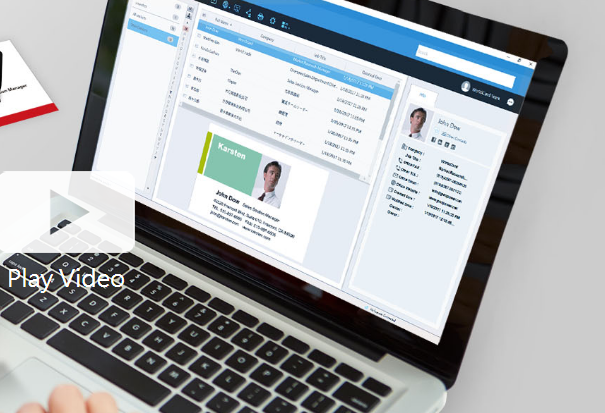
Business cards can be recognized and the associated data can be exported as a CSV file prior to the subscription's expiration. If you wish to retain the images of the business cards, it is advisable to reach out to PenPower's customer service for assistance. Please note that after the subscription expires, user data will be retained by the system for a period of 180 days; if renewal does not occur within this timeframe, all data will be permanently deleted. To optimize performance with WorldCard Team, it is recommended that the NAS edition should not exceed 20 users, while the Basic edition is best suited for fewer than 100 users. The maximum number of users allowed for the Windows Server edition will depend on the performance capabilities of your server. Additionally, you can transfer contact data to WorldCard Team from either WorldCard or WorldCard Mobile. When implementing the WorldCard Team system in your organization, we highly recommend migrating all contacts to WorldCard Team rather than continuing with WorldCard for improved efficiency and streamlined management of your business contacts. This approach not only enhances organization but also facilitates better collaboration among team members.
API Access
Has API
No
API Access
Has API
No
Screenshots View All
No images available


Integrations
Salesforce
No
Pricing Details
$20 one-time purchase for 1 PC
Free Trial
Yes
Free Version
No
Pricing Details
Contact PenPower Technologies for pricing details.
Free Trial
Yes
Free Version
No
Deployment
Web-Based
No
On-Premises
No
iPhone App
No
iPad App
No
Android App
No
Windows
Yes
Mac
No
Linux
No
Chromebook
No
Deployment
Web-Based
Yes
On-Premises
No
iPhone App
Yes
iPad App
Yes
Android App
Yes
Windows
Yes
Mac
Yes
Linux
No
Chromebook
No
Customer Support
Business Hours
No
Live Rep (24/7)
No
Online Support
Yes
Customer Support
Business Hours
Yes
Live Rep (24/7)
No
Online Support
No
Types of Training
Training Docs
Yes
Webinars
No
Live Training (Online)
No
In Person
No
Types of Training
Training Docs
Yes
Webinars
No
Live Training (Online)
Yes
In Person
No
Vendor Details
Company Name
Wide Angle Software
Founded
2006
Country
United Kingdom
Website
www.wideanglesoftware.com/contacttransfer/
Vendor Details
Company Name
PenPower Technology
Founded
1991
Country
United States
Website
www.worldcardteam.com/EN/
Product Features
Contact Management
Activity Management
No
Appointment Management
No
Contact Database
No
Contact History
No
Contact Import/Export
No
Customer Pipeline
No
Email Marketing
No
Group Management
No
Interaction Tracking
No
Lead Management
No
Prospecting Tools
No
Sales Pipeline Management
No
Search / Filter
No
Segmentation
No
Shared Contacts
No
Social Media Integration
No
Product Features
Business Card
Contact Management
Yes
Data Extraction
Yes
Design Templates
No
Image Editor
No
Print Management
No
Step-by-Step Wizard
No
Contact Management
Activity Management
No
Appointment Management
No
Contact Database
Yes
Contact History
No
Contact Import/Export
Yes
Customer Pipeline
No
Email Marketing
No
Group Management
No
Interaction Tracking
Yes
Lead Management
No
Prospecting Tools
No
Sales Pipeline Management
No
Search / Filter
No
Segmentation
Yes
Shared Contacts
Yes
Social Media Integration
No
CRM
Calendar/Reminder System
No
Call Logging
No
Document Storage
No
Email Marketing
Yes
Internal Chat Integration
No
Lead Scoring
No
Marketing Automation Integration
No
Mobile Access
Yes
Quotes / Proposals
No
Segmentation
No
Social Media Integration
Yes
Task Management
No
Territory Management
No
Customer Engagement
Analytics
No
Churn Management
No
Communication Management
Yes
Community Management
Yes
Content Syndication
Yes
Feedback Collection
Yes
Gamification
No
Live Chat
No
Video Content
No
