Average Ratings 0 Ratings
Average Ratings 0 Ratings
Similar Products
-
PipedrivePipedrive is a powerful CRM and sales pipeline management platform designed to help businesses track and optimize their sales processes. The platform offers automation tools, AI-powered sales insights, and real-time reporting to help businesses close deals faster and more effectively. With customizable workflows, integrations with a wide range of apps, and an intuitive interface, Pipedrive supports sales teams of all sizes in managing leads, automating repetitive tasks, and monitoring performance for smarter, data-driven decisions.
-
ClickUpWork is broken because your tools are. Dozens of apps, zero shared context, your team stuck playing messenger between all of them. That's not collaboration. That's overhead. ClickUp eliminates the mess. One platform: tasks, docs, chat, goals, time tracking, whiteboards, and AI Agents that work autonomously while you sleep. Everything shares one connected brain. No silos. No duplicated effort. No lost threads. Manage any workflow with custom views, automations, and real-time collaboration baked into every layer. 15+ views including List, Board, Gantt, Timeline, and Calendar. Create rich documents with nested pages and embedded tasks. Set measurable goals with automatic rollups that connect daily output to company objectives. Track time natively with timers, estimates, and workload views that prevent burnout. Over 1,000 integrations plug into your existing stack without adding chaos. GitHub, Slack, Google Drive, Figma, Salesforce, Zoom, and hundreds more — all feeding into one system of record. Built-in AI writes, summarizes, and executes entire workflows on its own. Not a bolt-on — native intelligence woven through every feature. AI Agents handle complex multi-step work around the clock without waiting for humans. SOC 2 Type II certified. SSO/SAML. Custom roles. Audit logs. Scales from five people to fifty thousand. Stop patching a broken system. Start free today. No credit card, no commitment.
-
PlanfixThe Planfix platform allows organizations to manage their entire business online. Regardless of company size and industry, Planfix has something to offer as an excellent project and work management tool. With Planfix, your company gets a fully customizable management system, from process design to appearance. Planfix’s platform combines task and project management, CRM, sales, marketing, production, logistics, support service, accounting, and HR in one full-featured solution. Data is seamlessly transferred from one team to another - for example, a transaction at the implementation stage becomes a project and then is transferred to support. Planfix is equally well suited for businesses and non-profit organizations, public associations, or any other group of people working towards a common cause. Trusted by 7724 companies, automates business workflows of more than 68 000 users.
-
CoeveraCoevera is an AI-native CRM and sales process platform for B2B sales organizations of 15 to 2,500 quota-carrying sellers — companies with a defined sales process, sales managers accountable for pipeline, and deals complex enough that consultation rather than transaction wins them. Formerly Pipeliner CRM, built since 2011 on one idea: a sales process should be visible, teachable and repeatable. Intelligence is the default state of the system, not a premium add-on. The platform is industry-agnostic; our strongest results have come from manufacturing, financial services, insurance, software, professional services, energy and mining. Sales leaders buy Coevera for a forecast they can defend. Sales operations teams buy it because it can be configured, changed and reported on without a dedicated administrator, outside consultants or a multi-year build. Reps use it because the pipeline is visual and the next step is obvious. Voyager AI — predictive deal and pipeline guidance in context, with native MCP so Coevera data is available to the AI tools your team already uses. Visual pipeline management — drag-and-drop pipelines, buying centers and relationship maps, so who is involved in a deal and what stage it is actually in are both visible. Guided selling — your stages, required activities and qualification criteria enforced in the flow of work rather than in a document. Automatizer — no-code workflow automation your own ops team builds and changes. Reporting and forecasting built in — no BI licence required, with BI Feeder exporting to Tableau, Power BI and others when your analysts want the raw data. Three editions at three price points — $85, $115 and $150 per user per month. Implementations run in weeks, not quarters. Served markets: United States, Canada, the Un
-
Act!Act! Advantage, a full front-office CRM solution with all-new functionality that unites sales, marketing, and customer management in one intuitive, affordable platform, is the culmination of nearly four decades of feedback. Every feature is designed to reflect how today’s SMBs run their businesses and helps them stay organized, attract new customers, and turn relationships into results. Act! Advantage includes the largest injection of new functionality in Act’s history, broadening its footprint across your entire front office, and reducing your need for costly, third-party tools. Additionally, you can select the perfect fit, cost-effective tier to meet your current needs with peace of mind knowing that Act! will grow with you.
-
TE RecruitTE Recruit™ is a modern recruiting platform for staffing agencies, executive search firms, and independent recruiters that need an applicant tracking system and CRM without unnecessary complexity. Built by Top Echelon, TE Recruit centralizes candidate records, company and contact data, job orders, communications, tasks, pipelines, and placement activity. Recruiters can manage business development and talent acquisition from the same system, while owners and managers gain clearer insight into activity, progress, and performance. The platform supports configurable workflows, email sequencing, resume parsing, job posting, sourcing, reporting, and automation that reduces repetitive work. AI People Search uses semantic technology to uncover relevant candidates across related experience, skills, and job titles rather than relying only on exact keywords. It complements traditional Boolean search and is available with TE Recruit Pro. TE Recruit connects with email, job boards, calling and texting providers, and other tools used across the recruiting technology stack. Pro customers can also use the open API to build custom integrations, exchange data between systems, and support more advanced workflows. Guided onboarding, training, and responsive customer support are included, helping teams implement the platform and adapt it as their recruiting business evolves. Firms can also add TE Network™, Top Echelon’s split-placement recruiter network. Its integrated Network Feed allows TE Recruit users to access shared candidates, additional job orders, and recruiter collaboration opportunities without leaving the ATS. TE Recruit is a strong fit for recruiting businesses seeking flexible technology, practical AI, connected workflows, reliable support, and more ways to t
-
Shape SoftwareShape Software's purpose-built sales and marketing automation software empowers you to manage all aspects of your business from one platform. The cloud-based software from Shape offers many tools to help you manage and automate your online marketing, promotions via text, email and digital marketing ads, capture leads from online sources, nurture prospects and customers and project manage your day. You can also offer customers a secure portal to streamline your intake processes, systematically score leads with ShapeIQ, and run detailed custom reporting. Start growing your revenue with Shape's flexible suite of services today.
-
InfoFloCase Management Software made simple to allow you to focus on your non-profit. 360-degree views of all your cases from a single dashboard. Get rid of your excel documents and access your data anywhere, on any device. InfoFlo will provide you with a system that is fully customized to meet your needs at an affordable cost.
-
Dialpad SupportCustomer experience shouldn't run on disconnected tools and static scripts. Dialpad Contact Center brings voice, digital channels, and human agents together in a single AI-native platform, built to act — not just record — on every customer interaction. This is Agentic AI in practice: agents that reason through a problem, take the next step, and drive it to resolution without waiting on a human to intervene. Where legacy systems leave data trapped in silos, Dialpad Contact Center closes that gap, linking voice and data so context travels with the customer instead of getting lost between systems. The payoff compounds. Dialpad has already generated over 775 million AI recaps, and each new interaction adds to a growing base of operational intelligence — sharper resolution paths, more productive agents, better outcomes quarter over quarter. None of it runs unchecked: Dialpad's Guardian layer keeps AI operations secure and governed, so intelligence scales without sacrificing oversight. In practice, that means up to 80% of issues get resolved autonomously, freeing your team to focus on the conversations that genuinely need a human. Intelligence works at the edge; people stay at the center of the experience. And you don't have to take the ROI on faith. Through Dialpad's Proving Ground, enterprises can validate performance and cost savings before rolling out at scale — a far more reliable path than betting on a brittle, rules-based bot.
-
AiraloStay connected effortlessly across more than 200 countries and regions with an eSIM that can be installed in just minutes. Experience seamless global connectivity without the burden of roaming charges — it’s straightforward and budget-friendly. This technology is integrated into your phone's hardware, functioning just like a traditional SIM card but operating entirely in a digital format. By opting for an eSIM, you can bypass the hassle of physical SIM cards and spotty Wi-Fi, allowing you to connect to a mobile network as soon as you reach your destination. Choose from a variety of prepaid local, regional, or global eSIM plans tailored to help you stay online wherever you go. Simply download the eSIM, install it on your device, and you’ll be ready to access mobile networks seamlessly upon arrival. With this modern solution, you can enjoy the freedom and flexibility of staying connected without any unexpected fees or complications.
Description
Connecti5 is an innovative platform for contact management and digital networking tailored for professionals and organizations aiming to enhance their networking efficiency. This versatile tool enables users to digitize business cards, store contacts, streamline their professional relationships, add personalized notes, locate contacts geographically, employ NFC-enabled business cards, and swiftly connect with the right individuals from their network when necessary.
Established by Rajan Rawal, Connecti5 caters to entrepreneurs, sales representatives, consultants, recruiters, event participants, and teams who frequently engage with new individuals and require an efficient method for managing contacts post-meetings, events, and daily interactions. By incorporating features such as business card scanning, digital organization of contacts, NFC card sharing, and AI-driven networking support via Ask My Network, Connecti5 empowers users to transform their chaotic contact lists into a structured and valuable professional network that can be leveraged effectively. Additionally, the platform ensures that users can maintain meaningful connections, fostering opportunities for collaboration and growth within their industries.
Description
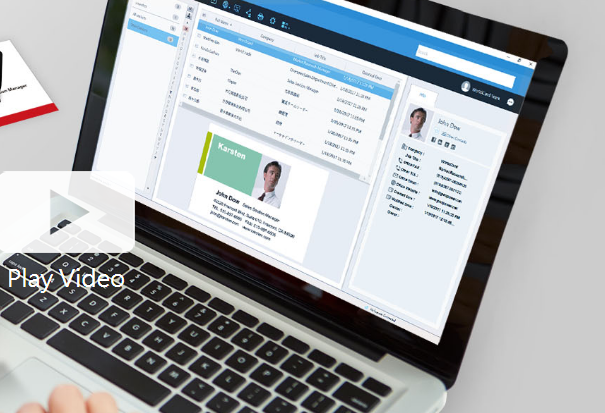
Business cards can be recognized and the associated data can be exported as a CSV file prior to the subscription's expiration. If you wish to retain the images of the business cards, it is advisable to reach out to PenPower's customer service for assistance. Please note that after the subscription expires, user data will be retained by the system for a period of 180 days; if renewal does not occur within this timeframe, all data will be permanently deleted. To optimize performance with WorldCard Team, it is recommended that the NAS edition should not exceed 20 users, while the Basic edition is best suited for fewer than 100 users. The maximum number of users allowed for the Windows Server edition will depend on the performance capabilities of your server. Additionally, you can transfer contact data to WorldCard Team from either WorldCard or WorldCard Mobile. When implementing the WorldCard Team system in your organization, we highly recommend migrating all contacts to WorldCard Team rather than continuing with WorldCard for improved efficiency and streamlined management of your business contacts. This approach not only enhances organization but also facilitates better collaboration among team members.
API Access
Has API
No
API Access
Has API
No
Screenshots View All
No images available


Integrations
Salesforce
No
Pricing Details
$2.11month/user
Free Trial
Yes
Free Version
No
Pricing Details
Contact PenPower Technologies for pricing details.
Free Trial
Yes
Free Version
No
Deployment
Web-Based
Yes
On-Premises
No
iPhone App
Yes
iPad App
No
Android App
Yes
Windows
Yes
Mac
Yes
Linux
No
Chromebook
No
Deployment
Web-Based
Yes
On-Premises
No
iPhone App
Yes
iPad App
Yes
Android App
Yes
Windows
Yes
Mac
Yes
Linux
No
Chromebook
No
Customer Support
Business Hours
Yes
Live Rep (24/7)
No
Online Support
No
Customer Support
Business Hours
Yes
Live Rep (24/7)
No
Online Support
No
Types of Training
Training Docs
No
Webinars
No
Live Training (Online)
No
In Person
No
Types of Training
Training Docs
Yes
Webinars
No
Live Training (Online)
Yes
In Person
No
Vendor Details
Company Name
Connecti5
Founded
2016
Country
India
Website
connecti5.com
Vendor Details
Company Name
PenPower Technology
Founded
1991
Country
United States
Website
www.worldcardteam.com/EN/
Product Features
Contact Management
Activity Management
No
Appointment Management
No
Contact Database
No
Contact History
No
Contact Import/Export
No
Customer Pipeline
No
Email Marketing
No
Group Management
No
Interaction Tracking
No
Lead Management
No
Prospecting Tools
No
Sales Pipeline Management
No
Search / Filter
No
Segmentation
No
Shared Contacts
No
Social Media Integration
No
Product Features
Business Card
Contact Management
Yes
Data Extraction
Yes
Design Templates
No
Image Editor
No
Print Management
No
Step-by-Step Wizard
No
Contact Management
Activity Management
No
Appointment Management
No
Contact Database
Yes
Contact History
No
Contact Import/Export
Yes
Customer Pipeline
No
Email Marketing
No
Group Management
No
Interaction Tracking
Yes
Lead Management
No
Prospecting Tools
No
Sales Pipeline Management
No
Search / Filter
No
Segmentation
Yes
Shared Contacts
Yes
Social Media Integration
No
CRM
Calendar/Reminder System
No
Call Logging
No
Document Storage
No
Email Marketing
Yes
Internal Chat Integration
No
Lead Scoring
No
Marketing Automation Integration
No
Mobile Access
Yes
Quotes / Proposals
No
Segmentation
No
Social Media Integration
Yes
Task Management
No
Territory Management
No
Customer Engagement
Analytics
No
Churn Management
No
Communication Management
Yes
Community Management
Yes
Content Syndication
Yes
Feedback Collection
Yes
Gamification
No
Live Chat
No
Video Content
No
