Average Ratings 0 Ratings
Average Ratings 0 Ratings
Similar Products
-
ProcareProcare is the most widely used child care management solution for child care centers, before and after school programs, and youth organizations to ease the burdens of running a business, coordinating staff, communicating with parents, and educating their children. ADMINISTRATION Manage every aspect of your center or multi-centers, all in one cloud-based, integrated platform. COMMUNICATION Keep your staff and parents connected on all milestones and activities, whether by phone, email, text, or the app, creating an environment of exceptional child care. BILLING AND PAYMENTS Automated billing and payment collection, making it convenient for parents while providing integrated, real-time data and functionality for providers. FINANCIAL MANAGEMENT Central real-time view of all financials and receivables for the center through the integrated dashboard. LESSON PLANNING Create lesson plans, student assessments, and manage lessons by classroom without the stress and time-consuming task of outdated paper formats. MOBILE APP An easy-to-use app that is fully integrated, for staff and family engagement, allowing centers to stay connected with families. AND MORE.. That’s why over 40,000 customers choose Procare.
-
Gradelink SISGradelink can help your school save time, increase enrollment and accomplish its mission. Gradelink, a renowned student management system and student information system, is suitable for all levels of schools from pre-K to college. It combines teaching, management, and learning tools to help schools achieve their best. It has top features such as attendance management, report cards and classes and scheduling, communications and student/parent information. Gradelink is easy to use. School who move to Gradelink find the setup so easy because set up is handled by our tech support team. Top features include attendance management, report cards, classes and scheduling, standards-grading system, communications, student information, and student/parent access. Lesson plans, grade sheets, parent communication and custom reports all work together in perfect unison. Gradelink is ideal for K8 schools, private schools and Charter schools. Help your school save time, increase enrollment, and achieve its mission with Gradelink. An award-winning student information system and school management system, Gradelink school management software system is suitable for Preschool through High school.
-
CoachIQCoachIQ offers sports coaches a comprehensive platform to manage scheduling, payments, client communication, and session tracking with ease. Beyond these core features, it provides video analysis and media sharing capabilities that let coaches upload athlete clips, add notes or voiceover feedback, and share libraries of drills or game footage for athlete learning. With tools to enhance both in-person and virtual coaching, CoachIQ helps coaches grow their business and deepen engagement. Trusted by top coaches, it simplifies daily operations and supports scaling with professional features.
-
BookinglayerAll-in-one booking system that allows you to manage and sell your activities and accommodation. You can take bookings directly from your website, and greatly reduce the number and frequency of phone calls required to confirm them. Our Booking Engine allows you to sell packages and give your customers the freedom to choose how much control you want. You can use our Payment Form to collect payments using any payment method you choose. You can set up automatic reminders to pay a deposit or balance payment, and allow bookings to expire if they are not paid. You can request information from your guest through the Guest Portal. You can ask specific questions, set up levels and select diets. The Guest Portal makes it easy to make your initial booking. Changing bookings, handling refunds, scheduling activities, assigning instructors, sending emails.
-
CapLinkedCapLinked is a web-based platform built for organizations that need a better way to manage, protect, and share sensitive business documents during high stakes work. Known as The Deal Room That Works, CapLinked gives teams, advisors, and lawyers a controlled workspace for due diligence, mergers and acquisitions, fundraising, audits, licensing, asset sales, and confidential projects where accuracy, speed, and oversight matter. Instead of relying on email attachments, consumer file sharing links, or scattered folders, teams can organize documents in structured workspaces with clear folder layouts, searchable files, user groups, and permissions. Administrators can decide who can view, upload, print, download, or share materials, while watermarking, passwords, expiration settings, tracking, and reporting help reduce risk when information is shared outside the organization. CapLinked makes complex document review more efficient for internal teams and external reviewers. Buyers, investors, attorneys, accountants, partners, and other stakeholders can access the materials they need in a professional environment, while project owners maintain visibility into engagement and adjust access as a review changes. This helps reduce version confusion and manual follow up when managing sensitive files across organizations. For boutique firms, Big 4 consultants, global enterprises, and teams in between, CapLinked supports secure collaboration without unnecessary complexity. Its data room and document tools help companies protect financial records, legal documents, intellectual property, contracts, operational files, and strategic materials while keeping reviews organized. Visit caplinked.com to see how CapLinked can help teams share documents, control access, and move work forward
-
annyanny is an all-in-one solution for booking and managing hybrid workplaces. Employees can easily reserve desks, rooms, parking spots, equipment, and other shared resources in one central platform. Flexible booking rules and group permissions ensure you stay in control of access and usage. Key Features: ✨ anny AI: Simply say what you need in the chat, for example, “Book my favorite desk for Thursday.” The AI checks availability in real time and immediately creates a booking. 🗺️ 3D Office Map – Interactive floor plans for an easy and visual booking experience. 🧍 Visitor Management – Simplify guest registration with digital check-in, e-signatures, and real-time notifications. 🗓️ Weekly Planner – Coordinate office presence, see when colleagues are onsite, and plan smarter. 🌐 Integrations – Works seamlessly with Microsoft 365, Outlook, and Google Workspace. 📞 Dedicated Support – Personal, reliable support that helps your team succeed. 🔒 Data Privacy & Security – Internationally compliant and built to protect your organization’s data. Trusted by 1,000+ organizations worldwide – including DeepL, Samsung, and Nio – anny helps teams collaborate effectively and optimize office space.
-
Proton MailSecure your company’s communications with Proton Mail — the business email solution trusted by over 50,000 organizations. With end-to-end encryption built in, your internal and external communications stay confidential by default. Proton Mail helps your business meet GDPR, HIPAA, and other compliance standards, while giving you full control over your data under strong Swiss privacy laws. Empower your team with encrypted email and calendar, support for your custom email domains, professional branding, and simple migration from providers like Google Workspace or Microsoft 365 — no IT team required.
-
FilerevFilerev is a powerful tool that helps you easily find and manage hidden files, duplicate files, large files, and oversized folders, ensuring a streamlined and clutter-free digital workspace. Key features include advanced scanning technology that identifies the unorganized files taking up the most space and cluttering your Google Drive. Filerev enhances productivity by saving time and reducing the frustration of manual file organization. The custom filters and bulk delete tool give you complete control over finding and removing unwanted files in your account. The storage analyzer lets you browse your folders by size to see where the space is being used in your Google Drive. Whether you're an individual, a small business, or a large enterprise, Filerev offers robust solutions tailored to your needs. Visit filerev.com to discover how Filerev can transform your Google Drive experience and boost efficiency.
-
SmartDrawSmartDraw makes professional drawings and diagrams accessible to everyone. Non-technical users can quickly create floor plans, while professionals get the precision and scale they require. With industry-leading floor planning tools and an intuitive interface for traditional diagramming like flowcharts and organizational charts, SmartDraw delivers enterprise-ready power without unnecessary complexity. Key features: - Large collection of symbols and templates - Ability to create custom shapes - Import PDFs, images, Google Maps, Visio files, Visio stencils - Draw to any scale - Enrich drawings with data - Generate manifest and bills of materials - Generate diagrams from data automatically like org charts, AWS, Azure, PI Boards, and more - Use natural language text prompts to generate diagrams with AI - Save files directly to OneDrive, SharePoint, or Google Drive, or other preferred provider - Integrations with the Microsoft and Google enterprise stack plus Confluence and Jira SmartDraw supports a wide range of industries and real-world use cases, helping teams plan, document, and communicate more effectively. Construction professionals use it to create scaled floor plans, site layouts, and electrical and plumbing drawings. Fire departments rely on it for fire pre-planning and incident documentation, while police departments use it for accident reconstruction and crime scene diagrams. IT teams build network diagrams and cloud architectures, HR leaders create organizational charts, and product managers map out processes and workflows. From physical layouts to business processes, SmartDraw provides a single platform that adapts to the needs of each role and industry.
-
SKU ScienceSKU Science delivers a fast and intuitive solution for sales forecasting and performance tracking. Implement your demand planning process in as little as two days! Created by seasoned experts, it’s specifically designed for operations managers, S&OP managers, supply chain professionals, and demand planners. With 644 statistical combinations, the platform generates highly accurate and tailored sales forecasts at any level. For even greater precision, AI models can be trained on your unique dataset. Automatically calculated KPIs highlight the most critical items, helping you focus on what matters most for your supply chain and business success. The platform’s operational dashboards refresh every cycle, ensuring efficient activity monitoring and data-driven decision-making. Combining advanced capabilities with ease of use, SKU Science is trusted by clients across manufacturing, food and beverage, healthcare, retail, and e-commerce sectors.
Description
Cc is a user-friendly lesson planner designed to streamline your organization and save valuable time. Say goodbye to the chaos of Google Docs and seamlessly plan your lessons, units, and assignments all within one platform. Effortlessly share sections of your lessons on Google Classroom, while keeping track of your tasks right from your lesson planner. You can concentrate on a single day’s agenda or expand your view to encompass an entire year at a glance. Cc centralizes all your planning in a versatile calendar format. Maintain organization by syncing your materials with your lessons, incorporating links and files from various platforms like your computer, Dropbox, Google Drive, or One Drive. Quickly search for relevant topics and integrate them into your lessons with just a click. The system automatically monitors the standards you have addressed and those still pending, ensuring comprehensive coverage. Easily adjust your lesson cards if students require additional time for certain activities, and shift all your lessons forward in response to unexpected events, such as off-days or surprise assemblies. This adaptability allows you to stay on track without the hassle of constant reorganization.
Description
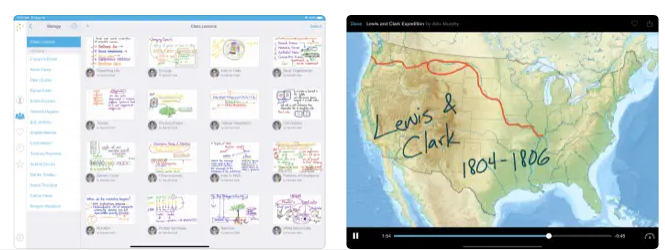
Capture your voice along with your iPad screen to produce engaging video lessons that can be accessed by students and colleagues whenever they need them. You can upload your videos to Educreations and easily share them with anyone, whether through email, Facebook, Twitter, or YouTube, and you also have the option to download them for storage in Dropbox or Google Drive. With all your videos securely hosted in the cloud, they are readily available wherever you go, and you have complete control over who can view each video. You can clarify any topic and quickly share your insights with others, empowering students to take charge of their learning journey and grasp new ideas effectively. Review student submissions to identify misunderstandings and recognize their achievements, allowing you to focus more on meaningful one-on-one interactions. This opens the door for more hands-on learning experiences. Educreations serves as a distinctive interactive whiteboard and screencasting tool that combines simplicity, effectiveness, and enjoyment in its use. You can annotate, animate, and narrate a wide range of materials as you elucidate any topic, making learning not only informative but also enjoyable. With this versatile tool, educators can truly enhance the educational experience for their students.
API Access
Has API
No
API Access
Has API
No


Integrations
Dropbox
Yes
Google Drive
Yes
Facebook
No
Google Classroom
Yes
Microsoft Office 2021
Yes
X (Twitter)
No
YouTube
No
Integrations
Dropbox
Yes
Google Drive
Yes
Facebook
Yes
Google Classroom
No
Microsoft Office 2021
No
X (Twitter)
Yes
YouTube
Yes
Pricing Details
$5.59 per month
Free Trial
Yes
Free Version
Yes
Pricing Details
$8.25 per month
Free Trial
No
Free Version
Yes
Deployment
Web-Based
Yes
On-Premises
No
iPhone App
No
iPad App
No
Android App
No
Windows
No
Mac
No
Linux
No
Chromebook
No
Deployment
Web-Based
No
On-Premises
No
iPhone App
No
iPad App
Yes
Android App
No
Windows
No
Mac
No
Linux
No
Chromebook
No
Customer Support
Business Hours
Yes
Live Rep (24/7)
Yes
Online Support
Yes
Customer Support
Business Hours
No
Live Rep (24/7)
No
Online Support
Yes
Types of Training
Training Docs
Yes
Webinars
No
Live Training (Online)
Yes
In Person
Yes
Types of Training
Training Docs
Yes
Webinars
No
Live Training (Online)
No
In Person
No
Vendor Details
Company Name
Common Curriculum
Country
United States
Website
www.commoncurriculum.com
Vendor Details
Company Name
Educreations
Country
United States
Website
www.educreations.com
Product Features
Product Features
Student Engagement Platform
Communication Tools
No
Community Management
No
Event Calendar
No
Higher Education
No
Interactive Learning
No
K-12
No
Location Tracking
No
Mobile App
No
Orientation Management
No
Polls / Voting
No
Safety Management
No
Student Group Management
No
