Average Ratings 0 Ratings
Average Ratings 0 Ratings
Similar Products
-
HighchartsHighcharts, a Javascript-based charting library, makes it easy to add interactive charts and graphs to web or mobile projects of any size. Highcharts is used by more than 80% of the 100 biggest companies in the world, as well as thousands of developers from a variety of industries, including finance, publishing, application development, and data science. Highcharts is in active development since 2009. It remains a favorite among developers due to its robust feature set and ease-of-use documentation, accessibility features and vibrant community.
-
DXchartsIn just a few days, you can integrate and customize a lightning-fast financial table with your product. You can make changes or create a completely new interface. You want more? We offer a full access alternative. Data feeds with futures and indices, equities, FX and cryptocurrencies by default. Sign up now to get your data feeds. DXcharts can be integrated with any market data source, as it is data feed-agnostic. Native libraries for all platforms. Native web, native mobile & desktop. Get a solution that is specifically tailored to your product. Analyzing statistics from trading activity can help you evaluate securities and predict their future movements. You can create custom studies with the intuitive dxScript. You can adjust the layout of charts however you like and sync them by instrument, chart type and timeframe, range, studies & appearance.
-
All in One AccessibilityAn AI based accessibility tool enables websites to be accessible among people with hearing or vision impairments, motor impaired, color blind, dyslexia, cognitive & learning impairments, seizure & epileptic, ADHD, elderly, and Parkinson. It installs in just 2 minutes. It reduces the risk of time-consuming accessibility lawsuits by improving accessibility compliance for the standards WCAG 2.0, 2.1, 2.2, ADA, Section 508, European EAA EN 301 549, Canada ACA, California Unruh, Israeli Standard 5568, Australian DDA, UK Equality Act, Ontario AODA, Indian RPD Act, GIGW 3.0, France RGAA, German BITV, Brazilian Inclusion law LBI 13.146/2015, Spain UNE 139803:2012, JIS X 8341, Italian Stanca Act, Switzerland DDA & more. It supports GDPR, HIPAA, CCPA, SOC Type 2, ISO 9001:2015, & ISO 27001:2022. It supports 190+ languages. It is a cornerstone of improving web accessibility through its ease of use for companies of all sizes and with the help of paid add-ons like manual accessibility audit, remediation, PDF accessibility remediation, VPAT/ ACR, white label subscription, and live site translation, SkynetAccessibility Scanner, and video subtitle. Top features of the All in One Accessibility: - AI Screen Reader - Accessibility statement - Accessibility interface for UI design fixes - Free Accessibility Statement Generator - Voice Navigation - Talk & Type - Libras (Brazilian Portuguese) Sign Language - Dashboard Automatic accessibility score - AI based Image Alternative Text remediation - AI based Text to Speech Screen Reader - Select Screen Reader Voice - Auto-detect language - Keyboard navigation adjustments - Content, Color, Contrast, Orientation Adjustments - Custom widget color, position, icon size, type - Dedicated support
-
OptiSignsOptiSigns, your friendly digital signage software! Designed with simplicity and ease in mind, it's the perfect harmony of affordable software and usage with any hardware in the market. Pick from 140+ Apps, Thousands of Templates, and formats like images & videos, playlists, Google Slides, Weather, Instagram, Twitter, YouTube – you name it! Level up your business and start engaging your audience. For just $10/month per screen, use any display to capture your audiences attention! Remotely manage it all from one central portal. Indulge in features, images, videos, playlists, and schedules. Jazz it up with apps like Google Slides, Weather, Instagram, Facebook, Twitter, and more. Oh, and did we mention? We play nice with the most hardware and operating systems in the market like Fire TV Stick, Android, Chrome, Raspberry Pi, Roku, Windows, Linux, and MacOS. Time to unleash your business potential!
-
Adobe Experience ManagerAdobe Experience Manager is an enterprise content management platform designed to power seamless digital experiences across web, mobile, apps, and other channels. Experience Manager Sites enables teams to create, manage, and optimize content efficiently while ensuring high performance and rapid delivery. Experience Manager Assets provides a robust digital asset management system with automation tools to source, adapt, and distribute content at scale. AI-driven Experience Platform Agents enhance productivity by automating tasks such as high-volume page updates, content migration, governance enforcement, and content optimization. Forms capabilities allow organizations to create responsive digital forms with secure e-signature workflows for streamlined customer interactions. Adobe Learning Manager integrates training and development directly into brand ecosystems, while Experience Manager Guides supports scalable documentation through a cloud-native CCMS. Built-in governance tools ensure compliance, brand consistency, and permission control across digital properties. By combining automation, AI, and centralized management, Adobe Experience Manager accelerates time-to-market and enhances customer engagement.
-
MarkMagicMarkMagic barcode label software makes it easy to design and print barcode labels, electronic forms, and RFID tags that you need to communicate your needs with customers and suppliers. MarkMagic is the barcoding engine in the most popular warehouse management software, such as Infor, Honeywell Intelligrated and Apparel Business Systems. MarkMagic is powerful and simple to use. You'll see why thousands upon thousands of software vendors and customers around the world rely on it to create business critical documents.
-
EcwidEcwid by Lightspeed makes it easy to add an online shop to any website or social media profile. Ecwid is used by hundreds of thousands merchants in 175 different countries. It has everything you need for reaching your customers wherever they may be: in-person or through your website, Instagram and Facebook, Amazon, Google Shopping, or Amazon. Ecwid's integrated point-of-sale and email marketing integrations and dedicated mobile app allow you to manage your marketing, sales, and merchandising from anywhere.
-
NINJIONINJIO is an all-in-one cybersecurity awareness training solution that lowers human-based cybersecurity risk through engaging training, personalized testing, and insightful reporting. This multi-pronged approach to training focuses on the latest attack vectors to build employee knowledge and the behavioral science behind human engineering to sharpen users’ intuition. Our proprietary NINJIO Risk Algorithm™ identifies users’ social engineering vulnerabilities based on phishing simulation data and informs content delivery to provide a personalized experience that changes individual behavior. With NINJIO you get: - NINJIO AWARE attack vector-based training that engages viewers with Hollywood style, micro learning episodes based on real hacks. - NINJIO PHISH3D simulated phishing identifies the specific social engineering tricks most likely to fool users in your organization. - NINJIO SENSE is our new behavioral science-based training course that shows employees what it “feels like” when hackers are trying to manipulate them.
-
AIMS360 Apparel SoftwareAIMS360 apparel software is the most popular ERP for the fashion industry. The fashion software features cover the entire fashion business lifecycle. AIMS360 business management software covers production, material and finished goods purchasing, omni-channel order taking, order processing, automated inventory management, warehouse management, shipping, invoicing, accounts receivable, and more. Get a demo of AIMS360’s 100+ apparel software features & integrations. Our most popular integrations: Shopify, JOOR, NuOrder, Brandboom, EDI, DSCO, Dropship, 3PL Integrations, Factoring, & more. See the AIMS360 fashion ERP website for our full features & integrations list.
-
TradingView Stock WidgetsAs fast as it takes to make a cup of coffee, grab powerful charts and add real-time financial information to your website. Simply copy and paste our iFrame codes, and you're good to go. Our display ratings make it easy to see the technical analysis of a symbol. This widget is ideal for macro-level analysis of the markets. This widget is especially useful on homepages. The widget displays the top five most active stocks, as well as the losing and winning stocks. It updates based upon current market activity so you always see the most relevant stocks. Keep an eye out for announcements and important economic events. You can also set up filters in just a few clicks. Our scrolling ticker tape allows you to go vintage Wall Street. This stock exchange-style ticker can be embedded in just a few clicks. You don't need a power suit or expensive watch.
Description
ColorZilla is an intuitive and comprehensive suite of color-related tools, including an advanced eyedropper, color picker, and gradient generator, making it both secure and dependable. With more than 10 million downloads globally, it stands out as one of the most widely used developer extensions for Chrome and Firefox. This tool allows users to effortlessly capture a color from any spot within their browser, making quick adjustments before transferring it to another application. Additionally, it enables users to manipulate colors by tweaking their hue, saturation, and value components. It also provides detailed information about elements on the page, including tag names, classes, IDs, and sizes, while offering a color palette extraction feature for any website, ensuring a seamless experience for web designers and developers alike. Such versatility makes ColorZilla a must-have tool for anyone working with color in digital design.
Description
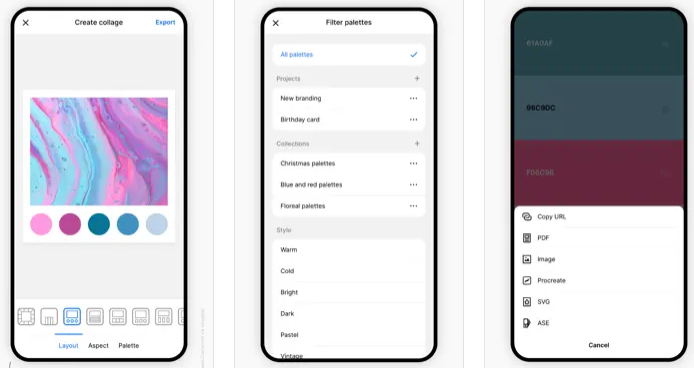
Coolors is a rapid color palette generator that assists you in crafting the ideal color palette or finding inspiration from a myriad of stunning color schemes. Accessible via web platforms, mobile applications, plugins, and extensions, it allows users to create color palettes in mere seconds by tapping the space bar, secure preferred colors to enhance the palette, and rearrange or modify the number of colors included. Additionally, it features an Image Picker to derive color schemes from personal photos and a Contrast Checker to ensure the combinations are accessible for all users. The Palette Visualizer offers a way to see how colors look in real design scenarios, while other tools, including a Color Picker, Collage Maker, gradient generator, and extensive color libraries, further enhance the experience. Users can export their palettes in various formats such as PDF, image, CSS, and SVG, as well as share links and integrate with design software like Figma or a Chrome extension. The platform also supports multiple color-space values including HEX, RGB, and CMYK, and includes functionalities for simulating color-blindness along with adjusting luminance, hue, and temperature for precision in design. Overall, Coolors combines functionality and creativity to cater to both amateur and professional designers alike.
API Access
Has API
No
API Access
Has API
No


Integrations
Google Chrome
Yes
Adobe Acrobat
No
CSS
No
Figma
No
Instagram
No
Mozilla Firefox
Yes
Integrations
Google Chrome
Yes
Adobe Acrobat
Yes
CSS
Yes
Figma
Yes
Instagram
Yes
Mozilla Firefox
No
Pricing Details
No price information available.
Free Trial
No
Free Version
No
Pricing Details
Free
Free Trial
No
Free Version
Yes
Deployment
Web-Based
Yes
On-Premises
No
iPhone App
No
iPad App
No
Android App
No
Windows
No
Mac
No
Linux
No
Chromebook
No
Deployment
Web-Based
Yes
On-Premises
No
iPhone App
Yes
iPad App
Yes
Android App
Yes
Windows
No
Mac
Yes
Linux
No
Chromebook
No
Customer Support
Business Hours
No
Live Rep (24/7)
No
Online Support
Yes
Customer Support
Business Hours
No
Live Rep (24/7)
No
Online Support
Yes
Types of Training
Training Docs
No
Webinars
No
Live Training (Online)
No
In Person
No
Types of Training
Training Docs
Yes
Webinars
No
Live Training (Online)
Yes
In Person
No
Vendor Details
Company Name
ColorZilla
Website
www.colorzilla.com/chrome/
Vendor Details
Company Name
Coolors
Founded
2014
Country
Italy
Website
coolors.co
Product Features
Graphic Design
Collaboration
No
Data Visualization
No
Filtering
No
Image Database
No
Image Editor
No
Templates
No
Product Features
Graphic Design
Collaboration
No
Data Visualization
No
Filtering
No
Image Database
No
Image Editor
No
Templates
No

