Average Ratings 0 Ratings
Average Ratings 0 Ratings
Similar Products
-
JetBrains JunieJetBrains Junie is an innovative AI coding assistant that works inside many JetBrains IDEs to streamline programming efforts and boost efficiency. This agent leverages advanced AI to help developers write, test, and inspect code without leaving their familiar development environment. Junie offers both code execution and interactive collaboration, allowing programmers to switch between automated code writing and brainstorming sessions for features and improvements. By deeply understanding the codebase, Junie identifies the best ways to tackle tasks and ensures all changes meet quality standards through syntax and semantic checks. It also runs tests to minimize errors and keep the project healthy, freeing developers from routine tasks. Many developers have successfully built complex applications and games using Junie, highlighting its flexibility across different languages and frameworks. The AI adapts to each task’s complexity and workflow, making coding less tedious and more focused on creativity. Whether you are building a simple web app or a complex game, Junie offers smart support throughout the development cycle.
-
RetoolRetool is a modern AI-native application development platform designed to help teams build internal software quickly and efficiently. It enables users to create agents, workflows, dashboards, and full-stack apps using natural language prompts and visual tools. Retool connects directly to databases, APIs, vector stores, and AI models to ensure applications work seamlessly with existing systems. The platform allows teams to transform raw data into actionable tools such as dashboards, admin panels, and monitoring systems. With drag-and-drop UI building, code-level customization, and AI-assisted generation, Retool supports multiple development styles. Built-in workflows automate complex processes while maintaining auditability and security. Retool fits naturally into standard engineering stacks with support for CI/CD and version control. Enterprise-grade permissions and hosting options ensure sensitive data stays protected. Used by thousands of companies worldwide, Retool helps teams ship AI-powered software faster. It bridges the gap between idea and production with speed and control.
-
Aikido SecurityAikido is the all-in-one security platform for development teams to secure their complete stack, from code to cloud. Aikido centralizes all code and cloud security scanners in one place. Aikido offers a range of powerful scanners including static code analysis (SAST), dynamic application security testing (DAST), container image scanning, and infrastructure-as-code (IaC) scanning. Aikido integrates AI-powered auto-fixing features, reducing manual work by automatically generating pull requests to resolve vulnerabilities and security issues. It also provides customizable alerts, real-time vulnerability monitoring, and runtime protection, enabling teams to secure their applications and infrastructure seamlessly.
-
Google AI StudioGoogle AI Studio is an all-in-one environment designed for building AI-first applications with Google’s latest models. It supports Gemini, Imagen, Veo, and Gemma, allowing developers to experiment across multiple modalities in one place. The platform emphasizes vibe coding, enabling users to describe what they want and let AI handle the technical heavy lifting. Developers can generate complete, production-ready apps using natural language instructions. One-click deployment makes it easy to move from prototype to live application. Google AI Studio includes a centralized dashboard for API keys, billing, and usage tracking. Detailed logs and rate-limit insights help teams operate efficiently. SDK support for Python, Node.js, and REST APIs ensures flexibility. Quickstart guides reduce onboarding time to minutes. Overall, Google AI Studio blends experimentation, vibe coding, and scalable production into a single workflow.
-
GearsetGearset is a full‑featured Salesforce DevOps solution built for the enterprise, giving teams the tools to adopt best practices across every stage of the DevOps lifecycle. From metadata and CPQ deployments to CI/CD, testing, code analysis, sandbox seeding, backups, archiving, and observability, Gearset gives teams unmatched insight and control over their Salesforce workflows. Over 3,000 organizations — including names like McKesson and IBM — rely on Gearset to deliver with security and scale in mind. With advanced governance, detailed audit trails, SOX/ISO/HIPAA support, multi‑team pipelines, integrated security checks, and adherence to ISO 27001, SOC 2, GDPR, CCPA/CPRA, and HIPAA, Gearset combines enterprise‑ready compliance with rapid onboarding and an intuitive interface — all in one platform. Leading firms in finance, healthcare, and tech trust Gearset to power their DevOps initiatives without adding complexity.
-
Kasm WorkspacesKasm Workspaces streams your workplace environment directly to your web browser…on any device and from any location. Kasm is revolutionizing the way businesses deliver digital workspaces. We use our open-source web native container streaming technology to create a modern devops delivery of Desktop as a Service, application streaming, and browser isolation. Kasm is more than a service. It is a platform that is highly configurable and has a robust API that can be customized to your needs at any scale. Workspaces can be deployed wherever the work is. It can be deployed on-premise (including Air-Gapped Networks), in the cloud (Public and Private), or in a hybrid.
-
Thinfinity WorkspaceThinfinity Workspace 7.0's Technical Highlights: - Progressive Web App (PWA) technology for a seamless user experience - Integrated Thinfinity VNC, VirtualUI, and z/Scope for maximum versatility - HTML5 terminal emulation supporting DEC terminals, TN 5220, and TN 3270 protocols - Robust enterprise-grade audit logs for security and compliance management - Proprietary VNC protocol for real-time monitoring and troubleshooting IMPROVE USER EXPERIENCE - Deliver business-critical apps, desktops and files from a single web portal. - Provide simplified remote browser access for your users, while confining them to only the resources that they need. SIMPLIFY IT AND AVOID VPNs - Forget traditional VPN deployments and complexities. - Enable access from Chromebooks, mobile devices or any computer with a Web Browser. Zero setup. KEEP YOUR BUSINESS SECURE - Use enterprise-grade encrypted connections. - Integrate with your existing and external identity platforms. - Apply 2FA or MFA policies with all identity providers.
-
DbVisualizerDbVisualizer is a universal database client for anyone who works with data, from indie developers and startups to professional teams managing complex database environments, including developers, DBAs, analysts, and data engineers working across relational and NoSQL databases. Key features: - SQL editor with intelligent autocomplete, visual query builders, variables, and execution tools - AI Assistant for answering questions, explaining errors, and analyzing code - Git integration for managing SQL scripts and team collaboration - Customizable layouts, key bindings, and UI themes - Favorites for frequently used scripts and database objects - Configurable security settings for organizational requirements Connects via JDBC to MySQL, PostgreSQL, SQL Server, Oracle, Snowflake, SQLite, Cassandra, BigQuery, and more. Runs on Windows, macOS, and Linux. Nearly 7 million downloads, with Pro users in 150 countries, scaling from solo projects to enterprise database management.
-
NMI PaymentsNMI Payments gives developers, SaaS builders, ISVs and ISOs a simple path to embedded payments. As a full-stack processor, acquirer, and technology partner, NMI enables you to integrate, brand, and manage payment acceptance within your platform—without becoming a PayFac or building complex infrastructure. The platform combines flexibility, scalability, and speed, offering white-labeled payments infrastructure that keeps your brand front and center. With omnichannel support for in-store, online, in-app, and unattended payments, you can deliver a consistent merchant experience across every touchpoint. NMI also manages onboarding, compliance, and risk, freeing your team to focus on innovation and customer growth. Developer-First Experience NMI’s developer-first environment puts full control in your hands. Build, test, and launch payments in a modern sandbox with clear documentation and ready-to-use code snippets. Guided onboarding flows and API recipes simplify integration, while low-code and no-code tools accelerate deployment. Business users can evaluate monetization options with instant revenue calculators and self-service sign-up. Whether you’re embedding payments for the first time or scaling across channels, NMI helps you go live faster, stay compliant, and grow with confidence
-
Bright DataBright Data holds the title of the leading platform for web data, proxies, and data scraping solutions globally. Various entities, including Fortune 500 companies, educational institutions, and small enterprises, depend on Bright Data's offerings to gather essential public web data efficiently, reliably, and flexibly, enabling them to conduct research, monitor trends, analyze information, and make well-informed decisions. With a customer base exceeding 20,000 and spanning nearly all sectors, Bright Data's services cater to a diverse range of needs. Its offerings include user-friendly, no-code data solutions for business owners, as well as a sophisticated proxy and scraping framework tailored for developers and IT specialists. What sets Bright Data apart is its ability to deliver a cost-effective method for rapid and stable public web data collection at scale, seamlessly converting unstructured data into structured formats, and providing an exceptional customer experience—all while ensuring full transparency and compliance with regulations. This commitment to excellence has made Bright Data an essential tool for organizations seeking to leverage web data for strategic advantages.
Description
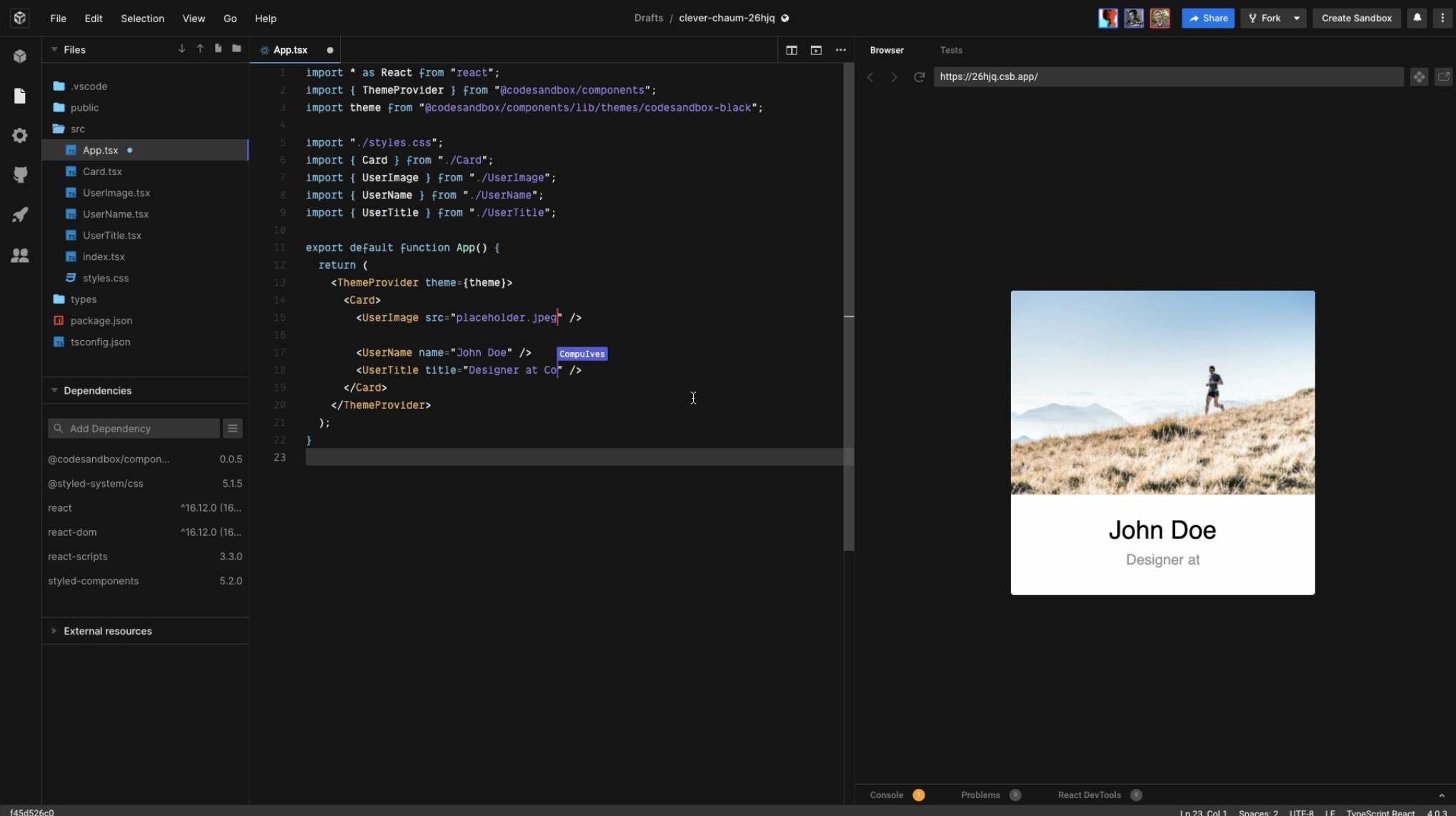
CodeSandbox aims to make it easier for you to express your ideas with code, and to validate them. It also removes the hassles of setting up development tooling and sharing your project. Join us to help build the future of web coding.
Over 4M developers use the platform each month. This includes organizations like Shopify and Atlassian. Since its launch, creators have created over 35M apps. It's used in thousands of open-source projects like React, Vue and Babel.
You can invite your friends, colleagues, or team to join you or simply view your creation by using a URL. Use any of 1M+ packages for building real, powerful applications quickly and efficiently. Import and run repos directly from GitHub or choose from hundreds of templates to start in seconds.
Boxy, CodeSandbox's AI-powered coding assistant, is now available to all Pro subscriptions.
Description
Introducing Slater, an AI-driven code editor designed specifically for Webflow that elevates your projects to new heights. Our innovative tool is being developed in collaboration with leading Webflow developers to ensure it meets the highest standards. Whether you're a solo creator or part of a larger team, Slater empowers you to effortlessly enhance your website. Simply input a prompt, press enter, and watch as AI streamlines the coding process for you. With an integrated AI functionality in Webflow, you can swiftly produce the precise code necessary for your project without unnecessary delays. Enjoy the flexibility to collaborate with others in real-time on the same project and write code for various pages within a single document. After crafting your code in Slater, simply copy it, paste it into your Webflow project, and save your changes. You now have access to a cutting-edge AI-powered coding environment tailored for your use. Code with confidence and ease, and continue to improve your work by asking Slater to generate additional code and refine your existing prompts, thus optimizing your development experience even further.
API Access
Has API
Yes
API Access
Has API
Yes




Integrations
JavaScript
Yes
Buildin.AI
Yes
Docsie
Yes
Elixir
Yes
GitHub
Yes
Java
Yes
Nix
Yes
Node.js
Yes
Nuxt
Yes
Reason
Yes
Integrations
JavaScript
Yes
Buildin.AI
No
Docsie
No
Elixir
No
GitHub
No
Java
No
Nix
No
Node.js
No
Nuxt
No
Reason
No
Pricing Details
$12 per month
Free Trial
Yes
Free Version
Yes
Pricing Details
$10 per month
Free Trial
Yes
Free Version
Yes
Deployment
Web-Based
Yes
On-Premises
Yes
iPhone App
Yes
iPad App
Yes
Android App
No
Windows
No
Mac
No
Linux
No
Chromebook
Yes
Deployment
Web-Based
Yes
On-Premises
No
iPhone App
No
iPad App
No
Android App
No
Windows
No
Mac
No
Linux
No
Chromebook
No
Customer Support
Business Hours
No
Live Rep (24/7)
No
Online Support
Yes
Customer Support
Business Hours
No
Live Rep (24/7)
No
Online Support
Yes
Types of Training
Training Docs
Yes
Webinars
No
Live Training (Online)
No
In Person
No
Types of Training
Training Docs
Yes
Webinars
No
Live Training (Online)
No
In Person
No
Vendor Details
Company Name
CodeSandbox
Founded
2017
Country
Netherlands
Website
codesandbox.io
Vendor Details
Company Name
Slater
Website
slater.app/
Product Features
Code Collaboration
Audio Conferencing
Yes
Chat / Messaging
Yes
Code Review
Yes
Discussion Threads
Yes
IDE Integration
Yes
Remote Control
No
Remote Pair Programming
Yes
Screen Sharing
No
Video Conferencing
No
Code Editors
API
Yes
Auto-Complete
Yes
Code Folding
Yes
Column Editing
Yes
Customizable Themes
Yes
Debugging
Yes
Formatting / Table Editing
Yes
Keyboard Shortcuts
Yes
Multi-Monitor Editing
Yes
Syntax Highlighting
Yes
WYSIWYG
No
IDE
Code Completion
Yes
Compiler
Yes
Cross Platform Support
Yes
Debugger
Yes
Drag and Drop UI
No
Integrations and Plugins
Yes
Multi Language Support
Yes
Project Management
No
Text Editor / Code Editor
Yes
Product Features
Code Editors
API
No
Auto-Complete
No
Code Folding
No
Column Editing
No
Customizable Themes
No
Debugging
No
Formatting / Table Editing
No
Keyboard Shortcuts
No
Multi-Monitor Editing
No
Syntax Highlighting
No
WYSIWYG
No
