Average Ratings 0 Ratings
Average Ratings 0 Ratings
Similar Products
-
PathSolutions TotalViewTotalView offers network monitoring as well as root-cause troubleshooting of problems in plain-English. The solution monitors every device as well as every interface on every device. In addition, TotalView goes deep, collecting 19 error counters, performance, configuration, and connectedness so nothing is outside of it’s view. A built-in heuristics engine analyzes this information to produce plain-English answers to problems. Complex problems can now be solved by junior level engineers leaving the senior level engineers to work on more strategic level projects. The core product includes everything needed to run a perfectly healthy network: Configuration management, server monitoring, cloud service monitoring, IPAM, NetFlow, path mapping, and diagramming. Get Total Network Visibility on your network and solve more problems faster.
-
ActCAD SoftwareACTCAD is suitable for professional drawings creation for Architects, Structural Engineers, Civil Engineres, Mechanical Drawings, Electrical drawings, interior design, tool design, machine designs etc.ActCAD is professional grade 2D Drafting and 3D Modeling CAD software which works in dwg and dxf file formats. Most affordable cad software.ActCAD is a native dwg/dxf cad software suitable for professional 2D drafting and 3D modeling projects. ActCAD is trusted by over 30000 users in over 103 countries for more than 10 years. The interface, commands, icons, dialogs, shortcuts etc. are very much similar to other popular cad software tools available in market. Flexible license types available even for single license. There is no learning for existing cad users while saving 80% of the costs.ActCAD offers free email technical support without any limitations. ActCAD can be fully customized and programs can be developed using our free API toolkit. It supports popular programming languages like , lisp dcl, .net, C++ etc. Apart from all regular commands, ActCAD offers many productive tools like pdf to cad converter, Block libraries, Image to Cad converter, handling point sets between Cad and Excel and many more.
-
DbVisualizerDbVisualizer is a universal database client for anyone who works with data, from indie developers and startups to professional teams managing complex database environments, including developers, DBAs, analysts, and data engineers working across relational and NoSQL databases. Key features: - SQL editor with intelligent autocomplete, visual query builders, variables, and execution tools - AI Assistant for answering questions, explaining errors, and analyzing code - Git integration for managing SQL scripts and team collaboration - Customizable layouts, key bindings, and UI themes - Favorites for frequently used scripts and database objects - Configurable security settings for organizational requirements Connects via JDBC to MySQL, PostgreSQL, SQL Server, Oracle, Snowflake, SQLite, Cassandra, BigQuery, and more. Runs on Windows, macOS, and Linux. Nearly 7 million downloads, with Pro users in 150 countries, scaling from solo projects to enterprise database management.
-
DaylightDaylight combines cutting-edge agentic AI with top-tier human skills to offer an advanced managed detection and response service that transcends mere notifications, striving to “take command” of your cybersecurity landscape. It ensures comprehensive monitoring of your entire environment, leaving no gaps, while providing context-sensitive protection that adapts and evolves based on your systems and historical incidents, including communications through platforms like Slack. This service boasts an exceptionally low rate of false positives, the quickest detection and response times in the industry, and seamless integration with your existing IT and security tools, accommodating limitless platforms and integrations while delivering actionable insights through AI-enhanced dashboards without unnecessary noise. With Daylight, you receive true comprehensive threat detection and response without the need for escalations, round-the-clock expert assistance, tailored response workflows, extensive visibility across your environment, and quantifiable enhancements in analyst efficiency and response time, all designed to transition your security operations from a reactive stance to a proactive command approach. This holistic approach not only empowers your team but also fortifies your defenses against evolving threats in the digital landscape.
-
ManageEngine EventLog AnalyzerEventLog Analyzer from Manage Engine is the industry's most affordable security information and event management software (SIEM). This cloud-based, secure solution provides all essential SIEM capabilities, including log analysis, log consolidation, user activity monitoring and file integrity monitoring. It also supports event correlation, log log forensics and log retention. Real-time alerting is possible with this powerful and secure solution. Manage Engine's EventLog Analyzer allows users to prevent data breaches, detect the root cause of security issues, and mitigate sophisticated cyber-attacks.
-
NinjaOneNinjaOne automates the hardest parts of IT, empowering more than 20,000 IT teams. By providing deep insights into endpoints, robust security measures, and centralized control, NinjaOne boosts efficiency while safeguarding sensitive data and cutting IT expenses. This comprehensive platform offers a versatile toolkit for managing and securing endpoints, including patch management, mobile device oversight, software distribution, remote support, backup solutions, and more, thanks to its extensive IT and security integrations.
-
WrikeWrike is a powerful work management platform that gives cross-functional teams full visibility into complex projects. Our cloud-based collaboration software software is trusted by 20,000+ leading companies around the world, including tech giants such as Fitbit and Siemens. Wrike boasts a wide range of award-winning features, including dynamic request forms, automated workflows, cross-tagging, custom item types, and 400+ app integrations. Work smarter with Work Intelligence™: our advanced communication software that offers voice commands, smart replies, and document processing. We also offer tailor-made templates to help teams kick-start Agile projects and tick every box for compliance. As well as 99.9% uptime, our enterprise-grade security offers single sign-on, role-based access control, and continuous data backup. For extra peace of mind, you can use the Wrike Lock add-on and gain full ownership of your master encryption key. Wrike has been proven to make organizational processes 40% more efficient, eliminating time-consuming admin work and reducing costs across the board. Discover how it can benefit your team — start your free two-week trial today.
-
Admin By Request Endpoint Privilege ManagementAdmin By Request EPM is an endpoint privilege management solution for Windows, macOS, and Linux. It removes permanent local admin rights and grants elevation only when a task requires it, so a compromised account can't take over an entire system. Elevation applies to applications rather than user accounts, and privileges can be delegated by user or group to fit developers, general staff, and third-party contractors alike. Threat and behavioral analytics identify risky users, assets, and software, and every session is logged for auditing. The solution runs from a single portal, works online or offline, and requires no additional servers or databases.
-
Google Cloud RunFully managed compute platform to deploy and scale containerized applications securely and quickly. You can write code in your favorite languages, including Go, Python, Java Ruby, Node.js and other languages. For a simple developer experience, we abstract away all infrastructure management. It is built upon the open standard Knative which allows for portability of your applications. You can write code the way you want by deploying any container that listens to events or requests. You can create applications in your preferred language with your favorite dependencies, tools, and deploy them within seconds. Cloud Run abstracts away all infrastructure management by automatically scaling up and down from zero almost instantaneously--depending on traffic. Cloud Run only charges for the resources you use. Cloud Run makes app development and deployment easier and more efficient. Cloud Run is fully integrated with Cloud Code and Cloud Build, Cloud Monitoring and Cloud Logging to provide a better developer experience.
-
MyQAt MyQ, the core belief is that print solutions should be automated, personalized, and easy to use, allowing people to focus on what matters most in their daily work. This principle is reflected in MyQ’s approach to our product design, combining intuitive user experiences with strong data security and efficient document workflows. MyQ’s print management solutions strengthen document security while helping organizations reduce costs, save time, and lower their environmental impact.
Description
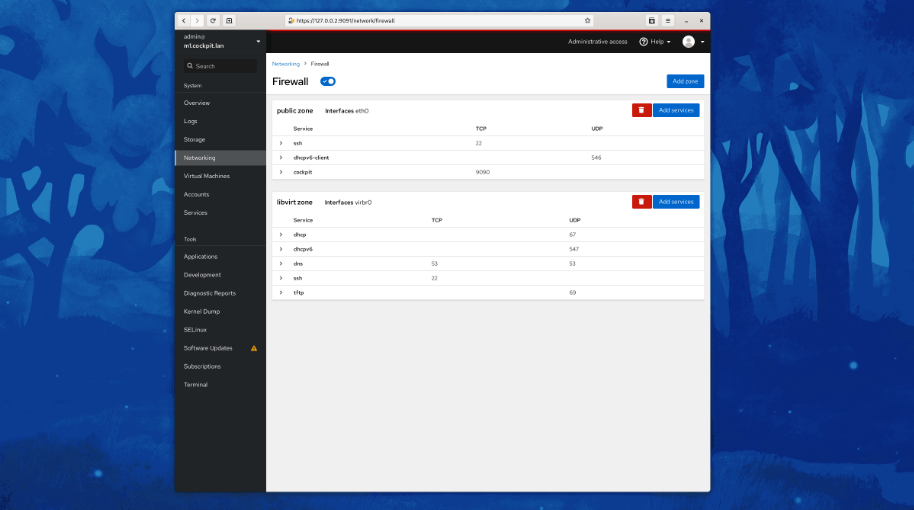
Cockpit serves as a user-friendly web-based graphical interface designed for server management, catering to everyone from beginners to seasoned Linux administrators. By leveraging system APIs and commands, Cockpit allows an entire team of administrators to manage systems in their preferred manner, whether that involves using the command line or various utilities alongside the Cockpit interface. With Cockpit, users can access their servers through a web browser and execute system tasks effortlessly using a mouse. It simplifies operations such as initiating containers, managing storage, configuring networks, and reviewing logs. Essentially, Cockpit acts like a graphical "desktop interface" tailored specifically for individual servers. If you have preferred applications or command-line tools for server management, you can continue utilizing those alongside Cockpit without any disruptions. Since Cockpit operates using the same system tools as the command line, you can seamlessly switch between Cockpit and your other preferred methods. This flexibility ensures that you can efficiently manage your servers while still maintaining your usual workflow.
Description
Created by seasoned server administrators, this open-source (GPL) panel streamlines the management of your hosting environment. You can specify which IPv4 and/or IPv6 addresses and ports are assigned per domain. Additionally, you can set which ports will utilize SSL and enable customers to manage their certificates for each domain. Different PHP configurations can be saved, and you can select the appropriate php.ini file for each domain (note that this applies only to FCGI/FPM setups). The system allows for the management of reseller resources and imposes limits on what customers can access in their dedicated control panel. You can track dedicated HTTP, FTP, and mail traffic, visualizing the data through interactive graphs. Major functionalities are accessible via an API, granting complete control over your hosting services. Furthermore, you can customize froxlor’s appearance by modifying the base CSS or by crafting an entirely new theme. Free SSL certificates from Let's Encrypt can also be easily integrated directly within froxlor, enhancing the security of your hosted domains. Such flexibility makes this panel a valuable tool for both administrators and customers alike.
API Access
Has API
No
API Access
Has API
No



Integrations
Ansible
Yes
CentOS
Yes
Debian
Yes
Fedora
Yes
Fedora CoreOS
Yes
Red Hat Enterprise Linux
Yes
Ubuntu
Yes
openSUSE Tumbleweed
Yes
Integrations
Ansible
No
CentOS
No
Debian
No
Fedora
No
Fedora CoreOS
No
Red Hat Enterprise Linux
No
Ubuntu
No
openSUSE Tumbleweed
No
Pricing Details
No price information available.
Free Trial
No
Free Version
Yes
Pricing Details
No price information available.
Free Trial
No
Free Version
No
Deployment
Web-Based
No
On-Premises
No
iPhone App
No
iPad App
No
Android App
Yes
Windows
Yes
Mac
Yes
Linux
Yes
Chromebook
No
Deployment
Web-Based
No
On-Premises
No
iPhone App
No
iPad App
No
Android App
No
Windows
No
Mac
No
Linux
Yes
Chromebook
No
Customer Support
Business Hours
No
Live Rep (24/7)
No
Online Support
Yes
Customer Support
Business Hours
No
Live Rep (24/7)
No
Online Support
Yes
Types of Training
Training Docs
Yes
Webinars
No
Live Training (Online)
No
In Person
No
Types of Training
Training Docs
Yes
Webinars
No
Live Training (Online)
No
In Person
No
Vendor Details
Company Name
Cockpit
Website
cockpit-project.org
Vendor Details
Company Name
froxlor
Founded
2010
Country
Germany
Website
froxlor.org
Product Features
Server Management
CPU Monitoring
No
Credential Management
No
Database Servers
No
Email Monitoring
No
Event Logs
No
History Tracking
No
Patch Management
No
Scheduling
No
User Activity Monitoring
No
Virtual Machine Monitoring
No
Product Features
Server Management
CPU Monitoring
No
Credential Management
No
Database Servers
No
Email Monitoring
No
Event Logs
No
History Tracking
No
Patch Management
No
Scheduling
No
User Activity Monitoring
No
Virtual Machine Monitoring
No
