Average Ratings 0 Ratings
Average Ratings 1 Rating
Similar Products
-
Altium DevelopAltium Develop is a collaborative platform for modern electronics engineering teams that connects requirements management, PCB design, systems engineering, and manufacturing workflows. Built on Altium Designer and Altium 365, the platform provides a centralized environment for design collaboration, requirements traceability, BOM management, supply chain visibility, and engineering change management. Altium Develop helps hardware organizations maintain alignment between requirements, design decisions, and manufacturing outcomes while supporting distributed engineering teams through cloud-based collaboration. Core Features: • PCB design collaboration • ECAD-MCAD co-design workflows • Component and supply chain visibility • BOM and engineering change management • Design review and approval workflows • Cloud-native team collaboration • Requirements management and traceability Used by electronics teams building complex PCB-based products, Altium Develop is frequently evaluated alongside Cadence OrCAD, Cadence Allegro, Autodesk Fusion Electronics, KiCad, Siemens Xpedition, and SOLIDWORKS PCB for organizations seeking greater collaboration and lifecycle visibility across hardware development programs.
-
SmartDrawSmartDraw makes professional drawings and diagrams accessible to everyone. Non-technical users can quickly create floor plans, while professionals get the precision and scale they require. With industry-leading floor planning tools and an intuitive interface for traditional diagramming like flowcharts and organizational charts, SmartDraw delivers enterprise-ready power without unnecessary complexity. Key features: - Large collection of symbols and templates - Ability to create custom shapes - Import PDFs, images, Google Maps, Visio files, Visio stencils - Draw to any scale - Enrich drawings with data - Generate manifest and bills of materials - Generate diagrams from data automatically like org charts, AWS, Azure, PI Boards, and more - Use natural language text prompts to generate diagrams with AI - Save files directly to OneDrive, SharePoint, or Google Drive, or other preferred provider - Integrations with the Microsoft and Google enterprise stack plus Confluence and Jira SmartDraw supports a wide range of industries and real-world use cases, helping teams plan, document, and communicate more effectively. Construction professionals use it to create scaled floor plans, site layouts, and electrical and plumbing drawings. Fire departments rely on it for fire pre-planning and incident documentation, while police departments use it for accident reconstruction and crime scene diagrams. IT teams build network diagrams and cloud architectures, HR leaders create organizational charts, and product managers map out processes and workflows. From physical layouts to business processes, SmartDraw provides a single platform that adapts to the needs of each role and industry.
-
VKSVKS makes it simple for companies to get rid of paper work instructions and transform into a digital factory. There are many benefits to our visual work instruction solution, including: No need for paper! Digital work instructions can be created with better results. You can reduce your defects up to 95% by performing in-process quality checks. Standardize best practices to increase productivity by 20% You can track your processes 100% with 100% certainty and real-time control. You can accelerate and improve the accuracy of your operational decision making. Capture tribal knowledge to close the skills gap.
-
ClickLearnClickLearn simplifies complex business processes using popular software. You can create multi-format learning materials in any language and publish them to a 24/7 learning portal with just one click. A video walkthrough of the process, with narration in your preferred language. Put your learning to the test. This interactive simulation of your workplace allows you to test your knowledge without any hints. Interactive simulation of your workplace environment that guides you through the process. This guide is step-by-step. ClickLearn wrote this guide with perfectly cropped screenshots. ClickLearn Assist can be your go-to helper when you are stuck, need process help, or want to try a new process in the live system. You don't have to worry about making another mistake. All your learning materials can be auto-translated with a click of a button
-
Interfacing Integrated Management System (IMS)Interfacing’s Integrated Management System (IMS ) is an AI-supported platform that brings BPM, QMS, Document Control, and GRC together in one environment. Teams use IMS to design and manage processes, govern documentation, oversee risks, and demonstrate compliance with complete visibility and reliable audit evidence. Built for sectors that depend on strict oversight, such as aerospace, life sciences, public sector, and financial services, IMS offers real-time monitoring, automated workflows, and AI-driven analytics that strengthen quality and lower operational exposure. The system is ISO 27001 certified and validated for 21 CFR Part 11, ensuring secure and compliant use in regulated operations. IMS also provides low-code automation, process mining, audit tools, training management, CAPA workflows, and dashboards that help organizations improve performance and maintain regulatory control. AI enhances governance, improves precision, and supports continuous compliance.
-
PartfulPartful is a 3D Explosion Parts Catalog and Work Instructions Platform. Showcase your products and parts in stunning 3D. Let your customers and dealers instantly find the right parts and click to order in one exploded view. No more incorrect orders, only a superior customer experience. From paperback catalogues to legacy, old-fashioned and slow static systems, Partful can completely replace them and take away your daily time wasters. Our Work Instructions let you customise and provide your end users a unique training experience in stunning 3D. It allows your end users to instantly find the right instructions and steps. Say goodbye to digging through stacks of PDF manuals trying to match things up. Say hello to an immersive training experience at your fingertips.
-
AI Video CutAI Video Cut is a complimentary tool designed to convert long videos into dynamic short clips that are perfect for platforms such as YouTube Shorts, TikTok, and social media advertisements. By utilizing AI-enhanced prompts, it provides a range of ready-made templates alongside customizable features, enabling users to craft enticing trailers, product showcases, and educational content. The tool boasts advanced smart cropping technology that recognizes faces, a variety of caption styles, and multilingual support, ensuring that the content resonates with a wide array of audiences. Additionally, users have the flexibility to export their videos in different lengths and aspect ratios tailored to various platforms and viewer preferences. Ideal for content creators, digital marketers, social media strategists, e-commerce entrepreneurs, event coordinators, and podcasters, AI Video Cut streamlines the process of enhancing video content, making it accessible and efficient for anyone looking to elevate their visual storytelling. With its user-friendly interface and innovative features, AI Video Cut empowers individuals and businesses alike to make a lasting impact through their video content.
-
Epicor Connected Process ControlEpicor Connected Process Control (CPC) is a flexible no-code/low-code MES and manufacturing operations platform that helps manufacturers standardize production and assembly processes, improve quality, and increase visibility across the shop floor. Using digital work instructions with multimedia content, manufacturers can guide operators through critical tasks, enforce process control, and improve consistency across products, workstations, and production lines. CPC connects equipment and devices to collect production and quality data in real time, helping manufacturers identify issues faster, reduce waste, and support continuous improvement. CPC provides product traceability with a complete historical record of each product's build and inspection history. Manufacturers use CPC to support assembly verification, error proofing, quality inspections, operator guidance, and other connected manufacturing initiatives. For manufacturers with complex product variations, CPC can dynamically present the correct work instructions based on the product or configuration being built, helping ensure products are assembled accurately and consistently. Available on-premises or in the cloud, CPC scales from a single work cell to enterprise-wide deployments.
-
Adobe FireflyAdobe Firefly is a versatile AI-powered creative platform designed to help users generate and edit multimedia content with ease. It allows users to create images, videos, and audio using simple text prompts within an interactive and flexible workspace. The platform features tools like generative fill, image editing, and video editing, enabling users to refine and enhance their creations. Firefly also includes quick actions such as background removal, cropping, resizing, and format conversion to streamline workflows. Users can explore an infinite canvas for creative production and experiment with various styles and outputs. The platform encourages creativity by allowing users to remix content from a shared community gallery. With its intuitive design, it reduces the need for advanced technical skills. Firefly integrates AI capabilities to speed up content creation and editing processes. It supports both beginners and professionals in producing high-quality results. Overall, Adobe Firefly provides a powerful and accessible environment for modern digital creativity.
-
ActCAD SoftwareACTCAD is suitable for professional drawings creation for Architects, Structural Engineers, Civil Engineres, Mechanical Drawings, Electrical drawings, interior design, tool design, machine designs etc.ActCAD is professional grade 2D Drafting and 3D Modeling CAD software which works in dwg and dxf file formats. Most affordable cad software.ActCAD is a native dwg/dxf cad software suitable for professional 2D drafting and 3D modeling projects. ActCAD is trusted by over 30000 users in over 103 countries for more than 10 years. The interface, commands, icons, dialogs, shortcuts etc. are very much similar to other popular cad software tools available in market. Flexible license types available even for single license. There is no learning for existing cad users while saving 80% of the costs.ActCAD offers free email technical support without any limitations. ActCAD can be fully customized and programs can be developed using our free API toolkit. It supports popular programming languages like , lisp dcl, .net, C++ etc. Apart from all regular commands, ActCAD offers many productive tools like pdf to cad converter, Block libraries, Image to Cad converter, handling point sets between Cad and Excel and many more.
Description
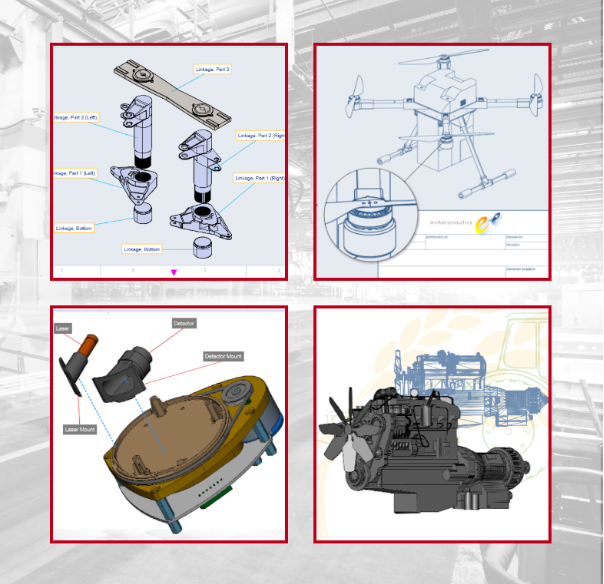
The Envision Cloud Platform combines the evCreator 2D and 3D graphics application with document storage, collaboration, mark-up and review, and interactive viewing in a turnkey package. It can be hosted on our AWS servers or on your private cloud.
Document viewers will be able to easily access and consume digital instructional content containing precise 2D graphics, narrated animations, and fully interactive embedded 3D models. Interactive digital instructions are proven to drive faster time to task completion and reduce error count.
There are hundreds, if certainly thousands, of downstream colleagues who have access to rich product data, such as 3DCAD models, and whose success is dependent on their ability to create, consume, interact with, and interact visually with that data. Too often, success is impeded by the lack of data access and the training and software to use it effectively.
- 2D drawing and vector graphics
- Image editing
- 3D CAD visualization
- Animation with text to speech
- Flow charts and process diagrams
- Smart annotation & dimension tools
- Charts, tables, symbols
- Text and document layout
- Export to JPG, PNG, PDF, MP4, and more
Description
Napkin effortlessly converts your written ideas into visuals, making the process of sharing your thoughts both swift and efficient. Rather than relying on prompts, Napkin operates directly from your text input, generating visuals that are most pertinent to your content. You then have the opportunity to choose the image that best encapsulates your vision. The visuals produced by Napkin are completely customizable, allowing you to modify both the content and style for maximum effectiveness. You can enhance your visuals by adding or substituting icons from a vast collection, ensuring that the aesthetics align with your concept. With dynamic connectors capable of linking various elements, and colors that maintain appeal in both light and dark modes, Napkin's versatility truly stands out. The visuals you create can be applied across various platforms, capturing your audience's attention with auto-generated infographics, diagrams, flowcharts, and more. In essence, Napkin serves as your personal visual consultant, ready to transform your text into engaging visuals like charts, scenes, and images, thus helping you effectively communicate your ideas. This innovative tool not only simplifies the transition from text to visuals but also empowers you to present complex information in a clear and appealing manner.
API Access
Has API
Yes
API Access
Has API
No




Integrations
AutoCAD
Yes
CATIA
Yes
Competency.ai
Yes
Confluence
No
Creo
Yes
Google Docs
No
Google Sheets
No
Keynote
No
LinkedIn
No
Medium
No
Integrations
AutoCAD
No
CATIA
No
Competency.ai
No
Confluence
Yes
Creo
No
Google Docs
Yes
Google Sheets
Yes
Keynote
Yes
LinkedIn
Yes
Medium
Yes
Pricing Details
No price information available.
Free Trial
Yes
Free Version
No
Pricing Details
Free
Free Trial
No
Free Version
Yes
Deployment
Web-Based
Yes
On-Premises
No
iPhone App
No
iPad App
No
Android App
No
Windows
Yes
Mac
Yes
Linux
No
Chromebook
No
Deployment
Web-Based
Yes
On-Premises
No
iPhone App
No
iPad App
No
Android App
No
Windows
No
Mac
No
Linux
No
Chromebook
No
Customer Support
Business Hours
Yes
Live Rep (24/7)
Yes
Online Support
Yes
Customer Support
Business Hours
No
Live Rep (24/7)
No
Online Support
Yes
Types of Training
Training Docs
Yes
Webinars
No
Live Training (Online)
Yes
In Person
Yes
Types of Training
Training Docs
Yes
Webinars
No
Live Training (Online)
No
In Person
No
Vendor Details
Company Name
Canvas GFX
Founded
1986
Country
United States
Website
www.canvasgfx.com/envision
Vendor Details
Company Name
Napkin
Country
United States
Website
www.napkin.ai/
Product Features
CAD
2 1/2-Axis Milling
No
2D Drawing
Yes
3-Axis Milling
No
3D Modeling
Yes
4-Axis Milling
No
5-Axis Milling
No
Civil
Yes
Collaboration
Yes
Database Connectivity
No
Design Analysis
No
Design Export
Yes
Document Management
Yes
Electrical
Yes
Hole Making
No
Mechanical
Yes
Mechatronics
Yes
Presentation Tools
Yes
Simulate Cycles
No
Spiral Output
No
Structural Engineering
Yes
Toolpath Simulation
No
User Defined Cycles
No
Collaboration
Brainstorming
No
Calendar Management
No
Chat / Messaging
Yes
Contact Management
No
Content Management
Yes
Document Management
Yes
Project Management
Yes
Real Time Editing
Yes
Task Management
No
Version Control
No
Video Conferencing
No
Flowchart
Collaboration
Yes
Diagramming
Yes
Drag & Drop
Yes
Organizational Charting
Yes
Process Mapping
Yes
Revision Management
Yes
Templates
Yes
Text to Chart
Yes
Graphic Design
Collaboration
Yes
Data Visualization
Yes
Filtering
Yes
Image Database
Yes
Image Editor
Yes
Templates
Yes
Vector Graphics
2D Drawing
Yes
Animation
Yes
Data Import / Export
Yes
Drag & Drop
Yes
Image Editor
Yes
Image Tracing
Yes
Rendering
Yes
Templates
Yes
Product Features
Diagram
Data Import / Export
No
Drag & Drop
No
Flowchart
No
For Developers
No
Mind Map
No
Multi-User Collaboration
No
Organizational Charting
No
Templates
No
Flowchart
Collaboration
No
Diagramming
No
Drag & Drop
No
Organizational Charting
No
Process Mapping
No
Revision Management
No
Templates
No
Text to Chart
No
Idea Management
Activity Dashboard
No
Brainstorming
No
Collaboration
No
Creator Tracking
No
Idea Ranking
No
Project Tracking
No
Status Tracking
No
Note-Taking
Categories / Organization
No
Clip From Web
No
Document Scanning
No
Formatting / Markdown
No
Handwriting
No
Hyperlinking
No
Image Insertion
No
List/Checklist Creation
No
Printing
No
Search
No
Sharing / Collaboration
No
Syncing
No
Templates
No
Voice Notes
No
