Average Ratings 0 Ratings
Average Ratings 0 Ratings
Similar Products
-
TimeControlTimeControl is a timesheet system that can be used for both finance and project management. TimeControl was designed to serve multiple purposes at once. TimeControl tracks time task-bytask and project-byproject. Despite its project-based controls it is still a financial timesheet that meets all the requirements of payroll, human resource, billing, and finance. TimeControl is available for subscription in the cloud and for purchase for an installation on-premise. It includes both a browser interface as well as the TimeControl Mobile App for iOS or Android.
-
Switcher StudioSwitcher Studio allows you to capture video from multiple angles and edit it in real-time. This will allow you to connect with your community in a more engaging way. You can stream it live or save it for later. Your audience will be attracted to you with relevant content. Make it look great. There's no need to purchase, lug or learn largeequipment. Switcher is compatible with iPads and iPhones. Switcher is so intuitive that anyone can create amazing video with it. You don't need to hire outside videographers or producers. It takes an hour to edit every minute of edited video. Every minute of live-editing takes, well, one second. You can share every moment, live or recorded, external or internal, with video -- no matter what it holds.
-
OmnilertSave lives by detecting potential threats early and responding quickly with visual gun detection. Our AI-powered Gun Detect software provides reliable, 24-hour monitoring of security cameras. This makes it easy to deploy an early gun detection solution. Our Emergency Communications and Automation Platform shares intelligence by automatically activating emergency response plans and safety system. We help you maximize every second and protect your people from danger, no matter what the threat is, from guns to severe storms. Protect your people, facilities, and operations from any threat you face today.
-
Monitask🚀 Supercharge Your Team's Productivity! 🚀 Introducing the ultimate productivity hack for the modern workforce. Whether your squad is crushing it in the office, remote, or rocking that hybrid life, we've got you covered. 📊 What's in the box? Smart Time Tracking: Auto clock-in/out. No more "I forgot" excuses! Random Screenshots: Catch those Insta-scrolling moments Web Detective: Know if they're coding or... "coding" 😉 Real-time Mission Control: See who's winning at work Ninja Mode: Stealth monitoring for the win Perfect for: Startups, agencies, outsourcing pros, and corporate giants 💡 Why it's awesome: Turn productivity data into team superpowers Spot workflow kryptonite and zap it Keep it ethical: Privacy for employees, insights for you 🕵️ Ninja Mode: Psst! Our stealth feature lets you observe natural work habits. It's like having a productivity crystal ball! 🔒 Fort Knox-level security included. Because we're paranoid, so you don't have to be. Ready to transform your team into productivity superheroes? Let's go! 🦸♂️🦸♀️
-
Azore CFDAzore is software for computational fluid dynamics. It analyzes fluid flow and heat transfers. CFD allows engineers and scientists to analyze a wide range of fluid mechanics problems, thermal and chemical problems numerically using a computer. Azore can simulate a wide range of fluid dynamics situations, including air, liquids, gases, and particulate-laden flow. Azore is commonly used to model the flow of liquids through a piping or evaluate water velocity profiles around submerged items. Azore can also analyze the flow of gases or air, such as simulating ambient air velocity profiles as they pass around buildings, or investigating the flow, heat transfer, and mechanical equipment inside a room. Azore CFD is able to simulate virtually any incompressible fluid flow model. This includes problems involving conjugate heat transfer, species transport, and steady-state or transient fluid flows.
-
UENIUENI is a done-for-you website design service and small business platform: you answer a few questions, and UENI's team builds, writes, and launches your website in about 7 days. No templates to pick, no editor to learn, no code. Who it is for: small and local businesses that need a professional web presence fast. Tradespeople, contractors, salons, clinics, cleaners, restaurants, retailers, photographers, coaches, and consultants. Every UENI plan includes: • A custom, mobile-friendly website built and copywritten for you • Managed web hosting with a free SSL certificate • A custom domain and professional business email • Local SEO and Google Business Profile setup so you get found on Google and Google Maps • Online booking and appointment scheduling • Payments, invoicing, and an online store with 0% UENI transaction fees • Lead-capture, quote request, and contact forms • Unlimited done-for-you edits, handled by a real team • A 1:1 launch and training call Plans: Website Launch $24.99/month plus $79 setup. Plus $59/month adds advanced SEO, integrations, multiple mailboxes, and priority phone support. Growth $124.99/month adds a dedicated growth team, marketing plan, content creation, and monthly 1:1 marketing sessions. 30-day money-back guarantee on all plans. Platform choice matters: UENI can build on the UENI CMS, on Wix, or on WordPress with managed WordPress hosting, so you are never locked into one proprietary stack. Founded in 2014, UENI has launched websites for more than 700,000 small businesses worldwide and holds a 4.8 out of 5 Trustpilot rating from over 9,000 reviews. The short version: UENI is the affordable alternative to a web design agency and the shortcut past half-finished DIY website builders.
-
AthenaHQAthenaHQ is a powerful platform focused on Generative Engine Optimization (GEO), helping brands improve their AI search visibility and brand perception across AI-powered search engines. It offers tools to track brand mentions, identify gaps in AI-generated content, and enhance content to align with AI’s evolving preferences. With features like daily tracking, competitor analysis, and source intelligence, AthenaHQ provides actionable insights to help businesses stay relevant in an AI-dominated search landscape. The platform's AI-powered capabilities enable businesses to optimize content and drive more meaningful engagement through generative search.
-
PartfulPartful is a 3D Explosion Parts Catalog and Work Instructions Platform. Showcase your products and parts in stunning 3D. Let your customers and dealers instantly find the right parts and click to order in one exploded view. No more incorrect orders, only a superior customer experience. From paperback catalogues to legacy, old-fashioned and slow static systems, Partful can completely replace them and take away your daily time wasters. Our Work Instructions let you customise and provide your end users a unique training experience in stunning 3D. It allows your end users to instantly find the right instructions and steps. Say goodbye to digging through stacks of PDF manuals trying to match things up. Say hello to an immersive training experience at your fingertips.
-
MobiPDFMobiPDF (formerly PDF Extra) is an intuitive reader and editor that allows you to read, edit, create, OCR, organize, annotate, fill and sign, convert, and share any PDF. This makes MobiPDF an excellent choice for users seeking a budget-friendly alternative to Adobe Acrobat Pro. HERE’S WHAT YOU GET WITH MOBIPDF: Multiple Page View Modes: Enjoy a distraction-free "Read Mode". Advanced Editing Tools: Experience a Word-like PDF editing environment. Two-Way Conversions: Convert PDFs to and from Word, Excel, PowerPoint, or image formats. OCR Support: Make scanned documents searchable. Markup Tools: Highlight, comment, strikethrough, stamp, and more to enhance your documents. Effortless PDF Organizer: Reorder, compress, split, and combine PDFs with ease. Sign & Secure: Add signatures, create and fill forms, and protect your PDFs with passwords, encryption, and digital certificates. Offline Mode: Work freely on your projects, even offline. Seamless translation: One-click translate any PDF into 50+ languages.
-
ManageEngine Endpoint CentralManageEngine Endpoint Central is a unified endpoint management and security platform designed for IT teams managing diverse and distributed device environments eliminating the need for multiple disconnected products for patching, remote access, mobile management, and security. The platform supports Windows, macOS, Linux, iOS, Android, and Chrome OS. Automated patch deployment covers OS and 1,000+ third-party applications with scheduling, testing, rollback, and compliance reporting. Software can be deployed, updated, or removed across thousands of endpoints simultaneously. OS imaging workflows provision new devices quickly, while continuous asset inventory supports license compliance and audit readiness. Security capabilities are built directly into the platform. Vulnerability assessment identifies and prioritizes endpoint weaknesses by severity. Application control prevents unauthorized software execution. Device control governs USB and peripheral access. Endpoint privilege management removes unnecessary admin rights. EDR delivers behavioral threat detection and incident response, while NGAV blocks malware, ransomware, and zero-day threats. BitLocker and FileVault encryption enforces disk protection across Windows and macOS. Built-in remote desktop allows technicians to connect instantly without third-party software. Integrated MDM covers iOS and Android enrollment, app management, and remote wipe for corporate and BYOD environments. DEX monitoring gives IT teams real-time visibility into device performance enabling proactive issue resolution before productivity is impacted. Available as cloud or on-premises across Free, Professional, Enterprise, UEM, and Security editions.
Description
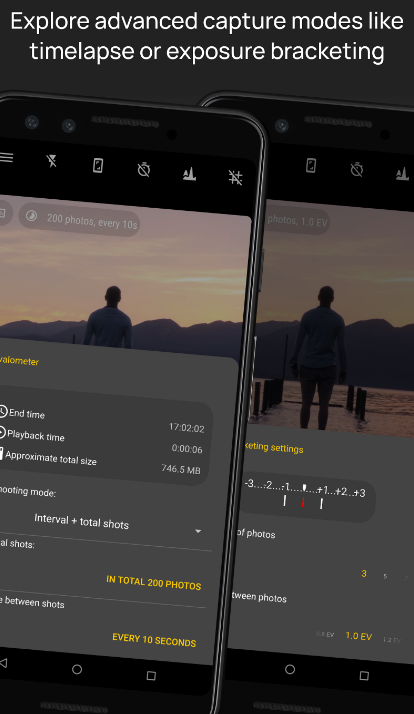
Camera FV-5 is an advanced photography app designed for mobile devices, providing users with DSLR-like manual controls right at their fingertips. This application is specifically crafted for both photography enthusiasts and professionals, enabling you to take remarkable raw images that can be edited later for breathtaking outcomes. The boundaries of your creativity and imagination are the only things that can limit your photography experience! Users have full access to adjustable photographic parameters, including exposure compensation, ISO settings, metering modes, focus options, white balance, and program modes. You can create impressive timelapse videos, including bracketed and HDR variants, as well as controlled series of images. Furthermore, all essential camera functions can be mapped to volume buttons, allowing for quick adjustments to EV, ISO, and color temperature. The app also supports devices equipped with dedicated hardware camera shutter keys, enhancing the shooting experience. Additionally, the capability for background photo and RAW development ensures that your camera operation remains fluid and uninterrupted. This combination of features empowers you to explore your photographic potential fully.
Description
To embark on your journey with Ultraleap's premier hand tracking technology, you'll want to utilize the Hand Tracking Software, which serves as the core of the system, providing all necessary components to operate your camera module and enable hand tracking functionality. Every user engaging with Ultraleap's hand tracking devices and software is required to obtain a license to proceed. The Visualizer tool not only displays your tracked hands but also presents the infrared imagery captured directly from the camera module. Through the control panel, you can fine-tune system configurations, adjust the interaction zone, and perform diagnostics as needed. This software orchestrates the camera module's operations and relays hand tracking information to compatible applications. For developers employing the LeapC API, this software is essential, while alternative options include TouchFree and plugins for Unity or Unreal Engine. Our comprehensive guides cater to various use cases, whether you're working with VR headsets, touchless kiosks, or standard desktop environments. To ensure everything is functioning correctly, launch the Visualizer to verify your device's performance; simply right-click the Ultraleap icon located in your system tray and choose the Visualizer option. Additionally, staying updated with the latest software version can enhance performance and introduce new features.
API Access
Has API
No
API Access
Has API
No


Integrations
MRTK-Unity
No
Unity
No
Unreal Engine
No
Pricing Details
Free
Free Trial
No
Free Version
Yes
Pricing Details
No price information available.
Free Trial
No
Free Version
Yes
Deployment
Web-Based
No
On-Premises
No
iPhone App
No
iPad App
No
Android App
Yes
Windows
No
Mac
No
Linux
No
Chromebook
No
Deployment
Web-Based
No
On-Premises
No
iPhone App
No
iPad App
No
Android App
No
Windows
Yes
Mac
Yes
Linux
Yes
Chromebook
No
Customer Support
Business Hours
No
Live Rep (24/7)
No
Online Support
Yes
Customer Support
Business Hours
No
Live Rep (24/7)
No
Online Support
Yes
Types of Training
Training Docs
Yes
Webinars
No
Live Training (Online)
No
In Person
No
Types of Training
Training Docs
Yes
Webinars
No
Live Training (Online)
Yes
In Person
No
Vendor Details
Company Name
Camera FV-5
Country
Germany
Website
www.camerafv5.com
Vendor Details
Company Name
Ultraleap
Country
United Kingdom
Website
developer.leapmotion.com/tracking-software-download
