Average Ratings 0 Ratings
Average Ratings 0 Ratings
Similar Products
-
ActCAD SoftwareACTCAD is suitable for professional drawings creation for Architects, Structural Engineers, Civil Engineres, Mechanical Drawings, Electrical drawings, interior design, tool design, machine designs etc.ActCAD is professional grade 2D Drafting and 3D Modeling CAD software which works in dwg and dxf file formats. Most affordable cad software.ActCAD is a native dwg/dxf cad software suitable for professional 2D drafting and 3D modeling projects. ActCAD is trusted by over 30000 users in over 103 countries for more than 10 years. The interface, commands, icons, dialogs, shortcuts etc. are very much similar to other popular cad software tools available in market. Flexible license types available even for single license. There is no learning for existing cad users while saving 80% of the costs.ActCAD offers free email technical support without any limitations. ActCAD can be fully customized and programs can be developed using our free API toolkit. It supports popular programming languages like , lisp dcl, .net, C++ etc. Apart from all regular commands, ActCAD offers many productive tools like pdf to cad converter, Block libraries, Image to Cad converter, handling point sets between Cad and Excel and many more.
-
DronedeskDronedesk is the most comprehensive and user-friendly drone operations management platform on the market. 98% of reviewers rate us "great" or "excellent" with an NPS of 80! It brings together all the business admin and flight planning tools you need into a single, secure web application. And, it scales seamlessly for any size of operation from solo pilots through to complex enterprise organisations. With Dronedesk, you can: - Stay safe: Plan and execute safe and compliant drone flights with advanced airspace intelligence, street and satellite map layers, and real-time air and ground hazard data. - Stay compliant: Keep comprehensive records of every aspect of your drone operations, including flight plans, fleet and equipment inventories, and flight logs. - Save time: No more spreadsheets or document templates, everything is centrally recorded, accessible from any device and available in an instant. - Save money: Operators like you tell us that, on avaerage, they saved 51 minutes per job since switching to Dronedesk. You can see just how much you'll save with our handy calculator. - Grow your business: Create quotes and invoices, get access to tender opportunities, and automate lead generation to grow your business
-
DaylightDaylight combines cutting-edge agentic AI with top-tier human skills to offer an advanced managed detection and response service that transcends mere notifications, striving to “take command” of your cybersecurity landscape. It ensures comprehensive monitoring of your entire environment, leaving no gaps, while providing context-sensitive protection that adapts and evolves based on your systems and historical incidents, including communications through platforms like Slack. This service boasts an exceptionally low rate of false positives, the quickest detection and response times in the industry, and seamless integration with your existing IT and security tools, accommodating limitless platforms and integrations while delivering actionable insights through AI-enhanced dashboards without unnecessary noise. With Daylight, you receive true comprehensive threat detection and response without the need for escalations, round-the-clock expert assistance, tailored response workflows, extensive visibility across your environment, and quantifiable enhancements in analyst efficiency and response time, all designed to transition your security operations from a reactive stance to a proactive command approach. This holistic approach not only empowers your team but also fortifies your defenses against evolving threats in the digital landscape.
-
MyQAt MyQ, the core belief is that print solutions should be automated, personalized, and easy to use, allowing people to focus on what matters most in their daily work. This principle is reflected in MyQ’s approach to our product design, combining intuitive user experiences with strong data security and efficient document workflows. MyQ’s print management solutions strengthen document security while helping organizations reduce costs, save time, and lower their environmental impact.
-
DbVisualizerDbVisualizer is a universal database client for anyone who works with data, from indie developers and startups to professional teams managing complex database environments, including developers, DBAs, analysts, and data engineers working across relational and NoSQL databases. Key features: - SQL editor with intelligent autocomplete, visual query builders, variables, and execution tools - AI Assistant for answering questions, explaining errors, and analyzing code - Git integration for managing SQL scripts and team collaboration - Customizable layouts, key bindings, and UI themes - Favorites for frequently used scripts and database objects - Configurable security settings for organizational requirements Connects via JDBC to MySQL, PostgreSQL, SQL Server, Oracle, Snowflake, SQLite, Cassandra, BigQuery, and more. Runs on Windows, macOS, and Linux. Nearly 7 million downloads, with Pro users in 150 countries, scaling from solo projects to enterprise database management.
-
Checksum.aiEngineering teams shipping with AI have a new bottleneck: validation. Code output has accelerated. Quality hasn't. Checksum closes the gap. Checksum is a continuous quality platform with a suite of AI agents that handle testing end-to-end, at every stage of the development lifecycle. Where most tools wait for a human to trigger them, Checksum runs autonomously in the background, generating tests, executing them, and repairing failures without manual intervention. Seventy percent of test failures are resolved automatically through real-time auto-recovery. The platform covers every layer: end-to-end UI flows via Playwright, API endpoint chains, and targeted CI tests scoped to exactly what changed in a PR. All tests land as real code in your repository and are delivered as standard Playwright, owned by your team. Checksum is fine-tuned on 1.5+ million test runs and integrates natively with Cursor, Claude Code, and 100+ AI coding agents. Type /checksum and your coding agent's output gets tested before it ever reaches review. Generation and healing happen on Checksum's cloud infrastructure which means no LLM tokens consumed, no local resources required. The result: test suites that stay green as the product evolves, fewer regressions reaching production, and release confidence that scales alongside AI output.
-
RemotePeopleRemotePeople helps businesses build international teams through Employer of Record services, recruitment and workforce administration in 150+ countries. Founded in 2018 and based in New York, RemotePeople combines a web platform with dedicated account managers and in-country HR expertise. With EOR, RemotePeople handles local employment contracts, onboarding, payroll, tax administration and statutory benefits while clients manage employees' daily work. EOR Flex starts at $199 per employee/month. EOR Plus starts at $399 per employee/month, billed annually for 5+ employees. Salaries and statutory employer costs are additional; availability and terms vary by country. In-house recruitment and executive search help companies source talent before hiring. Recruitment + EOR costs 2% of annual salary each month for recruitment, plus the EOR fee. Other services include Global Payroll, US Payroll, Contractor Management, Contractor of Record and US PEO. RemotePeople also supports global benefits, equity, visas and immigration, company incorporation, ongoing entity management and transfers from EOR to a client's own entity. Optional support includes employment contracts, legal assistance, background checks, compliance audits, equipment, workplace services, expenses and offboarding. AI Command Center accepts natural-language requests for onboarding, payroll, leave, expenses and contract changes, with expert review of high-impact actions and an audit trail. Employee self-service brings payslips, documents and requests into one platform. Request a demo or country-specific quote; no free trial is offered.
-
DriveStrikeDriveStrike is simple to use, implement, and manage. DriveStrike allows you to perform remote wipe, remote lock, or remote locate commands on any platform. Mobile device management MDM for mobile platforms. Integrated drive encryption support. Our support team is available to answer any questions, help you install our services, or manage your account. It's never been easier to protect your data and devices. We are happy to answer any questions you may have or help you understand how to best protect your data. Protect your business with a device- and data protection platform that keeps all devices protected with a single solution. Your Workstations, iPads and iPads, Smartphones as well as Tablets, Tablets, Tablets, and Laptops will be protected, organized, secure, & protected.
-
ISL Light Remote DesktopISL Light is a remote desktop software that is easy to use for security-conscious users. It offers great value-performance. ISL Light is a powerful tool for IT staff and support personnel to solve problems remotely via remote support, unattended access, or screen-sharing from mobile devices. It is cross-platform and provides 256-bit encrypted sessions, all the standard remote access features, as well as session recording, chat, videocall and multi-monitor support, file transfers, reporting, and many other important extras. Users can choose between cloud and on-premise services. ISL Online license doesn't limit the number or workstations of clients, users, and users you can support. It is a reliable, highly secure software that can be used in all industries, including banks, hospitals, government institutions, and insurances.
-
AdRem NetCrunchNetCrunch is commercial, self-hosted, agentless network and IT infrastructure monitoring software for Windows Server. It monitors network devices, servers, virtualization platforms, cloud services, applications, websites, logs, telemetry, and network traffic across distributed environments. NetCrunch supports 680+ monitoring targets and provides 270+ ready-to-use Monitoring Packs for devices, applications, and operating systems. Policy-based monitoring automatically applies monitoring settings, Monitoring Packs, thresholds, and alerts to matching devices and systems. Licensing is based on monitored nodes and network interfaces rather than individual sensors, checks, or metrics. NetCrunch provides real-time dashboards and automatic Layer 2 and routing topology maps for visibility into network status and performance. Network traffic analysis supports NetFlow, sFlow, IPFIX, and other flow technologies. Its alerting system supports event correlation, dependency-aware suppression, predictive thresholds, escalation, and 40+ automated response actions, including scripts, notifications, API calls, and integrations with external systems. Distributed Monitoring Probes extend monitoring to remote and isolated locations. NetCrunch also provides a REST API for integration and automation with external IT management, service management, and operational systems. NetCrunch is self-hosted on Windows Server and can monitor on-premises, air-gapped, cloud, and hybrid IT environments.
Description
COLMAP serves as a versatile pipeline for Structure-from-Motion (SfM) and Multi-View Stereo (MVS), featuring both graphical and command-line interfaces. This software provides an extensive array of functionalities for the reconstruction of both ordered and unordered collections of images. It operates under the new BSD license, with the most recent source code accessible on GitHub. Building upon previous research, users must also credit the original authors of specific algorithms utilized within COLMAP, as outlined in the source code documentation. For user convenience, the pre-compiled binaries for Windows include executables for both the graphical and command-line interfaces. To launch the COLMAP GUI, you can simply double-click the COLMAP.bat batch script or execute it from either the Windows command shell or Powershell. The command-line interface can be accessed in the same manner, as the batch script automatically configures the required library paths. Additionally, to view the list of available commands within COLMAP, you can execute COLMAP.bat -h in the cmd.exe command shell or Powershell. This flexibility in accessing the software makes it a powerful tool for image reconstruction tasks.
Description
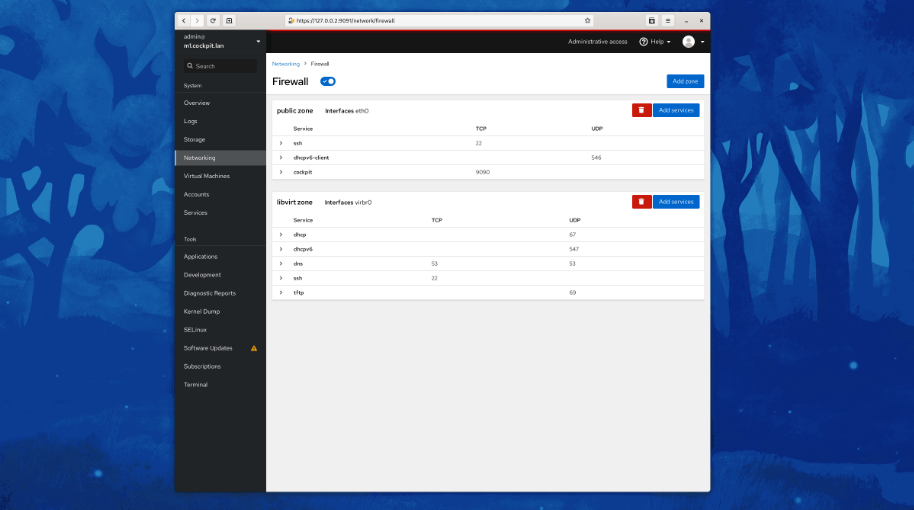
Cockpit serves as a user-friendly web-based graphical interface designed for server management, catering to everyone from beginners to seasoned Linux administrators. By leveraging system APIs and commands, Cockpit allows an entire team of administrators to manage systems in their preferred manner, whether that involves using the command line or various utilities alongside the Cockpit interface. With Cockpit, users can access their servers through a web browser and execute system tasks effortlessly using a mouse. It simplifies operations such as initiating containers, managing storage, configuring networks, and reviewing logs. Essentially, Cockpit acts like a graphical "desktop interface" tailored specifically for individual servers. If you have preferred applications or command-line tools for server management, you can continue utilizing those alongside Cockpit without any disruptions. Since Cockpit operates using the same system tools as the command line, you can seamlessly switch between Cockpit and your other preferred methods. This flexibility ensures that you can efficiently manage your servers while still maintaining your usual workflow.
API Access
Has API
No
API Access
Has API
No



Integrations
Ansible
No
CentOS
No
Debian
No
Fedora
No
Fedora CoreOS
No
Red Hat Enterprise Linux
No
Ubuntu
No
openSUSE Tumbleweed
No
Integrations
Ansible
Yes
CentOS
Yes
Debian
Yes
Fedora
Yes
Fedora CoreOS
Yes
Red Hat Enterprise Linux
Yes
Ubuntu
Yes
openSUSE Tumbleweed
Yes
Pricing Details
No price information available.
Free Trial
No
Free Version
No
Pricing Details
No price information available.
Free Trial
No
Free Version
Yes
Deployment
Web-Based
No
On-Premises
No
iPhone App
No
iPad App
No
Android App
No
Windows
Yes
Mac
Yes
Linux
No
Chromebook
No
Deployment
Web-Based
No
On-Premises
No
iPhone App
No
iPad App
No
Android App
Yes
Windows
Yes
Mac
Yes
Linux
Yes
Chromebook
No
Customer Support
Business Hours
No
Live Rep (24/7)
No
Online Support
Yes
Customer Support
Business Hours
No
Live Rep (24/7)
No
Online Support
Yes
Types of Training
Training Docs
Yes
Webinars
No
Live Training (Online)
No
In Person
No
Types of Training
Training Docs
Yes
Webinars
No
Live Training (Online)
No
In Person
No
Vendor Details
Company Name
COLMAP
Website
colmap.github.io
Vendor Details
Company Name
Cockpit
Website
cockpit-project.org
Product Features
Drone Mapping
2D Maps
No
3D Maps
No
Annotations
No
Compare Maps
No
Distance Measurement
No
Elevation Profiles
No
Overlays
No
Photogrammetry
No
Sharing Tools
No
Site Progress Tracking
No
Virtual Inspections
No
Product Features
Server Management
CPU Monitoring
No
Credential Management
No
Database Servers
No
Email Monitoring
No
Event Logs
No
History Tracking
No
Patch Management
No
Scheduling
No
User Activity Monitoring
No
Virtual Machine Monitoring
No