Average Ratings 0 Ratings
Average Ratings 0 Ratings
Similar Products
-
ClickUpWork is broken because your tools are. Dozens of apps, zero shared context, your team stuck playing messenger between all of them. That's not collaboration. That's overhead. ClickUp eliminates the mess. One platform: tasks, docs, chat, goals, time tracking, whiteboards, and AI Agents that work autonomously while you sleep. Everything shares one connected brain. No silos. No duplicated effort. No lost threads. Manage any workflow with custom views, automations, and real-time collaboration baked into every layer. 15+ views including List, Board, Gantt, Timeline, and Calendar. Create rich documents with nested pages and embedded tasks. Set measurable goals with automatic rollups that connect daily output to company objectives. Track time natively with timers, estimates, and workload views that prevent burnout. Over 1,000 integrations plug into your existing stack without adding chaos. GitHub, Slack, Google Drive, Figma, Salesforce, Zoom, and hundreds more — all feeding into one system of record. Built-in AI writes, summarizes, and executes entire workflows on its own. Not a bolt-on — native intelligence woven through every feature. AI Agents handle complex multi-step work around the clock without waiting for humans. SOC 2 Type II certified. SSO/SAML. Custom roles. Audit logs. Scales from five people to fifty thousand. Stop patching a broken system. Start free today. No credit card, no commitment.
-
Act!Act! Advantage, a full front-office CRM solution with all-new functionality that unites sales, marketing, and customer management in one intuitive, affordable platform, is the culmination of nearly four decades of feedback. Every feature is designed to reflect how today’s SMBs run their businesses and helps them stay organized, attract new customers, and turn relationships into results. Act! Advantage includes the largest injection of new functionality in Act’s history, broadening its footprint across your entire front office, and reducing your need for costly, third-party tools. Additionally, you can select the perfect fit, cost-effective tier to meet your current needs with peace of mind knowing that Act! will grow with you.
-
PlanfixThe Planfix platform allows organizations to manage their entire business online. Regardless of company size and industry, Planfix has something to offer as an excellent project and work management tool. With Planfix, your company gets a fully customizable management system, from process design to appearance. Planfix’s platform combines task and project management, CRM, sales, marketing, production, logistics, support service, accounting, and HR in one full-featured solution. Data is seamlessly transferred from one team to another - for example, a transaction at the implementation stage becomes a project and then is transferred to support. Planfix is equally well suited for businesses and non-profit organizations, public associations, or any other group of people working towards a common cause. Trusted by 7724 companies, automates business workflows of more than 68 000 users.
-
WallesterWallester is an Estonian-licensed financial institution and has been an official Visa partner since 2018, specialising in innovative digital financial solutions and card issuance. We empower companies across the European Economic Area (EEA) and the UK to streamline payments, launch branded cards, and scale efficiently. What we do: 1. White-Label Solution with Embedded Finance Our White-Label solution enables businesses to integrate financial services directly into their platforms - a concept known as embedded finance. This allows companies to launch branded payment cards tailored to their specific needs, enhancing customer experiences and opening new revenue streams. We ensure a swift time-to-market with simplified integration and dedicated support from our implementation team. 2. Wallester Business: Corporate Expense Management Wallester Business is designed to modernise corporate expense management. It provides companies with instant access to virtual and physical Visa cards, streamlining financial processes through a modern app and comprehensive portal. Features include expense tracking, budget analytics, and seamless integration with accounting systems to enhance financial oversight and efficiency. With a diverse team of over 190 professionals located in Estonia, Latvia, France and the United Kingdom, we are dedicated to developing high-quality, profitable products for our clients. Our passion for innovation drives us to improve and adapt to the evolving financial landscape continuously. We aim to elevate businesses by providing the most advanced financial technologies, enabling them to reach new heights in efficiency and growth. We are always open to collaboration and eager to assist companies in navigating the future of finance.
-
Shape SoftwareShape Software's purpose-built sales and marketing automation software empowers you to manage all aspects of your business from one platform. The cloud-based software from Shape offers many tools to help you manage and automate your online marketing, promotions via text, email and digital marketing ads, capture leads from online sources, nurture prospects and customers and project manage your day. You can also offer customers a secure portal to streamline your intake processes, systematically score leads with ShapeIQ, and run detailed custom reporting. Start growing your revenue with Shape's flexible suite of services today.
-
EBizChargeEBizCharge is the leading embedded payments application for businesses to accept payments directly inside QuickBooks, Microsoft Dynamics, NetSuite, SAP, Acumatica, and 100+ other business systems. Trusted by 20,000 companies, EBizCharge combines modern billing tools with integrated payment processing to help B2B companies get invoices paid faster, eliminate manual work, and keep payment data automatically synced to their ERP. Companies use EBizCharge to: ◉ Accept credit card, debit card, and ACH payments natively inside ERP, CRM, or eCommerce platforms ◉ Speed up collections with easy billing tools: payment links, online customer portal, recurring billing, saved cards, and more ◉ Improve security and reduce risk with PCI-compliance, encryption, tokenization, fraud protection, and certified by the PCI-Security Council ⎯ HOW IT WORKS IN YOUR ERP, CRM, & E-COMMERCE PLATFORMS EBizCharge integrates natively with your ERP, CRM, or e-commerce platform through certified software connections, so payments work directly inside the system you already use. ⎯ FEATURES • Email payment links • Recurring billing • Secure online customer payment portal • Securely save cards • EMV terminals • Mobile payments • Ability to surcharge • Dedicated in-house support
-
Square PaymentsAccept all payments quickly, securely, and easily. Accept card payments quickly and easily, no matter where you are selling. You can streamline the process of creating, sending, and tracking your invoices. Customer not available in person? Remote credit card payments can be made over the phone or via your computer. Get paid quickly Square makes it easy to create and grow an online store and accept online payments seamlessly with Square. Accepting cards is as easy, painless, secure, and fast as possible with Square. We don't charge extra, have no long-term contracts and are not able to use tricks. You can rely on fast, secure payments.
-
GroupTogetherGroupTogether is a user-friendly online platform designed for creating group cards, collecting gifts, and sending eGift Cards quickly and effortlessly. It allows users to initiate a group card, decide whether to gather funds or select a gift, and then distribute a single link to friends, family, coworkers, or teammates. Participants have the option to add personalized messages, share photos, and include GIFs, while also contributing a specific amount, any amount they choose, or simply signing the card without making a financial contribution. With privacy assured, GroupTogether eliminates the discomfort of using personal banking details and ensures secure transactions, complete with verifiable records of contributions and expenditures. Organizers have the flexibility to use the collected funds for a variety of gifts, including eGift Cards, gift baskets, flowers, or the versatile GroupTogether AnyCard that allows recipients to choose from over 100 eGift Cards. The platform provides the option for digital delivery or downloadable PDFs for printing, making it a practical solution for various occasions such as remote team celebrations, workplace events, classroom activities, birthdays, farewells, and retirements. Moreover, this seamless process fosters a sense of community and connection, even in virtual settings.
-
VoucherCartProfitable Gift cards, vouchers, and tickets are the most lucrative items you can sell for your business. They allow you to receive payment in full and in advance of products/services that you only deliver about 85% of the time. Flexible Your services and products can be sold as tickets, gift cards, or vouchers. You can sell what you want, at the terms and prices that you set, whenever and wherever you like, and at the profits you make. Powerful VoucherCart allows you to reach your customers in a way that is unmatched by other digital channels. Viral VoucherCart's embedded viral behaviors and loyalty means that we can attract new customers and retain them like no other eCommerce platform.
-
Square POSSquare POS is a simple, intuitive point-of sale (POS) solution. It provides a rich set of tools for inventory tracking, sales tracking, online payment processing and digital receipts. Square POS is available for Android and iOS devices. It records transactions offline by storing data locally, then automatically syncing information when there is an Internet connection. Square POS allows users to manage details such as names, prices and quantities. It also offers features such as a barcode scanner and discounts, credit card processing and gift cards, refunds and more.
Description
The Business Card Reader is a mobile application designed to effortlessly transfer data from business cards into your CRM with just two taps. By taking a photo of the card, all pertinent information is instantly imported into your CRM system. This cutting-edge tool also enables users to generate a wealth of additional data regarding potential clients, partners, or colleagues. However, it's important to note that custom fields are not supported within this application. The Business Card Reader, particularly the Multi CRM edition, stands out as the most efficient, fastest, and secure method for transferring information from business cards. With compatibility for over 12 CRM systems integrated into a single application, switching between platforms is seamless. So, if you manage multiple CRMs, downloading this app will enhance your experience significantly. Furthermore, the app offers the capability to gather even more insights about your potential clients, partners, or colleagues, making it an all-in-one solution. In just moments, you can capture a business card and seamlessly upload it to your CRM account, ensuring all your essential information is organized in one convenient location.
Description
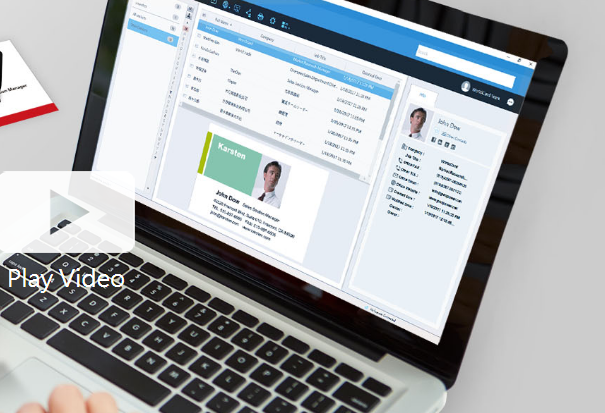
Business cards can be recognized and the associated data can be exported as a CSV file prior to the subscription's expiration. If you wish to retain the images of the business cards, it is advisable to reach out to PenPower's customer service for assistance. Please note that after the subscription expires, user data will be retained by the system for a period of 180 days; if renewal does not occur within this timeframe, all data will be permanently deleted. To optimize performance with WorldCard Team, it is recommended that the NAS edition should not exceed 20 users, while the Basic edition is best suited for fewer than 100 users. The maximum number of users allowed for the Windows Server edition will depend on the performance capabilities of your server. Additionally, you can transfer contact data to WorldCard Team from either WorldCard or WorldCard Mobile. When implementing the WorldCard Team system in your organization, we highly recommend migrating all contacts to WorldCard Team rather than continuing with WorldCard for improved efficiency and streamlined management of your business contacts. This approach not only enhances organization but also facilitates better collaboration among team members.
API Access
Has API
No
API Access
Has API
No



Integrations
Act!
Yes
Bitrix24
Yes
Capsule
Yes
Creatio
Yes
Freshsales
Yes
HubSpot CRM
Yes
HubSpot Customer Platform
Yes
Insightly
Yes
Keap
Yes
Kommo
Yes
Integrations
Act!
No
Bitrix24
No
Capsule
No
Creatio
No
Freshsales
No
HubSpot CRM
No
HubSpot Customer Platform
No
Insightly
No
Keap
No
Kommo
No
Pricing Details
No price information available.
Free Trial
No
Free Version
Yes
Pricing Details
Contact PenPower Technologies for pricing details.
Free Trial
Yes
Free Version
No
Deployment
Web-Based
Yes
On-Premises
No
iPhone App
No
iPad App
No
Android App
Yes
Windows
No
Mac
No
Linux
No
Chromebook
No
Deployment
Web-Based
Yes
On-Premises
No
iPhone App
Yes
iPad App
Yes
Android App
Yes
Windows
Yes
Mac
Yes
Linux
No
Chromebook
No
Customer Support
Business Hours
Yes
Live Rep (24/7)
No
Online Support
Yes
Customer Support
Business Hours
Yes
Live Rep (24/7)
No
Online Support
No
Types of Training
Training Docs
Yes
Webinars
No
Live Training (Online)
No
In Person
Yes
Types of Training
Training Docs
Yes
Webinars
No
Live Training (Online)
Yes
In Person
No
Vendor Details
Company Name
MagneticOne Mobile
Founded
2014
Country
Ukraine
Website
magneticonemobile.com/business-card-reader-apps/
Vendor Details
Company Name
PenPower Technology
Founded
1991
Country
United States
Website
www.worldcardteam.com/EN/
Product Features
Contact Management
Activity Management
No
Appointment Management
No
Contact Database
Yes
Contact History
No
Contact Import/Export
Yes
Customer Pipeline
No
Email Marketing
No
Group Management
No
Interaction Tracking
Yes
Lead Management
Yes
Prospecting Tools
No
Sales Pipeline Management
Yes
Search / Filter
No
Segmentation
Yes
Shared Contacts
No
Social Media Integration
No
Product Features
Business Card
Contact Management
Yes
Data Extraction
Yes
Design Templates
No
Image Editor
No
Print Management
No
Step-by-Step Wizard
No
Contact Management
Activity Management
No
Appointment Management
No
Contact Database
Yes
Contact History
No
Contact Import/Export
Yes
Customer Pipeline
No
Email Marketing
No
Group Management
No
Interaction Tracking
Yes
Lead Management
No
Prospecting Tools
No
Sales Pipeline Management
No
Search / Filter
No
Segmentation
Yes
Shared Contacts
Yes
Social Media Integration
No
CRM
Calendar/Reminder System
No
Call Logging
No
Document Storage
No
Email Marketing
Yes
Internal Chat Integration
No
Lead Scoring
No
Marketing Automation Integration
No
Mobile Access
Yes
Quotes / Proposals
No
Segmentation
No
Social Media Integration
Yes
Task Management
No
Territory Management
No
Customer Engagement
Analytics
No
Churn Management
No
Communication Management
Yes
Community Management
Yes
Content Syndication
Yes
Feedback Collection
Yes
Gamification
No
Live Chat
No
Video Content
No
