
Average Ratings 0 Ratings
Average Ratings 0 Ratings
Similar Products
-
Visual PlanningVisual Planning is a powerful scheduling and resource management tool that's simple to use. Visual Planning is used by thousands of organizations to share their schedules and work more efficiently together.
-
GantticGanttic is a flexible drag-and-drop scheduler for resource planning. Its resource-centric Gantt charts provide a holistic view of your equipment, personnel, facilities, and vehicles, providing a clear understanding of who or what is engaged and when. Beyond its scheduling capabilities, Ganttic enables a deeper level of resource management and project portfolio oversight. Harness the power to optimize resource utilization, generate detailed reports, and establish project or resource-breakdown structures that streamline the planning process. Unlimited Custom Views help segment large resource pools, giving different managers the power to organize their teams and departments according to their own needs. Create unique data fields to incorporate data that matters, and ensuring the right resource is booked for the job. Easily share Views to facilitate collaboration among teams and stakeholders, while notifications, calendar syncs, and a mobile app keep the right individuals informed of any changes. With unlimited user access in all subscriptions, everyone stays up to date. Take advantage of a free 14 day trial with complimentary training and onboarding from our dedicated support team.
-
Project InsightProject Insight is a project and portfolio management software for growing companies. It centralizes project data from across expanding teams and multiplying software systems to streamline workflows, automate processes, and help you make confident, data-driven decisions about your business. Project Insight also empowers you to manage work at the project, program, and portfolio levels–simultaneously. Identify priorities and keep work aligned with strategic objectives. Track cross-level progress, resources, budgets, and risks & take immediate action from a centralized hub that automatically notifies teams of adjustments. Integrate & sync project data between the software tools you are already using like Azure DevOps, Jira, Microsoft Project, and ServiceNow. Optimize cross-team workflows, reduce double-entry, and get a clear picture of capacity, progress, budgets, and risks across your organization.
-
Zoho ProjectsProject management is as efficient as it gets. Zoho Projects, a cloud-based project management software, helps you plan and track your work efficiently. It also allows you to collaborate with your team from anywhere. To get things done on schedule, plan your project activities, assign work, manage your resources, and collaborate better with your team. Gantt charts can be used to create your project plan and track your tasks. Zoho Projects helps you keep track of your key tasks and their dependencies and shows you any deviations from your planned progress. Reduce time spent on repetitive tasks. Our project management software is easy to use, no matter how complex your process is. It has a drag-and drop interface that makes it easier to create and deploy new automations. The Projects timesheet module allows you to log both billable and unbilled hours. You can record every minute of your hardwork, manually or with timers. Our built-in integration with Zoho Invoice generates invoices.
-
PlanfixThe Planfix platform allows organizations to manage their entire business online. Regardless of company size and industry, Planfix has something to offer as an excellent project and work management tool. With Planfix, your company gets a fully customizable management system, from process design to appearance. Planfix’s platform combines task and project management, CRM, sales, marketing, production, logistics, support service, accounting, and HR in one full-featured solution. Data is seamlessly transferred from one team to another - for example, a transaction at the implementation stage becomes a project and then is transferred to support. Planfix is equally well suited for businesses and non-profit organizations, public associations, or any other group of people working towards a common cause. Trusted by 7724 companies, automates business workflows of more than 68 000 users.
-
WorksectionRevolutionize your project management with Worksection, the online project management tool that streamlines workflows and enhances team collaboration. Designed for teams of all sizes, Worksection’s user-friendly interface makes it accessible for everyone, not just IT professionals. Trusted by over 1,600 marketing agencies, design studios, software developers, law firms, and architectural offices, Worksection is perfect for handling complex projects with ease. Its built-in time tracking helps you effortlessly monitor billable hours, ensuring accurate client billing. With streamlined task management, Gantt charts for precise planning, Kanban boards to visualize progress, and centralized communication, Worksection keeps your projects on track from start to finish. Plus, detailed reports provide deep insights into your team's performance, helping you make informed decisions. Seamlessly integrate with tools like Slack, Google Drive, and Zapier to ensure a smooth workflow across all your platforms. Use friendly support to reach your goals as fast as possible. Sign up to transform your project management with Worksection.
-
JOpt.TourOptimizerIf you are developing software for Logistics Dispatch Solutions, which contain challenges: -For staff dispatching, such as sales reps, mobile service, or workforce? -For truck shipment allocation in daily transportation and logistics (scheduling, tour optimization, etc.)? -For waste management and District Planning? -Generally, highly constrained problem sets? And your product does not have an automized optimization engine? Then JOpt is the perfect fit for your product and can help you to save money, time, and workforce, letting you concentrate on your core business. JOpt.TourOptimizer is an adaptable component to solve VRP, CVRP, and VRPTW class problems for any route optimization in logistics or similar fields. It comes as a Java library or in Docker Container utilizing the Spring Framework and Swagger.
-
HighchartsHighcharts, a Javascript-based charting library, makes it easy to add interactive charts and graphs to web or mobile projects of any size. Highcharts is used by more than 80% of the 100 biggest companies in the world, as well as thousands of developers from a variety of industries, including finance, publishing, application development, and data science. Highcharts is in active development since 2009. It remains a favorite among developers due to its robust feature set and ease-of-use documentation, accessibility features and vibrant community.
-
BuildxactBuildxact is a construction management software that is easy to use for contractors, residential builders, and remodelers. It helps them manage their projects smoothly and efficiently. Transform your business with one system, from the first takeoff to the final invoice. Streamline estimation - Create takeoffs faster and get quotes 5x faster. Buildxact is cloud-based so you can get up and running in no time. Save time by ditching paper plans and spreadsheets! Buildxact digital takeoffs let you scale plans and measure with a few mouse clicks. Quickly measure and count materials knowing your numbers are correct. Easily move material counts into your estimate with online tools and pricing that are 5X faster than paper and pencil. Estimates that clearly lay out materials, labor and overhead for the client. Professional quotes that win more jobs. Find out today with a free trial!
-
RunnRunn is a real-time resource management platform with integrated time tracking and powerful forecasting capabilities. Intuitively plan projects and schedule resources with allocations, project phases, milestones, and time off. Flick between monthly, quarterly and half-yearly views to plan for the short and long term. Get a dynamic bird’s-eye view of your entire organization to manage capacity, workload and availability changes as you create your plans. Runn makes resource management dynamic and visual from a single, shared view. Drill into different roles, teams and tags to compare trends and understand which groups are overbooked. Plan out tentative projects to see how plans might change if work gets confirmed. Track projects, view forecasts, and get relevant metrics within Runn. Get insights like utilization, project variance, and overall financial performance. Use Runn’s built-in timesheets to monitor project progress. Runn integrates with Harvest, WorkflowMax, and Clockify. With the API, build your own integrations to connect Runn with your favorite tools.
Description
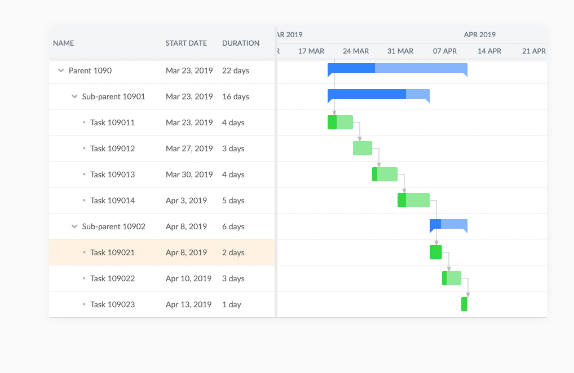
Bryntum stands out as a premier provider of advanced scheduling solutions designed for web applications. Our extensive collection of JavaScript components—featuring Gantt, Scheduler, Task Board, and Calendar—equips developers with the tools needed to create contemporary project management software that includes functionalities like drag-and-drop scheduling, efficient resource management, and dynamic timelines. With seamless compatibility with widely-used frameworks such as React, Angular, Vue, and Ext JS, we offer both flexibility and swift deployment. By enhancing planning processes and allowing for the visualization of intricate schedules, as well as optimizing resource utilization, Bryntum’s offerings enable organizations from various sectors to implement powerful and user-friendly project planning tools on a large scale. Ultimately, our commitment to innovation helps drive efficiency and effectiveness in project execution.
Description
Kickstart your application using stunning components that follow Material Design principles. React Toolbox offers a collection of React components that adhere to Google’s Material Design guidelines. It leverages modern technologies such as CSS Modules (crafted with SASS), Webpack, and ES6, making it both cutting-edge and user-friendly. The library seamlessly fits into your Webpack setup and boasts a high degree of customization and flexibility. Be sure to explore our exceptional documentation, which itself is created with React Toolbox, and interact with all the components through live demonstrations. We’ve designed a playground feature so you can experience our components without any installation hassle, making the process enjoyable! The app bar serves as a unique toolbar that facilitates branding, navigation, search functionalities, and various actions. Typically, it includes controls on both sides and displays a title that reflects the current section or name of the application. You should enrich the content with child elements, which can include text, images, or a combination of both, all tailored to match your application’s color palette. This enables a cohesive aesthetic throughout your app.
API Access
Has API
API Access
Has API


Integrations
Angular
JavaScript
React
Salesforce
Vue.js
Pricing Details
$680
Free Trial
Free Version
Pricing Details
Free
Free Trial
Free Version
Deployment
Web-Based
On-Premises
iPhone App
iPad App
Android App
Windows
Mac
Linux
Chromebook
Deployment
Web-Based
On-Premises
iPhone App
iPad App
Android App
Windows
Mac
Linux
Chromebook
Customer Support
Business Hours
Live Rep (24/7)
Online Support
Customer Support
Business Hours
Live Rep (24/7)
Online Support
Types of Training
Training Docs
Webinars
Live Training (Online)
In Person
Types of Training
Training Docs
Webinars
Live Training (Online)
In Person
Vendor Details
Company Name
Bryntum
Founded
2009
Country
Sweden
Website
www.bryntum.com
Vendor Details
Company Name
React Toolbox
Website
react-toolbox.io
Product Features
Gantt Chart
Alerts/Notifications
Capacity Monitoring
Color Coding
Dependency Tracking
Drag & Drop
Milestone Tracking
Progress Tracking
Task Management
Templates
Kanban
Collaboration Tools
Dependency Tracking
KPI Monitoring
Milestone Tracking
Multi-Board
Prioritization
Project Planning
Roadmapping
Supports Scrum
Task Management
Time Tracking

