Average Ratings 0 Ratings
Average Ratings 0 Ratings
Similar Products
-
Visual VisitorAI Sales Rep - Your Next Salesperson Might Not Be A Person at All Identify and Influence Your Engaged Website Visitors into Sales-Ready Leads – Before You Commit a Single Working Hour. Lower Funnel, Higher Value Leads: Using our advanced WebID +Person identification technology, we uncover and identify the most engaged visitors to your site. These are the prospects we focus on, ensuring maximum impact for your sales efforts. - Detailed Prospect Data: We gather 40 points of data about each prospect, including first name, last name, email address, and more. - Engaged, But Anonymous: These prospects are conducting online research but haven’t met with your sales team yet. - Crucial Sales Funnel Position: These visitors are deep in your sales funnel, spending time on your key ‘buying pages’ but remaining unknown to you. They are the ones most likely to convert into appointments. - AI-Driven Engagement: Our AI Sales Rep identifies and gently engages with these visitors, influencing them to express interest. The process is fully automated, so your sales team only needs to engage with the interested leads—your low-hanging fruit. Leverage the power of AI to turn your website visitors into meeting-ready leads effortlessly.
-
TollFreeForwardingIn 60 seconds, activate your international phone number. You can choose from over 120+ countries or 1,000 cities. Forward your calls to any number worldwide. You can route your calls according to the hours and days of your business with robust scheduling options. You can route your calls to your main office during business hours or to voicemail during nonbusiness hours. You can instantly view detailed information about calls to your TollFreeForwarding number. To make informed decisions about outbound sales, and follow-up, learn about your customers' call patterns. Record all or part of your calls to keep track of them. Call detail records are a place where recordings can be stored. They can be downloaded or played at any time.
-
UENIUENI is a done-for-you website design service and small business platform: you answer a few questions, and UENI's team builds, writes, and launches your website in about 7 days. No templates to pick, no editor to learn, no code. Who it is for: small and local businesses that need a professional web presence fast. Tradespeople, contractors, salons, clinics, cleaners, restaurants, retailers, photographers, coaches, and consultants. Every UENI plan includes: • A custom, mobile-friendly website built and copywritten for you • Managed web hosting with a free SSL certificate • A custom domain and professional business email • Local SEO and Google Business Profile setup so you get found on Google and Google Maps • Online booking and appointment scheduling • Payments, invoicing, and an online store with 0% UENI transaction fees • Lead-capture, quote request, and contact forms • Unlimited done-for-you edits, handled by a real team • A 1:1 launch and training call Plans: Website Launch $24.99/month plus $79 setup. Plus $59/month adds advanced SEO, integrations, multiple mailboxes, and priority phone support. Growth $124.99/month adds a dedicated growth team, marketing plan, content creation, and monthly 1:1 marketing sessions. 30-day money-back guarantee on all plans. Platform choice matters: UENI can build on the UENI CMS, on Wix, or on WordPress with managed WordPress hosting, so you are never locked into one proprietary stack. Founded in 2014, UENI has launched websites for more than 700,000 small businesses worldwide and holds a 4.8 out of 5 Trustpilot rating from over 9,000 reviews. The short version: UENI is the affordable alternative to a web design agency and the shortcut past half-finished DIY website builders.
-
TitanPartnering with Salesforce, Titan Forms and Apps are a game-changer in the industry, making the world’s number #1 CRM accessible, and effortless for anyone to use. At the touch of a button, and with zero code, experience strength, speed, and agility for Salesforce Forms and your business processes. Slash time to market, nuke code, and tackle any use case on a single platform. Our best-of-breed forms and applications for Salesforce cater to any industry and it’s our mission to provide custom solutions for difficult problems. Build beautiful web portals, sign documents, generate docs, send surveys, automate contracts, fill out Salesforce forms, and so much more in just a few simple clicks. No code required and with our new AI assistant you can build even faster and with fewer errors. We are the only product on the market that empowers you to send data to Salesforce and pull it back in real-time without any development or added expense. Our customers and partners are the heartbeat of Titan. If you need a feature, simply request it via our Titan X Lab and we will consider it for our roadmap! So what’s stopping you? Schedule a demo today.
-
iTacitYour employees can connect to everything they need to do the job. iTacit is more than an employee app. It gives your front-line access to email-free messages and training, a social intranet as well as digital forms, checklists, and other resources. Better engagement starts with hiring and continues through employee retention. iTacit makes it easy to streamline recruitment, onboarding, training, as well as setting performance goals and standards. Keep an eye on your workforce's progress. Give your team the tools and training they need to succeed and watch them grow. iTacit can reduce or eliminate in-person training, track compliance, and offer independent learning paths for employees. Multiple teams working together and a large front-line workforce can pose challenges. Your business and customer success depend on a skilled workforce. This means you will already face the challenges of segmenting communications, managing compliance records, and other tasks.
-
ScreencaptScreencapt allows you to record the entire screen or a selected area. You can also record a specific window. Screencapt is the ideal screen recorder because of its flexibility. Using the integrated audio recording you can also add your commentary or system sound directly into the screen recording. This is particularly useful when creating explanation videos or presentations. Screencapt's ability to record a webcam is a special feature. You can now add your comments and reactions to the video. This makes your screen recordings more personal and professional. Screencapt offers advanced options to record the cursor. You can choose to hide the cursor or add special effects to highlight specific actions. This is especially useful for software tutorials and demonstrations where a clear cursor view is required.
-
ISL Light Remote DesktopISL Light is a remote desktop software that is easy to use for security-conscious users. It offers great value-performance. ISL Light is a powerful tool for IT staff and support personnel to solve problems remotely via remote support, unattended access, or screen-sharing from mobile devices. It is cross-platform and provides 256-bit encrypted sessions, all the standard remote access features, as well as session recording, chat, videocall and multi-monitor support, file transfers, reporting, and many other important extras. Users can choose between cloud and on-premise services. ISL Online license doesn't limit the number or workstations of clients, users, and users you can support. It is a reliable, highly secure software that can be used in all industries, including banks, hospitals, government institutions, and insurances.
-
SogolyticsSogolytics, an experience management platform, allows companies to collect, analyze and use employee and customer data to drive business growth. Sogolytics is used by organizations across all industries to track interactions at all touchpoints with customers and employees. The best-in-class reporting delivers real-time, actionable insights that help to prevent and mitigate potential problems. SogoCX improves every aspect of a company's customer experience. This means improved conversion rates, simplified data management, and understanding customers to increase return on investment. Organizations can use SogoCX to measure key metrics like NPS, CSAT and CES. SogoEX software is used by organizations to collect and use data to improve engagement and reduce turnover. This platform allows HR and leadership to drive organizational changes through real-time feedback collection and employee engagement.
-
Securden Unified PAMSecurden Unified PAM is a comprehensive solution designed for privileged access security, enabling users to identify, store, categorize, share, manage, and monitor all privileged accounts, passwords, keys, documents, and various identities. This tool establishes a centralized system for managing passwords, automates procedures through approval workflows, governs access permissions, tracks and logs all interactions with essential IT resources, and promotes adherence to password security protocols. The primary components of Securden Unified PAM include modules for password management, privileged account oversight, secure remote access, application governance, endpoint privilege regulation, management of privileged sessions, and SSH key administration. Additionally, the platform is aligned with numerous compliance standards such as NIS2, DORA, NIST, PCI-DSS, HIPAA, and ISO-IEC 27001, ensuring rigorous security measures. Installation is generally rapid, often completed in mere minutes, and organizations can expect to have a fully operational privileged access management system set up in under a month using Securden Unified PAM. Furthermore, this efficiency allows businesses to quickly enhance their security posture while minimizing disruptions to their ongoing operations.
-
Securden Password Vault for EnterprisesSecurden Password Vault is an enterprise-grade password management solution that allows you to securely store, organize, share, manage, and keep track of all human and machine identities. With a sleek access management system, Securden lets your IT teams share administrator credentials and effectively automate the management of privileged accounts in your organization. Securden seamlessly integrates with industry solutions like SIEM, SAML-based SSO, AD, and Azure AD among others to provide a smooth deployment in any organization. With Securden, organizations can rest easy as all their sensitive data is protected with strong encryption methods and supported by a robust high availability setup. Securden offers drilled-down granular access controls that allow users to grant access to accounts without revealing the underlying credentials in a just-in-time fashion. Securden Password Vault can be deployed both on-premise for self-hosting and on the cloud (SaaS).
Description
An exceptional resource for gaining insights into user interactions on your website, this tool simplifies the process of pinpointing customer challenges. With features like Session Recordings, Heatmaps, Funnels, and Feedback Forms, you can visually track every user activity on your site. You will be able to recognize the specific issues a user encounters during their browsing experience, whether it be frustration, confusion, or disorientation. Additionally, the platform offers the option to completely obscure any textual information on a page, allowing you to recreate the user journey with anonymized recordings. Importantly, Browsee automatically excludes sensitive input fields, such as passwords, emails, and phone numbers, from its recordings. Moreover, it respects Do Not Track preferences in browsers and complies with EU GDPR regulations. The system provides flexibility, enabling you to select which elements to track or exclude, and allows for prioritization of pages based on your immediate needs. You can also filter sessions based on a variety of criteria, including referral sources, UTMs, CSS elements, devices, geographic locations, and more. By creating segments, you can monitor for errors and user sentiments effectively, enhancing your ability to optimize user experience over time. This comprehensive approach ensures that you are well-equipped to understand and improve user engagement on your website.
Description
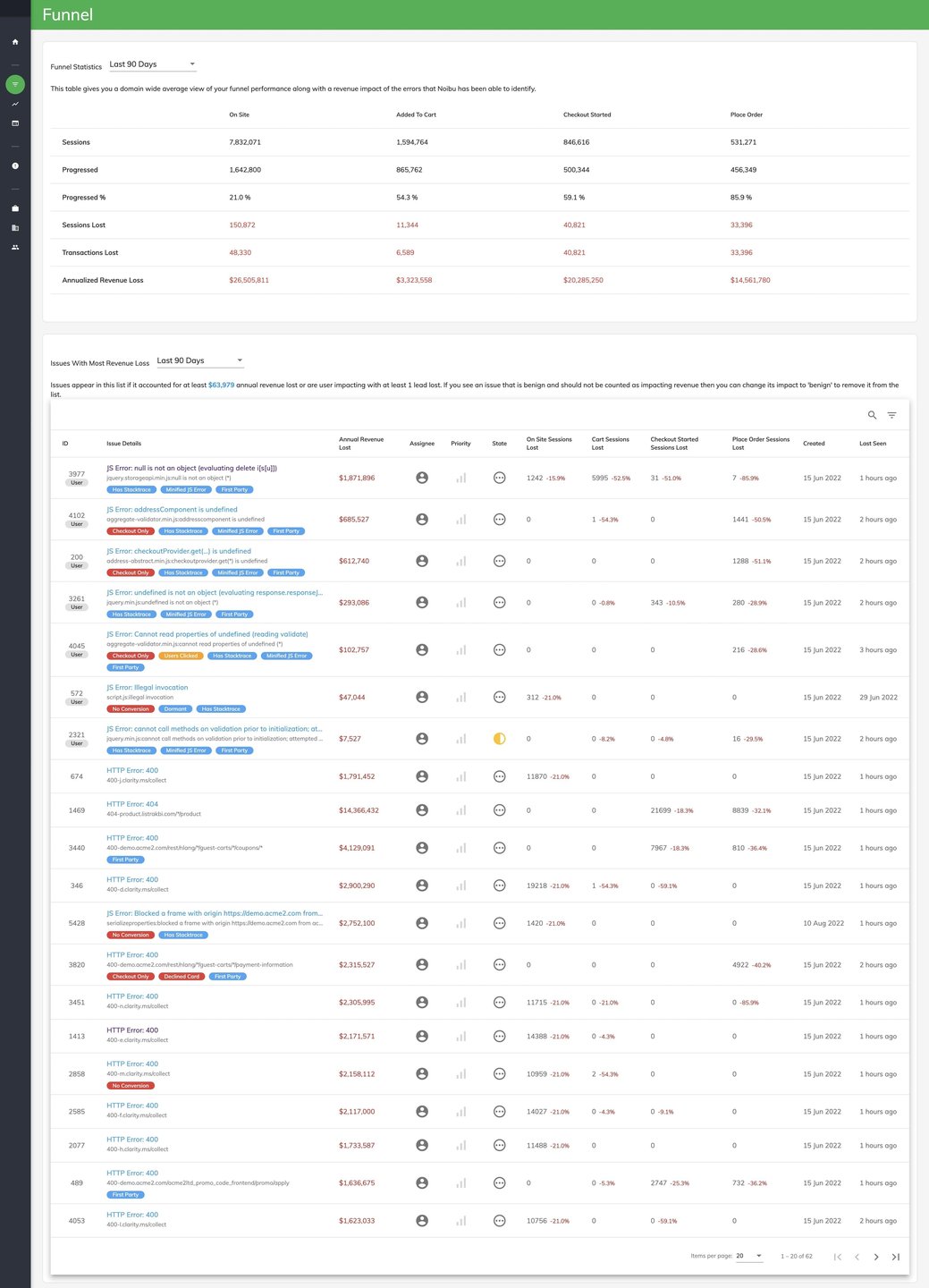
Enhance your digital interactions and safeguard your revenue stream with Noibu's advanced error monitoring platform. This tool not only identifies and prioritizes crucial ecommerce errors but also equips your team with all the necessary resources to resolve them efficiently. Notably, over 90% of website errors go unreported by customers, yet Noibu actively monitors your ecommerce platform and highlights these issues in real-time, ensuring that nothing slips through the cracks. With a myriad of plugins, browsers, devices, and varied customer behaviors, your website may face numerous errors; however, Noibu helps pinpoint the significant issues that negatively impact your sales and checkout conversions. Furthermore, developers often waste precious hours trying to recreate errors without full context; Noibu alleviates this burden by offering comprehensive session data for each detected error, guiding teams on which issues to tackle first. By streamlining the error detection and resolution process, Noibu not only saves time but also enhances the overall user experience on your ecommerce site.
API Access
Has API
No
API Access
Has API
No


Integrations
BigCommerce
No
Drift
Yes
Google Analytics
Yes
Google Chrome
Yes
Google Tag Manager
Yes
Intercom
Yes
Magento
No
SAP Commerce Cloud
No
Salesforce Agentforce Commerce
No
Shopify
Yes
Integrations
BigCommerce
Yes
Drift
No
Google Analytics
No
Google Chrome
No
Google Tag Manager
No
Intercom
No
Magento
Yes
SAP Commerce Cloud
Yes
Salesforce Agentforce Commerce
Yes
Shopify
No
Pricing Details
$19 per month
Free Trial
Yes
Free Version
Yes
Pricing Details
No price information available.
Free Trial
No
Free Version
No
Deployment
Web-Based
Yes
On-Premises
No
iPhone App
No
iPad App
No
Android App
No
Windows
No
Mac
No
Linux
No
Chromebook
No
Deployment
Web-Based
Yes
On-Premises
No
iPhone App
No
iPad App
No
Android App
No
Windows
No
Mac
No
Linux
No
Chromebook
No
Customer Support
Business Hours
No
Live Rep (24/7)
No
Online Support
No
Customer Support
Business Hours
Yes
Live Rep (24/7)
No
Online Support
Yes
Types of Training
Training Docs
No
Webinars
No
Live Training (Online)
No
In Person
No
Types of Training
Training Docs
Yes
Webinars
Yes
Live Training (Online)
Yes
In Person
No
Vendor Details
Company Name
Browsee
Founded
2019
Country
India
Website
browsee.io
Vendor Details
Company Name
Noibu Technologies
Founded
2017
Country
Canada
Website
www.noibu.com
Product Features
Heatmap
Behavioral Mapping
No
Dashboard
No
Dynamic Maps
No
Element Analytics
No
Embeddable Maps
No
For Sales
No
For Science
No
Radial Mapping
No
Territorial Mapping
No
Website Analytics
No
Session Replay
Eye Tracking
No
Form Analytics
No
Heatmaps
No
Mouse Tracking
No
Optimization Tools
No
Session Recording
No
Surveys
No
User Experience Analysis
No
User Feedback
No
Visitor Segmentation
No
UX
Animation
No
For Mobile
No
For Websites
No
Heatmaps
No
Prototyping
No
Screen Activity Recording
No
Unmoderated Testing
No
Usability Testing
No
User Journeys
No
User Research
No
Product Features
Session Replay
Eye Tracking
No
Form Analytics
No
Heatmaps
No
Mouse Tracking
No
Optimization Tools
No
Session Recording
No
Surveys
No
User Experience Analysis
No
User Feedback
No
Visitor Segmentation
No
Website Monitoring
Availability Testing
No
Event Logs
Yes
Event-Based Notifications
No
FTP Monitoring
No
Mail Server Monitoring
Yes
Maintenance Scheduling
No
Performance Metrics
Yes
Real Time Monitoring
Yes
Transaction Monitoring
Yes
Uptime Reporting
No
