Average Ratings 0 Ratings
Average Ratings 0 Ratings
Similar Products
-
Google WorkspaceGoogle Workspace is an all-in-one cloud productivity platform developed by Google to help businesses manage communication, collaboration, document creation, and workflow automation from a centralized environment. The platform combines professional email, cloud storage, video conferencing, document editing, team messaging, scheduling, and AI-powered assistance into one subscription-based ecosystem optimized for modern work environments. Google Workspace includes applications such as Gmail, Google Drive, Google Meet, Docs, Sheets, Slides, Calendar, Chat, Keep, Forms, Sites, NotebookLM, and Gemini AI, enabling teams to work together seamlessly across devices and locations. One of the platform’s core strengths is its built-in AI functionality powered by Gemini, which helps users draft emails, summarize meetings, generate research insights, automate repetitive tasks, and improve productivity using contextual awareness from workplace data. Google Workspace also supports advanced collaboration features including real-time editing, appointment scheduling, eSignatures, document sharing, cloud storage management, and AI-assisted research tools. Businesses benefit from enterprise-grade security features such as AI-powered threat protection, data classification, endpoint management, Data Loss Prevention, secure access controls, and compliance support for enterprise environments. The platform offers scalable pricing plans suitable for startups, small businesses, enterprises, educational institutions, nonprofits, and government organizations. Google Workspace also simplifies data migration and onboarding with built-in migration tools and partner support for transferring emails, files, and business information securely into the cloud.
-
InfoBoxEliminate communication silos and simplify enterprise content delivery across your entire workforce. InfoBox provides IT and corporate communications teams with a secure, centralized hub for broadcasting updates, standard operating procedures (SOPs), and operational resources. Designed to overcome the low engagement of legacy intranets and messy email threads, InfoBox pushes targeted updates directly to mobile devices, web applications, and desktop email clients. Core Technical & Platform Capabilities: 1. Granular Role-Based Access & Segmentation: Categorize content delivery by department, location, role, or administrative unit to ensure users receive strictly relevant information. 2. Flexible Authentication & External Access: Support for multi-provider authentication (Google Workspace, Microsoft 365, Yahoo, and personal email accounts) enables secure inclusion of contractors, frontline workers, and external partners without requiring additional core directory domain licenses. 3. Google Workspace /Microsoft 365: Native add-on integration allows users to consume visual updates and company feeds directly inside without additional costs. 4. Cross-Platform Accessibility: Native mobile clients for iOS and Android alongside a unified Web portal (infobox.info) ensure consistent UI/UX across all endpoint devices. 5. No-Code Content Builder & Resource Management: Equips administrators with visual templates for broadcasting policy updates, announcements, and searchable document libraries without IT intervention. 6. Engagement & Usage Analytics: Gain visibility into reach, content consumption, and search trends across the organization.
-
HaystackHaystack connects every employee of your organization with the people, resources, and information they need to thrive and succeed. Haystack provides employees with a fun, intuitive and informative way to start the day. Custom branding with no-code and a modular layout make it easy to highlight key resources, organizational culture, and knowledge. Haystack's automated multi-channel delivery, combined with actionable analytics, makes it easy for you to reach your employees at the right time and place. Spend less time looking for information and more on achieving your goals. Haystack’s knowledge-sharing features make it easy for employees to get the materials they need, no matter where in the world they are. It can be difficult to stay connected with everyone as teams grow and change. Haystack’s rich employee profiles and company directory make colleagues around the world feel as if they are right across the room.
-
UptimeRobotThe ultimate uptime monitoring service. Get 50 monitors with 5-minute checks completely free. Set up in seconds and stay informed about your website’s health at all times. Website monitoring: Get instant alerts when your website goes down. Reliable and accurate monitoring helps you fix issues before they affect users and prevent revenue loss. SSL certificate monitoring: Avoid losing visitors due to expired SSL certificates. Get notified 30 days before expiration so you can renew in time. Ping and port monitoring: Check if your server is online or if your email service is running on port 465. Monitor any port you need with real-time alerts. Cron job monitoring: Track scheduled tasks with heartbeat monitoring. We verify if the request arrives on time, making sure server-side jobs and internet-connected devices are running properly. Status pages: Create up to 100 branded status pages, protect them with a password, and allow subscribers to receive updates. Stay informed with email, SMS, voice calls, push notifications, or integrations with Slack, Zapier, PagerDuty, Telegram, Discord, Microsoft Teams, Google Chat, and more. Maintenance windows: Pause monitoring when you schedule downtime to avoid unnecessary alerts
-
FathomFathom is an AI meeting assistant that helps users capture, summarize, search, and act on meetings with less manual work. The platform creates accurate transcripts, instant summaries, action items, and follow-up notes so users can focus on live conversations instead of taking notes. Fathom supports both traditional meeting capture and bot-free capture through its desktop app. Teams can use Fathom as a shared source of truth across customer calls, internal meetings, strategy sessions, and project conversations. Ask Fathom lets users search across meetings and ask questions about conversations, decisions, commitments, risks, and next steps. The platform also supports topic monitoring so important moments and signals are easier to find. Fathom syncs meeting notes, insights, and action items into tools such as Slack, Salesforce, HubSpot, Notion, Asana, Gmail, Zoom, Google Meet, Microsoft Teams, ChatGPT, Claude, Zapier, and API or MCP workflows. It supports security and compliance needs with SOC 2 Type II, GDPR, HIPAA compliance, SSO, and SCIM. By combining AI notetaking, bot-free capture, transcripts, summaries, integrations, search, and workflow automation, Fathom helps teams move from meetings to execution faster.
-
ConnecteamConnecteam is an all in one employee app that was specifically designed for non-desk employees. It provides all the necessary capabilities to manage and operate field employees, including communication features, workflows and scheduling, as well as time clock. Just a few clicks and you can bring together your deskless workforce. Your desktop Launchpad allows you to collaborate, manage operations, develop professional skills, and monitor employee engagement. In minutes, you can create a fully-branded mobile app for your company. You can add safety checklists, orientation courses, product catalogues, and shift management to your mobile app. Or, you can customize the features to suit your needs. You can also gain insight into how your team interacts with company assets and take steps to improve efficiency. Connecteam allows managers and employees to automate their processes and allow them to focus on growth. Integrations include Google Calendar, Gusto, QuickBooks Payroll, Xero and others.
-
MyHub Intranet SoftwareMyHub, a revolutionary cloud-based intranet system that streamlines workflows for businesses, provides a variety of manuals and tools. MyHub is mobile-friendly and allows users to connect with whole teams or just a few members. Projects will run smoothly with MyHub's combination of in-app options for email, social media, as well as the tools necessary to be efficient. Administrators can give their users the ability of managing content, a discussion board, file-cloud-sharing, and many other features.
-
Elecard BoroElecard Boro is a professional software solution designed to monitor video stream health and track QoS/QoE parameters across distributed networks. By providing centralized access to statistics and automated reporting, Boro enables telecom professioals to build a powerful monitoring ecosystem from scratch or easily scale existing infrastructure to ensure flawless broadcast quality. How it works: Boro utilizes distributed software probes to monitor UDP, RTP, HTTP, HLS, DASH, SRT, and RTMP streams. By aggregating multi-point measurements on a centralized server, operators can instantly isolate quality degradation across the entire delivery chain. The platform provides network-wide visibility and real-time alerts for ETSI TR 101 290 errors via Email, SNMP, Webhook, PagerDuty, and Telegram. Key Features: • Rapid Deployment & Scalability: Launch a monitoring probe in just 30 minutes. Easily scale your infrastructure by adding new probes to the unified Boro ecosystem on any hardware. • Proactive Issue Resolution: Monitor over 50 QoS and QoE parameters (including full ETSI TR 101 290 compliance) and use triggers to localize network anomalies before they impact viewers. • Advanced Diagnostics: Use comprehensive analysis of SCTE-35 ad-insertion cues and PCAP stream recording for in-depth delivery troubleshooting. • Effortless Integration & Access: Access monitoring data from any device via an intuitive web interface. Seamlessly integrate Boro into your existing workflow using WebHook, SNMP, and ControlAPI. • Operational Efficiency: Reduce the workload on QA and network engineers through automated regular reporting, advanced visualization dashboards, and smart threshold tuning that eliminates false alarms.
-
DialerAIOur autodialer software is used to automate sales calls, payment collections and appointment reminders. It can also be used to broadcast mass emergency voice broadcasting. This system is ideal for Telcos or companies selling callcenter services. It is multi-tenant with billing, white-labeled, and economical to operate as you choose your Voice Provider. Our autodialer software can dramatically increase productivity by dropping busy, disconnected and unanswered lines, passing calls to real people back and answering them, and leaving messages on answering machine.
-
NotifyreElevate your business communications with Notifyre's secure SMS and fax solutions. Streamline SMS and faxing processes online, via email, app, or effortlessly integrate through our developer-friendly SMS and fax API. We're ISO 27001 certified and fully HIPAA compliant, giving you the utmost security for your faxes and SMS messages. Notifyre users from flexible pay-as-you-go fax & SMS and outstanding value receive fax plans and 10DLC number plans. 5 Star service guarantee! -Fax Online, Email to Fax, Fax API - Receive Fax Online -> Encrypted Cloud Storage -Online Fax Numbers -Fax Number Porting -Fax Broadcast 40,000+ Utilise the power of SMS messaging in your business, engaging with your audiences via SMS. Send SMS broadcasts or bulk SMS for marketing, promotions, surveys, support, alerts, or notifications all via a user-friendly secure online SMS portal. - 10DLC Virtual SMS Numbers -> Book a Demo for one-on-one guidance! - SMS Online, Email to SMS, SMS API - Mass Text Message Broadcast + SMS Marketing - Subscriber Management - Contact Management, Bulk Upload + Merge Fields + SMS Templates - Appointment Reminders, eCommerce Promo & Cart Reminders, SMS Alerts & Notification & More
Description
Quickly create updates using Broadcast and effortlessly distribute them through Slack and Email. Broadcast transforms the process of sending out weekly updates into a quick and easy task, allowing you to reclaim your valuable time. It compiles all necessary information—such as metrics, upcoming tasks, and other relevant details—before you even begin drafting. You can assign different sections and leave comments to facilitate real-time collaboration among your team members. Track the effectiveness of your communications with insights into who is engaging with your messages on both email and Slack. For the first time, you can manage all company updates from a single interface, significantly alleviating your team's largest challenges as you grow. With Broadcast, you only need to write your updates once to share them seamlessly across email and Slack. You can easily resume your work from where you paused, collaborating directly within the app or responding via email. By integrating numerical data into your updates, you create a compelling narrative that enhances the overall message. This streamlined process not only saves time but also increases engagement and clarity among team members.
Description
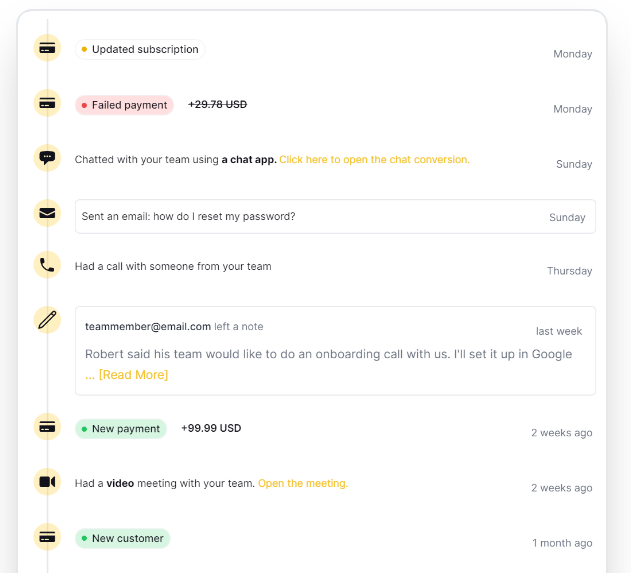
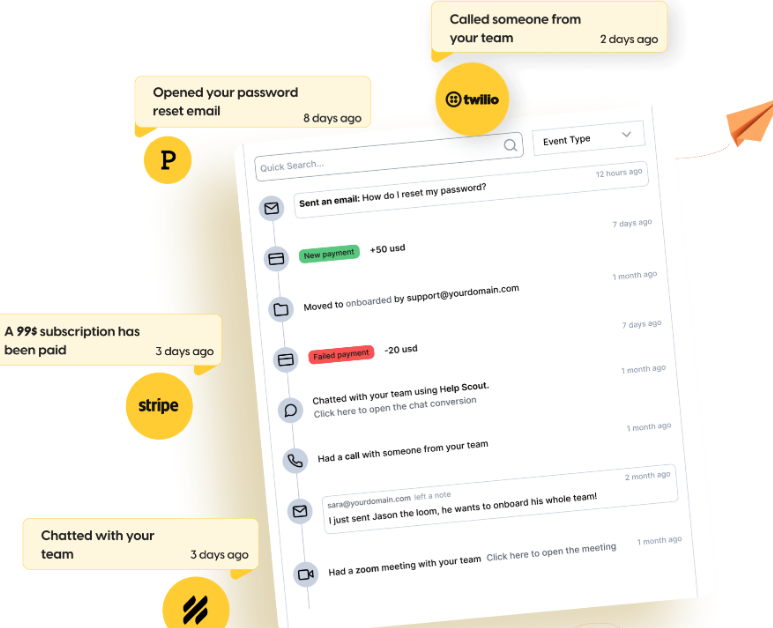
Your company's entire data repository is now easily accessible with just a prompt. Enhance your efficiency by engaging in conversations with your data while monitoring every user interaction, all consolidated within a single tab. UserSketch presents your customers' journeys in a format similar to a newsfeed, allowing you to swiftly track their progress without the hassle of multiple tabs. Effortlessly inquire about your Slack communications, emails, support tickets, payment statuses, and more, all from one simple prompt. This empowers you and your team to quickly uncover vital information from customer discussions and team interactions. Now you and your colleagues can search through historical conversations and actions seamlessly. For instance, you can prompt AI to provide an overview of your paid invoices from the previous week or review a conversation without sifting through a complicated paper trail left by teammates. The potential applications are limitless, and you can monitor your customers' journeys from initial acquisition to long-term retention all in one cohesive platform. Such comprehensive functionality not only streamlines workflows but also fosters better decision-making based on past interactions.
API Access
Has API
No
API Access
Has API
Yes


Integrations
Slack
Yes
Fastmail
No
Gmail
No
Google Calendar
No
Google Contacts
No
Help Scout
No
Mailchimp Transactional Email (Mandrill)
No
Mailgun
No
Mailjet
No
Microsoft Outlook
No
Integrations
Slack
Yes
Fastmail
Yes
Gmail
Yes
Google Calendar
Yes
Google Contacts
Yes
Help Scout
Yes
Mailchimp Transactional Email (Mandrill)
Yes
Mailgun
Yes
Mailjet
Yes
Microsoft Outlook
Yes
Pricing Details
No price information available.
Free Trial
No
Free Version
No
Pricing Details
$27 per month
Free Trial
Yes
Free Version
No
Deployment
Web-Based
Yes
On-Premises
No
iPhone App
No
iPad App
No
Android App
No
Windows
No
Mac
No
Linux
No
Chromebook
No
Deployment
Web-Based
Yes
On-Premises
No
iPhone App
No
iPad App
No
Android App
No
Windows
No
Mac
No
Linux
No
Chromebook
No
Customer Support
Business Hours
No
Live Rep (24/7)
No
Online Support
Yes
Customer Support
Business Hours
No
Live Rep (24/7)
No
Online Support
Yes
Types of Training
Training Docs
No
Webinars
No
Live Training (Online)
No
In Person
No
Types of Training
Training Docs
Yes
Webinars
No
Live Training (Online)
Yes
In Person
Yes
Vendor Details
Company Name
Broadcast
Website
www.withbroadcast.com
Vendor Details
Company Name
UserSketch
Country
United States
Website
usersketch.com
Product Features
Internal Communications
App Integration
No
Blogs
No
Chat/Messaging
No
Email Management
No
Employee Directory
No
Event Calendar
No
Newsletter Management
No
Photo Gallery
No
Social Sharing
No
Survey Management
No
Telephony
No
Video Chat
No
Voice Chat
No
