Average Ratings 0 Ratings
Average Ratings 0 Ratings
Similar Products
-
ClickUpWork is broken because your tools are. Dozens of apps, zero shared context, your team stuck playing messenger between all of them. That's not collaboration. That's overhead. ClickUp eliminates the mess. One platform: tasks, docs, chat, goals, time tracking, whiteboards, and AI Agents that work autonomously while you sleep. Everything shares one connected brain. No silos. No duplicated effort. No lost threads. Manage any workflow with custom views, automations, and real-time collaboration baked into every layer. 15+ views including List, Board, Gantt, Timeline, and Calendar. Create rich documents with nested pages and embedded tasks. Set measurable goals with automatic rollups that connect daily output to company objectives. Track time natively with timers, estimates, and workload views that prevent burnout. Over 1,000 integrations plug into your existing stack without adding chaos. GitHub, Slack, Google Drive, Figma, Salesforce, Zoom, and hundreds more — all feeding into one system of record. Built-in AI writes, summarizes, and executes entire workflows on its own. Not a bolt-on — native intelligence woven through every feature. AI Agents handle complex multi-step work around the clock without waiting for humans. SOC 2 Type II certified. SSO/SAML. Custom roles. Audit logs. Scales from five people to fifty thousand. Stop patching a broken system. Start free today. No credit card, no commitment.
-
SmartDrawSmartDraw makes professional drawings and diagrams accessible to everyone. Non-technical users can quickly create floor plans, while professionals get the precision and scale they require. With industry-leading floor planning tools and an intuitive interface for traditional diagramming like flowcharts and organizational charts, SmartDraw delivers enterprise-ready power without unnecessary complexity. Key features: - Large collection of symbols and templates - Ability to create custom shapes - Import PDFs, images, Google Maps, Visio files, Visio stencils - Draw to any scale - Enrich drawings with data - Generate manifest and bills of materials - Generate diagrams from data automatically like org charts, AWS, Azure, PI Boards, and more - Use natural language text prompts to generate diagrams with AI - Save files directly to OneDrive, SharePoint, or Google Drive, or other preferred provider - Integrations with the Microsoft and Google enterprise stack plus Confluence and Jira SmartDraw supports a wide range of industries and real-world use cases, helping teams plan, document, and communicate more effectively. Construction professionals use it to create scaled floor plans, site layouts, and electrical and plumbing drawings. Fire departments rely on it for fire pre-planning and incident documentation, while police departments use it for accident reconstruction and crime scene diagrams. IT teams build network diagrams and cloud architectures, HR leaders create organizational charts, and product managers map out processes and workflows. From physical layouts to business processes, SmartDraw provides a single platform that adapts to the needs of each role and industry.
-
InsightfulInsightful is a Work Intelligence platform that helps organizations understand how work actually happens across people, processes, and AI, so they can improve performance, optimize workflows, and reduce operational waste. When work is spread across people, locations, and tools, small gaps add up fast. Time goes missing. Work slows down. Problems surface late. Insightful brings this together in one platform, built to help organizations optimize People, Process, and Technology through three core capabilities: 1. Workforce Analytics: Measure workforce productivity, utilization, and performance with real-time visibility into how work gets done. 2. Workflow Optimization: Identify bottlenecks, eliminate inefficiencies, and optimize workflows across teams and processes. 3. Work Intelligence: Measure AI adoption, usage, and business impact to maximize the ROI of your AI investments. With Insightful, you can: • Understand how work happens across teams, processes, and AI • Spot drops in utilization and output early • Track AI adoption, usage, and business impact • Arrange a custom layout with widgets to surface the KPIs and insights most relevant to your role • See where work slows, stalls, or creates rework across workflows • Compare performance across teams, roles, or locations • Use real activity data to review work and resolve disputes • Automate time tracking and reporting This is not just another monitoring tool. It’s a precision Work Intelligence for actionable bottom line impact. You get clear data you can use in weekly reviews, planning, and day-to-day decisions. Teams choose Insightful because it delivers strong visibility and control without the cost or complexity of heavier tools.
-
Google AI StudioGoogle AI Studio is an all-in-one environment designed for building AI-first applications with Google’s latest models. It supports Gemini, Imagen, Veo, and Gemma, allowing developers to experiment across multiple modalities in one place. The platform emphasizes vibe coding, enabling users to describe what they want and let AI handle the technical heavy lifting. Developers can generate complete, production-ready apps using natural language instructions. One-click deployment makes it easy to move from prototype to live application. Google AI Studio includes a centralized dashboard for API keys, billing, and usage tracking. Detailed logs and rate-limit insights help teams operate efficiently. SDK support for Python, Node.js, and REST APIs ensures flexibility. Quickstart guides reduce onboarding time to minutes. Overall, Google AI Studio blends experimentation, vibe coding, and scalable production into a single workflow.
-
JetBrains JunieJetBrains Junie is an innovative AI coding assistant that works inside many JetBrains IDEs to streamline programming efforts and boost efficiency. This agent leverages advanced AI to help developers write, test, and inspect code without leaving their familiar development environment. Junie offers both code execution and interactive collaboration, allowing programmers to switch between automated code writing and brainstorming sessions for features and improvements. By deeply understanding the codebase, Junie identifies the best ways to tackle tasks and ensures all changes meet quality standards through syntax and semantic checks. It also runs tests to minimize errors and keep the project healthy, freeing developers from routine tasks. Many developers have successfully built complex applications and games using Junie, highlighting its flexibility across different languages and frameworks. The AI adapts to each task’s complexity and workflow, making coding less tedious and more focused on creativity. Whether you are building a simple web app or a complex game, Junie offers smart support throughout the development cycle.
-
Planview ProjectAdvantagePlanview ProjectAdvantage brings clarity, control, and scalability to enterprise project management by unifying project data, resources, and performance insights in one platform. Built for growing PMOs and complex organizations, it eliminates silos and inefficiencies by connecting teams through a single source of truth. Users can monitor resource allocation, track workloads, and forecast capacity with precision using dynamic dashboards. ProjectAdvantage’s portfolio scoring tools and sandbox environments make it easy to prioritize initiatives and align them with company strategy. Its flexibility supports any methodology—Agile, hybrid, or Waterfall—making it ideal for diverse industries and workflows. Seamless integrations with leading enterprise systems like Jira, ServiceNow, and Microsoft Teams enable cross-functional collaboration and real-time visibility. Backed by AI-driven analytics, Planview Projectadvantage helps accelerate project delivery, improve performance tracking, and ensure continuous strategic alignment. Designed for agility, it’s a transformative solution that turns project chaos into structured, measurable success.
-
Altium DevelopAltium Develop is a collaborative platform for modern electronics engineering teams that connects requirements management, PCB design, systems engineering, and manufacturing workflows. Built on Altium Designer and Altium 365, the platform provides a centralized environment for design collaboration, requirements traceability, BOM management, supply chain visibility, and engineering change management. Altium Develop helps hardware organizations maintain alignment between requirements, design decisions, and manufacturing outcomes while supporting distributed engineering teams through cloud-based collaboration. Core Features: • PCB design collaboration • ECAD-MCAD co-design workflows • Component and supply chain visibility • BOM and engineering change management • Design review and approval workflows • Cloud-native team collaboration • Requirements management and traceability Used by electronics teams building complex PCB-based products, Altium Develop is frequently evaluated alongside Cadence OrCAD, Cadence Allegro, Autodesk Fusion Electronics, KiCad, Siemens Xpedition, and SOLIDWORKS PCB for organizations seeking greater collaboration and lifecycle visibility across hardware development programs.
-
Rise VisionRise Vision is the all-in-one platform for digital signage, screen sharing, and emergency alerts designed to help organizations communicate, teach, collaborate, and improve safety. The cloud-based system integrates digital signage, interactive digital signage, screen sharing, and emergency alerts, making it an ideal choice for organizations looking to streamline their visual communication efforts. With its easy-to-use software and world-class support, Rise Vision caters to a diverse range of industries and applications. Key features of Rise Vision include over 750 professionally designed templates that allow users to quickly create visually appealing content without the need for extensive design skills. Users can also use the AI presentation design and editing tool that's the fastest way to turn an idea in your head into engaging digital signage. The platform supports a wide range of hardware, enabling users to either utilize recommended hardware or integrate their existing technology. This flexibility ensures that organizations can implement Rise Vision in a way that best suits their needs and budget. Additionally, the seamless screen sharing capability enhances collaboration among team members, allowing for real-time sharing of presentations and information. Another significant aspect of Rise Vision is its powerful emergency alert system, which provides users with the ability to broadcast critical information during emergencies. This feature is essential for ensuring safety in environments such as schools and workplaces, where timely communication can make a significant difference. With world-class support available, users can feel confident in their ability to resolve any issues and maximize the platform's potential.
-
Adobe FireflyAdobe Firefly is a versatile AI-powered creative platform designed to help users generate and edit multimedia content with ease. It allows users to create images, videos, and audio using simple text prompts within an interactive and flexible workspace. The platform features tools like generative fill, image editing, and video editing, enabling users to refine and enhance their creations. Firefly also includes quick actions such as background removal, cropping, resizing, and format conversion to streamline workflows. Users can explore an infinite canvas for creative production and experiment with various styles and outputs. The platform encourages creativity by allowing users to remix content from a shared community gallery. With its intuitive design, it reduces the need for advanced technical skills. Firefly integrates AI capabilities to speed up content creation and editing processes. It supports both beginners and professionals in producing high-quality results. Overall, Adobe Firefly provides a powerful and accessible environment for modern digital creativity.
-
Dialpad SupportCustomer experience shouldn't run on disconnected tools and static scripts. Dialpad Contact Center brings voice, digital channels, and human agents together in a single AI-native platform, built to act — not just record — on every customer interaction. This is Agentic AI in practice: agents that reason through a problem, take the next step, and drive it to resolution without waiting on a human to intervene. Where legacy systems leave data trapped in silos, Dialpad Contact Center closes that gap, linking voice and data so context travels with the customer instead of getting lost between systems. The payoff compounds. Dialpad has already generated over 775 million AI recaps, and each new interaction adds to a growing base of operational intelligence — sharper resolution paths, more productive agents, better outcomes quarter over quarter. None of it runs unchecked: Dialpad's Guardian layer keeps AI operations secure and governed, so intelligence scales without sacrificing oversight. In practice, that means up to 80% of issues get resolved autonomously, freeing your team to focus on the conversations that genuinely need a human. Intelligence works at the edge; people stay at the center of the experience. And you don't have to take the ROI on faith. Through Dialpad's Proving Ground, enterprises can validate performance and cost savings before rolling out at scale — a far more reliable path than betting on a brittle, rules-based bot.
Description
Balsamiq Wireframes serves as an efficient low-fidelity UI wireframing tool that mimics the sensation of sketching on paper or a whiteboard, all within a digital environment. This approach encourages a strong emphasis on structure and content, steering clear of extensive debates about colors and finer details that are best reserved for later stages of development. Users can confidently piece together elements knowing that they can be seamlessly implemented in the final product. Wireframes can be easily shared or showcased online, through images, or as interactive PDFs, providing flexibility in presentation. The tool also allows for the creation of templates, master components, and customizable libraries that can be reused, enhancing productivity. With features like Quick Add and a variety of keyboard shortcuts, wireframing becomes a rapid process, allowing ideas to flow freely and swiftly. Ultimately, Balsamiq Wireframes streamlines the design workflow, making it easier for teams to collaborate and iterate effectively.
Description
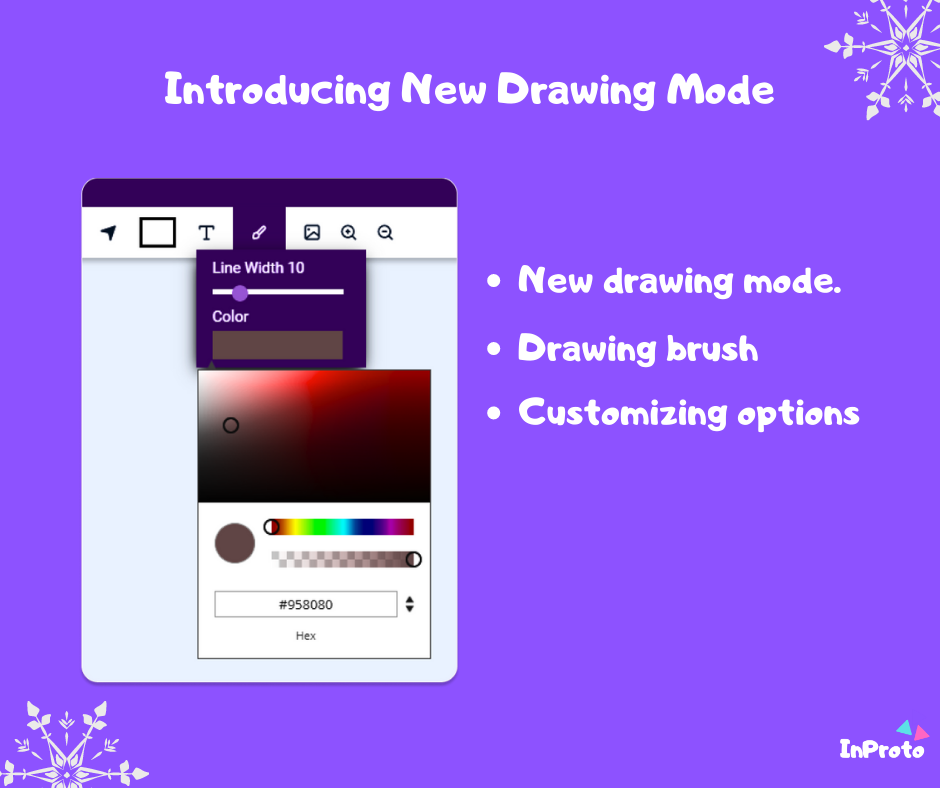
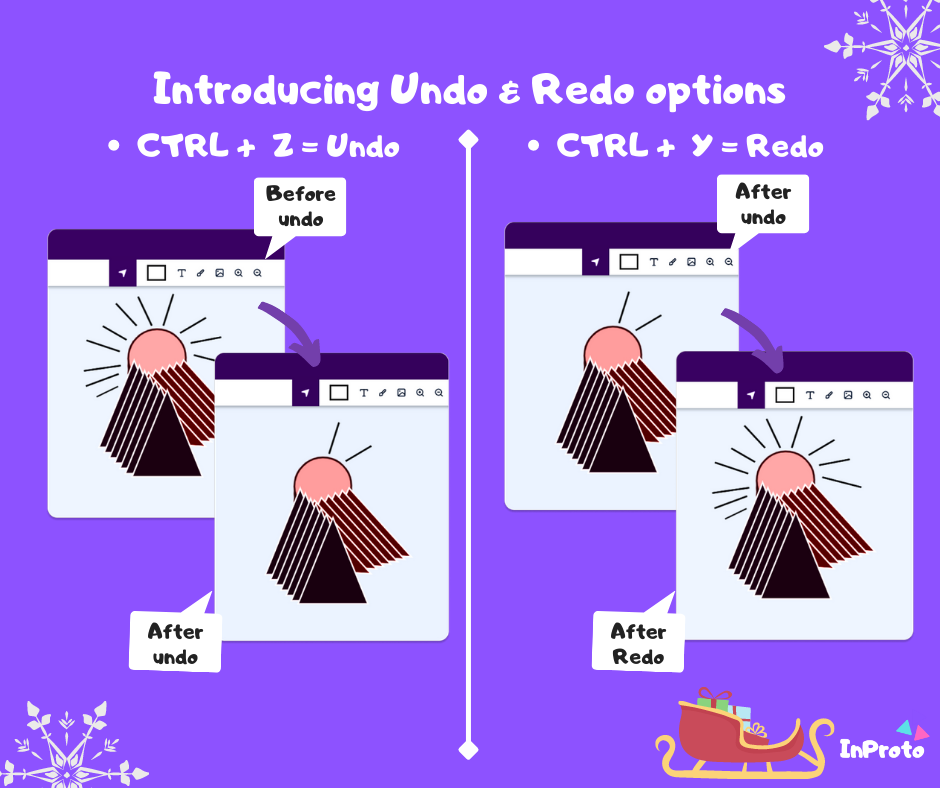
Inproto is a visual design and wireframing platform ideal for crafting various design projects, including user interfaces, Facebook banners, birthday cards, and more. This innovative tool provides users with a library of free widgets and assets, making it simple to create the designs you envision. After completing your design, you can easily save and export your layouts for further use. The user-friendly interface of Inproto requires no technical expertise, allowing anyone to effortlessly navigate the platform and complete their projects without complications. With the added benefit of drag-and-drop functionality, you can customize your designs quickly and efficiently, utilizing the built-in assets to enhance your creative process. Inproto offers a multitude of features, including both desktop and web versions, ensuring accessibility and convenience for all users. Whether you're a seasoned designer or a beginner, Inproto caters to all skill levels, making design more approachable and enjoyable.
API Access
Has API
No
API Access
Has API
No





Integrations
Confluence
Yes
Jira
Yes
Jira Service Management
Yes
Jira Work Management
Yes
Trello
Yes
Integrations
Confluence
No
Jira
No
Jira Service Management
No
Jira Work Management
No
Trello
No
Pricing Details
$12 per month
Pay per project, not per user.
Free Trial
Yes
Free Version
No
Pricing Details
$15 per user per month
Free Trial
No
Free Version
Yes
Deployment
Web-Based
Yes
On-Premises
No
iPhone App
No
iPad App
No
Android App
No
Windows
No
Mac
No
Linux
No
Chromebook
No
Deployment
Web-Based
Yes
On-Premises
No
iPhone App
No
iPad App
No
Android App
No
Windows
Yes
Mac
No
Linux
No
Chromebook
No
Customer Support
Business Hours
No
Live Rep (24/7)
No
Online Support
Yes
Customer Support
Business Hours
Yes
Live Rep (24/7)
Yes
Online Support
Yes
Types of Training
Training Docs
Yes
Webinars
No
Live Training (Online)
No
In Person
No
Types of Training
Training Docs
Yes
Webinars
No
Live Training (Online)
Yes
In Person
No
Vendor Details
Company Name
Balsamiq
Founded
2008
Country
United States
Website
balsamiq.com
Vendor Details
Company Name
InProto
Founded
2020
Country
Sri Lanka
Website
inproto.net
Product Features
UX
Animation
No
For Mobile
Yes
For Websites
Yes
Heatmaps
Yes
Prototyping
Yes
Screen Activity Recording
No
Unmoderated Testing
Yes
Usability Testing
Yes
User Journeys
Yes
User Research
No
Wireframe
Collaboration
Yes
Desktop Interface
No
Drag & Drop
Yes
Feedback Management
No
Interactive Elements
Yes
Mobile Interface
No
Mockup Creation
Yes
Page Linking
Yes
Presentation Tools
Yes
Prototype Creation
Yes
Revision History
Yes
Screen Capture
No
Wireframe Creation
Yes
Product Features
Wireframe
Collaboration
No
Desktop Interface
Yes
Drag & Drop
Yes
Feedback Management
No
Interactive Elements
Yes
Mobile Interface
No
Mockup Creation
Yes
Page Linking
No
Presentation Tools
Yes
Prototype Creation
Yes
Revision History
No
Screen Capture
No
Wireframe Creation
Yes
