Average Ratings 0 Ratings
Average Ratings 0 Ratings
Similar Products
-
Google Cloud SQLCloud SQL is a fully managed relational database service that supports MySQL, PostgreSQL, and SQL Server. It includes rich extensions, configuration flags, and developer ecosystems. Cloud SQL offers $300 in credits for new customers. You won't pay until you upgrade. Reduce maintenance costs by using fully managed MySQL, PostgreSQL, and SQL Server databases. The SRE team provides 24/7 support for reliable and secure services. Data encryption in transit and at rest ensures the highest level of security. Private connectivity with Virtual Private Cloud, user-controlled network access, and firewall protection add an additional layer of safety. Compliant with SSAE 16, ISO 27001, PCI DSS, and HIPAA, you can trust your data to be protected. Scale your database instances with a single API request, whether you are just testing or need a highly available database in production. Standard connection drivers and integrated migration tools let you create and connect to a database in a matter of minutes. Transform your database management with AI-driven support in Gemini, currently available in preview on Cloud SQL. It enhances development, optimizes performance, and simplifies fleet management, governance, and migration.
-
RaimaDBRaimaDB, an embedded time series database that can be used for Edge and IoT devices, can run in-memory. It is a lightweight, secure, and extremely powerful RDBMS. It has been field tested by more than 20 000 developers around the world and has been deployed in excess of 25 000 000 times. RaimaDB is a high-performance, cross-platform embedded database optimized for mission-critical applications in industries such as IoT and edge computing. Its lightweight design makes it ideal for resource-constrained environments, supporting both in-memory and persistent storage options. RaimaDB offers flexible data modeling, including traditional relational models and direct relationships through network model sets. With ACID-compliant transactions and advanced indexing methods like B+Tree, Hash Table, R-Tree, and AVL-Tree, it ensures data reliability and efficiency. Built for real-time processing, it incorporates multi-version concurrency control (MVCC) and snapshot isolation, making it a robust solution for applications demanding speed and reliability.
-
WindocksWindocks provides on-demand Oracle, SQL Server, as well as other databases that can be customized for Dev, Test, Reporting, ML, DevOps, and DevOps. Windocks database orchestration allows for code-free end to end automated delivery. This includes masking, synthetic data, Git operations and access controls, as well as secrets management. Databases can be delivered to conventional instances, Kubernetes or Docker containers. Windocks can be installed on standard Linux or Windows servers in minutes. It can also run on any public cloud infrastructure or on-premise infrastructure. One VM can host up 50 concurrent database environments. When combined with Docker containers, enterprises often see a 5:1 reduction of lower-level database VMs.
-
DbVisualizerDbVisualizer is a universal database client for anyone who works with data, from indie developers and startups to professional teams managing complex database environments, including developers, DBAs, analysts, and data engineers working across relational and NoSQL databases. Key features: - SQL editor with intelligent autocomplete, visual query builders, variables, and execution tools - AI Assistant for answering questions, explaining errors, and analyzing code - Git integration for managing SQL scripts and team collaboration - Customizable layouts, key bindings, and UI themes - Favorites for frequently used scripts and database objects - Configurable security settings for organizational requirements Connects via JDBC to MySQL, PostgreSQL, SQL Server, Oracle, Snowflake, SQLite, Cassandra, BigQuery, and more. Runs on Windows, macOS, and Linux. Nearly 7 million downloads, with Pro users in 150 countries, scaling from solo projects to enterprise database management.
-
Teradata VantageCloudTeradata VantageCloud: Open, Scalable Cloud Analytics for AI VantageCloud is Teradata’s cloud-native analytics and data platform designed for performance and flexibility. It unifies data from multiple sources, supports complex analytics at scale, and makes it easier to deploy AI and machine learning models in production. With built-in support for multi-cloud and hybrid deployments, VantageCloud lets organizations manage data across AWS, Azure, Google Cloud, and on-prem environments without vendor lock-in. Its open architecture integrates with modern data tools and standard formats, giving developers and data teams freedom to innovate while keeping costs predictable.
-
Google Cloud PlatformGoogle Cloud is an online service that lets you create everything from simple websites to complex apps for businesses of any size. Customers who are new to the system will receive $300 in credits for testing, deploying, and running workloads. Customers can use up to 25+ products free of charge. Use Google's core data analytics and machine learning. All enterprises can use it. It is secure and fully featured. Use big data to build better products and find answers faster. You can grow from prototypes to production and even to planet-scale without worrying about reliability, capacity or performance. Virtual machines with proven performance/price advantages, to a fully-managed app development platform. High performance, scalable, resilient object storage and databases. Google's private fibre network offers the latest software-defined networking solutions. Fully managed data warehousing and data exploration, Hadoop/Spark and messaging.
-
DragonflyDragonfly serves as a seamless substitute for Redis, offering enhanced performance while reducing costs. It is specifically engineered to harness the capabilities of contemporary cloud infrastructure, catering to the data requirements of today’s applications, thereby liberating developers from the constraints posed by conventional in-memory data solutions. Legacy software cannot fully exploit the advantages of modern cloud technology. With its optimization for cloud environments, Dragonfly achieves an impressive 25 times more throughput and reduces snapshotting latency by 12 times compared to older in-memory data solutions like Redis, making it easier to provide the immediate responses that users demand. The traditional single-threaded architecture of Redis leads to high expenses when scaling workloads. In contrast, Dragonfly is significantly more efficient in both computation and memory usage, potentially reducing infrastructure expenses by up to 80%. Initially, Dragonfly scales vertically, only transitioning to clustering when absolutely necessary at a very high scale, which simplifies the operational framework and enhances system reliability. Consequently, developers can focus more on innovation rather than infrastructure management.
-
Google Cloud BigQueryBigQuery is a serverless, multicloud data warehouse that makes working with all types of data effortless, allowing you to focus on extracting valuable business insights quickly. As a central component of Google’s data cloud, it streamlines data integration, enables cost-effective and secure scaling of analytics, and offers built-in business intelligence for sharing detailed data insights. With a simple SQL interface, it also supports training and deploying machine learning models, helping to foster data-driven decision-making across your organization. Its robust performance ensures that businesses can handle increasing data volumes with minimal effort, scaling to meet the needs of growing enterprises. Gemini within BigQuery brings AI-powered tools that enhance collaboration and productivity, such as code recommendations, visual data preparation, and intelligent suggestions aimed at improving efficiency and lowering costs. The platform offers an all-in-one environment with SQL, a notebook, and a natural language-based canvas interface, catering to data professionals of all skill levels. This cohesive workspace simplifies the entire analytics journey, enabling teams to work faster and more efficiently.
-
CouchbaseCouchbase’s operational data platform for AI is a scalable foundation for enterprise operational, analytical, mobile and AI workloads that replaces legacy infrastructure and data services. Couchbase connects and mobilizes your data, so you can power peak experiences, harness the power of AI and scale globally—all with less risk and lower overhead.
-
OdooOdoo is an open-source, fully customizable and extensible software that includes hundreds of professionally designed business applications. Odoo's intuitive database can meet most business needs including CRM, Sales, Projects, Manufacturing, Inventory, Accounting, and Accounting. Odoo is a software solution that can be used to meet all company needs, regardless of size or budget. Odoo's seamless design makes it easy for businesses to become more efficient and save time. Each module is interconnected to offer a seamless experience from one app to the next. Users can automate many tasks that would otherwise require manual inputs to multiple applications. Odoo enables teams to collaborate with each other from one platform, allowing them to keep all business functions in one place.
Description
Prioritize application innovation rather than database oversight by utilizing the fully managed and intelligent Azure Database for PostgreSQL service. Effortlessly scale your workloads while maintaining confidence in performance. Benefit from remarkable high availability, guaranteed by a service-level agreement (SLA) that promises up to 99.99 percent uptime, and select between same-zone or zone-redundant high availability options, coupled with AI-driven performance insights and robust enterprise security features. Concentrate on application development with a PostgreSQL database offered as a managed service. The zone-redundant high availability feature streamlines maintenance, patching, and updates for your convenience. Set up your database in mere minutes and adjust compute or storage resources independently as needed. Reduce expenses with extensive database monitoring and optimization resources that ensure efficiency. Leverage intelligent performance recommendations to maintain optimal application functionality. Seamlessly migrate your data using a fully managed PostgreSQL database that supports the latest versions and technologies. Moreover, enhance your projects with popular PostgreSQL extensions, including Cron, PostGIS, PLV8, and more, to unlock a wider range of functionalities.
Description
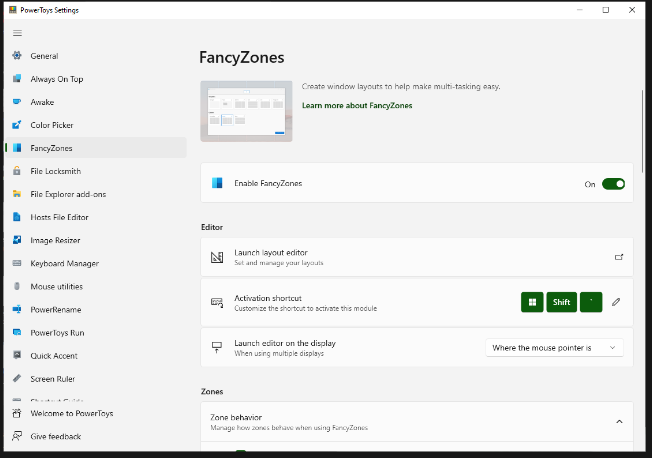
FancyZones serves as a window management tool designed to help users arrange and snap their application windows into optimized layouts, enhancing workflow efficiency and allowing for quick restoration of these layouts. This utility empowers you to specify a series of designated zones on your desktop where windows can be directed. By dragging a window into a predetermined zone or using a designated keyboard shortcut, the respective window automatically resizes and relocates to occupy that zone completely. Additionally, if you have the "Use non-primary mouse button to toggle zone activation" option activated, you can enter zone selection mode by simply clicking the secondary mouse button. When two zones are positioned next to each other, a window can be adjusted to span the combined area of both zones, effectively rounding up to the smallest rectangle that encompasses the two. As you maneuver the mouse cursor close to the shared boundary of two zones, both zones become active at the same time, giving you the flexibility to drop the window into either or both. Moreover, you can drag the window until it activates one zone and then, by pressing and holding the control key while continuing to drag, select multiple zones to expand your layout options. This feature significantly streamlines the process of organizing your desktop workspace efficiently.
API Access
Has API
No
API Access
Has API
No


Integrations
AnalyticsCreator
Yes
Azure App Service
Yes
Azure Kubernetes Service (AKS)
Yes
Azure Linux
Yes
DBmarlin
Yes
List & Label
Yes
Microsoft Azure
Yes
Microsoft Defender XDR
Yes
Microsoft Intelligent Data Platform
Yes
Microsoft Power BI
Yes
Integrations
AnalyticsCreator
No
Azure App Service
No
Azure Kubernetes Service (AKS)
No
Azure Linux
No
DBmarlin
No
List & Label
No
Microsoft Azure
No
Microsoft Defender XDR
No
Microsoft Intelligent Data Platform
No
Microsoft Power BI
No
Pricing Details
$0.017 per hour
Free Trial
Yes
Free Version
No
Pricing Details
Free
Free Trial
No
Free Version
Yes
Deployment
Web-Based
Yes
On-Premises
No
iPhone App
No
iPad App
No
Android App
No
Windows
No
Mac
No
Linux
No
Chromebook
No
Deployment
Web-Based
No
On-Premises
No
iPhone App
No
iPad App
No
Android App
No
Windows
Yes
Mac
No
Linux
No
Chromebook
No
Customer Support
Business Hours
Yes
Live Rep (24/7)
Yes
Online Support
Yes
Customer Support
Business Hours
Yes
Live Rep (24/7)
No
Online Support
Yes
Types of Training
Training Docs
Yes
Webinars
Yes
Live Training (Online)
Yes
In Person
No
Types of Training
Training Docs
Yes
Webinars
Yes
Live Training (Online)
No
In Person
Yes
Vendor Details
Company Name
Microsoft
Founded
1975
Country
United States
Website
azure.microsoft.com/en-us/products/postgresql/
Vendor Details
Company Name
Microsoft
Country
United States
Website
learn.microsoft.com/en-us/windows/powertoys/fancyzones
Product Features
Database
Backup and Recovery
No
Creation / Development
No
Data Migration
No
Data Replication
No
Data Search
No
Data Security
No
Database Conversion
No
Mobile Access
No
Monitoring
No
NOSQL
No
Performance Analysis
No
Queries
No
Relational Interface
No
Virtualization
No
RDBMS
Backup
No
Data Migration
No
Monitoring
No
Performance Analysis
No
Queries
No
Storage Optimization
No
Relational Database
ACID Compliance
No
Data Failure Recovery
No
Multi-Platform
No
Referential Integrity
No
SQL DDL Support
No
SQL DML Support
No
System Catalog
No
Unicode Support
No


