Average Ratings 1 Rating
Average Ratings 0 Ratings
Similar Products
-
Secure EraserSecure Eraser: Secure Data Deletion, Shredders Your Files & Folders. Just because it has been removed from your hard drive doesn't mean that it is gone forever. Anyone can restore the information as long as it was not overwritten. It becomes more difficult if the computer has been resold, or given away. Secure Eraser employs the most well-known method of data disposal. It overwrites sensitive information so that it cannot be recovered even with specialized software. Our award-winning solutions for permanently destroying data eliminate cross-references that may leave traces of deleted files within the allocation table of your hard disk. This Windows software is easy to use and can overwrite sensitive data up to 35 times, regardless of whether they're files, folders or drives, recycle bins, or traces of surfing. You can also delete files that you have already deleted but not for good.
-
PeerGFSA Comprehensive Solution for Streamlined File Orchestration and Management across Edge, Data Center, and Cloud Storage PeerGFS presents an exclusively software-based solution designed to address file management and replication challenges within multi-site and hybrid multi-cloud environments. With our extensive expertise spanning over 25 years, we specialize in file replication for geographically dispersed organizations. Here's how PeerGFS can benefit your operations: Enhanced Availability: Achieve high availability through Active-Active data centers, whether located on-premises or in the cloud. Edge Data Protection: Safeguard your valuable data at the Edge with continuous protection to the central Data Center. Improved Productivity: Empower distributed project teams by providing swift, local access to critical file information. In today's world, having a real-time data infrastructure is paramount. PeerGFS seamlessly integrates with your existing storage systems, supporting: High-volume data replication between interconnected data centers. Wide area networks characterized by lower bandwidth and higher latency. Rest assured, PeerGFS is designed to be user-friendly, making installation and management a breeze.
-
Veeam Data PlatformVeeam Data Platform is a unified data resilience solution that helps organizations recover from cyberattacks and outages, and protect workloads across hybrid and multicloud environments – all without vendor lock-in. The platform includes built-in security capabilities designed to mitigate ransomware and other data-loss threats, including AI-backed threat detection across a broad range of workload types. This is intended to help teams identify and respond to threats before they disrupt operations. Veeam Data Platform supports workload portability across hypervisors, cloud providers, and on-premises environments, allowing organizations to move or recover data across infrastructure without being tied to a specific vendor or platform. For organizations looking to simplify deployment, Veeam Software Appliance provides a pre-built, hardened, and highly available option, reducing the manual setup and maintenance work required from IT teams.
-
TinyPNGTinyPNG (by Tinify) is a free image optimization service built for developers and designers. It utilizes smart lossy compression to reduce the file sizes of JPEG, PNG, WebP, and AVIF files by up to 80% with no visible quality loss. That means faster load times, better SEO, and lower bandwidth. You can compress, convert, and resize images via a clean web interface or integrate it into your workflow with the API. The platform also provides an image CDN for fast global delivery of optimized assets. SDKs are available for Python, Node.js, PHP, Java, Ruby, and .NET. WordPress plugin included, plus plenty of community-driven integrations. No tuning, no noise, Tinify just works. Whether you're optimizing a handful of images or processing millions, it scales effortlessly. All plans include a generous free tier, and support is quick when you need it. George the panda 🐼 approves.
-
Comet BackupStart running backups and restores in less than 15 minutes! Comet is a fast, secure all-in-one backup platform for businesses and IT providers. You control your backup environment and storage destination (local, Wasabi, AWS, Google Cloud Storage, Azure, Backblaze, or other S3 storage providers). Our software supports businesses across 120 countries in 13 languages. Test drive Comet Backup with a 30-day FREE trial!
-
NinjaOneNinjaOne automates the hardest parts of IT, empowering more than 20,000 IT teams. By providing deep insights into endpoints, robust security measures, and centralized control, NinjaOne boosts efficiency while safeguarding sensitive data and cutting IT expenses. This comprehensive platform offers a versatile toolkit for managing and securing endpoints, including patch management, mobile device oversight, software distribution, remote support, backup solutions, and more, thanks to its extensive IT and security integrations.
-
ImorgonImprove radiology reporting efficiency and report quality with Imorgon's reporting automation. As the top DICOM SR software for radiology, our solution significantly reduces unnecessary dictation by precisely transferring ultrasound and DEXA modality measurements into Powerscribe, Fluency, or RadAI. This eliminates manual errors and significantly accelerates the generation of reports. Imorgon's unique advantages include: - guaranteed transfer of all measurements - usually DICOM SR - electronic worksheets for direct report population (eliminating dictation from notes) - worksheets with priors, calculators, and clinical decision support (TI-RADS, O-RADS, etc) - integration with Epic and other EHRs. - vendor-neutral Our dedicated support team ensures uninterrupted workflow. Invest in Imorgon for a quick and substantial return on investment, transforming your reporting overhead into a streamlined, high-quality operation.
-
UnimusUnimus is a powerful network automation, configuration backup, and change management solution designed to simplify network operations for businesses of all sizes. Supporting 450+ device types across 160+ vendors, Unimus is a network-agnostic platform that eliminates manual network tasks while enhancing security and reliability. With automated configuration backups, Unimus ensures seamless disaster recovery, giving IT teams quick access to historical versions and real-time change tracking. Its network auditing features provide instant visibility into configuration consistency, compliance, and security risks. Change management is simplified with automatic change detection, detailed version history, and customizable notifications. Unimus' intuitive web-based interface makes it easy to manage networks without requiring deep technical expertise, while its integrated CLI access allows for real-time troubleshooting and command execution. Whether you're looking to automate bulk configuration changes, perform firmware upgrades, or improve network visibility, Unimus provides a scalable, cost-effective solution for modern network infrastructures.
-
MelioMelio is an accounts payable platform designed to simplify bill payments, improve workflows, and maximize cash flow efficiency for businesses of all sizes. To get started, try all of Melio's features free for 30 days! You can pay vendors online using bank transfers or credit/debit cards—even if they only accept checks—while Melio takes care of the manual tasks. Integrate seamlessly with QuickBooks and Xero to keep your accounting up-to-date. Melio allows you to pay through bank transfer or card, helping you extend your cash flow and gain rewards. Enter vendor or bill details manually, upload, or snap a photo of the invoice—it’s that simple. Schedule payments according to your cash flow plan and let Melio manage them. Additionally, you can pay international vendors in their local currency for services and products. On-the-go? No problem, just get the Melio mobile app on iOS or Android to manage your payments, process approvals, and much more no matter where your business day takes you.
-
DragonflyDragonfly serves as a seamless substitute for Redis, offering enhanced performance while reducing costs. It is specifically engineered to harness the capabilities of contemporary cloud infrastructure, catering to the data requirements of today’s applications, thereby liberating developers from the constraints posed by conventional in-memory data solutions. Legacy software cannot fully exploit the advantages of modern cloud technology. With its optimization for cloud environments, Dragonfly achieves an impressive 25 times more throughput and reduces snapshotting latency by 12 times compared to older in-memory data solutions like Redis, making it easier to provide the immediate responses that users demand. The traditional single-threaded architecture of Redis leads to high expenses when scaling workloads. In contrast, Dragonfly is significantly more efficient in both computation and memory usage, potentially reducing infrastructure expenses by up to 80%. Initially, Dragonfly scales vertically, only transitioning to clustering when absolutely necessary at a very high scale, which simplifies the operational framework and enhances system reliability. Consequently, developers can focus more on innovation rather than infrastructure management.
Description
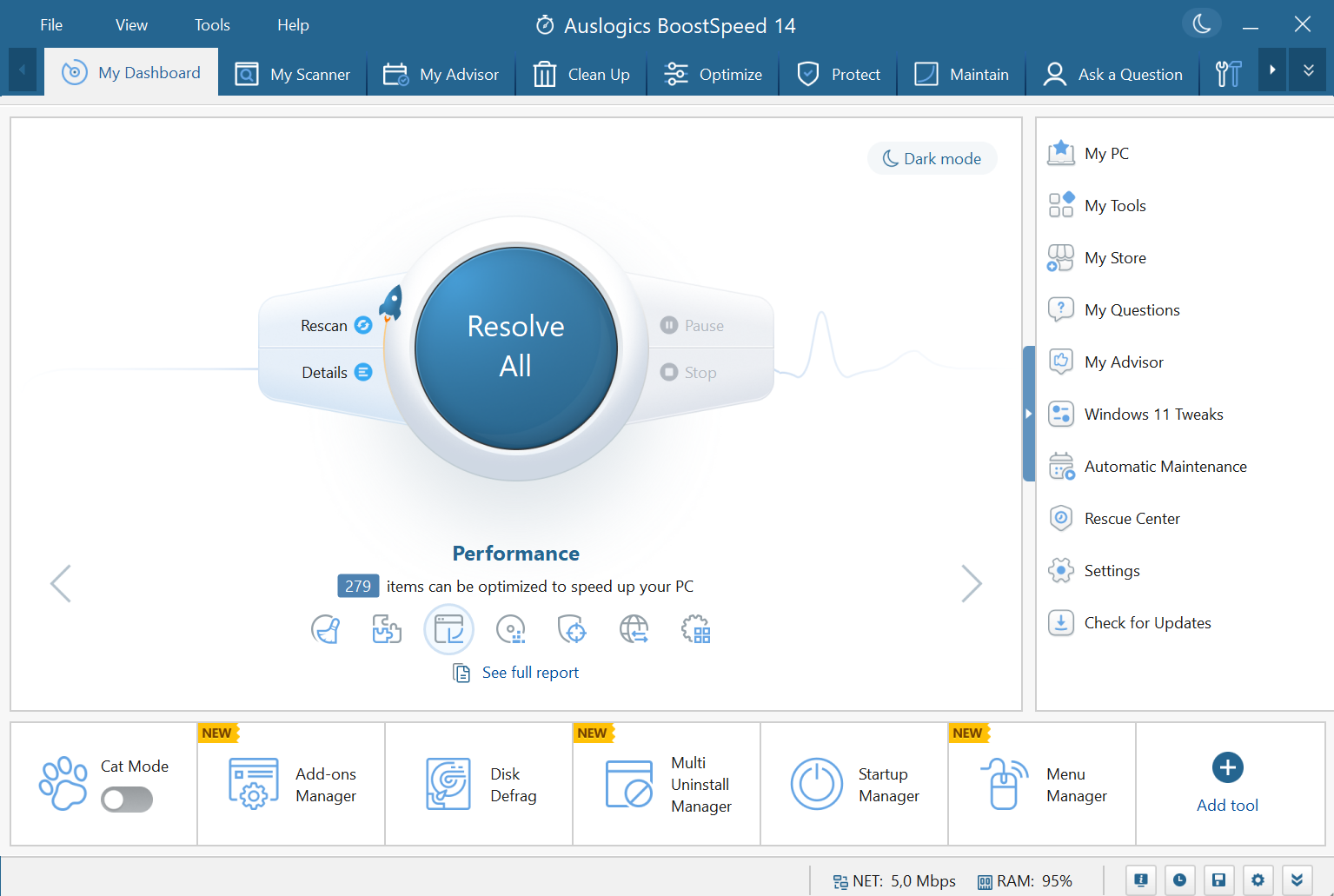
BoostSpeed performs a thorough system check. It will locate junk files, speed-reducing problems, and causes of system or application crashes or glitches. We have developed precise techniques to locate issues that can be safely fixed without causing any damage to your operating system. This has been achieved through extensive research and testing.
The cleaning module in BoostSpeed was designed to remove all types of junk from your computer, including unneeded system and user temporary file, web browser cache, unused errors logs, leftover Windows Update files and temporary Sun Java files, as well as unneeded Microsoft Office cache. It can help reclaim gigabytes worth of hard disk space for an average PC.
BoostSpeed uses precision tools to remove invalid entries and corrupt keys from the Windows registry. This is done in the same way as a skilled surgeon. Our software has been tested to ensure that it fixes most glitches and crashes, restoring smooth performance.
Description
Maximize your Mac's performance with the ultimate speed-enhancing application available. This tool allows you to configure automatic RAM cleaning modes, eliminating the need for constant manual checks on CPU usage across applications. It provides detailed insights into system RAM usage, including the memory consumed by applications, background processes, available free memory, and even details on the latest RAM cleanup's date and size. You can explore a variety of additional features in the Preferences section, where you can also choose how to display memory usage in the menu bar. Automatically release memory when you close large applications, and customize the memory cleanup frequency based on your usage patterns or personal preferences. If you've ever encountered unresponsive applications, you may find that the “Force Quit on Mac” option is ineffective. Fortunately, Memory Cleaner can resolve this issue by force quitting even stubborn processes like Finder. Additionally, it enables you to identify the applications that are consuming the most memory and clear RAM effortlessly with a single click, ensuring your system runs smoothly at all times. This versatile tool not only optimizes your Mac but also enhances your overall computing experience.
API Access
Has API
No
API Access
Has API
No



Integrations
Google Chrome
No
Safari
No
iFinder
No
Pricing Details
$69.95 per year
1 Year Subscription
3 PC license
3 PC license
Free Trial
No
Free Version
Yes
Pricing Details
No price information available.
Free Trial
No
Free Version
Yes
Deployment
Web-Based
No
On-Premises
No
iPhone App
No
iPad App
No
Android App
No
Windows
Yes
Mac
No
Linux
No
Chromebook
No
Deployment
Web-Based
Yes
On-Premises
No
iPhone App
No
iPad App
No
Android App
No
Windows
No
Mac
Yes
Linux
No
Chromebook
No
Customer Support
Business Hours
Yes
Live Rep (24/7)
No
Online Support
Yes
Customer Support
Business Hours
Yes
Live Rep (24/7)
No
Online Support
Yes
Types of Training
Training Docs
Yes
Webinars
No
Live Training (Online)
Yes
In Person
No
Types of Training
Training Docs
Yes
Webinars
No
Live Training (Online)
No
In Person
Yes
Vendor Details
Company Name
Auslogics
Founded
2008
Country
Australia
Website
www.auslogics.com
Vendor Details
Company Name
Nektony
Founded
2011
Country
Ukraine
Website
nektony.com/memory-cleaner
Product Features
Data Recovery
Web Access / Restoration
Yes
Backup Log
Yes
Backup Scheduling
Yes
Compression
No
Continuous Backup
No
Encryption
No
Incremental Backup
No
Local Server Options
No
Multiple System Support
No
Remote Server Options
No
Secure Data Storage
No
