Average Ratings 0 Ratings
Average Ratings 0 Ratings
Similar Products
-
Bright DataBright Data holds the title of the leading platform for web data, proxies, and data scraping solutions globally. Various entities, including Fortune 500 companies, educational institutions, and small enterprises, depend on Bright Data's offerings to gather essential public web data efficiently, reliably, and flexibly, enabling them to conduct research, monitor trends, analyze information, and make well-informed decisions. With a customer base exceeding 20,000 and spanning nearly all sectors, Bright Data's services cater to a diverse range of needs. Its offerings include user-friendly, no-code data solutions for business owners, as well as a sophisticated proxy and scraping framework tailored for developers and IT specialists. What sets Bright Data apart is its ability to deliver a cost-effective method for rapid and stable public web data collection at scale, seamlessly converting unstructured data into structured formats, and providing an exceptional customer experience—all while ensuring full transparency and compliance with regulations. This commitment to excellence has made Bright Data an essential tool for organizations seeking to leverage web data for strategic advantages.
-
ApifyApify provides the infrastructure developers need to build, deploy, and monetize web automation tools. The platform centers on Apify Store, a marketplace featuring 10,000+ community-built Actors. These are serverless programs that scrape websites, automate browser tasks, and power AI agents. Developers create Actors using JavaScript, Python, or Crawlee (Apify's open-source crawling library), then publish them to the Store. When other users run your Actor, you earn money. Apify manages the infrastructure, handles payments, and processes monthly payouts to thousands of active developers. Apify Store offers ready-to-use solutions for common use cases: extracting data from Amazon, Google Maps, and social platforms; monitoring prices; generating leads; and much more. Under the hood, Actors automatically manage proxy rotation, CAPTCHA solving, JavaScript-heavy pages, and headless browser orchestration. The platform scales on demand with 99.95% uptime and maintains SOC2, GDPR, and CCPA compliance. For workflow automation, Apify connects to Zapier, Make, n8n, and LangChain. The platform also offers an MCP server, enabling AI assistants like Claude to discover and invoke Actors programmatically.
-
OxylabsOxylabs is a market leader in web intelligence, helping businesses worldwide turn public web data into actionable insights with enterprise-grade, ethical, and compliant solutions. Its proxy infrastructure spans one of the largest global networks, offering residential, ISP, mobile, datacenter, and dedicated datacenter proxies, along with Web Unblocker – an AI-driven tool that ensures seamless, block-free access to even the most protected sites. On the scraping side, Oxylabs provides a complete ecosystem. The Web Scraper API manages every stage of large-scale data extraction, from proxy management to parsing, while OxyCopilot, an AI-powered assistant, generates parsing requests from simple natural language prompts. For dynamic, bot-protected websites, the Headless Browser, a headless browser designed to mimic human behavior, ensures uninterrupted access. Oxylabs also pioneers AI-driven tools like AI Studio, which enables natural language scraping and crawling so anyone can extract data without writing code. Its ready-made datasets provide instant, structured information across industries such as e-commerce, real estate, travel, and more – accelerating data projects without custom scraping. With the largest proxy services in the market, Oxylabs offers 177M+ IPs across 195 countries and is trusted by 4,000+ clients worldwide, including Fortune 500 companies. Plus, their 24/7 customer service ensures businesses get support whenever it’s needed.
-
GaffaGaffa is a REST API built for web scraping and browser automation, allowing developers to run real, full browsers at scale with a single API call. It removes the difficulty of managing headless browser frameworks, rotating proxies, CAPTCHA solving, and scaling infrastructure, all of which are handled automatically. JavaScript-heavy and dynamic websites render exactly as they would for a human visitor by default. Beyond standard scraping, Gaffa supports AI-driven structured data extraction (extract data into a defined schema without writing CSS selectors), screenshot and PDF capture, infinite-scroll and form-filling automation, and clean Markdown conversion for feeding webpages directly into LLM and RAG pipelines. A rotating residential proxy network keeps access reliable across regions, and a credit-based pricing model means teams pay only for the browser time and bandwidth they actually use. Gaffa is designed for AI engineers, data teams, and developers who want production-grade web data extraction without having to build and maintain their own infrastructure.
-
NetNutNetNut is a leading proxy service provider offering a comprehensive suite of solutions, including residential, static residential, mobile, and datacenter proxies, designed to enhance online operations and ensure top-notch performance. With access to over 85 million residential IPs across 195 countries, NetNut enables users to conduct seamless web scraping, data collection, and online anonymity with high-speed, reliable connections. Their unique architecture provides one-hop connectivity, minimizing latency and ensuring stable, uninterrupted service. NetNut's user-friendly dashboard offers real-time proxy management and insightful usage statistics, allowing for easy integration and control. Committed to customer satisfaction, NetNut provides responsive support and tailored solutions to meet diverse business needs.
-
csidec/side: The Client-Side Platform for Cybersecurity, Compliance, and Privacy Monitoring third-party scripts effectively eliminates uncertainty, ensuring that you are always aware of what is being delivered to your users' browsers, while also enhancing script performance by up to 30%. The unchecked presence of these scripts in users' browsers can lead to significant issues when things go awry, resulting in adverse publicity, potential legal actions, and claims for damages stemming from security breaches. Compliance with PCI DSS 4.0.1, particularly sections 6.4.3 and 11.6.1, requires that organizations handling cardholder data implement tamper-detection measures by March 31, 2025, to help prevent attacks by notifying stakeholders of unauthorized modifications to HTTP headers and payment information. c/side stands out as the sole fully autonomous detection solution dedicated to evaluating third-party scripts, moving beyond reliance on merely threat feed intelligence or easily bypassed detections. By leveraging historical data and artificial intelligence, c/side meticulously analyzes the payloads and behaviors of scripts, ensuring a proactive stance against emerging threats. Our continuous monitoring of numerous sites allows us to stay ahead of new attack vectors, as we process all scripts to refine and enhance our detection capabilities. This comprehensive approach not only safeguards your digital environment but also instills greater confidence in the security of third-party integrations.
-
NodeMavenNodeMaven employs a sophisticated filtering mechanism that evaluates IPs in real-time prior to allocation, guaranteeing that you receive high-quality addresses 95% of the time. With access to over 30 million premium, pre-screened residential IPs spanning more than 150 countries and 1,400 cities, NodeMaven facilitates targeted usage at the country, region, and city levels. Their state-of-the-art filtering process ensures that 95% of the IPs maintain clean records, thereby boosting success rates in activities such as web scraping, SEO monitoring, and social media management. The platform allows for unlimited concurrent sessions and features super sticky sessions that can endure for up to 24 hours, ensuring stable and dependable connections. NodeMaven's intuitive dashboard makes the selection of proxies and their integration with popular third-party applications like Selenium, Puppeteer, and various anti-detect browsers a breeze. Additionally, they offer comprehensive onboarding assistance and expert support to help users successfully navigate anti-bot systems, thereby enhancing user experience and efficiency. This combination of features positions NodeMaven as a leading choice for those in need of reliable proxy solutions.
-
DataImpulseDataImpulse is an ethical proxy provider offering a large pool of over 90 million residential, mobile, and data center IPs from 195 countries. Pricing starts at $1 per GB for residential proxies, with a pay-as-you-go model that has no subscriptions or traffic expiration. DataImpulse proxies are ideal for web scraping, SERP monitoring, ad verification, price tracking, and more. They support HTTP/HTTPS and SOCKS5 protocols, with rotating and sticky session options. Integration options include Scrapy, Selenium, Puppeteer, proxy managers, browser extensions, and custom tools. Rated 4.8 out of 5 on G2, DataImpulse offers 24/7 human support, advanced targeting, bulk discounts, and custom features upon request.
-
Auth0Auth0 takes a modern approach to Identity and enables organizations to provide secure access to any application, for any user. Auth0 is highly customizable, and simple yet flexible. Safeguarding billions of login transactions each month, Auth0 delivers convenience, privacy, and security so customers can focus on innovation. With Auth0, you can rapidly integrate authentication and authorization for web, mobile, and legacy applications, with new Fine Grained Authorization (FGA) that goes beyond role-based access control.
-
Code-Cube.ioCode-Cube.io is a comprehensive marketing observability solution that ensures the accuracy and reliability of tracking data across digital platforms. It continuously monitors tags, dataLayers, and conversion events to detect issues the moment they occur. By providing real-time alerts, the platform allows teams to quickly respond to tracking failures before they affect campaign performance or reporting accuracy. Its automated auditing capabilities remove the need for time-consuming manual QA processes, saving valuable resources. With features like Tag Monitor, users can oversee tag behavior across both client-side and server-side environments with full transparency. DataLayer Guard further strengthens data integrity by validating events, parameters, and values in real time. The platform helps businesses avoid wasted ad spend caused by incorrect or incomplete data signals. It also supports multi-domain tracking, ensuring consistency across complex digital ecosystems. Code-Cube.io is trusted by global brands to maintain high-quality marketing data at scale. Ultimately, it enables organizations to optimize performance and make confident, data-driven decisions.
Description
AnyPicker is a user-friendly web scraping tool designed specifically for the Chrome browser, allowing users to extract entire websites effortlessly with just their mouse. There’s no need for coding knowledge or complex configurations, making the process remarkably straightforward. Users can operate AnyPicker solely through mouse clicks, while the tool cleverly navigates around common crawler-blocking measures to ensure a smooth experience. It can scrape any website accessible through Google Chrome, making it versatile and widely applicable. The innovative artificial intelligence data pattern detection engine enhances its functionality by automatically identifying and highlighting the data to be extracted, streamlining your workflow. Furthermore, AnyPicker simplifies the scraping of data that requires user login; simply log in and launch the tool to manage the rest. The extracted data can be conveniently saved in various formats, including XLS and CSV. For light scraping tasks, AnyPicker is available for free, but users looking to extract larger volumes of data can opt for one of the affordable paid plans that fit their specific needs. Additionally, this tool is ideal for both beginners and experienced users alike, ensuring that everyone can benefit from its powerful features.
Description
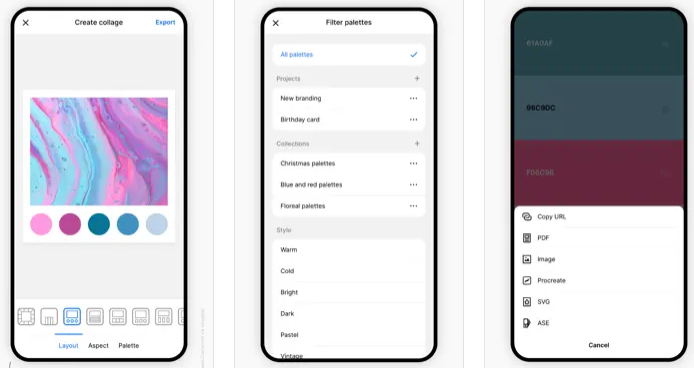
Coolors is a rapid color palette generator that assists you in crafting the ideal color palette or finding inspiration from a myriad of stunning color schemes. Accessible via web platforms, mobile applications, plugins, and extensions, it allows users to create color palettes in mere seconds by tapping the space bar, secure preferred colors to enhance the palette, and rearrange or modify the number of colors included. Additionally, it features an Image Picker to derive color schemes from personal photos and a Contrast Checker to ensure the combinations are accessible for all users. The Palette Visualizer offers a way to see how colors look in real design scenarios, while other tools, including a Color Picker, Collage Maker, gradient generator, and extensive color libraries, further enhance the experience. Users can export their palettes in various formats such as PDF, image, CSS, and SVG, as well as share links and integrate with design software like Figma or a Chrome extension. The platform also supports multiple color-space values including HEX, RGB, and CMYK, and includes functionalities for simulating color-blindness along with adjusting luminance, hue, and temperature for precision in design. Overall, Coolors combines functionality and creativity to cater to both amateur and professional designers alike.
API Access
Has API
No
API Access
Has API
No


Integrations
Google Chrome
Yes
Adobe Acrobat
No
CSS
No
Figma
No
Instagram
No
Integrations
Google Chrome
Yes
Adobe Acrobat
Yes
CSS
Yes
Figma
Yes
Instagram
Yes
Pricing Details
$39 per month
Free Trial
No
Free Version
Yes
Pricing Details
Free
Free Trial
No
Free Version
Yes
Deployment
Web-Based
Yes
On-Premises
No
iPhone App
No
iPad App
No
Android App
No
Windows
No
Mac
No
Linux
No
Chromebook
No
Deployment
Web-Based
Yes
On-Premises
No
iPhone App
Yes
iPad App
Yes
Android App
Yes
Windows
No
Mac
Yes
Linux
No
Chromebook
No
Customer Support
Business Hours
No
Live Rep (24/7)
Yes
Online Support
Yes
Customer Support
Business Hours
No
Live Rep (24/7)
No
Online Support
Yes
Types of Training
Training Docs
Yes
Webinars
No
Live Training (Online)
No
In Person
No
Types of Training
Training Docs
Yes
Webinars
No
Live Training (Online)
Yes
In Person
No
Vendor Details
Company Name
AnyPicker
Country
United States
Website
www.anypicker.com
Vendor Details
Company Name
Coolors
Founded
2014
Country
Italy
Website
coolors.co
Product Features
Product Features
Graphic Design
Collaboration
No
Data Visualization
No
Filtering
No
Image Database
No
Image Editor
No
Templates
No
