Average Ratings 0 Ratings
Average Ratings 0 Ratings
Similar Products
-
Lightspeed GolfThe leading golf course software. Lightspeed is the golf course management software used by more than 2000 golf clubs worldwide. It is supported by a team of golfers who are passionate about golf. Lightspeed gives you the peace of mind that comes with being able manage your entire facility on a single platform. The industry's most advanced tee-sheet will help you run your business like a professional. Lightspeed is the industry's most powerful cloud-based golf course management and tee sheet software. All from one system, and more efficiently than ever. Modernize your pro-shop and improve customer service by using a POS system that is tailored for golf retail. It's also fully integrated with your tee-sheet. You can run your pro-shop from anywhere, on any device.
-
EcwidEcwid by Lightspeed makes it easy to add an online shop to any website or social media profile. Ecwid is used by hundreds of thousands merchants in 175 different countries. It has everything you need for reaching your customers wherever they may be: in-person or through your website, Instagram and Facebook, Amazon, Google Shopping, or Amazon. Ecwid's integrated point-of-sale and email marketing integrations and dedicated mobile app allow you to manage your marketing, sales, and merchandising from anywhere.
-
Google AI StudioGoogle AI Studio is an all-in-one environment designed for building AI-first applications with Google’s latest models. It supports Gemini, Imagen, Veo, and Gemma, allowing developers to experiment across multiple modalities in one place. The platform emphasizes vibe coding, enabling users to describe what they want and let AI handle the technical heavy lifting. Developers can generate complete, production-ready apps using natural language instructions. One-click deployment makes it easy to move from prototype to live application. Google AI Studio includes a centralized dashboard for API keys, billing, and usage tracking. Detailed logs and rate-limit insights help teams operate efficiently. SDK support for Python, Node.js, and REST APIs ensures flexibility. Quickstart guides reduce onboarding time to minutes. Overall, Google AI Studio blends experimentation, vibe coding, and scalable production into a single workflow.
-
RetoolRetool is a modern AI-native application development platform designed to help teams build internal software quickly and efficiently. It enables users to create agents, workflows, dashboards, and full-stack apps using natural language prompts and visual tools. Retool connects directly to databases, APIs, vector stores, and AI models to ensure applications work seamlessly with existing systems. The platform allows teams to transform raw data into actionable tools such as dashboards, admin panels, and monitoring systems. With drag-and-drop UI building, code-level customization, and AI-assisted generation, Retool supports multiple development styles. Built-in workflows automate complex processes while maintaining auditability and security. Retool fits naturally into standard engineering stacks with support for CI/CD and version control. Enterprise-grade permissions and hosting options ensure sensitive data stays protected. Used by thousands of companies worldwide, Retool helps teams ship AI-powered software faster. It bridges the gap between idea and production with speed and control.
-
JetBrains JunieJetBrains Junie is an innovative AI coding assistant that works inside many JetBrains IDEs to streamline programming efforts and boost efficiency. This agent leverages advanced AI to help developers write, test, and inspect code without leaving their familiar development environment. Junie offers both code execution and interactive collaboration, allowing programmers to switch between automated code writing and brainstorming sessions for features and improvements. By deeply understanding the codebase, Junie identifies the best ways to tackle tasks and ensures all changes meet quality standards through syntax and semantic checks. It also runs tests to minimize errors and keep the project healthy, freeing developers from routine tasks. Many developers have successfully built complex applications and games using Junie, highlighting its flexibility across different languages and frameworks. The AI adapts to each task’s complexity and workflow, making coding less tedious and more focused on creativity. Whether you are building a simple web app or a complex game, Junie offers smart support throughout the development cycle.
-
Virtuoso QAVirtuoso QA is an AI-native test automation solution built to streamline and scale enterprise quality assurance processes. It allows users to author tests in natural language, making it accessible for both technical and non-technical team members. The platform leverages self-healing AI to automatically adapt to changes in applications, reducing test flakiness and maintenance overhead. With features like live authoring, real-time execution, and automated diagnostics, teams can quickly identify and resolve issues. Virtuoso QA supports continuous testing across multiple browsers, devices, and environments, ensuring comprehensive test coverage. It integrates seamlessly with popular tools such as Jira, Jenkins, Azure DevOps, and BrowserStack, enabling smooth CI/CD workflows. The platform also provides detailed analytics and dashboards to track performance and optimize testing strategies. By automating test generation and execution, it significantly reduces manual effort and accelerates release cycles. Virtuoso QA empowers organizations to deliver high-quality software faster and more reliably.
-
XpertCodingXpertCoding by XpertDox is an AI medical coding software that utilizes advanced artificial intelligence, machine learning, and natural language processing (NLP) to automatically code medical claims within 24 hours. This software streamlines and enhances the coding process, ensuring faster and more accurate claim submissions and maximizing financial returns for healthcare organizations. Features include a comprehensive coding audit trail, minimal need for human supervision, a clinical documentation improvement module, seamless integration with EHR systems, a business intelligence platform, a flexible cost structure, significant reduction in claim denials and coding costs, and risk-free implementation with no initial fee and a free first month. XpertCoding's automated coding software ensures timely payments for healthcare providers & organizations, accelerating the revenue cycle and allowing them to focus on patient care. Choose XpertCoding for reliable, efficient, and precise medical coding tailored to your practice.
-
Google Cloud BigQueryBigQuery is a serverless, multicloud data warehouse that makes working with all types of data effortless, allowing you to focus on extracting valuable business insights quickly. As a central component of Google’s data cloud, it streamlines data integration, enables cost-effective and secure scaling of analytics, and offers built-in business intelligence for sharing detailed data insights. With a simple SQL interface, it also supports training and deploying machine learning models, helping to foster data-driven decision-making across your organization. Its robust performance ensures that businesses can handle increasing data volumes with minimal effort, scaling to meet the needs of growing enterprises. Gemini within BigQuery brings AI-powered tools that enhance collaboration and productivity, such as code recommendations, visual data preparation, and intelligent suggestions aimed at improving efficiency and lowering costs. The platform offers an all-in-one environment with SQL, a notebook, and a natural language-based canvas interface, catering to data professionals of all skill levels. This cohesive workspace simplifies the entire analytics journey, enabling teams to work faster and more efficiently.
-
CodemagicCodemagic’s macOS build environments facilitate the smooth creation of hybrid applications, bolstered by an extensive array of preinstalled software. You can efficiently configure your Cordova Android and iOS application builds and workflows through a single codemagic.yaml file. To maintain the performance of your Android and iOS applications, Codemagic provides automated testing on simulators, emulators, and actual devices, ensuring you receive prompt feedback on your build outcomes. Integration with the Apple Developer Portal streamlines iOS code signing, enabling seamless deployment to App Store Connect and Google Play. Similarly, you can also set up your React Native app builds and workflows in one straightforward codemagic.yaml file. With multiple versions of Xcode, Android SDK, and npm preinstalled, Codemagic’s macOS build machines are designed for effortless Android and iOS builds. Moreover, Codemagic simplifies the automation of testing for your React Native applications across a variety of testing platforms. This comprehensive approach not only boosts productivity but also enhances the overall development experience.
-
ClickLearnClickLearn simplifies complex business processes using popular software. You can create multi-format learning materials in any language and publish them to a 24/7 learning portal with just one click. A video walkthrough of the process, with narration in your preferred language. Put your learning to the test. This interactive simulation of your workplace allows you to test your knowledge without any hints. Interactive simulation of your workplace environment that guides you through the process. This guide is step-by-step. ClickLearn wrote this guide with perfectly cropped screenshots. ClickLearn Assist can be your go-to helper when you are stuck, need process help, or want to try a new process in the live system. You don't have to worry about making another mistake. All your learning materials can be auto-translated with a click of a button
Description
Red Hat Ansible Lightspeed, powered by IBM Watsonx Code Assistant, is a generative AI tool that enhances the efficiency of automation teams in creating, implementing, and managing Ansible content. By utilizing natural language prompts, it generates code suggestions tailored for automation tasks while adhering to Ansible best practices. This innovative service enables the transformation of specialized knowledge into trusted and scalable Ansible code that can be utilized across various teams and sectors. With the recent addition of comprehensive Ansible Playbook generation, Ansible Lightspeed significantly speeds up the integration of automation by empowering a broader range of content creators. Designed to minimize the learning curve for new Ansible developers, it allows those with merely a foundational grasp of YAML syntax to articulate their automation objectives using everyday English. Subsequently, Ansible Lightspeed provides relevant code recommendations that facilitate the achievement of these automation goals with greater efficiency and effectiveness. Moreover, this tool not only enhances productivity but also fosters collaboration among team members by streamlining the coding process.
Description
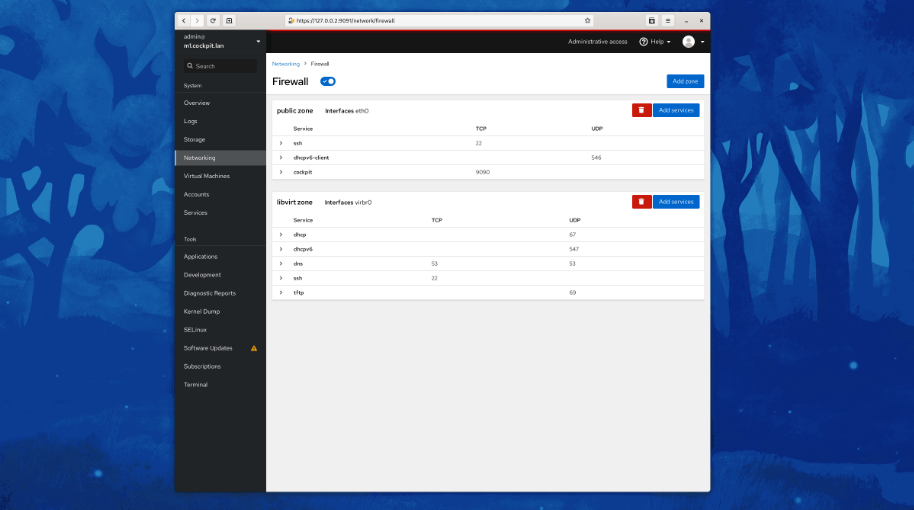
Cockpit serves as a user-friendly web-based graphical interface designed for server management, catering to everyone from beginners to seasoned Linux administrators. By leveraging system APIs and commands, Cockpit allows an entire team of administrators to manage systems in their preferred manner, whether that involves using the command line or various utilities alongside the Cockpit interface. With Cockpit, users can access their servers through a web browser and execute system tasks effortlessly using a mouse. It simplifies operations such as initiating containers, managing storage, configuring networks, and reviewing logs. Essentially, Cockpit acts like a graphical "desktop interface" tailored specifically for individual servers. If you have preferred applications or command-line tools for server management, you can continue utilizing those alongside Cockpit without any disruptions. Since Cockpit operates using the same system tools as the command line, you can seamlessly switch between Cockpit and your other preferred methods. This flexibility ensures that you can efficiently manage your servers while still maintaining your usual workflow.
API Access
Has API
No
API Access
Has API
No



Integrations
Ansible
No
CentOS
No
Debian
No
Fedora
No
Fedora CoreOS
No
IBM watsonx Code Assistant
Yes
Red Hat Enterprise Linux
No
Supy
Yes
Ubuntu
No
openSUSE Tumbleweed
No
Integrations
Ansible
Yes
CentOS
Yes
Debian
Yes
Fedora
Yes
Fedora CoreOS
Yes
IBM watsonx Code Assistant
No
Red Hat Enterprise Linux
Yes
Supy
No
Ubuntu
Yes
openSUSE Tumbleweed
Yes
Pricing Details
No price information available.
Free Trial
Yes
Free Version
No
Pricing Details
No price information available.
Free Trial
No
Free Version
Yes
Deployment
Web-Based
Yes
On-Premises
No
iPhone App
No
iPad App
No
Android App
No
Windows
No
Mac
No
Linux
No
Chromebook
No
Deployment
Web-Based
No
On-Premises
No
iPhone App
No
iPad App
No
Android App
Yes
Windows
Yes
Mac
Yes
Linux
Yes
Chromebook
No
Customer Support
Business Hours
Yes
Live Rep (24/7)
No
Online Support
Yes
Customer Support
Business Hours
No
Live Rep (24/7)
No
Online Support
Yes
Types of Training
Training Docs
Yes
Webinars
Yes
Live Training (Online)
Yes
In Person
Yes
Types of Training
Training Docs
Yes
Webinars
No
Live Training (Online)
No
In Person
No
Vendor Details
Company Name
Red Hat
Founded
1993
Country
United States
Website
www.redhat.com/en/technologies/management/ansible/ansible-lightspeed
Vendor Details
Company Name
Cockpit
Website
cockpit-project.org
Product Features
Product Features
Server Management
CPU Monitoring
No
Credential Management
No
Database Servers
No
Email Monitoring
No
Event Logs
No
History Tracking
No
Patch Management
No
Scheduling
No
User Activity Monitoring
No
Virtual Machine Monitoring
No
