
Average Ratings 0 Ratings
Average Ratings 0 Ratings
Similar Products
-
DataHubDataHub is a versatile open-source metadata platform crafted to enhance data discovery, observability, and governance within various data environments. It empowers organizations to easily find reliable data, providing customized experiences for users while avoiding disruptions through precise lineage tracking at both the cross-platform and column levels. By offering a holistic view of business, operational, and technical contexts, DataHub instills trust in your data repository. The platform features automated data quality assessments along with AI-driven anomaly detection, alerting teams to emerging issues and consolidating incident management. With comprehensive lineage information, documentation, and ownership details, DataHub streamlines the resolution of problems. Furthermore, it automates governance processes by classifying evolving assets, significantly reducing manual effort with GenAI documentation, AI-based classification, and intelligent propagation mechanisms. Additionally, DataHub's flexible architecture accommodates more than 70 native integrations, making it a robust choice for organizations seeking to optimize their data ecosystems. This makes it an invaluable tool for any organization looking to enhance their data management capabilities.
-
SCIKIQSCIKIQ is one of the most innovative AI-native Data & Intelligence platforms for enterprises, built to make enterprise data AI-ready in weeks, not years. Recognized by Forrester among leading AI-augmented data platforms, NASSCOM League of 10, YourStory Tech30, Inc42 and DataIQ, SCIKIQ is trusted by leading global enterprises across the USA, India, and UAE. SCIKIQ brings Data Integration, Data Quality, Data Governance, Metadata Management, Data Lineage, Semantic Intelligence, Knowledge Graphs, Conversational Analytics, Generative AI, Data Products and AI Agents together in one unified platform. Unlike traditional data platforms that require enterprises to move or rebuild their technology stack, SCIKIQ works with what you already have. Connect SAP, Salesforce, Oracle, Snowflake, Databricks, AWS, Azure, GCP, data lakes, warehouses and enterprise applications through 200+ pre-built connectors, with no rip-and-replace. What makes SCIKIQ different is Contextual Intelligence. SCIKIQ doesn't just connect data; it helps AI understand its business meaning. Its semantic layer combines business terms, KPI definitions, metadata, lineage, ownership, rules, ontologies and relationships to create a trusted foundation for enterprise AI. Business users can talk to their data in natural language, investigate KPIs, discover root causes and generate insights without SQL. Data teams gain enterprise-grade governance, quality, lineage and control. AI teams get trusted, contextual data for building GenAI applications and intelligent AI agents. Why enterprises choose SCIKIQ AI-ready in 3–6 weeks | 167+ connectors | 99.9% availability | Multi-cloud | No-code | No vendor lock-in | No replatforming Proven production deployments across Manufacturing retail, airlines, logistics, BFSI
-
Semarchy xDMExperience Semarchy’s flexible unified data platform to empower better business decisions enterprise-wide. With xDM, you can discover, govern, enrich, enlighten and manage data. Rapidly deliver data-rich applications with automated master data management and transform data into insights with xDM. The business-centric interfaces provide for the rapid creation and adoption of data-rich applications. Automation rapidly generates applications to your specific requirements, and the agile platform quickly expands or evolves data applications.
-
DenodoDenodo is a logical data management platform built to help enterprises unify, govern, and deliver trusted data across complex technology environments. It connects data from cloud, on-premises, SaaS, third-party, and multi-cloud systems without copying or duplicating the information. The platform gives organizations a single trusted view of distributed data, helping analytics teams, business users, and AI agents access current information more efficiently. Denodo supports trustworthy agentic AI by combining live data access with business semantics, centralized governance, compliance controls, and lineage. Its self-service data marketplace allows users to find, prepare, and use governed data while reducing dependence on IT teams. The platform also supports natural language search, personalized data delivery, and role-specific views so users can get data with the right business meaning. Denodo helps organizations improve data lakehouse investments by giving teams optimized access to data beyond a single repository. Its real-time delivery capabilities help operations, analytics, and AI systems make decisions based on current information instead of stale copies. By reducing integration time and improving time-to-insight, Denodo gives enterprises a trusted data foundation for AI, analytics, and digital transformation.
-
SafeticaSafetica Intelligent Data Security protects sensitive enterprise data wherever your team uses it. Safetica is a global software company that provides Data Loss Prevention and Insider Risk Management solutions to organizations. ✔️ Know what to protect: Accurately pinpoint personally identifiable information, intellectual property, financial data, and more, wherever it is utilized across the enterprise, cloud, and endpoint devices. ✔️ Prevent threats: Identify and address risky activities through automatic detection of unusual file access, email interactions, and web activity. Receive the alerts necessary to proactively identify risks and prevent data breaches. ✔️ Secure your data: Block unauthorized exposure of sensitive personal data, trade secrets, and intellectual property. ✔️ Work smarter: Assist teams with real-time data handling cues as they access and share sensitive information.
-
AnsaradaAnsarada brings order to organizational chaos to increase business value. Ansarada is a total deal lifecycle management platform that provides world-leading AI-powered Virtual Data Rooms and dealmaking tools. These tools include advanced AI insights and automation, next level Q&A and collaboration, plus purpose-built, digitized and customizable workflows and checklists for M&A, capital raising, business audits, tenders and other high stakes outcomes. Unlike some competitor Virtual Data Rooms, Ansarada offers free trials, 24/7 localized expert support, integrated Q&A via email, AI-assisted deal prediction, plus easy drag and drop upload and superior document security controls. Manage and maximize your Deals with Ansarada Always & Secure File Share. Ansarada is designed to drive stronger business outcomes based on best practices from over 35,000 transactions.
-
Teradata VantageCloudTeradata VantageCloud: Open, Scalable Cloud Analytics for AI VantageCloud is Teradata’s cloud-native analytics and data platform designed for performance and flexibility. It unifies data from multiple sources, supports complex analytics at scale, and makes it easier to deploy AI and machine learning models in production. With built-in support for multi-cloud and hybrid deployments, VantageCloud lets organizations manage data across AWS, Azure, Google Cloud, and on-prem environments without vendor lock-in. Its open architecture integrates with modern data tools and standard formats, giving developers and data teams freedom to innovate while keeping costs predictable.
-
KrakenDEngineered for peak performance and efficient resource use, KrakenD can manage a staggering 70k requests per second on just one instance. Its stateless build ensures hassle-free scalability, sidelining complications like database upkeep or node synchronization. In terms of features, KrakenD is a jack-of-all-trades. It accommodates multiple protocols and API standards, offering granular access control, data shaping, and caching capabilities. A standout feature is its Backend For Frontend pattern, which consolidates various API calls into a single response, simplifying client interactions. On the security front, KrakenD is OWASP-compliant and data-agnostic, streamlining regulatory adherence. Operational ease comes via its declarative setup and robust third-party tool integration. With its open-source community edition and transparent pricing model, KrakenD is the go-to API Gateway for organizations that refuse to compromise on performance or scalability.
-
DataBuckBig Data Quality must always be verified to ensure that data is safe, accurate, and complete. Data is moved through multiple IT platforms or stored in Data Lakes. The Big Data Challenge: Data often loses its trustworthiness because of (i) Undiscovered errors in incoming data (iii). Multiple data sources that get out-of-synchrony over time (iii). Structural changes to data in downstream processes not expected downstream and (iv) multiple IT platforms (Hadoop DW, Cloud). Unexpected errors can occur when data moves between systems, such as from a Data Warehouse to a Hadoop environment, NoSQL database, or the Cloud. Data can change unexpectedly due to poor processes, ad-hoc data policies, poor data storage and control, and lack of control over certain data sources (e.g., external providers). DataBuck is an autonomous, self-learning, Big Data Quality validation tool and Data Matching tool.
-
TIMiHigh-Performance Data Engineering. Total Sovereignty. TIMi delivers the power of a complete cloud data stack—on-premises, fully sovereign, and ridiculously fast. We reject artificial vendor lock-in and hidden costs. Instead, we offer absolute peace of mind through engineering excellence, giving your team the freedom to experiment, innovate, and solve complex AI, analytics, and automation challenges in record time. Why Top Enterprises Choose TIMi? Enterprise Integration & *No-Code* ETL/Data preparation: Automate complex workflows and seamlessly link your entire stack: SAP, Salesforce, SharePoint, S3, Azure Storage, PowerBI, Tableau, etc. Unmatched Infrastructure Efficiency: Our competitors such as Databricks, Dataiku, and MS Fabric all rely on Spark—and that makes them inherently inefficient since a single €2k TIMi server outperforms a 267-node Spark cluster. TIMi process billions of rows in seconds and manage petabyte-scale data lakes at a fraction of the cost. Proven AI Leadership: Harness pioneering machine learning from the creators of the first Auto-ML engine (est. 2007). Whether deployed on-premises or via our EU-Hosted Sovereign Cloud, TIMi empowers leaders in Banking, Telecoms, Manufacturing, Retail, Defense and Government.
Description
Amazon DataZone serves as a comprehensive data management solution that empowers users to catalog, explore, share, and regulate data from various sources, including AWS, on-premises systems, and third-party platforms. It provides administrators and data stewards with the ability to manage and oversee data access with precision, guaranteeing that users possess the correct level of permissions and contextual understanding. This service streamlines data access for a diverse range of professionals, such as engineers, data scientists, product managers, analysts, and business users, thereby promoting insights driven by data through enhanced collaboration. Among its notable features are a business data catalog that enables searching and requesting access to published datasets, tools for project collaboration to oversee and manage data assets, a user-friendly web portal offering tailored views for data analysis, and regulated data sharing workflows that ensure proper access. Furthermore, Amazon DataZone leverages machine learning to automate the processes of data discovery and cataloging, making it an invaluable resource for organizations striving to maximize their data utility. As a result, it significantly enhances the efficiency of data governance and utilization across various business functions.
Description
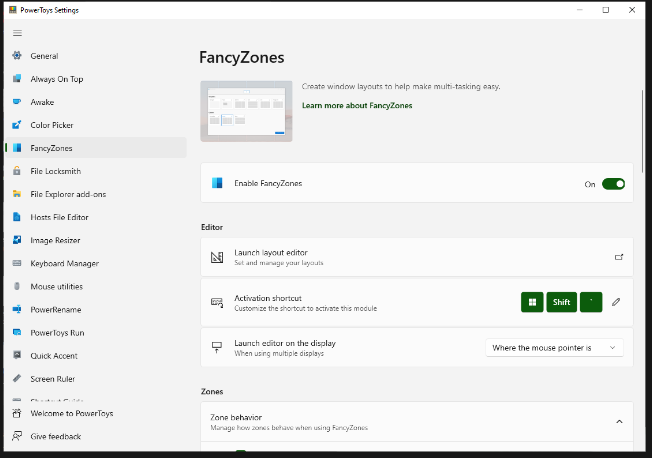
FancyZones serves as a window management tool designed to help users arrange and snap their application windows into optimized layouts, enhancing workflow efficiency and allowing for quick restoration of these layouts. This utility empowers you to specify a series of designated zones on your desktop where windows can be directed. By dragging a window into a predetermined zone or using a designated keyboard shortcut, the respective window automatically resizes and relocates to occupy that zone completely. Additionally, if you have the "Use non-primary mouse button to toggle zone activation" option activated, you can enter zone selection mode by simply clicking the secondary mouse button. When two zones are positioned next to each other, a window can be adjusted to span the combined area of both zones, effectively rounding up to the smallest rectangle that encompasses the two. As you maneuver the mouse cursor close to the shared boundary of two zones, both zones become active at the same time, giving you the flexibility to drop the window into either or both. Moreover, you can drag the window until it activates one zone and then, by pressing and holding the control key while continuing to drag, select multiple zones to expand your layout options. This feature significantly streamlines the process of organizing your desktop workspace efficiently.
API Access
Has API
No
API Access
Has API
No


Integrations
AWS Glue
Yes
AWS Lake Formation
Yes
Amazon Athena
Yes
Amazon Redshift
Yes
Amazon SageMaker Unified Studio
Yes
Amazon Web Services (AWS)
Yes
Integrations
AWS Glue
No
AWS Lake Formation
No
Amazon Athena
No
Amazon Redshift
No
Amazon SageMaker Unified Studio
No
Amazon Web Services (AWS)
No
Pricing Details
No price information available.
Free Trial
No
Free Version
No
Pricing Details
Free
Free Trial
No
Free Version
Yes
Deployment
Web-Based
Yes
On-Premises
Yes
iPhone App
No
iPad App
No
Android App
No
Windows
No
Mac
No
Linux
No
Chromebook
No
Deployment
Web-Based
No
On-Premises
No
iPhone App
No
iPad App
No
Android App
No
Windows
Yes
Mac
No
Linux
No
Chromebook
No
Customer Support
Business Hours
Yes
Live Rep (24/7)
Yes
Online Support
Yes
Customer Support
Business Hours
Yes
Live Rep (24/7)
No
Online Support
Yes
Types of Training
Training Docs
Yes
Webinars
Yes
Live Training (Online)
Yes
In Person
Yes
Types of Training
Training Docs
Yes
Webinars
Yes
Live Training (Online)
No
In Person
Yes
Vendor Details
Company Name
Amazon
Founded
1998
Country
United States
Website
aws.amazon.com/datazone/
Vendor Details
Company Name
Microsoft
Country
United States
Website
learn.microsoft.com/en-us/windows/powertoys/fancyzones
Product Features
Data Discovery
Contextual Search
No
Data Classification
No
Data Matching
No
False Positives Reduction
No
Self Service Data Preparation
No
Sensitive Data Identification
No
Visual Analytics
No
Data Governance
Access Control
No
Data Discovery
No
Data Mapping
No
Data Profiling
No
Deletion Management
No
Email Management
No
Policy Management
No
Process Management
No
Roles Management
No
Storage Management
No

