Average Ratings 0 Ratings
Average Ratings 8 Ratings
Similar Products
-
FilecampFilecamp is a cloud-based Digital Asset Management (DAM) software solution that helps marketing & creative teams organize and share their digital media such as images, videos, and brand guidelines. Filecamp comes with unlimited users, each user configured with their own set of user-, admin-, and folder permissions. Filecamp's unique custom branding options will make sure your DAM system matches your brand guidelines. The built-in online proofing and commenting tools allow you to review and approve creative work. Prices start at only USD 29/month and their free 30-day trial allows you to test the solution with your files, teammates, and customers.
-
AirConsolidate your team's resources in a well-structured workspace that is organized, version-controlled, and simple to share. While Air securely stores your content, it also offers intelligent search capabilities, guest access, customizable layouts, version tracking, and effortless sharing, enhancing every aspect of the creative journey. Don't let your valuable assets languish in folders and zip files; instead, plan social media campaigns, develop streamlined presentations, and arrange your materials in a workspace that embodies your brand identity. Effortlessly navigate your workspace using features akin to a search engine, where tools like image recognition and smart tags empower all team members to independently find assets. The only challenging element of the feedback process will now be the feedback itself, as you can create public boards that allow guests to upload directly to your workspace. Engage in commentary, initiate discussions, and make selections with context, all while staying updated on new modifications and clearly tracking the most recent version of each asset. This streamlined approach not only boosts collaboration but also fosters creativity within your team.
-
Adobe FireflyAdobe Firefly is a versatile AI-powered creative platform designed to help users generate and edit multimedia content with ease. It allows users to create images, videos, and audio using simple text prompts within an interactive and flexible workspace. The platform features tools like generative fill, image editing, and video editing, enabling users to refine and enhance their creations. Firefly also includes quick actions such as background removal, cropping, resizing, and format conversion to streamline workflows. Users can explore an infinite canvas for creative production and experiment with various styles and outputs. The platform encourages creativity by allowing users to remix content from a shared community gallery. With its intuitive design, it reduces the need for advanced technical skills. Firefly integrates AI capabilities to speed up content creation and editing processes. It supports both beginners and professionals in producing high-quality results. Overall, Adobe Firefly provides a powerful and accessible environment for modern digital creativity.
-
Project InsightProject Insight is a strategic project and portfolio management software that gives companies a complete picture of the work happening across their entire organization. Streamline workflows, automate processes, enhance collaboration, and capture project data points from all your teams and systems in one central command center so you can make confident decisions about business. Manage work at the project, program or portfolio levels and integrate with the tools you already use, including Azure DevOps, Jira, Microsoft, Salesforce, and ServiceNow, and HubSpot to eliminate the need to manually key in data across teams. With the most views of any project management platform, teams can keep tabs on assignments, status, risks, resources, capacity, schedules, budgets, and more. Project Insight also offers free view only seats for clients. The power of AI can be used to assign action items after meetings, predict future capacity, balance workloads, & select the right resources. Additional AI-powered features include what if simulations to generate tradeoffs when priorities change and AI-generated project templates (WBS). Whether you are moving from basic spreadsheet project tracking or you have a sophisticated PMO with a complex web of unique business processes, Project Insight has the broad feature set to help you grow as you go. Our onboarding teams are known for being the best in the business and our platform can be fully customized to manage projects and data the way your company needs to.
-
Zoho ProjectsProject management is as efficient as it gets. Zoho Projects, a cloud-based project management software, helps you plan and track your work efficiently. It also allows you to collaborate with your team from anywhere. To get things done on schedule, plan your project activities, assign work, manage your resources, and collaborate better with your team. Gantt charts can be used to create your project plan and track your tasks. Zoho Projects helps you keep track of your key tasks and their dependencies and shows you any deviations from your planned progress. Reduce time spent on repetitive tasks. Our project management software is easy to use, no matter how complex your process is. It has a drag-and drop interface that makes it easier to create and deploy new automations. The Projects timesheet module allows you to log both billable and unbilled hours. You can record every minute of your hardwork, manually or with timers. Our built-in integration with Zoho Invoice generates invoices.
-
KnakKnak is the enterprise-grade, no-code solution that transforms how marketing teams build emails and landing pages — without relying on developers or agencies. With a robust modular design system, real-time collaboration, and native integrations with platforms like Marketo, SFMC, and Eloqua, Knak eliminates production bottlenecks while preserving brand governance. Empower your team to deliver high-performance assets quickly, securely, and at scale — no code required. Trusted by global brands to streamline campaign execution and accelerate time-to-market.
-
ONLYOFFICE DocsONLYOFFICE Docs is a secure online office suite for teams and businesses of all sizes. Create and edit docs, sheets, slides, fillable forms and PDFs. Collaborate with your teammates in real time using two co-editing modes, version history and other tools. Enable the AI assistant of your choice — ChatGPT, DeepSeek, Mistral, Groq AI, etc. Generate new content, summarize, translate and do more with your favourite AI tool while working on office files. Integrate ONLYOFFICE Docs into your business platform, whether it be Odoo, Alfresco, Confluence, Pipedrive, Nextcloud, Redmine, SuiteCRM, etc., via an integration app (40+ available integrations). Use Docs within ONLYOFFICE DocSpace, a room-based document collaboration platform equipped with the online office suite. Create dedicated spaces for different purposes, invite your teammates, assign access permissions and collaborate the way you like. With DocSpace, you can store, share and co-edit office files, and even interact with third parties.
-
MyHub Intranet SoftwareMyHub, a revolutionary cloud-based intranet system that streamlines workflows for businesses, provides a variety of manuals and tools. MyHub is mobile-friendly and allows users to connect with whole teams or just a few members. Projects will run smoothly with MyHub's combination of in-app options for email, social media, as well as the tools necessary to be efficient. Administrators can give their users the ability of managing content, a discussion board, file-cloud-sharing, and many other features.
-
Intermedia UniteIntermedia Unite is an all-in-one business communications and collaboration platform designed to keep employees connected and responsive across locations, devices, and teams. The solution combines cloud phone service, video meetings, team messaging, file sharing, customer engagement tools, and productivity features into one integrated platform. By consolidating multiple communication tools, Unite reduces app switching and gives employees a simpler way to call, meet, chat, share files, and engage customers from desktop or mobile devices. Its enterprise-grade calling system includes more than 100 voice features that support professional business communications and consistent customer interactions. The platform also supports enhanced Microsoft Teams experiences, helping organizations extend communication capabilities within their existing collaboration environment. AI features such as transcription, summaries, and conversation insights help users retain important information, identify follow-up actions, and improve team efficiency. Mobile and desktop apps allow employees to maintain a consistent business identity whether they are in the office, remote, or on the go. Backed by strong uptime commitments and J.D. Power-certified support, Intermedia Unite is built for reliability and ease of use. By unifying communications, collaboration, and engagement, Unite helps organizations increase productivity while improving the way teams serve customers.
-
RAD PDFInstall-free PDF editing, form filling, redaction, signing, viewing, and more on your website with RAD PDF! Packaged as an easy to use library / WebControl (compatible with .NET 3.5+, .NET Core, and .NET 5+), RAD PDF can be used with just about any flavor of ASP.NET including MVC, Razor, Blazor, WebForms, and more. RAD PDF is compatible with 99% of internet browsers, including those on Linux, Mac OS X, Microsoft Windows, and mobile. No plugins. No Adobe Reader. RAD PDF is more than a PDF to HTML converter. It natively supports all the most common PDF features including annotations, bookmarks, form fields, page labels, and more. With advanced PDF options, RAD PDF allows you to selectively enable and disable features not available with Adobe Acrobat Reader, like protecting a PDF from being downloaded while still viewable online. RAD PDF users can use PDF form fields directly from the web browser by enabling PDF form filling and PDF form saving without having to install any software. Integrating directly with ASP.NET, RAD PDF allows your web application to capture input data, build custom workflows, and provide an intuitive graphical user interface (GUI) for just about any online PDF interaction imaginable!
Description
Video editing collaboration has never been easier. Teams can work together seamlessly and securely on shared sequences and compositions. If you belong to an Adobe Creative Cloud for teams or enterprise plan, you’ll find Team Projects conveniently integrated into your preferred video applications. This cloud-hosted solution is embedded within Adobe Premiere Pro, After Effects, and Prelude, eliminating the need for any extra software or hardware. You can either keep source files on your local system or distribute lightweight proxies, allowing remote editors to join effortlessly. Team Projects simplifies the process of creating multiple variations and facilitates collaboration on projects that are still evolving. Editors and motion graphics designers can safely share their projects without the risk of overwriting each other's contributions. Whether it’s for news segments, advertisements, or promotional content, collaboration occurs at a faster pace than traditional methods. The ability to work across After Effects and Premiere Pro without the need for rerendering streamlines the workflow significantly. Your content will remain private until you determine it’s ready for sharing, and the handoff process is straightforward and efficient. This innovative approach not only enhances teamwork but also leads to increased productivity in the editing process.
Description
QuickReviewer is an online design review software that allows teams to quickly approve designs and receive feedback and approval. You can review videos, HTML, PDFs, images, and other media. It's not just an annotation tool. You can get conflicting feedbacks.
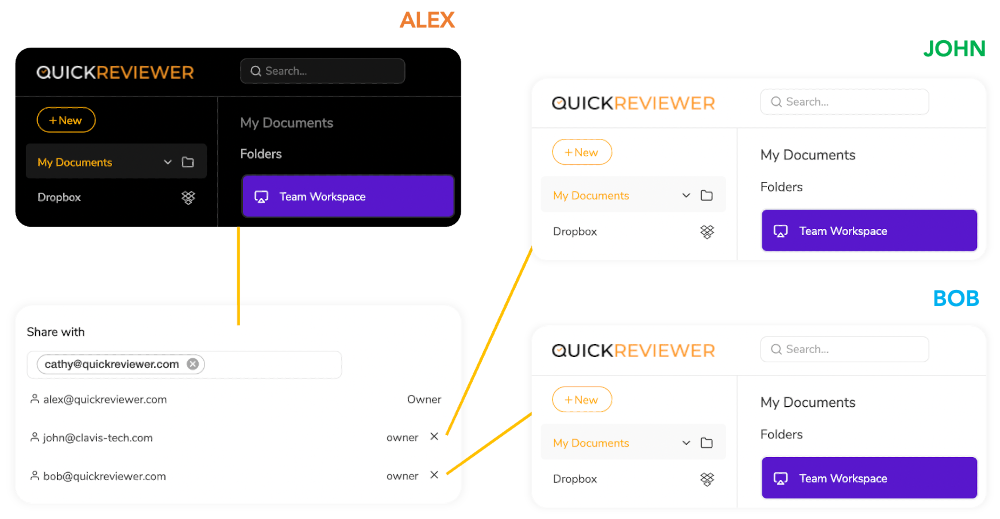
You can organize feedback on creative projects without needing to exchange multiple files or emails. Drag and drop to upload files, and share them with as many reviewers as you like. Highlight text, pinpoint and add comments. Each reviewer can be identified by colour and can reply to or upvote each other's comments.
QuickReviewer can be used on mobile devices to review and approve files.
API Access
Has API
No
API Access
Has API
No



Integrations
Adobe Premiere Pro
Yes
Adobe After Effects
Yes
Adobe Creative Cloud
Yes
Adobe Illustrator
No
Adobe InDesign
No
Adobe Photoshop
No
Adobe Premiere Rush
Yes
BEAM Brand Center
Yes
Dropbox
No
Google Drive
No
Integrations
Adobe Premiere Pro
Yes
Adobe After Effects
No
Adobe Creative Cloud
No
Adobe Illustrator
Yes
Adobe InDesign
Yes
Adobe Photoshop
Yes
Adobe Premiere Rush
No
BEAM Brand Center
No
Dropbox
Yes
Google Drive
Yes
Pricing Details
$33.99 per user per month
Free Trial
No
Free Version
No
Pricing Details
$35 Per Month
Save $72 /yr
Free Trial
Yes
Free Version
Yes
Deployment
Web-Based
Yes
On-Premises
No
iPhone App
Yes
iPad App
Yes
Android App
Yes
Windows
No
Mac
No
Linux
No
Chromebook
No
Deployment
Web-Based
Yes
On-Premises
No
iPhone App
No
iPad App
No
Android App
No
Windows
Yes
Mac
Yes
Linux
No
Chromebook
No
Customer Support
Business Hours
Yes
Live Rep (24/7)
Yes
Online Support
Yes
Customer Support
Business Hours
Yes
Live Rep (24/7)
No
Online Support
Yes
Types of Training
Training Docs
Yes
Webinars
No
Live Training (Online)
No
In Person
Yes
Types of Training
Training Docs
No
Webinars
No
Live Training (Online)
Yes
In Person
No
Vendor Details
Company Name
Adobe
Founded
1982
Country
United States
Website
www.adobe.com/creativecloud/team-projects.html
Vendor Details
Company Name
Clavis Technologies Pvt. Ltd.
Founded
2011
Country
India
Website
www.quickreviewer.com
Product Features
Video Review & Collaboration
Activity Notifications
No
Annotations
No
Client Portal
No
Communication Tools
No
Customizable Branding / White Label
No
For Agencies
No
One-Click Approvals
No
Roles / Permissions / Groups
No
Side-to-Side Comparisons
No
Stages
No
Threaded Comments
No
Version Control
No
Video Editing
No
Workflow Management
No
Product Features
Online Proofing
Audit Trail
No
Due Date Tracking
No
File Sharing
Yes
Markup Tools
No
Role-Based Permissions
No
Status Tracking
Yes
Version Control
Yes
Video Review & Collaboration
Activity Notifications
No
Annotations
No
Client Portal
No
Communication Tools
No
Customizable Branding / White Label
No
For Agencies
No
One-Click Approvals
No
Roles / Permissions / Groups
No
Side-to-Side Comparisons
No
Stages
No
Threaded Comments
No
Version Control
No
Video Editing
No
Workflow Management
No
