Average Ratings 0 Ratings
Average Ratings 0 Ratings
Similar Products
-
MuzaicMuzaic: High-Fidelity AI Soundtracks for the Serial Creator Workflow For professional video creators, the production pipeline has a major bottleneck: sound design. While modern NLEs make visual editing fast, finding the right track remains a manual, 40-minute hunt through generic stock libraries. Muzaic is a web-based AI music architect designed to solve this by matching audio to video content programmatically. Instead of browsing metadata tags, Muzaic uses AI to analyze your video’s vibe, tempo, and emotional arc, generating custom soundtracks in seconds. This is built for agencies and serial creators—those producing recurring formats like YouTube series or high-ARPU ad campaigns—where workflow efficiency is the primary driver of ROI. Muzaic provides professional 192kbps audio that sounds like a studio production, not a generic AI demo. Proper synchronization isn't just aesthetic; it's a growth driver, directly affecting viewer retention and completion rates by managing the audience's emotional state. Match-First Pricing Model: We believe you should only pay for what actually works in your project. - Unlimited Generation: Preview unlimited tracks for free to find the perfect match. - One Soundtrack ($2): One high-quality track for your video, plus 3 AI video analyses. - Creator ($19/mo): Unlimited downloads and unlimited AI analyses for high-scale production. Technical Highlights: - AI Analysis: The system "watches" the video to propose styles that fit the specific content. - Commercial Licensing: 100% royalty-free for ads and client projects, eliminating copyright stress. - Efficiency: Reduces time spent on sound design by up to 70%. Stop searching. Start creating.
-
SynapSynap is an intelligent online exam platform for secure, question-based learning, trusted by organisations worldwide. Designed to help businesses, training providers, and educational institutions create, deliver, and manage both practice and high-stakes exams with ease. Synap offers a fully customisable, brandable portal, allowing companies to maintain their identity while providing seamless exam experiences. Our platform supports diverse question types including images, MCQs, and EMQs, which can be created directly or imported in bulk via CSV to streamline large-scale assessment needs. Integrated proctoring ensures exam integrity by monitoring candidates during live exams, preventing cheating and fraud. Synap delivers robust analytics and reporting tools, giving organisations detailed insights into learner performance, progress, and question effectiveness. This data empowers businesses to make informed decisions, improve training outcomes, and identify skill gaps quickly. With flexible exam timers, question randomisation, and secure environments, Synap scales effortlessly from small teams to enterprise-level clients. Plus, easy LMS integrations and API support enable smooth workflow automation. Synap’s intuitive interface requires minimal training, enabling organisations to deploy exams quickly and efficiently. Our dedicated customer success team provides ongoing support to ensure smooth implementation and continuous optimisation. Synap also supports compliance with data protection regulations, giving organisations peace of mind when handling sensitive learner data.
-
QuantCloud solution to manage retail spaces, product categories and planograms. Smart automatic generation of planograms based on sales is possible. This allows for the maintenance of planograms in a current state even in large sales networks with many stores. Quant is a complete solution for Space Planning and Category Management, planograms and ranging, shelf labels and POS printing, communication and in-store marketing. Quant Cloud offers all the benefits of cloud computing. You can work remotely on the same projects with your colleagues around the globe and access the same database from different computers. There is no need to create complex infrastructures or overload your IT department. Our consultants are always available to assist you. We train your users, and assist with data integration so Quant can go live in less than 12 week.
-
ROLLERAt ROLLER, we help leisure and attractions businesses unlock their full potential and grow with confidence. Trusted by more than 3,000 venues across 30+ countries—including leading brands like Sky Zone, Altitude, American Dream, Uptown Jungle, Flip Out, Oxygen, Innoflate, and Jumpsquare—we bring deep expertise in the unique needs of the attractions industry. From family entertainment centers and trampoline parks to water parks, zoos, aquariums, and children’s museums, ROLLER supports a wide range of venue types. Our all-in-one, cloud-based platform is designed to simplify operations and maximize revenue. With integrated tools for ticketing, point of sale, memberships, payments, and digital waivers, ROLLER enables operators to streamline workflows, improve the guest experience, and make smarter business decisions—all from a single system.
-
Astra PentestAstra's Pentest is a comprehensive solution for penetration testing. It includes an intelligent vulnerability scanner and in-depth manual pentesting. The automated scanner performs 10000+ security checks, including security checks for all CVEs listed in the OWASP top 10 and SANS 25. It also conducts all required tests to comply with ISO 27001 and HIPAA. Astra provides an interactive pentest dashboard which allows users to visualize vulnerability analysis, assign vulnerabilities to team members, collaborate with security experts, and to collaborate with security experts. The integrations with CI/CD platforms and Jira are also available if users don't wish to return to the dashboard each time they want to use it or assign a vulnerability for a team member.
-
WallesterWallester is an Estonian-licensed financial institution and has been an official Visa partner since 2018, specialising in innovative digital financial solutions and card issuance. We empower companies across the European Economic Area (EEA) and the UK to streamline payments, launch branded cards, and scale efficiently. What we do: 1. White-Label Solution with Embedded Finance Our White-Label solution enables businesses to integrate financial services directly into their platforms - a concept known as embedded finance. This allows companies to launch branded payment cards tailored to their specific needs, enhancing customer experiences and opening new revenue streams. We ensure a swift time-to-market with simplified integration and dedicated support from our implementation team. 2. Wallester Business: Corporate Expense Management Wallester Business is designed to modernise corporate expense management. It provides companies with instant access to virtual and physical Visa cards, streamlining financial processes through a modern app and comprehensive portal. Features include expense tracking, budget analytics, and seamless integration with accounting systems to enhance financial oversight and efficiency. With a diverse team of over 190 professionals located in Estonia, Latvia, France and the United Kingdom, we are dedicated to developing high-quality, profitable products for our clients. Our passion for innovation drives us to improve and adapt to the evolving financial landscape continuously. We aim to elevate businesses by providing the most advanced financial technologies, enabling them to reach new heights in efficiency and growth. We are always open to collaboration and eager to assist companies in navigating the future of finance.
-
YodeckNext-generation technology for digital signage professionals Yodeck, a cloud-based digital signage platform, is unbeatable. It powers your screen with dynamic content that instantly engages your target audience. Yodeck makes it easy to create, schedule, and design content from the web. To get your message across to those who matter most to you, use attention-grabbing media such as videos, images and PDF files, Office documents, data dashboards, and social media. It provides enterprise-grade security and control. Yodeck's drag-and-drop editing feature allows users to be creative in organizing content into interesting layouts. Yodeck is proud to offer a unique digital signage solution for businesses of all sizes. This includes local diners as well as global leaders like Delta Airlines, Autodesk and Adobe.
-
JOpt.TourOptimizerJOpt.TourOptimizer is an enterprise optimization engine for route planning, scheduling, and resource allocation across logistics, transportation, dispatch, and field service operations. It is built for organizations that need to solve complex planning problems under real-world business constraints rather than simple consumer-grade route calculation. The platform supports vehicle routing and scheduling scenarios such as VRP, CVRP, VRPTW, pickup and delivery, multi-depot planning, heterogeneous fleets, and workforce scheduling. JOpt.TourOptimizer can model time windows, working hours, visit durations, capacities, skills and expertise levels, territories, zone governance, overnight stays, alternate destinations, and custom business rules. This makes it suitable for production deployments where feasibility, transparency, and operational reliability matter. It is designed to generate practical plans that help teams balance travel time, service commitments, workload distribution, and operational cost in demanding enterprise environments. The solution is available both as an embedded Java SDK and as a Docker-based REST API with OpenAPI and Swagger support. This allows software vendors, enterprise developers, and system integrators to embed advanced optimization into TMS, ERP, CRM, WMS, dispatch systems, customer platforms, and field service applications. With support for scalable integration and modern service architectures, JOpt.TourOptimizer helps organizations improve planning efficiency, service quality, SLA compliance, transparency, and operational resilience at scale. It also supports enterprise integration strategies that require reproducible optimization runs, structured outputs, and flexible deployment models.
-
WERXWerx delivers powerful construction management tools at a price contractors love—starting at just $49/month. Built for small to midsized businesses, Werx simplifies your workflow with features like flexible estimating, AIA-Style billing, QuickBooks syncing, and labor tracking. Speed up payments with Stripe-powered online billing. Try Werx free for 30 days and see the difference! Tailored for contractors of all trades, Werx helps you save time, reduce stress, and boost profits. From managing schedules to tracking time in the field and creating polished invoices, Werx brings everything together in one easy-to-use platform. Affordable, reliable, and built to help your business grow—Werx is the smart choice for contractors.
-
AirConsolidate your team's resources in a well-structured workspace that is organized, version-controlled, and simple to share. While Air securely stores your content, it also offers intelligent search capabilities, guest access, customizable layouts, version tracking, and effortless sharing, enhancing every aspect of the creative journey. Don't let your valuable assets languish in folders and zip files; instead, plan social media campaigns, develop streamlined presentations, and arrange your materials in a workspace that embodies your brand identity. Effortlessly navigate your workspace using features akin to a search engine, where tools like image recognition and smart tags empower all team members to independently find assets. The only challenging element of the feedback process will now be the feedback itself, as you can create public boards that allow guests to upload directly to your workspace. Engage in commentary, initiate discussions, and make selections with context, all while staying updated on new modifications and clearly tracking the most recent version of each asset. This streamlined approach not only boosts collaboration but also fosters creativity within your team.
Description
ActiTrack is capable of managing data from as many as 32 infrared frames, enabling it to differentiate and evaluate the frequency and quantity of IR beam interruptions, which it subsequently translates into a track file for future analysis and report generation. This system offers significantly more detailed and integrated insights into animal behaviors, such as activity levels, spatial positioning, movements, and rearings, in comparison to the data provided by SeDaCom software. Additionally, the enclosure of the IR actimeter can be segmented into up to 32 designated zones utilizing specialized tools offered by ActiTrack. By capturing real-time beam interruptions, the system records animal trajectories that allow users to conduct analyses and revisit experiments with varying zone configurations, user-defined combinations of zones, and distinct parameters. Furthermore, users can replay tracks in real-time or through "accelerated" (with a user-defined velocity) or "instantaneous" modes. Reports generated can encompass either the entirety of the track or specific intervals of interest, ensuring comprehensive data review and analysis. Overall, ActiTrack facilitates a versatile approach to studying animal movement and behavior across diverse experimental setups.
Description
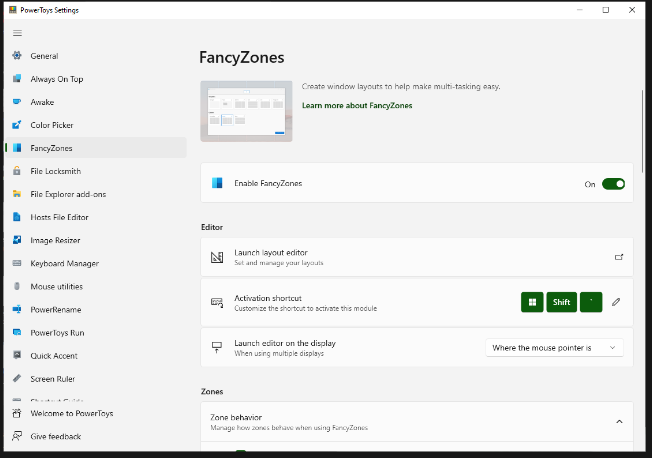
FancyZones serves as a window management tool designed to help users arrange and snap their application windows into optimized layouts, enhancing workflow efficiency and allowing for quick restoration of these layouts. This utility empowers you to specify a series of designated zones on your desktop where windows can be directed. By dragging a window into a predetermined zone or using a designated keyboard shortcut, the respective window automatically resizes and relocates to occupy that zone completely. Additionally, if you have the "Use non-primary mouse button to toggle zone activation" option activated, you can enter zone selection mode by simply clicking the secondary mouse button. When two zones are positioned next to each other, a window can be adjusted to span the combined area of both zones, effectively rounding up to the smallest rectangle that encompasses the two. As you maneuver the mouse cursor close to the shared boundary of two zones, both zones become active at the same time, giving you the flexibility to drop the window into either or both. Moreover, you can drag the window until it activates one zone and then, by pressing and holding the control key while continuing to drag, select multiple zones to expand your layout options. This feature significantly streamlines the process of organizing your desktop workspace efficiently.
API Access
Has API
No
API Access
Has API
No


Integrations
No details available.
Integrations
No details available.
Pricing Details
No price information available.
Free Trial
No
Free Version
No
Pricing Details
Free
Free Trial
No
Free Version
Yes
Deployment
Web-Based
No
On-Premises
No
iPhone App
No
iPad App
No
Android App
No
Windows
Yes
Mac
No
Linux
No
Chromebook
No
Deployment
Web-Based
No
On-Premises
No
iPhone App
No
iPad App
No
Android App
No
Windows
Yes
Mac
No
Linux
No
Chromebook
No
Customer Support
Business Hours
Yes
Live Rep (24/7)
No
Online Support
Yes
Customer Support
Business Hours
Yes
Live Rep (24/7)
No
Online Support
Yes
Types of Training
Training Docs
Yes
Webinars
No
Live Training (Online)
No
In Person
No
Types of Training
Training Docs
Yes
Webinars
Yes
Live Training (Online)
No
In Person
Yes
Vendor Details
Company Name
Panlab
Founded
1969
Country
Spain
Website
www.panlab.com/en/products/actitrack-software-panlab
Vendor Details
Company Name
Microsoft
Country
United States
Website
learn.microsoft.com/en-us/windows/powertoys/fancyzones
Product Features
Clinical Trial Management
21 CFR Part 11 Compliance
No
Document Management
No
Electronic Data Capture
No
Enrollment Management
No
HIPAA Compliant
No
Monitoring
No
Patient Database
No
Recruiting Management
No
Scheduling
No
Study Planning
No
